
1. Okwu mmalite
The Audizio Desio is a versatile digital radio that combines classic aesthetics with modern audio technology. It features DAB, DAB+, and FM tuning for clear radio reception, along with Bluetooth 5.0 for wireless streaming, a USB port for media playback, and a 3.5mm AUX input for wired connections. The radio is equipped with a 2.4-inch color LCD display and integrated stereo speakers, making it suitable for various environments such as living rooms, kitchens, or bedrooms.
This manual provides detailed instructions for setting up, operating, and maintaining your Audizio Desio radio. Please read it thoroughly before use to ensure proper functionality and to maximize your listening experience.
2. Ozi nchekwa
- Hụ na ihe nkwụnye ike voltage matches your local power supply before connecting.
- Etinyela igwe ahụ n'ime mmiri ozuzo, mmiri ozuzo, ma ọ bụ oke okpomọkụ.
- Zere idobe nkeji n'akụkụ ebe okpomọkụ ma ọ bụ na ìhè anyanwụ.
- Emeghela casing; zigara ndị ọrụ ruru eru ọrụ niile.
- Debe unit ahụ pụọ na mpaghara magnetik siri ike.
- Jiri naanị akwa dị nro hichaa otu ahụ.
3. Ihe ngwugwu
Biko lelee ma ihe niile dị mgbe ị na-ewepụ ihe ndị a:
- Audizio Desio DAB/DAB+/FM Radio
- Ihe nkwụnye ọkụ (DC 5V)
- Njikwa anya
- Akwụkwọ ntuziaka onye ọrụ
4. Njikwa na Njikọ
Njikwa Ogwe ihu
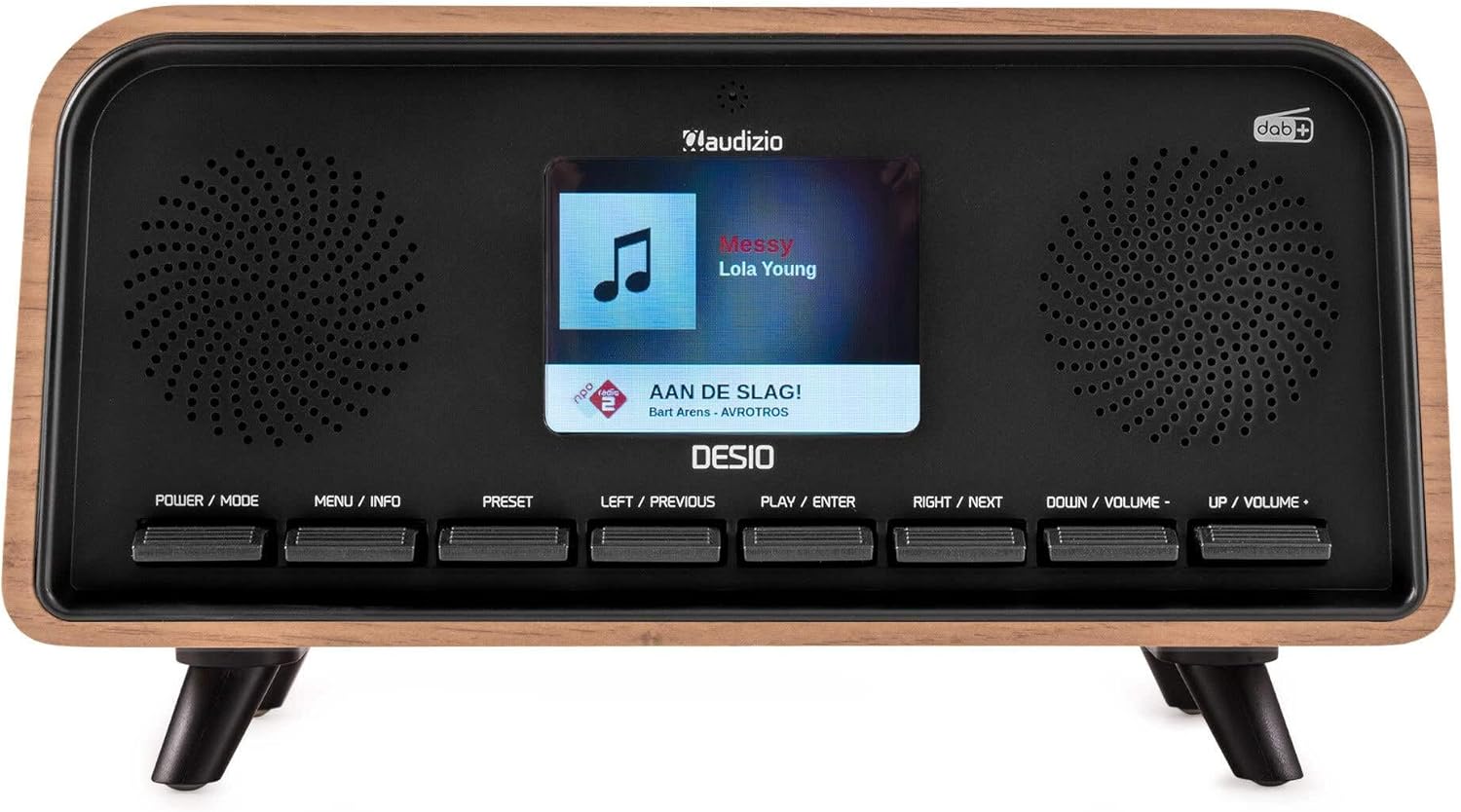
N'ihu view of the Audizio Desio radio, showing the display playing music with artist and track information. The control buttons are visible below the screen.
- POWER / MODE: Press to turn on/off. Press and hold to switch between DAB, FM, Bluetooth, USB, and AUX modes.
- MENU / INFO: Press to access menu options. In playback mode, press to cycle through information display.
- Ahịa: Press to recall saved stations. Press and hold to save current station.
- LEFT / PREVIOUS: Navigate left in menus, or skip to previous track/station.
- PLAY / ENTER: Confirm selection in menus, or play/pause media.
- RIGHT / NEXT: Navigate right in menus, or skip to next track/station.
- DOWN / VOLUME -: Decrease volume, or navigate down in menus.
- UP / VOLUME +: Increase volume, or navigate up in menus.
Njikọ Ogwe azụ
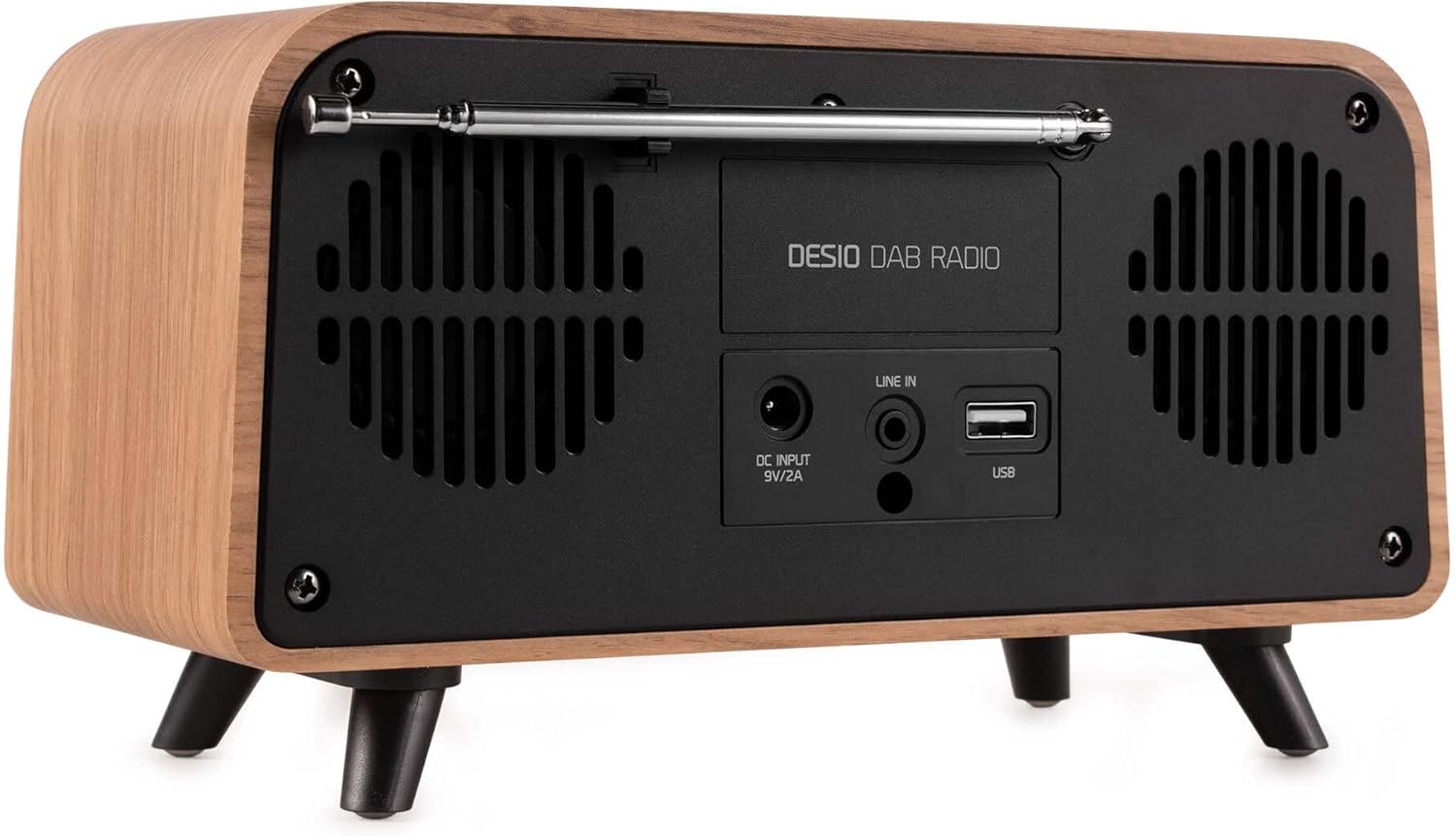
N'azụ view of the Audizio Desio radio, highlighting the DC INPUT 9V/2A, LINE IN (3.5mm AUX), and USB ports. The telescopic antenna is extended.
- DC INPUT 9V/2A: Jikọọ ihe nkwụnye ọkụ enyere ebe a.
- LINE IN (3.5mm AUX): Jikọọ ngwaọrụ ọdịyo mpụga site na iji eriri ọdịyo 3.5mm.
- USB: Fanye draịva USB maka ịkpọghachi MP3.
- Antenna telescopic: Extend fully for optimal DAB/DAB+ and FM reception.
5. Mbido Mbido
- Njikọ Ike: Plug the provided DC 5V power adapter into the DC INPUT port on the rear of the radio, then plug the adapter into a wall outlet.
- Gbatịa antenna: Fully extend the telescopic antenna located on the rear of the unit for best reception.
- Ike Na: Pịa IKE/Ụdị bọtịnụ iji gbanye redio.
- First-time DAB Scan: Upon first power-on, the radio will automatically perform a full scan for DAB/DAB+ stations. This may take a few minutes. The display will show the scanning progress.
- Tọọ Oge/Ụbọchị: The time and date will usually be set automatically via DAB signal. If not, you can manually set them via the menu.
6. Ntuziaka ọrụ
6.1 DAB/DAB+ Radio Operation

N'ihu view of the Audizio Desio radio, displaying a DAB radio station ('NPO Klassiek') and current time.
- Select DAB Mode: Pịa IKE/Ụdị button repeatedly until 'DAB' is displayed.
- Scan for Stations: If no stations are found or you wish to rescan, press MENU / INFO, wee jiri LEFT / PREVIOUS or RIRI/ỌZỌ to select 'Full Scan' and press PLAY / ENTER.
- Select Station: Jiri ihe LEFT / PREVIOUS or RIRI/ỌZỌ buttons to browse available stations. Press PLAY / ENTER ịhọrọ ọdụ ọdụ.
- Zọpụta Tọọ: To save a station, press and hold the PRESET bọtịnụ. Jiri LEFT / PREVIOUS or RIRI/ỌZỌ to choose a preset number (1-50), then press PLAY / ENTER iji gosi.
- Cheta ihe atọrọ: Iji cheta ebe echekwara, pịa ebe a na-echekwa data PRESET button (do not hold). Use LEFT / PREVIOUS or RIRI/ỌZỌ to select the desired preset, then press PLAY / ENTER.

N'ihu view of the Audizio Desio radio, showing the 'Preset Recall' menu on the display, indicating empty preset slots.
6.2 FM Redio arụ ọrụ
- Họrọ Usoro FM: Pịa IKE/Ụdị button repeatedly until 'FM' is displayed.
- Nyocha akpaaka: Pịa ma jide PLAY / ENTER iji nyochaa ma chekwaa ọdụ FM dị na akpaghị aka.
- Akwụkwọ ntuziaka: Jiri LEFT / PREVIOUS or RIRI/ỌZỌ iji hazie ugboro ole ọ na-ewe.
- Save/Recall Presets: Follow the same procedure as for DAB radio (Section 6.1).
6.3 Bluetooth (BT) Operation

N'ihu view of the Audizio Desio radio, with the display showing 'BT' (Bluetooth) mode and 'Connected' status.
- Select BT Mode: Pịa IKE/Ụdị button repeatedly until 'BT' is displayed. The radio will enter pairing mode, indicated by a flashing Bluetooth icon.
- Jikọọ ngwaọrụ: On your smartphone, tablet, or laptop, enable Bluetooth and search for available devices. Select 'Audizio Desio' from the list.
- Jikọọ: Once paired, the display will show 'Connected'. You can now stream audio from your device to the radio.
- Njikwa playback: Use your connected device or the radio's PLAY / ENTER, LEFT / PREVIOUS, na RIRI/ỌZỌ bọtịnụ iji jikwaa ịkpọghachi.
6.4 USB playback

N'ihu view of the Audizio Desio radio, with the display showing 'USB' mode, current time, and details of an MP3 file na-egwuri egwu.
- Tinye draịvụ USB: Insert a USB flash drive (formatted to FAT32) containing MP3 filebanye n'ọdụ ụgbọ USB dị n'azụ redio ahụ.
- Họrọ Ụdị USB: Pịa IKE/Ụdị button repeatedly until 'USB' is displayed. The radio will automatically start playing the first compatible audio file.
- Ịnyagharịa Files: Jiri LEFT / PREVIOUS or RIRI/ỌZỌ to skip tracks. Press PLAY / ENTER ka kwụsịtụ/ maliteghachi ịkpọghachi.
Ntinye AUX 6.5
- Jikọọ ngwaọrụ: Connect an external audio device (e.g., MP3 player, smartphone) to the 'LINE IN' (3.5mm AUX) port on the rear of the radio using a 3.5mm audio cable (not included).
- Họrọ Ụdị AUX: Pịa IKE/Ụdị button repeatedly until 'AUX' is displayed.
- Jikwaa nkwughachi: Playback is controlled directly from your connected external device. Adjust volume using the radio's volume controls.
6.6 Alarm and Timer Functions
- Ịtọ mkpu: Access the alarm settings via the MENU / INFO button. You can set multiple alarms with customizable sources (DAB, FM, Buzzer), volume, and recurrence (daily, weekdays, weekends).
- Oge ụra: The sleep timer allows the radio to turn off automatically after a set period. Access this function via the MENU / INFO button and select the desired duration.
- Ọrụ Sooze: When an alarm sounds, press any button (except Power) to activate the snooze function for a short period.
7. Nlekọta
- Nhicha: Use a soft, dry, lint-free cloth to clean the radio's surface. Do not use abrasive cleaners, waxes, or solvents.
- Nlekọta Antenna: Handle the telescopic antenna carefully to avoid bending or breaking.
- Nchekwa: If storing the radio for an extended period, disconnect it from the power supply and store it in a cool, dry place.
8. Nchọpụta nsogbu
| Nsogbu | Ihe nwere ike ime | Ngwọta |
|---|---|---|
| Enweghị ike | Ejikọghị ihe nkwụnye ọkụ ma ọ bụ ụzọ adịghị mma. | Check power adapter connection and try a different outlet. |
| Nnabata DAB/FM adịghị mma | Antenna not fully extended or poor signal area. | Fully extend the antenna. Try repositioning the radio. Perform a full scan. |
| Bluetooth anaghị ejikọ | Radio not in BT mode, device not in pairing mode, or too far away. | Ensure radio is in BT mode. Put your device in pairing mode. Move device closer to the radio (within 10m). |
| Ntugharị USB anaghị arụ ọrụ | USB drive not inserted correctly, unsupported file format, or drive not FAT32. | Reinsert USB drive. Ensure files are MP3. Check USB drive format (FAT32). |
| No sound from AUX | Radio not in AUX mode, cable faulty, or external device volume low. | Select AUX mode. Check 3.5mm cable. Increase volume on both radio and external device. |
9. Nka na ụzụ nkọwa
- Akara: Audizio
- Ụdị: Desio
- Nkà na ụzụ Tuner: FM, DAB+
- Bluetooth: Version 5.0 (Range: 10m)
- Nhọrọ ọkpụkpọ: Bluetooth, USB, 3.5mm AUX input
- Ụlọ atọrọ atọ: 50
- Ngosipụta: 2.4 inch Agba LCD
- Ọrụ: Alarm, Sleep Timer, Snooze, Dimming, Week/Weekend Alarm
- Max Speaker Power: 30 Watt
- Ịnye ọkụ: DC 5V (Power Adapter)
- Akụkụ ngwaahịa (H x W x D): 32 x 16 x 18 cm
- Arọ: 1.66 n'arọ
10. Akwụkwọ ikike na nkwado
This product comes with a standard manufacturer's warranty. For detailed warranty terms and conditions, please refer to the documentation provided at the time of purchase or contact your retailer.
For technical support, troubleshooting assistance, or service inquiries, please contact the Audizio customer support team or your local dealer. Please have your product model number (Desio) and purchase information ready when contacting support.