
1. Okwu mmalite
Welcome to your new xinwld A97 Pro Wireless Earbuds. These earbuds are designed to provide a high-fidelity audio experience with deep bass, advanced Bluetooth 5.4 connectivity, and effective environmental noise cancellation (ENC) for clear calls. This manual will guide you through the setup, operation, and maintenance of your earbuds.
Akụkụ ndị bụ isi:
- Bluetooth Bluetooth: For stable and efficient wireless connection.
- HiFi Stereo Sound with Deep Bass: Delivers rich audio quality.
- Up to 40 Hours Playtime: Agbatịpụrụ ege ntị na igbe nchaji.
- 4 ENC Noise Cancelling Microphones: Ensures clear calls by reducing ambient noise.
- IP7 Mgbochi mmiri: Protects earbuds from water splashes and sweat (earbuds only).
- Njikwa mmetụ aka: Njikwa dị mfe nke egwu na oku.
- Ikanam Digital Ngosipụta: Shows battery level of the charging case and earbuds.
2. Ihe ngwugwu
Biko lelee ngwungwu maka ihe ndị a:
- xinwld A97 Pro Wireless Earbuds (Left and Right)
- Nchaji case
- USB-C eriri USB
- Akwụkwọ ntuziaka onye ọrụ
- (Optional) Various Sizes of Eartips
3. Ngwaahịa gafereview
Familiarize yourself with the components of your xinwld A97 Pro Wireless Earbuds.
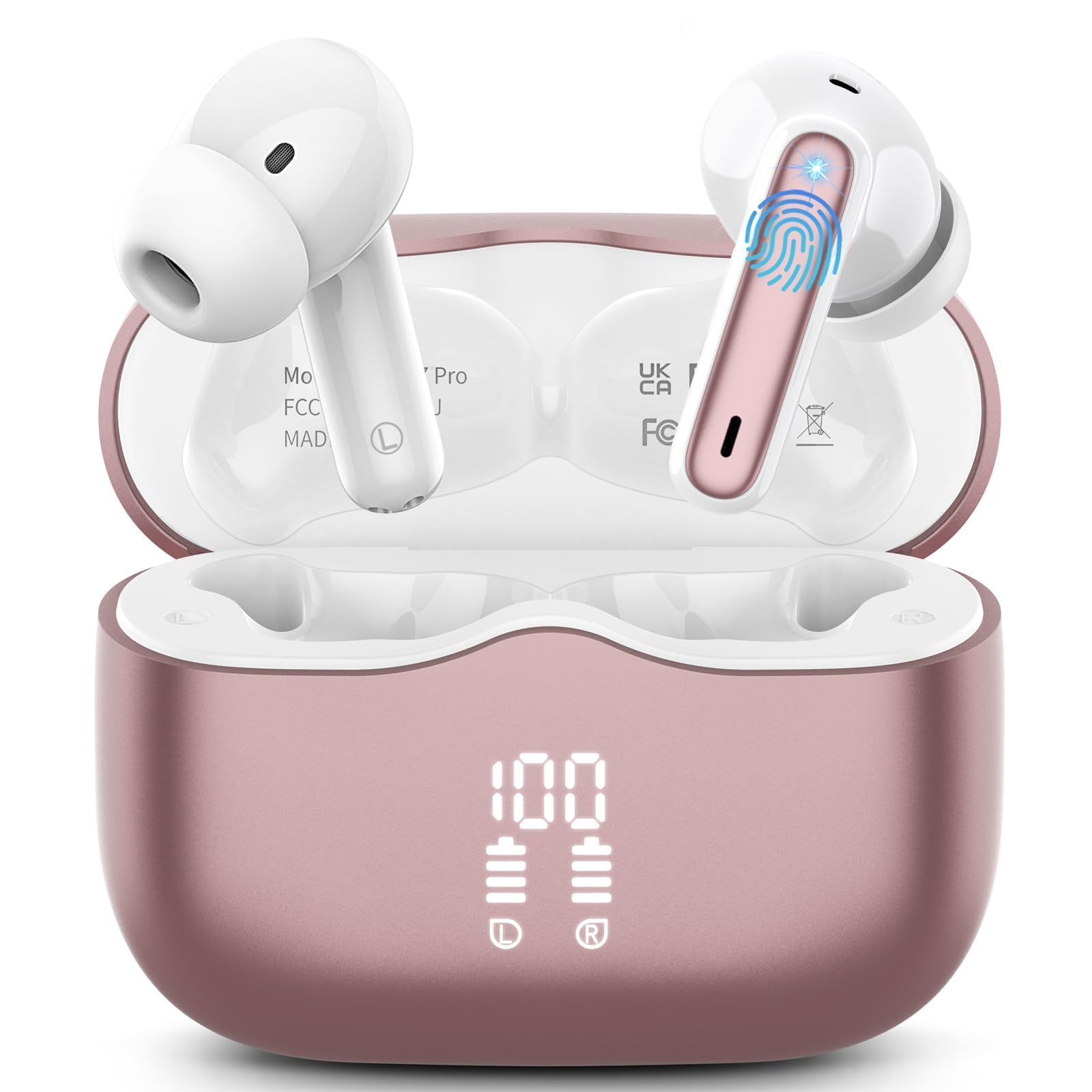
Foto nke 1: xinwld A97 Pro Wireless Earbuds and Charging Case. The image shows the black earbuds placed inside their charging case, which features a digital LED display on the front indicating battery levels.
Ihe ndị dị na ntị:
- Mpaghara njikwa aka: Maka ijikwa ọkpụkpọ egwu, oku, na onye enyemaka olu.
- Igwe okwu: For calls and ENC functionality.
- Kọntaktị na-akwụ ụgwọ: Connects with the charging case for power.
- Eartop: Provides comfort and sound isolation; replaceable.
Ihe ndị dị na ikpe chaja:
- Ikanam Digital Ngosipụta: Shows the battery level of the case and charging status of the earbuds.
- Ọdụ ụgbọ mmiri USB-C: Maka ịchaji ikpe ahụ.
- Oghere Nchaji Earbud: Holds and charges the earbuds when placed inside.
4. Ntuziaka Nhazi
4.1. Nchaji mbụ
Tupu ojiji nke mbụ, chajie nke ọma ekwe ntị na akpa nchaji.
- Tinye ntị ntị abụọ n'ime akpa chaja.
- Connect the USB-C charging cable to the charging port on the case and the other end to a USB power adapter (not included).
- The LED display on the charging case will show the battery percentage. The charging indicators for the earbuds will also be visible.
- Ozugbo chajịrị chaja zuru oke, kwụpụ eriri nchaji.
4.2. Ijikọ na ngwaọrụ gị
- Gbaa mbọ hụ na ebubo na ekwe ntị.
- Open the charging case. The earbuds will automatically power on and enter pairing mode, indicated by flashing lights.
- Na ngwaọrụ gị (smartphone, mbadamba, wdg), gaa na ntọala Bluetooth wee gbanye Bluetooth.
- Chọọ maka available devices. Select "xinwld A97 Pro" from the list.
- Once connected, you will hear a confirmation sound, and the earbud indicator lights will turn off or flash slowly.
- Ọ bụrụ na njikọ ahụ ada ada, tinyeghachi ntị ntị n'ime akpa ahụ, mechie mkpuchi ahụ, chere sekọnd ole na ole, wee megharịa usoro ndị ahụ.
5. Ntuziaka ọrụ
5.1. Gbanyụọ / gbanyụọ
- Ike Na: Mepee igbe chaja, ekweisi ga-agbanyekwa na akpaghị aka. Ma ọ bụghị ya, pịa ma jide mpaghara njikwa mmetụ aka na ekweisi abụọ ahụ maka sekọnd atọ.
- Gbanyụọ: Place the earbuds back into the charging case and close the lid. They will automatically power off and begin charging. Alternatively, disconnect them from Bluetooth, and they will power off after 5 minutes of inactivity.
5.2. Yiri ekwe ntị
Insert the earbuds into your ears and gently rotate them to find a comfortable and secure fit. Ensure the microphones are facing downwards for optimal call quality. Experiment with different eartip sizes (if included) for the best seal and sound.
5.3. Aka njikwa
The xinwld A97 Pro earbuds feature intuitive touch controls on each earbud. The functions are generally mirrored on both earbuds unless specified.
| Ọrụ | Omume |
|---|---|
| Kpọọ/kwụsịtụ egwu | Otu mgbata na ntị ntị |
| Track na-esote | Kpatụ ihe ntị ntị ugboro abụọ |
| Egwu gara aga | Pịa ugboro atọ na ntị ntị |
| Zaa/Kwụsị Oku | Otu mgbata na ntị ntị |
| Jụ oku | Pịa ma jide otu ntị ntị maka sekọnd 2 |
| Mee ka onye enyemaka olu rụọ ọrụ | Pịa ma jide otu ntị ntị maka sekọnd 3 |
| Njikwa olu | Control via your connected device (earbuds do not have direct volume control) |
5.4. Environmental Noise Cancellation (ENC)
The earbuds feature 4 ENC microphones to reduce ambient noise during calls, ensuring clearer conversations for both you and the person you are speaking with. This feature is automatically active during phone calls.
6. Nlekọta na nlekọta
6.1. Nhicha
- Jiri akwa dị nro, kpọrọ nkụ na-adịghị na-ehicha ntị ntị na chaja mgbe niile.
- Do not use harsh chemicals, cleaning solvents, or strong detergents, as these may damage the product.
- Gently clean the charging contacts on both the earbuds and inside the case to ensure proper charging and connectivity.
6.2. Mmiri Na-eguzogide Mmiri (IP7)
The earbuds are rated IP7 water-resistant, meaning they can withstand immersion in water up to 1 meter for 30 minutes. This rating applies to the earbuds only, not the charging case.
- Ekpudola akpa odori n'ime mmiri.
- Avoid using the earbuds in saunas, steam rooms, or during water sports.
- If the earbuds get wet, dry them thoroughly with a soft cloth before placing them back in the charging case to prevent damage to the charging contacts.
6.3. Nchekwa
When not in use, store the earbuds in their charging case to protect them from dust, scratches, and accidental damage.
6.4. Nlekọta batrị
To prolong battery life, avoid fully discharging the earbuds and charging case frequently. Charge them regularly, even if not in constant use, to maintain optimal battery health.
7. Nchọpụta nsogbu
Ọ bụrụ na ịnwee nsogbu ọ bụla, biko rụtụ aka na azịza ndị a na-ahụkarị:
7.1. Earbuds not pairing with device:
- Gbaa mbọ hụ na agbanyere Bluetooth na ngwaọrụ gị.
- Hụ na e nwere ihe e ji ekwe ntị chajị ma hapụ ya ka ọ dị n'ime akpa chajị.
- Try forgetting "xinwld A97 Pro" from your device's Bluetooth list and re-pairing.
- Malitegharịa ekwentị gị.
- Tinye ntị ntị azụ n'ime akpa ahụ, mechie mkpuchi ahụ, chere sekọnd iri, wee mepee ka ị banye ọzọ n'ụdị njikọ.
7.2. Only one earbud working:
- Gbaa mbọ hụ na akwụgoro ekwe ntị abụọ ahụ.
- Tinyekwa ntị ntị abụọ ahụ n'ime akpa nchaji, mechie mkpuchi, wee mepee ya ọzọ.
- Hichaa kọntaktị chaja dị na ntị ma na nke dị n'ime akpa ahụ.
7.3. Earbuds not charging:
- Gbaa mbọ hụ na ejikọrọ eriri chajị na echekwabara na ikpe ahụ yana isi iyi ike.
- Lelee ma kọntaktsị chaja dị na ntị ntị na n'ime akpa ahụ dị ọcha na enweghị irighiri ihe.
- Gbalịa eriri USB-C dị iche ma ọ bụ ihe nkwụnye ọkụ.
7.4. Poor sound quality:
- Gbaa mbọ hụ na ekwe ntị na-anọdụ ala nke ọma na ntị gị.
- Try different sized eartips for a better seal.
- Hichaa ihe ọ bụla dị n'ime ihe mkpuchi ntị ma ọ bụ ihe ndị dị n'ime ihe mkpuchi ntị.
- Ensure your device's volume is not too low.
- Gaa nso na ngwaọrụ ejikọrọ ka ịzenarị nnyonye anya.
8. Nkọwapụta
| Njirimara | Nkọwa |
|---|---|
| Ụdị | xinwld |
| Aha Nlereanya | A97 Pro |
| Nọmba nlereanya | A97 |
| Teknụzụ Njikọta | Ikuku (Bluetooth) |
| Ụdị Bluetooth | 5.4 |
| Ntinye ntị | Na Ntị |
| Ụdị njikwa | Njikwa aka |
| Ogo Nguzogide Mmiri | IP7 (naanị ekwe ntị) |
| Oge egwuregwu | Ruo awa 40 (ya na akpa chaja) |
| Igwe okwu | 4 ENC Noise Cancelling Mics |
| Ihe onwunwe | Plastic |
9. Akwụkwọ ikike na nkwado
9.1. Akwụkwọ ikike Ozi
Your xinwld A97 Pro Wireless Earbuds come with a limited warranty. Please refer to the warranty card included in your package or visit the official xinwld website for detailed warranty terms and conditions. The warranty period is typically 1 year from the date of purchase, covering manufacturing defects.
9.2. Nkwado ndị ahịa
For any questions, technical assistance, or warranty claims, please contact xinwld customer support through the following channels:
- Email: Please check your product packaging or the official xinwld website for direct customer support email.
- Websaịtị: Visit the xinwld Store on Amazon (for general inquiries or to find official contact information).
When contacting support, please have your product model (A97 Pro) and purchase details ready to expedite assistance.


