
1. Okwu mmalite
This manual provides detailed instructions for the safe and efficient use of your Surfans F20 Pro Android Hi-Res Music Player. Please read this manual thoroughly before operating the device and retain it for future reference.
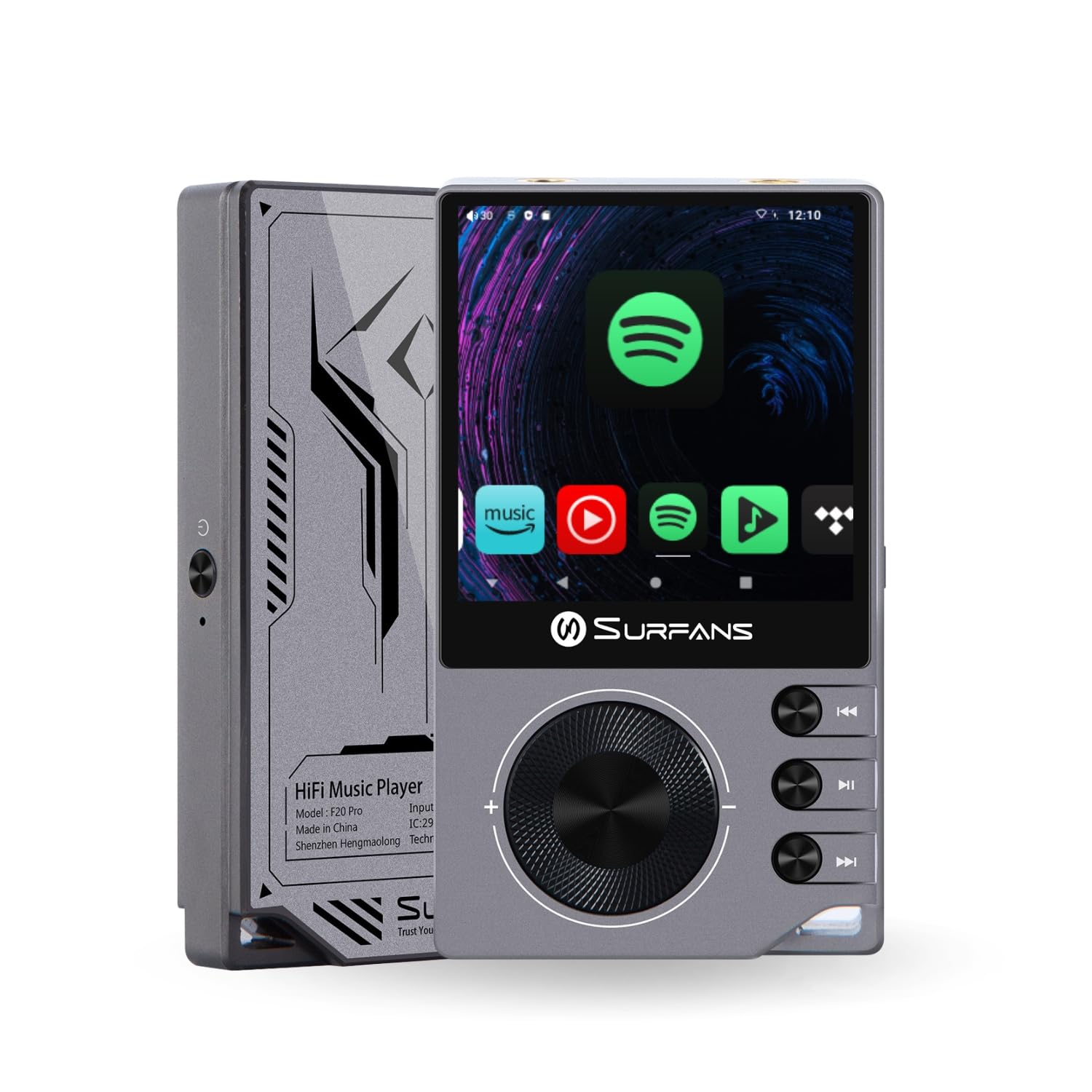
The Surfans F20 Pro Hi-Res Music Player, showcasing its compact design and touchscreen interface.
2. Ihe ngwugwu
Chọpụta na ihe niile dị na ngwugwu:
- Surfans F20 Pro Hi-Res Music Player
- USB Type-C USB
- 32 GB MicroSD Memory Card (pre-installed or separate)
- Okwu nchekwa
- Akwụkwọ ntuziaka (akwụkwọ a)
3. Ngwaọrụ gafereview
Familiarize yourself with the physical components and ports of your F20 Pro player.

Ihu na azụ view of the Surfans F20 Pro, highlighting its robust CNC metal chassis and button layout.
3.1. Atụmatụ igodo
- Dual ESS9018Q2M DACs: For high-fidelity audio processing.
- Octa-Core Android 12 System: Enables streaming app compatibility and smooth operation.
- 3.5mm Single-Ended & 4.4mm Balanced Outputs: Versatile headphone connectivity.
- Bluetooth 5.0 with LDAC: High-quality wireless audio transmission.
- Dual-Band Wi-Fi (2.4GHz & 5GHz): For stable internet connectivity.
- Nchekwa enwere ike ịgbasa: Supports up to 1TB via MicroSD card.
- Ihuenyo aka nke 2.7-inch: interface onye ọrụ nwere ọgụgụ isi.
4. Nhazi
4.1. Ịchaji ngwaọrụ
Before first use, fully charge the F20 Pro. Connect the included USB Type-C cable to the device's charging port and a compatible USB power adapter (not included) or computer USB port. The charging indicator will show the charging status.
4.2. Itinye Kaadị MicroSD
The F20 Pro supports MicroSD cards up to 1TB for expanded storage. Locate the MicroSD card slot on the side of the device. Gently insert the card until it clicks into place. To remove, push the card in again until it springs out.
4.3. Ike izizi
Press and hold the power button until the screen illuminates. Follow the on-screen prompts to complete the initial setup, including language selection and Wi-Fi connection.
4.4. Ijikọ na Wi-Fi
Gaa na Ntọala> Netwọk & ịntanetị> Wi-Fi. Select your desired network and enter the password if prompted. The F20 Pro supports both 2.4GHz and 5GHz Wi-Fi bands.

The Surfans F20 Pro demonstrating its dual-band Wi-Fi capability for fast and stable connections.
4.5. Njikọ Bluetooth
Iji jikọọ ekweisi ma ọ bụ ọkà okwu Bluetooth:
- Gbaa mbọ hụ na ngwaọrụ Bluetooth gị nọ na ọnọdụ njikọta.
- On the F20 Pro, go to Ntọala > Ngwaọrụ ejikọrọ > Jikọọ ngwaọrụ ọhụrụ.
- Select your device from the list and confirm pairing.

An illustration of the Bluetooth 5.0 chip, indicating support for high-resolution wireless audio codecs like LDAC.
5. Ijikwa ngwaọrụ
5.1. Nsoro ụzọ
The F20 Pro features a 2.7-inch touchscreen for navigation. Swipe to scroll, tap to select, and use the physical buttons for quick controls:
- Bọtịnụ ike: Power on/off, screen on/off.
- Wheel olu: Na-agbanwe olu mmepụta ọdịyo.
- bọtịnụ njikwa ọkpụkpọ: Play/Pause, Next Track, Previous Track.
5.2. Nghaghachi egwu
The F20 Pro supports various audio formats including DSD512, 192kHz/24bit, FLAC, WAV, WMA, M4A, MP3, MP2, and AAC.
5.2.1. Mpaghara Files
Nyefee egwu files to the device's internal storage or MicroSD card via USB connection to a computer. Use the pre-installed music player application to browse and play your library.
5.2.2. Ngwa Ngụgharị
The Android 12 operating system allows installation of streaming apps like Spotify, Apple Music, Tidal, or YouTube. Connect to Wi-Fi and download apps from the Google Play Store or other compatible sources.

The Surfans F20 Pro's screen showing various streaming application icons, demonstrating its Android capabilities.
5.3. Headphone Connections
The device offers both single-ended and balanced audio outputs.
- 3.5mm Single-Ended Output: Standard headphone jack (125mW/32Ω).
- 4.4mm Nwepụta Kwesịrị Ekwesị: For enhanced audio performance with compatible headphones (500mW/32Ω).

Agara nso view of the 3.5mm single-ended and 4.4mm balanced audio output ports on the Surfans F20 Pro.
6. Nlekọta
6.1. Nhicha
Use a soft, dry, lint-free cloth to clean the device. Avoid using abrasive cleaners or solvents, which may damage the surface.
6.2. Mmelite ngwanrọ
Periodically check for software updates to ensure optimal performance and access to new features. Updates can typically be found in Ntọala> Sistemu> Mmelite sistemụ.
6.3. Nlekọta batrị
Iji mee ka batrị dị ogologo, zere iwepụ ike niile na ngwaọrụ ahụ mgbe niile. Debe ngwaọrụ ahụ n'ebe dị jụụ ma kpọọ nkụ mgbe a naghị eji ya ruo ogologo oge.

Nke ime view of battery cells, representing the long-lasting battery capacity of the F20 Pro.
7. Nchọpụta nsogbu
If you encounter issues with your F20 Pro, refer to the following common problems and solutions:
| Nsogbu | Ihe nwere ike ime | Ngwọta |
|---|---|---|
| Ngwaọrụ anaghị agbanwu ọkụ | Batrị dị ala; Sistemụ dara | Charge the device; Press and hold the power button for 10-15 seconds to force restart. |
| Enweghị mmepụta ụda | Volume too low; Incorrect output selected; Faulty headphones | Increase volume; Check headphone connection; Test with different headphones. |
| Enweghị ike ijikọ na Wi-Fi | Incorrect password; Out of range; Router issue | Verify password; Move closer to router; Restart router. |
| Slow performance/App crashes | Ngwa dị oke ọnụ ahịa na-agba; Ebe nchekwa dị ala; ngwanrọ ochie | Close background apps; Free up storage; Check for system updates. |
8. Nkọwapụta
Detailed technical specifications for the Surfans F20 Pro:
| Njirimara | Nkọwa |
|---|---|
| Ụdị | Surfans |
| Aha Nlereanya | F20 PRO |
| DAC Chips | Dual ESS9018Q2M |
| Ee-Amps | Dual OPA1612 |
| Sistemụ nrụọrụ | Android 12 |
| RAM | 3GB |
| Nchekwa nke ime | 32GB |
| Nchekwa enwere ike ịgbasa | Ruo 1TB site na kaadị MicroSD |
| Nha ihuenyo | 2.73 sentimita asatọ |
| Njikọta | Aux, Bluetooth 5.0 (LDAC), USB Type-C, Wi-Fi (2.4GHz & 5GHz) |
| Ntinye ederede | 3.5mm Single-Ended (125mW/32Ω), 4.4mm Balanced (500mW/32Ω) |
| Ụdị ọdịyo akwadoro | DSD512, 192kHz/24bit, FLAC, WAV, WMA, M4A, MP3, MP2, AAC |
| Agba | Agba ntụ |

An illustration of the dual ESS9018K2M DAC chips, central to the F20 Pro's high-resolution audio capabilities.
9. Akwụkwọ ikike Ozi
The Surfans F20 Pro comes with a Akwụkwọ ikike nke afọ 1 site na ụbọchị azụrụ ya. Akwụkwọ ikike a na-ekpuchi ntụpọ nrụpụta na ọrụ aka n'oge ojiji nkịtị. Ọ naghị ekpuchi mmebi sitere na ojiji na-ezighị ezi, ihe mberede, mgbanwe na-akwadoghị, ma ọ bụ mmebi nkịtị. Biko debe ihe akaebe nke ịzụrụ ihe gị maka nkwupụta akwụkwọ ikike.
10. Nkwado ndị ahịa
For further assistance, technical support, or warranty inquiries, please contact Surfans customer service through the official website or your retailer. You may also find additional resources and FAQs online.