
Okwu mmalite
Welcome to the user manual for your Samsung QN65QN990FFXZA 65 Inch QN990F Neo QLED 8K TV. This document provides essential information for setting up, operating, maintaining, and troubleshooting your television. Please read these instructions carefully to ensure proper use and to maximize your viewahụmahụ.

Foto 1: N'ihu view of the Samsung QN65QN990FFXZA 65 Inch QN990F Neo QLED 8K TV.
Melite
1. Mwepu na ntinye
- Jiri nlezianya wepụ TV na ihe niile dị na ngwugwu ahụ.
- Place the TV on a stable, flat surface or mount it on a wall using a VESA 400mm x 300mm compatible mount. Ensure adequate ventilation around the TV.
2. Ijikọ Igbe Njikọ Ikuku Otu
The Samsung QN990F utilizes a Wireless One Connect Box to manage all external connections, reducing cable clutter around the TV. Connect all your devices to this box.

Figure 2: Wireless One Connect Box for streamlined connections.
3. External Device Connections
Connect your external devices (e.g., Blu-ray player, game console, soundbar) to the Wireless One Connect Box using the appropriate ports.

Figure 3: Detailed diagram of the Wireless One Connect Box ports.
- Eriri/ANT: Connect for over-the-air antenna or cable TV signals.
- USB-A: Standard rectangular port for power or media playback.
- Njikọ EX: Ọdụ ọrụ Samsung maka njikwa mpụga na nchọpụta ọrịa.
- HDMI 1, 2, 4: Transmits high-definition video and audio from external devices. Supports 8K@120Hz / 4K@240Hz for Gaming.
- HDMI 3 (eARC): Enhanced audio return for high-quality sound and advanced formats. Supports 8K@120Hz / 4K@240Hz for Gaming.
- Ethernet: Njikọ ịntanetị ejiri waya mee maka nkwanye ugwu, mmelite, na atụmatụ smart.
- Ọkụnụ (Optical): Na-ebuga ụda dijitalụ dị elu na ihe ndị na-akpọ ụda ma ọ bụ ndị na-anabata ya.
- Ike: Connects the power cable to the Wireless One Connect Box.
4. Njikọ ike
- Connect the power cable to the Wireless One Connect Box, then plug it into a wall outlet.
- Ensure the TV is properly connected to the One Connect Box.
Ntuziaka ọrụ
1. Ntọala Mmalite na Atụmatụ Smart
Upon first power-on, the TV will guide you through the initial setup process, including network connection, channel scanning, and smart feature configuration. The TV runs on the One UI Tizen operating system.
- NQ8 AI Gen3 processor: This processor optimizes content for enhanced viewing.
- Nhazi 8K AI: Lower resolution content is automatically upscaled to near 8K clarity.

Figure 4: 8K AI Upscaling Pro enhances content to near 8K resolution.
2. Mmezi Ogo Foto
- Glare Free: This technology minimizes reflections on the screen, improving visibility in bright environments.
- Neo Quantum HDR 8K+: Experience enhanced contrast and color depth.
- Quantum Matrix Technology Pro: Precise light control for detailed images.
- Ultra Viewn'akuku n'akuku: Maintains picture quality from various viewọnọdụ ọnọdụ.
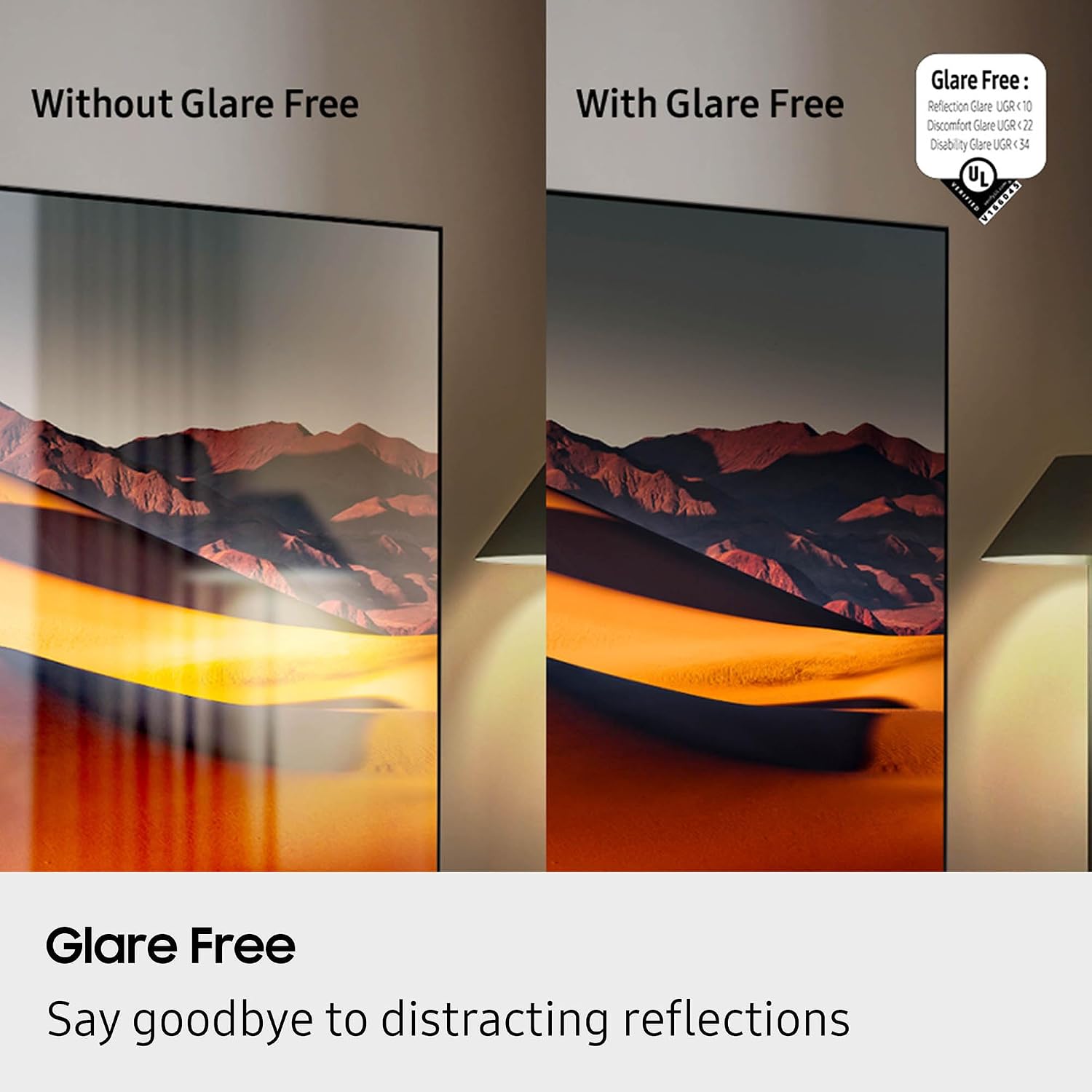
Figure 5: Glare Free technology reduces screen reflections.
3. Audio Atụmatụ
- Dolby Atmos: Provides immersive, multi-dimensional sound.
- Q-Symphony: Synchronizes TV speakers with compatible Samsung soundbars for a richer audio experience.
- AVA Pro (Active Voice Amplifier Pro): Enhances dialogue clarity in noisy environments.
- Adaptive Sound Pro: Optimizes sound based on content and room acoustics.
- 6.2.4 Ọwa gburugburu ụda: Integrated speaker system for a comprehensive audio field.
4. Njirimara egwuregwu
- Ebe egwuregwu: Access cloud gaming services and console games directly from your TV.
- 120Hz Refresh Rate & VRR FreeSync Premium Pro: Ensures smooth, tear-free gaming.

Figure 6: Samsung Gaming Hub for integrated gaming experience.
5. Official Product Video
Video 1: An informational overview of the Samsung QN990F Series TV features and capabilities.
Nlekọta
1. Nchacha ihuenyo
To clean your TV screen, use a soft, lint-free cloth. For stubborn marks, a non-ammonia and alcohol-free screen cleaning solution is recommended.

Figure 7: Recommended screen cleaning solution for display screens.
- Apply cleaning solution to the cloth, not directly to the screen.
- Gently wipe the screen to remove dust, dirt, and fingerprints.
- Zere kemịkalụ siri ike ma ọ bụ ihe na-emebi emebi.
2. Mmelite ngwanrọ
Periodically check for and install software updates to ensure optimal performance and access to the latest features. This can usually be done through the TV's settings menu under "Support" or "Software Update."
Nchọpụta nsogbu
Ọ bụrụ na ị hụ nsogbu na TV gị, lee usoro ndị a na-emekarị iji dozie nsogbu.
Enweghị Ike / Enweghị Foto
- Ensure the power cable is securely connected to both the One Connect Box and the wall outlet.
- Verify the One Connect Box is properly connected to the TV.
- Lelee ma oghere mgbidi ahụ na-arụ ọrụ site na nkwụnye na ngwaọrụ ọzọ.
- Pịa bọtịnụ ike na njikwa anya ma ọ bụ na TV n'onwe ya.
Enweghị ụda
- Check the volume level on both the TV and any connected audio devices (soundbar, receiver).
- Ensure the TV is not muted.
- Verify audio cables are correctly connected to the One Connect Box.
- If using external audio, check the audio output settings on the TV.
Ogo Foto adịghị mma
- Check the source resolution. While 8K AI Upscaling Pro enhances content, native 8K content will provide the best quality.
- Adjust picture settings (brightness, contrast, sharpness, color) in the TV menu.
- Ensure all video cables are securely connected and not damaged.
- If using an antenna, check antenna positioning and signal strength.
Njikwa Remote anaghị arụ ọrụ
- Dochie batrị ndị dị na njikwa anya.
- Gbaa mbọ hụ na enweghị ihe mgbochi n'etiti igwe anya na TV.
- Try re-pairing the remote control with the TV if it's a Bluetooth remote (refer to the TV's on-screen guide for pairing instructions).
Nkọwapụta
| Njirimara | Nkọwapụta |
|---|---|
| Aha Nlereanya | QN65QN990FFXZA |
| Nha ihuenyo | 65 sentimita asatọ |
| Ngosipụta teknụzụ | Neo QLED |
| Mkpebi | 8K |
| Ọnụego ume ọhụrụ | 120 Hz |
| Nhazi | NQ8 AI Gen3 processor |
| Technology Upscaling | 8K AI Upscaling Pro |
| Sistemụ nrụọrụ | Otu UI Tizen |
| Njikọta | HDMI x 5, USB-A x 3, USB-C x 1, Ethernet, RF, Wireless One Connect, Bluetooth, Wi-Fi |
| Ọnọdụ mmepụta ọdịyo | Surround (6.2.4 channel) |
| Integrated Surround Sound | Dolby Atmos |
| Akwadoro usoro HDR | HDR10+, HDR10 |
| Akụkụ ngwaahịa (D x W x H) | 10.5"D x 56.4"W x 35.1"H |
| Ibu Ibu | 66.6 pound |
| VESA Mount Standard | 400mm x 300mm |
| Agba | Nwa ojii |
Akwụkwọ ikike na nkwado
Akwụkwọ ikike nke onye nrụpụta
Your Samsung QN65QN990FFXZA 65 Inch QN990F Neo QLED 8K TV comes with a full 1-year manufacturer's warranty. This warranty covers defects in materials and workmanship under normal use. Please retain your proof of purchase for warranty claims.
Nkwado ndị ahịa
For technical assistance, troubleshooting beyond this manual, or warranty service, please contact Samsung Customer Support. Refer to the official Samsung website or your product registration documents for the most current contact information.
- Nkwado n'ịntanetị: Gaa na nkwado Samsung gọọmentị websaịtị.
- Nkwado ekwentị: Contact the Samsung customer service hotline.