
1. Okwu mmalite
This manual provides detailed instructions for the safe and effective use of your Moukey MPS5 Portable Karaoke Machine. Please read this manual thoroughly before operating the device and retain it for future reference. The MPS5 is a versatile portable speaker system designed for various audio playback needs, including karaoke, music streaming, and public address, featuring wireless microphones and multiple connectivity options.
2. Kedu ihe dị na Igbe ahụ
Carefully unpack all items from the box. Ensure all components listed below are present and in good condition.
- Moukey MPS5 Portable Karaoke Machine (1 unit)
- Wireless Microphones (2 units)
- USB USB cable (1 nkeji)
- 3.5mm AUX Cable (1 unit)
- Shoulder Strap (1 unit)
- Akwụkwọ ntuziaka onye ọrụ (1 nkeji)
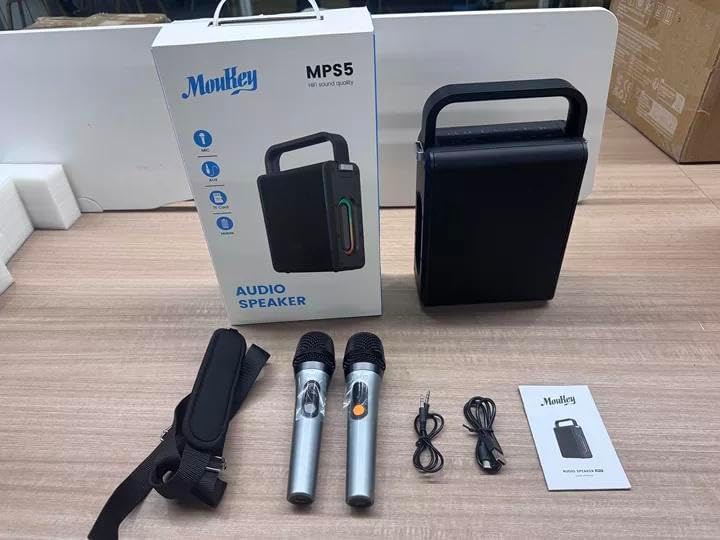
Image: All components included in the Moukey MPS5 package.
3. Ngwaahịa gafereview
The Moukey MPS5 is a compact yet powerful portable karaoke machine. It features a robust design with integrated LED lighting on the sides, enhancing the user experience. A sturdy handle and an included shoulder strap provide convenient portability.
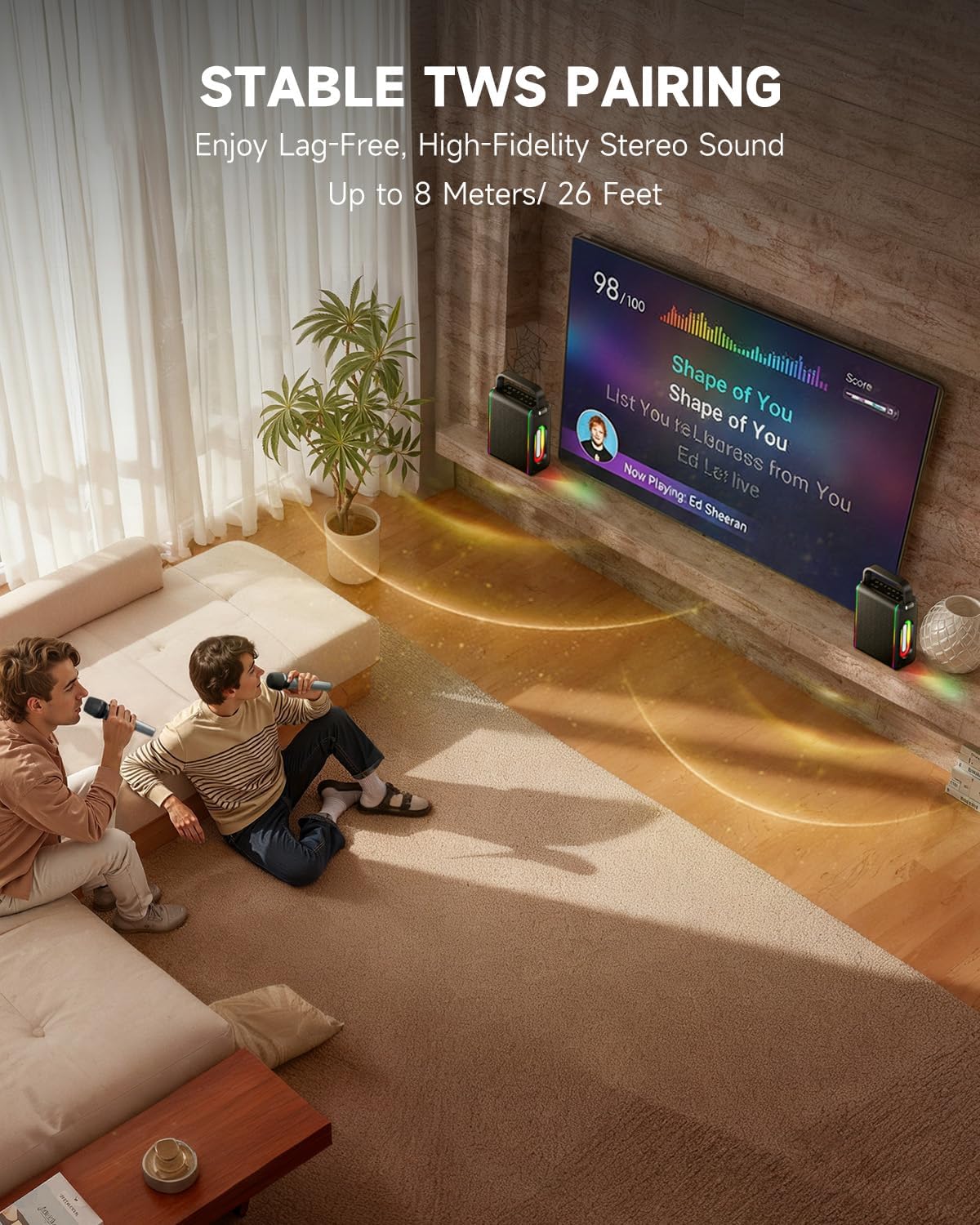
Foto: N'ihu view of the Moukey MPS5 speaker.

Foto: Akụkụ view of the Moukey MPS5, showing the LED lighting.
4. Atụmatụ igodo
- Excellent Sound Output: The MPS5 delivers 200W peak power (RMS 60W) through a 4-inch woofer and two 2-inch tweeters, providing full-range stereo sound with enhanced bass.
- Powerful Functionality: Supports Bluetooth 5.3 for wireless connection to various devices. Also includes Micro TF card, Flash USB, MP3, and AUX IN playback options. Features stable TWS (True Wireless Stereo) pairing for connecting two MPS5 units for a wider stereo soundstage.
- Ndụ batrị dị ogologo: The rechargeable battery provides up to 8 hours of continuous music playback on a 2-hour charge, suitable for extended use indoors or outdoors.
- Nhazi dị arọ na nke enwere ike ibugharị: Weighing only 2kg, the MPS5 is designed for easy transport. It can be carried by hand using the integrated handle or with the included shoulder strap.
- Igwe igwe ikuku abụọ: Includes two 2.4Ghz rechargeable microphones with a connection range of up to 60 feet and up to 8 hours of use time per charge (2-3 hours charging time). Features one-tap connectivity for effortless pairing.

Image: Internal speaker components of the MPS5.

Image: MPS5 connected to multiple devices via Bluetooth.

Image: Battery life and charging details for the MPS5.

Image: Demonstrating the portability of the MPS5 with hand and shoulder strap options.

Image: The two wireless microphones for the MPS5.
5. Nhazi
5.1 Ịchaji Igwe okwu na Igwe okwu
Before first use, fully charge the MPS5 speaker and both wireless microphones.
- Ọkà okwu: Connect the provided USB Type-C cable to the charging port on the speaker and to a compatible USB power adapter (not included). The charging indicator light will show charging status. A full charge takes approximately 2 hours.
- Igwe okwu: Each microphone has a charging port. Connect them to a USB power source using the provided USB cable. Charging time for microphones is 2-3 hours.
5.2 Gbanyụọ ma ọ bụ gbanyụọ
- To power on the speaker, press and hold the power button (U) on the top panel for 2 seconds.
- To power off, press and hold the power button (U) ọzọ maka 2 sekọnd.
5.3 Njikọ Bluetooth
- Ensure the MPS5 speaker is powered on and in Bluetooth mode (indicated by a blue LED). If not, press the 'M' (Mode) button to switch to Bluetooth mode.
- Na ngwaọrụ mkpanaaka gị (smartphone, tabletị, wdg), gbanye Bluetooth wee chọọ ngwaọrụ dịnụ.
- Select 'Moukey MPS5' from the list of devices to pair. A voice prompt will confirm successful connection.
Njikọta 5.4 TWS (Ezigbo Stereo Wireless)
To achieve stereo sound, you can pair two Moukey MPS5 speakers together.
- Ensure both MPS5 speakers are powered on and in Bluetooth mode, but not connected to any other device.
- On one of the speakers, double-press the 'M' (Mode) button. The speaker will enter TWS pairing mode.
- The two speakers will automatically connect to each other. A voice prompt will confirm successful TWS pairing.
- Once TWS is established, connect your mobile device to one of the MPS5 speakers via Bluetooth as described in section 5.3. Both speakers will then play audio in stereo.
Vidiyo: Oge egwuregwu dị mkpirikpiview of the MPS5 Karaoke Machine, demonstrating TWS pairing and other features.
6. Ntuziaka ọrụ
6.1 Na-achịkwaview
The top panel of the MPS5 speaker features several buttons for controlling playback, volume, and microphone settings.
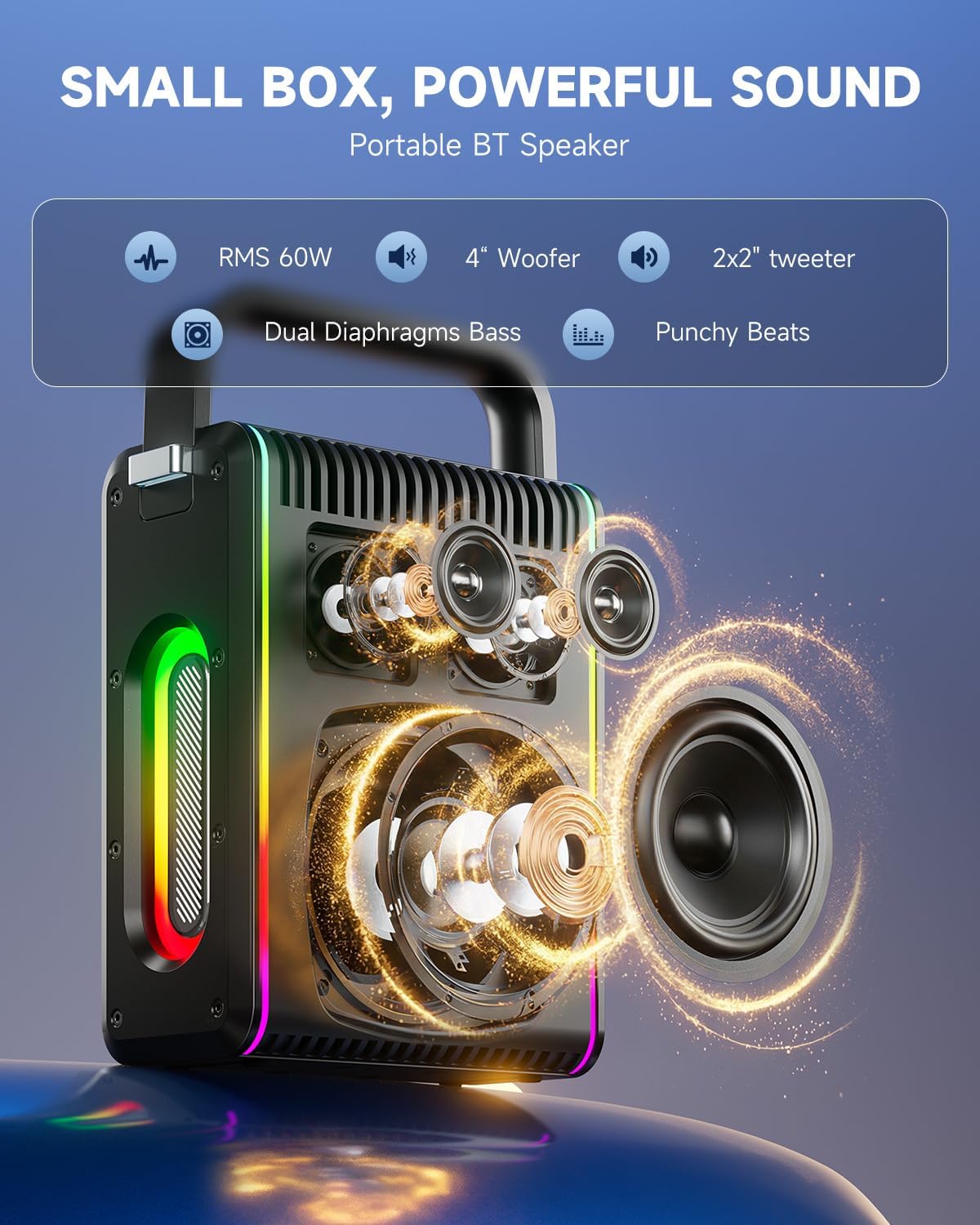
Image: Top control panel of the MPS5.
- bọtịnụ ike (U): Pịa ma jide sekọnd 2 ka ịgbanwuo/ gbanyụọ.
- Bọtịnụ ọnọdụ (M): Short press to cycle through input modes (Bluetooth, AUX, USB, TF Card). Double-press to initiate TWS pairing.
- Microphone Volume (Mic - / Mic +): Na-agbanwe olu nke igwe okwu ejikọtara.
- Echo Adjustment (R-/R+): Adjusts the echo effect for the microphones.
- Kwụsị/ Kwụsị (▶): Na-egwu ma ọ bụ kwụsịtụ egwu dị ugbu a.
- Mpịakọta ọnụ (-): Decreases the main speaker volume.
- Elu elu (+): Increases the main speaker volume.
- EQ A/E: Short press to switch between EQ modes. Long press to toggle between original sound and accompaniment elimination.
6.2 Igwe okwu
The MPS5 comes with two wireless microphones for karaoke and vocal performances.
- Gbanyụọ/ Gbanyụọ: Press and hold the power button on the microphone to turn it on or off.
- Na-ejikọta: The microphones are pre-paired with the speaker. If re-pairing is needed, ensure the speaker is on, then power on the microphone. They should connect automatically.
- Microphone Disconnect/Reconnect: Press the dedicated microphone button on the speaker's control panel to quickly disconnect or reconnect the microphones.
6.3 Audio Input Modes
In addition to Bluetooth, the MPS5 supports several wired and local storage input options.

Image: Input ports on the MPS5 speaker.
- Ntinye AUX: Connect an external audio device using the 3.5mm AUX cable. Select AUX mode using the 'M' button.
- USB playback: Fanye draịva USB nwere ọdịyo MP3 files n'ọdụ ụgbọ mmiri USB. Ọkà okwu ga-agbanwe ozugbo gaa na ọnọdụ USB wee malite ịkpọghachi.
- Ngụghachi kaadị TF: Insert a Micro TF card containing MP3 audio files banye n'ime oghere kaadị TF. Ọkà okwu ahụ ga-agbanwe na ọnọdụ kaadị TF ozugbo wee malite ịkpọghachi.
6.4 ọkụ ọkụ LED
The MPS5 features dynamic LED lighting on its sides. Use the dedicated LED button (if available, or refer to the 'M' button for light control if combined) to cycle through different light modes or turn them off.
7. Nlekọta
- Nhicha: Jiri akwa dị nro dị nro hichaa mpụta nke ọkà okwu. Ejila ihe na-ehicha mmiri mmiri ma ọ bụ ihe abrasive.
- Nchekwa: Chekwaa ngwaọrụ ahụ n'ebe dị jụụ, kpọrọ nkụ na-adịghị na ìhè anyanwụ kpọmkwem na oke okpomọkụ.
- Nlekọta batrị: Ka ịgbatị ndụ batrị ogologo, zere ịchaji batrị ugboro ugboro. Na-anya ngwaọrụ mgbe niile, ọbụlagodi na ọ naghị eji ya ogologo oge.
8. Nchọpụta nsogbu
If you encounter issues with your Moukey MPS5, refer to the following common problems and solutions:
| Nsogbu | Ihe nwere ike ime | Ngwọta |
|---|---|---|
| Enweghị ike | Batrị agwụla. | Jiri eriri USB Type-C enyere chajie ọkà okwu ahụ. |
| Enweghị ụda sitere na ọkà okwu | Volume is too low or muted. Incorrect input mode selected. | Increase volume using the '+' button. Press 'M' to cycle through input modes. |
| Njikọ Bluetooth adaghị | Speaker is not in pairing mode. Device is too far. | Ensure speaker is in Bluetooth mode. Move device closer to speaker. Try restarting both devices. |
| Igwe okwu anaghị arụ ọrụ | Microphone is off or uncharged. Microphone is disconnected. | Ensure microphone is charged and powered on. Press the microphone button on the speaker to reconnect. |
| Njikọ TWS dara | Speakers are already connected to another device. | Ensure both speakers are not connected to any other Bluetooth device before initiating TWS pairing. |
9. Nkọwapụta
- Akara: Moukey
- Nọmba nlereanya: MPS 5
- Mpụta Wattage: 200 Watts (Elu)
- Teknụzụ Njikọta: Bluetooth 5.3
- Ntinye odiyo: Bluetooth, TF card, USB, MP3, AUX, Wired microphones
- Ọnụọgụ ọwa: 2
- Isi mmalite ike: Akwanyere batrị
- Ụdị njikọ: USB Ụdị C
- Akụkụ ihe (L x W x H): 2.36 x 6.3 x 12.2 sentimita asatọ
- Ibu ihe: Ihe dị ka 2 n'arọ
- Ngwa dakọtara: Smartphone, Tablet, Laptop, MP3 Player, Microphone
- Agba: Black with Silver Accents
10. Akwụkwọ ikike & Nkwado
The Moukey MPS5 Portable Karaoke Machine comes with a Akwụkwọ ikike nke afọ 1 site na ụbọchị ịzụrụ ihe. Akwụkwọ ikike a na-ekpuchi ntụpọ nrụpụta na ọrụ aka n'oge ojiji nkịtị. Biko debe ihe akaebe nke ịzụrụ ihe gị maka nkwupụta akwụkwọ ikike.
For technical support, troubleshooting assistance, or warranty inquiries, please contact Moukey customer service through the retailer where the product was purchased or visit the official Moukey websaịtị maka ozi kọntaktị.