
Okwu mmalite
This manual provides detailed instructions for the safe and effective use of your Digitek DSL 555 RGB Portable LED Stick Light Wand. Please read this manual thoroughly before operating the device and retain it for future reference.
Kedu ihe dị na Igbe ahụ
Chọpụta na akụrụngwa niile dị mgbe ị na-ebupụ:
- Stick Light
- Barn Dozọ
- Pịnye C Nchaji USB
- Buru akpa
Ngwaahịa gafereview
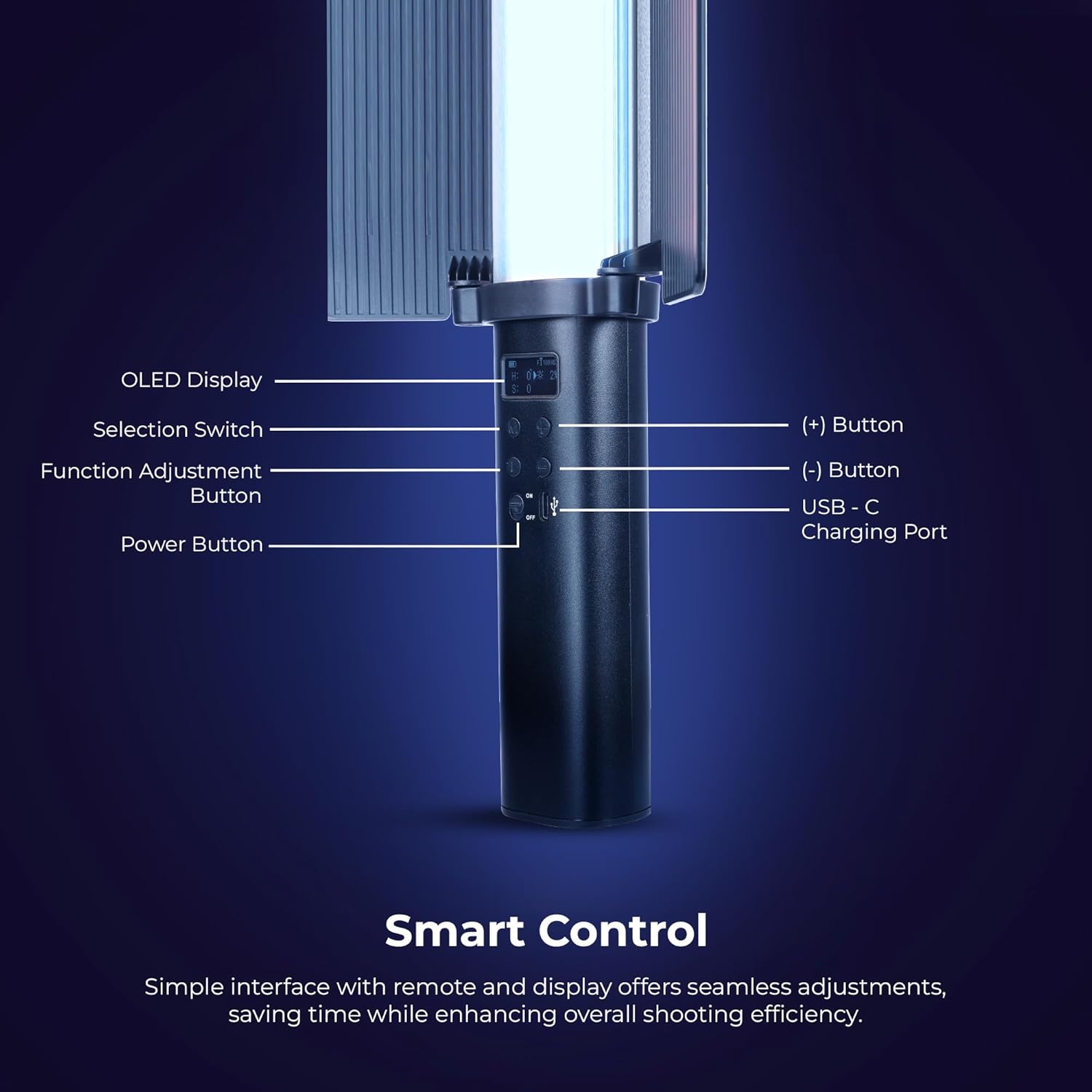
Foto: Zuru ezu view of the Digitek DSL 555 RGB control panel with OLED display and buttons.
The Digitek DSL 555 RGB is a versatile LED stick light designed for photography and videography. It features a robust 38W output, dual color temperature (2500K-9900K), full RGB color control, and 24 special effects. The device includes an OLED display for easy adjustments and supports app control for enhanced functionality.
- Ngosipụta OLED: Na-egosi ntọala dị ugbu a.
- Selection Switch: Navigates menu options.
- Function Adjustment Button: Confirms selections and changes modes.
- (+) bọtịnụ: Increases values or navigates up.
- (-) bọtịnụ: Decreases values or navigates down.
- Ọdụ ụgbọ mmiri USB-C: Maka ntinye ike na chaja.
- Bọtịnụ ike: Gbanyụọ ma ọ bụ gbanyụọ ngwaọrụ.
Melite
Ịchaji ngwaọrụ

Foto: Digitek DSL 555 RGB with USB-C Charging Port and Battery Details.
Connect the provided Type-C charging cable to the USB-C port on the light wand and plug the other end into a compatible USB power adapter (not included). The OLED display will indicate charging status. A full charge provides approximately 1.5 hours of operation.
Attaching the Barn Door

Foto: Digitek DSL 555 RGB with Removable Barn Door and HSI Color Adjustment.
Align the barn door accessory with the light panel and slide it into place until it securely clips onto the light wand. The barn door helps to shape and control the light output.
Ịkwanye
The DSL 555 RGB features a 1/4-inch universal mounting thread at its base. This allows for attachment to tripods, light stands, or other compatible rigs for stable positioning during use.
Ntuziaka ọrụ
Gbanyụọ/ Gbanyụọ
Pịa ma jide bọtịnụ ike located on the handle to turn the light wand on or off.
Basic Adjustments (Button Control)
- Jiri ihe Ngbanwe Nhọrọ to cycle through different modes (CCT, HSI, FX).
- Pịa Function Adjustment Button to select a parameter within a mode (e.g., color temperature, brightness, hue).
- Jiri ihe (+) na (-) Buttons to adjust the selected parameter's value.
Color Temperature (CCT Mode)
In CCT mode, adjust the color temperature from 2500K (warm light) to 9900K (cool light) using the (+) and (-) buttons. This mode also allows for RGB adjustments.
Ndozi ihie
The light intensity can be adjusted from 1% to 100% in any mode. Use the (+) and (-) buttons to set the desired brightness level.
HSI Color Mode
The HSI mode offers full creative control over colors:
- Hue (H): Adjust from 0-360 degrees to select any color in the spectrum.
- Saturation (S): Adjust from 0-100% to control the purity of the color.
- Intensity (I): Adjust from 0-100% to control the brightness of the color.
Special Effects (FX Modes)

Foto: Digitek DSL 555 RGB showcasing various special effects modes.
The DSL 555 RGB includes 24 pre-programmed special effects such as Strobe, Police, Flame, Firework, and more. Navigate to FX mode using the Selection Switch and choose your desired effect.
Dual-Sided Brilliance

Foto: Digitek DSL 555 RGB demonstrating Dynamic RGB and Natural Bi-Color sides.
The light wand features two distinct sides: one for dynamic RGB lighting and the other for natural bi-color (2500K-9900K) output, offering versatile lighting options.
Njikwa ngwa
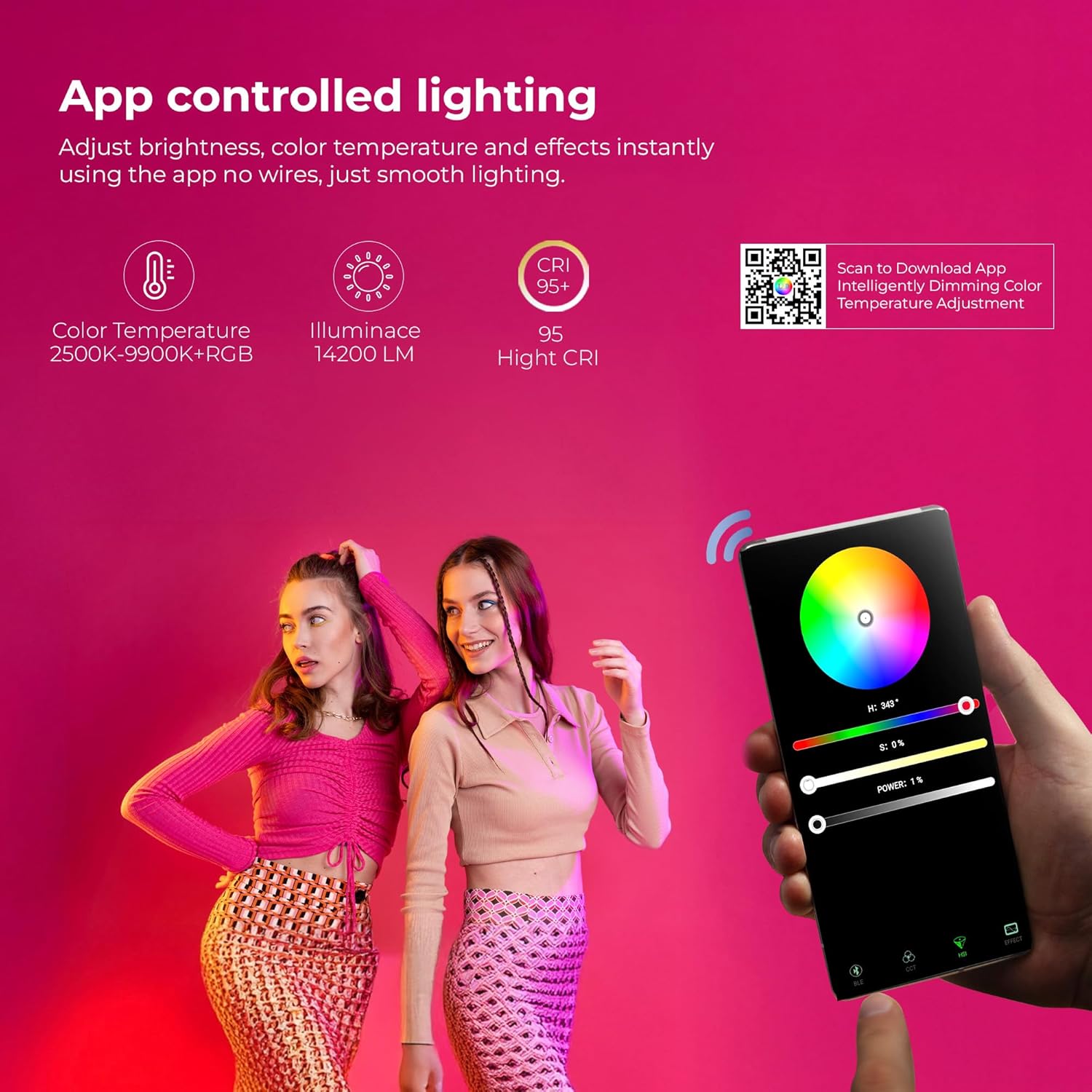
Foto: Digitek DSL 555 RGB App Control Interface and QR Code for Download.
For advanced control, download the official app. Scan the QR code provided on the product packaging or visit www.ledlyd.com to download the application. The app allows for remote adjustment of brightness, color temperature, and effects.
Nlekọta
Nhicha
Wipe the light wand with a soft, dry cloth. Do not use abrasive cleaners or solvents, as these may damage the surface or internal components.
Nchekwa
When not in use, store the light wand in its carry bag in a cool, dry place away from direct sunlight and extreme temperatures.
Nlekọta batrị
Ka ịgbatị ndụ batrị ogologo, zere ịchaji batrị ugboro ugboro. Na-anya ngwaọrụ mgbe niile, ọbụlagodi na ọ naghị eji ya ogologo oge.
Nchọpụta nsogbu
- Ìhè anaghị agbanwu: Ensure the device is charged. Connect to a power source using the Type-C cable.
- Nsogbu njikọ ngwa: Ensure Bluetooth is enabled on your mobile device. Restart both the light wand and the app. Refer to the app's help section for specific pairing instructions.
- Inconsistent light output: Check for any physical damage. Ensure the battery is adequately charged.
Ọ bụrụ na nsogbu ka dị, kpọtụrụ nkwado ndị ahịa maka enyemaka.
Nkọwapụta

Foto: Key Features of Digitek DSL 555 RGB LED Stick Light Wand.
| Mpụta ike | 38W |
| Ọkụ ọkụ | Ruo 14200LM |
| Okpomọkụ agba | 2500K - 9900K + RGB |
| CRI (Ndekọ nrụpụta agba) | RA>95 |
| Ndozi ihie | 1% - 100% |
| Ndụ batrị | Ihe ruru. Awa 1.5 |
| Nchaji ọdụ ụgbọ mmiri | USB Ụdị-C |
| Nhọrọ nkwụnye | 1/4” Universal Mount |
| Akụkụ ngwaahịa | 3 x 5 x 59 cm (ihe dị ka) |
| Ibu Ibu | 2 n'arọ |
| Mba onye si | China |
Akwụkwọ ikike na nkwado
For warranty information and technical support, please contact the manufacturer:
Onye nrụpụta: IMS Mercantiles Limited
adreesị: 704, 7th floor, Ring Road Mall, Sec-3, Rohini, Delhi 110085
Customer Helpline (Toll Free): 1800-123-544-444
Email: support@digitek.net.in
Biko jikwaa nnata nzụta gị dị ka ihe akaebe nke ịzụrụ ihe maka ebubo akwụkwọ ikike.