
Okwu mmalite
The Redmi Buds 8 Lite are advanced wireless earbuds designed to deliver an immersive audio experience with hybrid active noise cancellation, powerful sound, and extended battery life. This manual provides essential information for setting up, operating, and maintaining your earbuds.
Kedu ihe dị na Igbe ahụ
- Redmi Buds 8 Lite Earbuds (Left and Right)
- Nchaji case
- USB Type-C Nchaji USB
- Ntụaka ntị Silicone (nha dị iche iche)
- Akwụkwọ ntuziaka onye ọrụ

Image: Redmi Buds 8 Lite earbuds in their open charging case, showcasing imewe ojii mara mma.
Melite
1. Ịchaji ihe ntị na akpa
Before first use, fully charge the earbuds and the charging case. Place the earbuds into the charging case and connect the USB Type-C cable to the charging port on the case and a power source. The indicator light on the case will show charging status.

Image: The Redmi Buds 8 Lite charging case with earbuds, illustrating the extended battery life of up to 36 hours with the case.
2. Mmakọ mbụ
- Mepee igbe nchaji. Igwe ntị ga-abanye na ọnọdụ njikọta na-akpaghị aka.
- Na ngwaọrụ gị (smartphone, mbadamba, wdg), gbanye Bluetooth.
- Chọọ maka "Redmi Buds 8 Lite" in the list of available Bluetooth devices and select it to connect.
- For Android devices, Google Fast Pair will simplify the connection process by displaying a pop-up notification.
Na-arụ ọrụ Earbuds
Njikwa mmetụ
The Redmi Buds 8 Lite feature intuitive touch controls on each earbud. The functions can be customized via the Xiaomi Earbuds app.
- Gwuo/kwụsịtụ: Otu mgbata na ntị ntị.
- Track na-esote: Pịa bọtịnụ ntị aka nri ugboro abụọ.
- Gara aga Track: Kpatụ ntị ugboro abụọ n'akụkụ aka ekpe.
- Azịza/Kwụsị Oku: Otu mgbata na ntị ntị.
- Jụ oku: Pịa ma jide otu ntị ntị.
- Mee ka onye enyemaka olu rụọ ọrụ: Pịa ugboro atọ na ntị ntị.
- Gbanwee ANC/Ụdị Nghọta: Press and hold either earbud (customizable).
Nkagbu Noise nọchiri anya (ANC)
The earbuds feature 42dB Hybrid Active Noise Cancellation to reduce ambient noise, allowing for a more focused listening experience. You can switch between ANC, Transparency, and Standard modes using the touch controls or the Xiaomi Earbuds app.
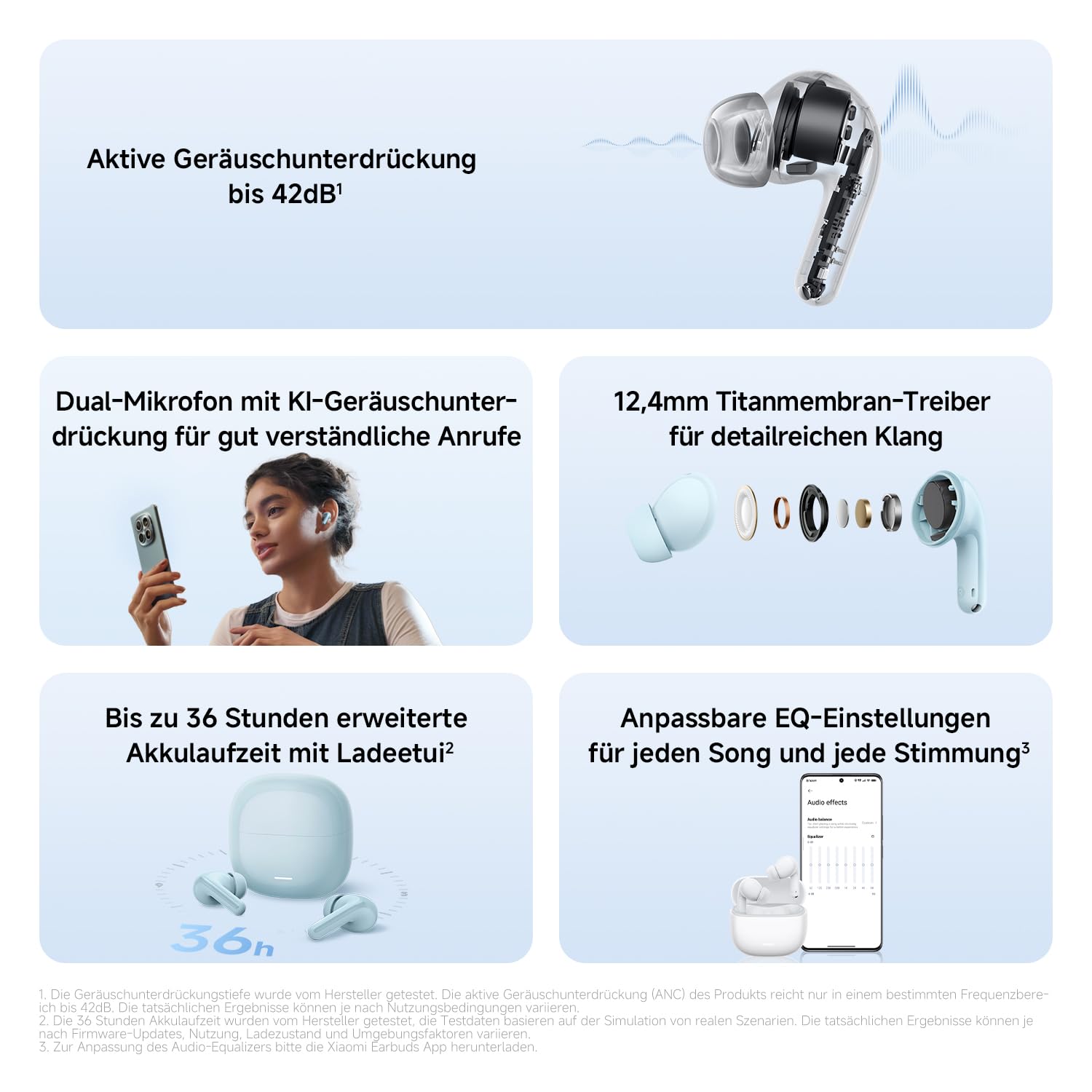
Foto: nkọwa zuru ezu view of the Redmi Buds 8 Lite earbud highlighting its active noise cancellation capability of up to 42dB.
Crystal-Clear Calls with AI Dual-Microphone
Equipped with an AI dual-microphone system, the earbuds effectively reduce background noise and wind interference during calls, ensuring your voice is transmitted clearly.

Image: A user wearing Redmi Buds 8 Lite earbuds while on a call, demonstrating the effectiveness of the AI dual-microphone system for clear communication.
Ngwa Xiaomi Earbuds
Download the Xiaomi Earbuds app to unlock full customization options, including personalized EQ settings, firmware updates, and touch control adjustments.
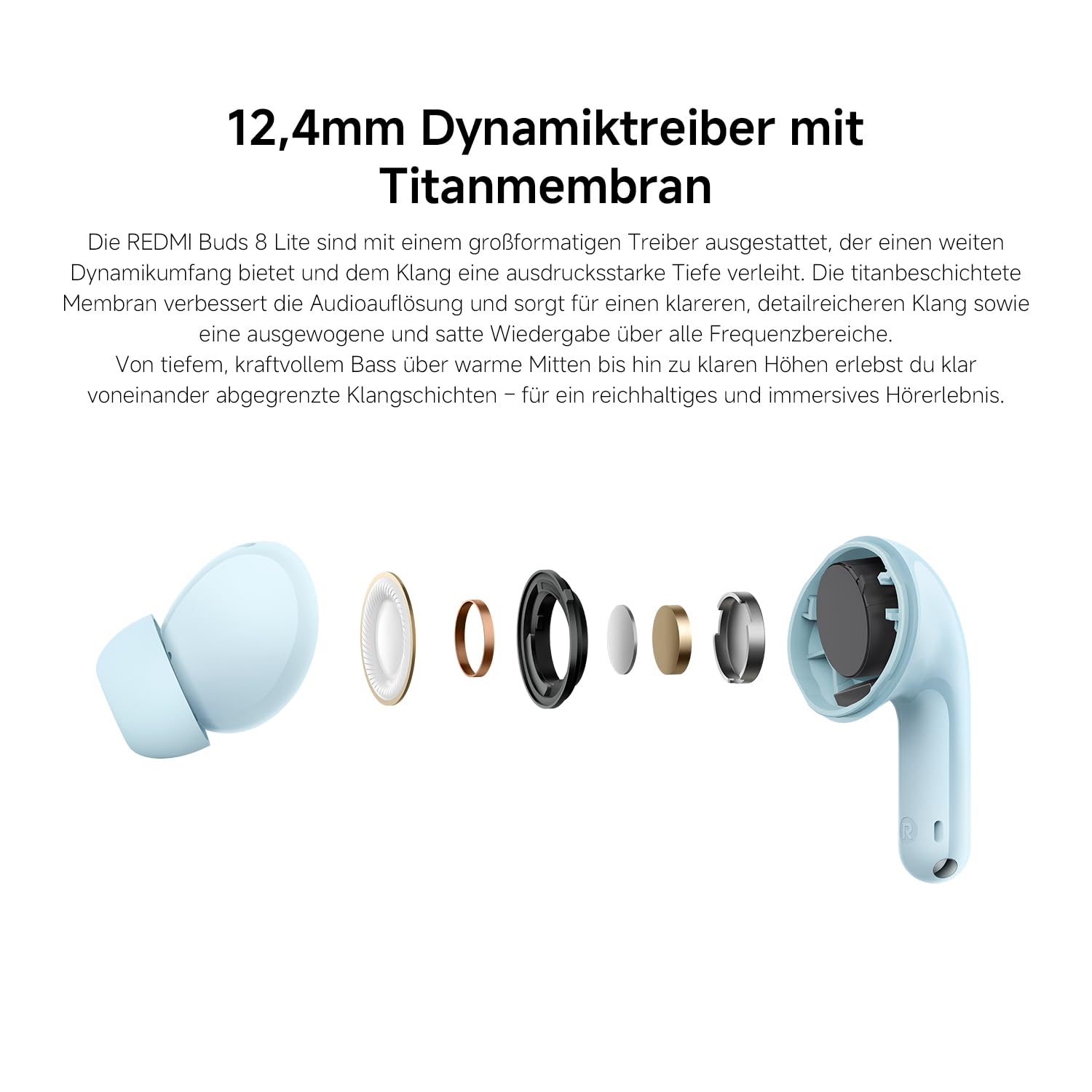
Image: A smartphone screen displaying the Xiaomi Earbuds app interface with various customizable EQ settings for audio personalization.
Atụmatụ igodo
- 42dB Hybrid Active Noise Cancellation: Provides deep quiet by blocking out ambient noise for immersive sound.
- Powerful 12.4mm Dynamic Driver: Delivers rich, detailed sound with strong bass and clear treble.
- AI Dual-Microphone System: Ensures crystal-clear calls by reducing background noise and wind interference.
- 8/36-Hour Ultra-Long Battery: Ruo awa ise n'otu chaji, yana awa iri abụọ na ise n'ime mkpokọta ya na akpa chaja.
- Nchaji ngwa ngwa: Get 2 hours of music from just a 10-minute charge.
- Ụda enwere ike ịhazi ya: Fine-tune audio via the Xiaomi Earbuds app with EQ settings.
- Njikọ Bluetooth 5.4: Offers stable and efficient wireless connection.
- IP54 Mgbochi mmiri: Protects against splashes and sweat, suitable for workouts and outdoor activities.
- Mmakọ ngwa ngwa Google: Enables quick and seamless pairing with Android devices.
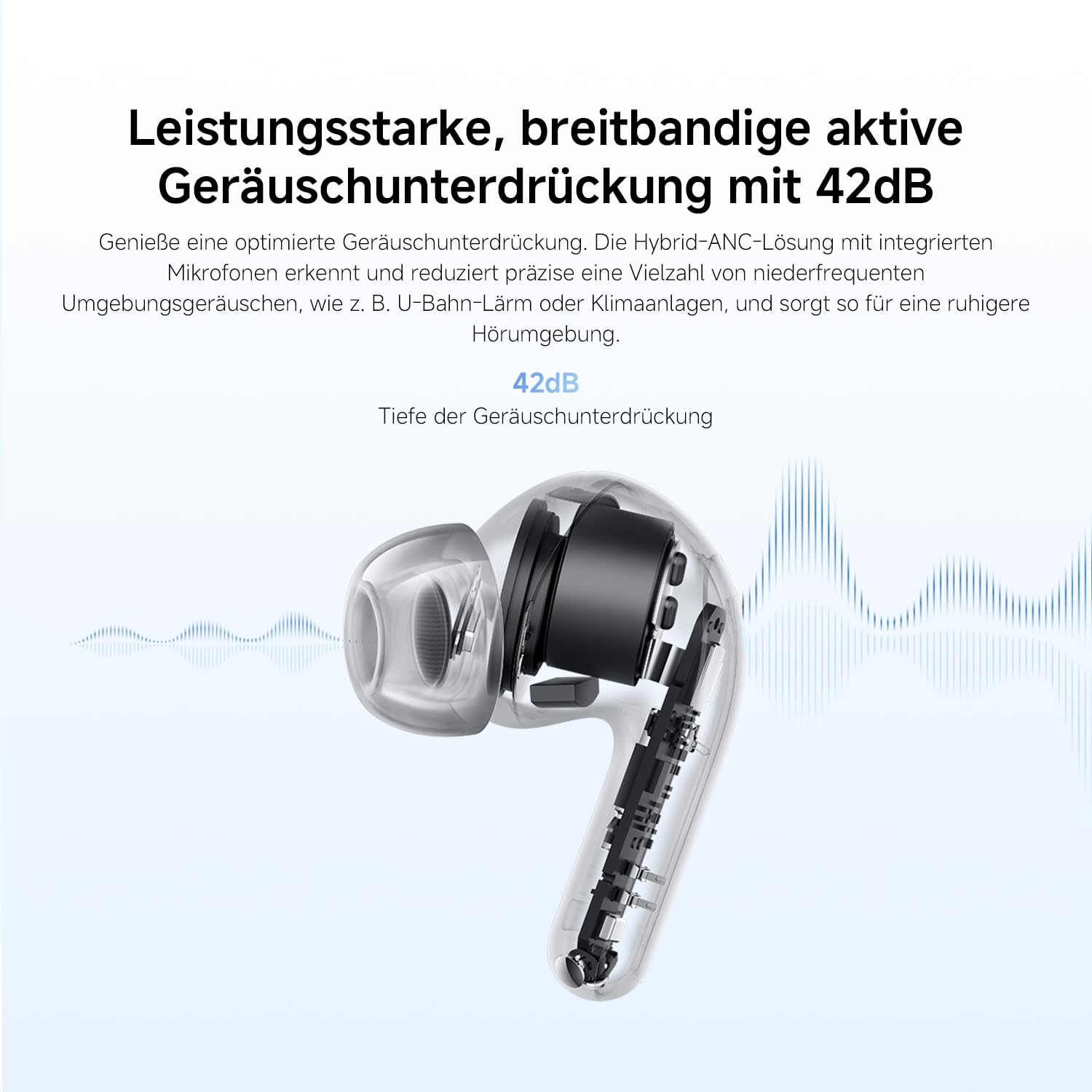
Image: An exploded diagram of the Redmi Buds 8 Lite earbud, highlighting its 12.4mm dynamic driver for detailed audio.
Nlekọta
To ensure the longevity and optimal performance of your Redmi Buds 8 Lite, follow these maintenance guidelines:
- Nhicha: Jiri akwa dị nro, kpọrọ nkụ na-adịghị na-ehicha ntị ntị na chaja mgbe niile. Ejila kemịkalụ siri ike ma ọ bụ ihe abrasive.
- Ndụmọdụ ntị: Wepụ ma hichaa nsọtụ ntị silicone mgbe niile site na iji mmiri na ncha dị nro. Hụ na ha kpọrọ nkụ kpamkpam tupu ị tinyeghachi ha.
- Nguzogide mmiri: The earbuds are IP54 water-resistant, meaning they are protected against splashes and sweat. Do not submerge them in water or expose them to heavy rain. Dry them thoroughly if they get wet.
- Nchekwa: Mgbe ejighị ya, chekwaa ntị ntị na chaja ha iji chebe ha pụọ na uzuzu na mmebi.
Nchọpụta nsogbu
If you encounter any issues with your Redmi Buds 8 Lite, refer to the following common solutions:
- Igwe ntị anaghị ejikọta: Hụ na ekweisi abụọ ahụ dị n'ime akpa chaja, wee mepee mkpuchi ahụ iji malite ọnọdụ njikọta. Lelee ntọala Bluetooth nke ngwaọrụ gị wee gbalịa ijikọghachi.
- Enweghị ụda sitere na otu ntị ntị: Place both earbuds back into the case, close the lid, wait a few seconds, then open it again. This often re-syncs them.
- Nsogbu ịchaji: Verify the charging cable is securely connected to both the case and the power source. Clean the charging contacts on the earbuds and inside the case.
- Ogo ụda adịghị mma: Ensure the ear tips provide a snug fit to your ear canal. Try different sized ear tips for better seal. Check for any debris blocking the earbud speakers.
- Njikwa mmetụ anaghị anabata: Ensure your fingers are clean and dry. A firmware update via the Xiaomi Earbuds app might resolve the issue.
- Tọgharia Factory: If problems persist, perform a factory reset (refer to the Xiaomi Earbuds app or official support for specific instructions).
Nkọwapụta
| Njirimara | Nkọwapụta |
|---|---|
| Ụdị | XIAOMI |
| Aha Nlereanya | redmi buds 8 lite |
| Nọmba nlereanya | BHR08OMGL |
| Agba | Nwa |
| Ntinye ntị | Na Ntị |
| Ụdị Ihe | Na Ntị |
| Mgbochi | 32 ohms |
| Teknụzụ Njikọta | Ikuku |
| Teknụzụ ikuku | Bluetooth |
| Ụdị Bluetooth | 5.4 |
| Oke Bluetooth | 10 mita |
| Ụdị njikwa | Njikwa aka |
| Usoro njikwa | Ngwa |
| Nkezi Ndụ batrị | Awa 38 (ya na igbe nchaji) |
| Oge nchaji batrị | Oge elekere 1 |
| Njikwa mkpọtụ | Hybrid Noise Cancellation (42 dB) |
| Oke ugboro ugboro | 20 Hz - 20,000 Hz |
| Ụdị ọkwọ ụgbọ ala ọdịyo | Onye ọkwọ ụgbọ ala dị ike (12.4mm) |
| Ọkwa Nguzogide mmiri | Mmiri na-eguzogide mmiri (IP54) |
| Ibu Ibu | 39 grams |
Akwụkwọ ikike na nkwado
The Redmi Buds 8 Lite are covered by a Akwụkwọ ikike onye nrụpụta afọ 1 from the date of purchase. This warranty covers defects in materials and workmanship under normal use. It does not cover damage caused by misuse, accidents, unauthorized modifications, or normal wear and tear.
For warranty claims, technical support, or further assistance, please visit the official XIAOMI support websaịtị ma ọ bụ kpọtụrụ ndị ahịa ha ọrụ. Debe ihe akaebe nke ịzụrụ ihe maka nkwado akwụkwọ ikike.
Official XIAOMI Support: https://www.mi.com/global/support