
1. Ngwaahịa gafereview
The darkFlash DB330M MESH is a Micro-ATX PC case designed for high heat dissipation and optimal airflow. It features a full mesh front panel and comes with three pre-installed PWM ARGB fans to ensure efficient cooling and dynamic lighting effects. This case supports various components, offering a user-friendly experience for PC builders.
2. Atụmatụ igodo
- High Airflow Mesh Front Panel: Provides superior intake and lower temperatures compared to panoramic cases.
- Pre-installed 3x DR08 PWM ARGB Fans: Ensures powerful cooling and vibrant RGB effects right out of the box.
- Vertical Airflow Cooling: Two fan positions above the power supply direct airflow to the graphics card for improved cooling.
- Nhazi eche echiche: Includes magnetic dust filters on the top and panel to keep components clean.
- Nwụnye dị mfe: User-friendly design facilitates hassle-free cable management and component access.
3. Nkọwapụta
| Njirimara | Nkọwa |
|---|---|
| Ụdị | ọchịchịrịFlash |
| Aha Nlereanya | DB330 MESH |
| Ndakọrịta Motherboard | Micro ATX |
| Ụdị ikpe | Ụlọ elu Midi |
| Agba | Nwa |
| Ihe onwunwe | Plastic, Tempered Glass |
| Akụkụ ngwaahịa (D x W x H) | 8.58" x 13.11" x 15.75" |
| Ụdị Nkwanye Ike | Ugwu ala |
| Usoro jụrụ oyi | Ikuku, Mmiri |
| Total USB 3.0 Ports | 1 |
| Atụmatụ pụrụ iche | Built-In Fan, Dust Filter, RGB Lighting |
| Internal Bays Quantity | 3 |
| Ogologo ogologo GPU | 305mm |
| Max CPU cooler elu | 180mm |
| Nkwado Radiator | Up to 240mm on top |
4. Ntọala na nwụnye
This section provides a general guide for installing components into your darkFlash DB330M MESH PC case. Always refer to your component manuals for specific installation instructions.
4.1 Na-akwado ikpe ahụ
Before installing components, ensure the case is placed on a stable, flat surface. Remove the side panels and any protective films.

Figure 4.1: The darkFlash DB330M MESH PC Case with side panels and front mesh removed, illustrating the ease of access for component installation.
4.2 Component Compatibility and Placement
- Motherboard: Supports Micro ATX and ITX motherboards. Install the motherboard onto the standoffs provided.
- Kaadị eserese: Maximum length of 305mm. Ensure your GPU fits within this specification.
- Ihe nju oyi CPU: Maximum height of 180mm for air coolers.
- Nnye ike (PSU): Supports standard size PSUs with a maximum length of 180mm, mounted at the bottom.
- Radiator: Up to 240mm AIO liquid cooling systems can be installed on the top panel.
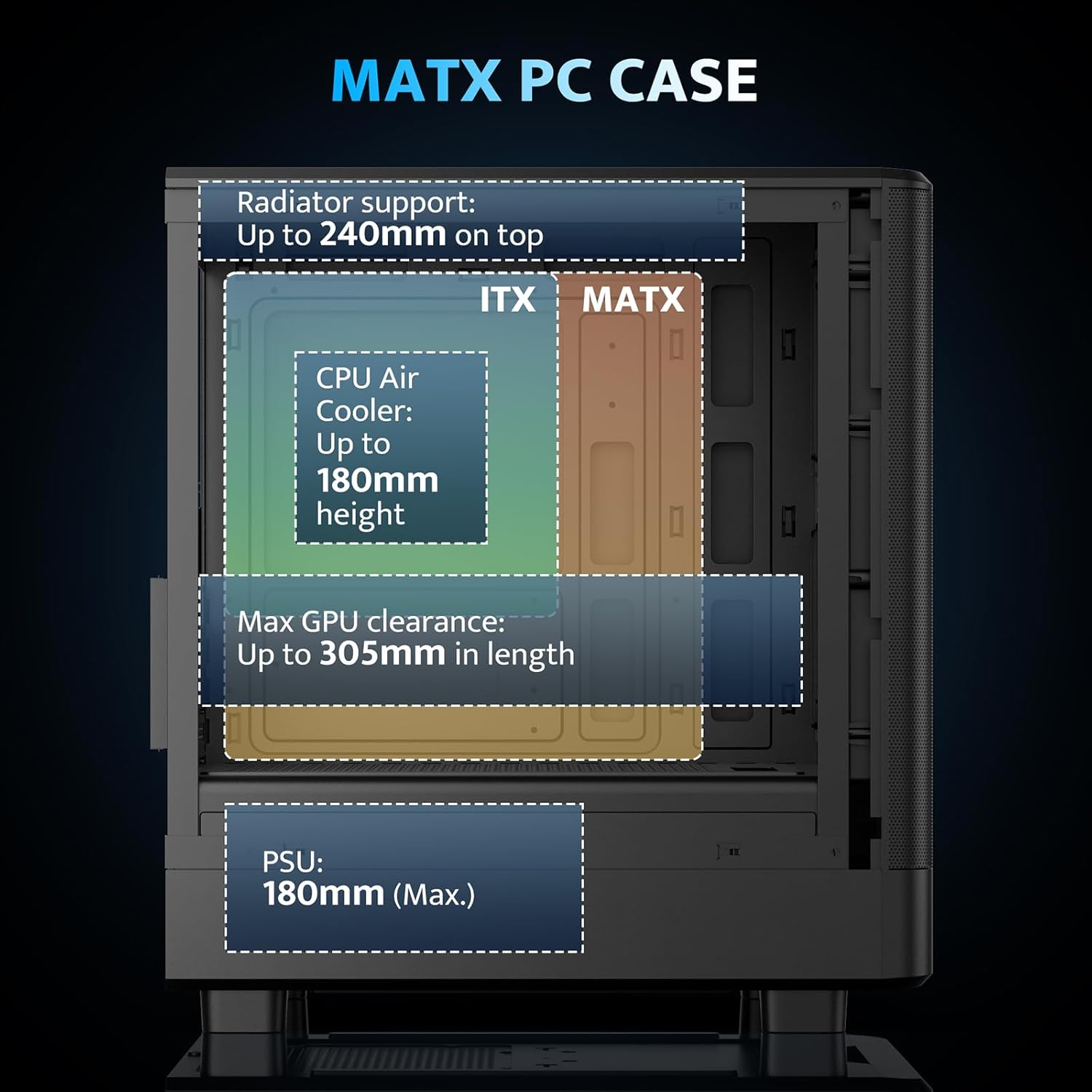
Figure 4.2: Internal layout and maximum dimensions for motherboard (ITX, MATX), CPU air cooler, GPU, and PSU.
4.3 Fan Configuration
The case comes with three pre-installed 120mm PWM ARGB fans. Two are located at the front for intake, and one at the rear for exhaust. Additional fan positions are available at the top (up to 2x 120mm/140mm) and bottom (up to 2x 120mm) for enhanced cooling.

Figure 4.3: Illustration of the pre-installed 120mm PWM ARGB fans and their placement within the case.

Figure 4.4: Optimized airflow channels demonstrating natural vertical air ducts for efficient heat dissipation.
5. Ntuziaka ọrụ
5.1 I/O Panel Functions
Ogwe I/O n'ihu na-enye ohere dị mma maka ọdụ ụgbọ mmiri na njikwa dị mkpa:
- Bọtịnụ ike: Iji gbanye ma ọ bụ gbanyụọ sistemụ ahụ.
- HD Audio Ports: Maka ijikọ ekweisi na igwe okwu.
- ọdụ ụgbọ mmiri USB 2.0: Maka njikọ peripherals.
- USB 3.0 ọdụ ụgbọ mmiri: Maka mbufe data dị elu.
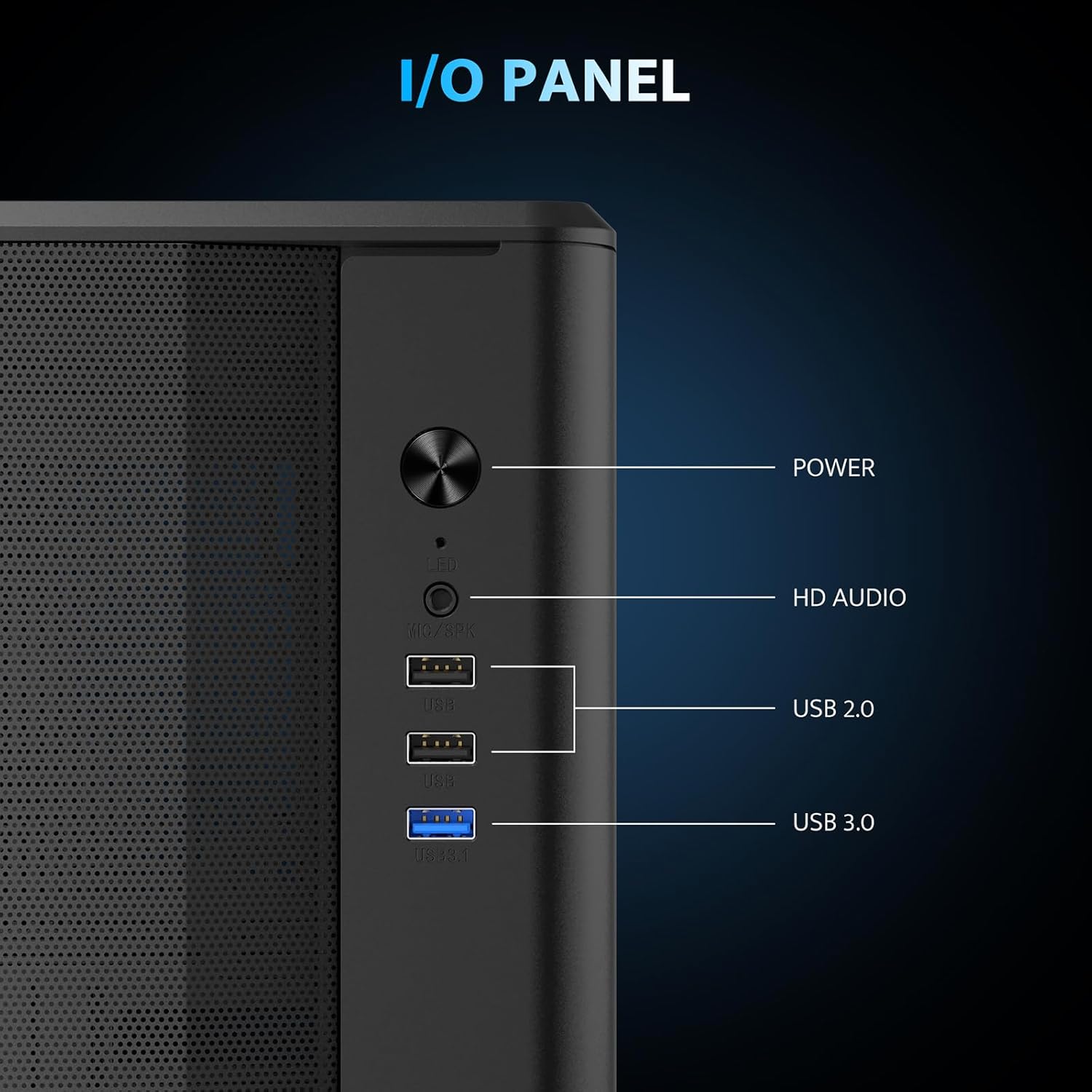
Ọgụgụ 5.1: Zuru ezu view of the I/O panel and its functionalities.
5.2 ARGB njikwa fan
The pre-installed fans are PWM ARGB fans. Their lighting effects can be controlled via your motherboard's ARGB software if your motherboard supports it. Please note that an ARGB Hub Controller is not included with the case.
6. Nlekọta
6.1 Nhicha uzuzu uzuzu
The darkFlash DB330M MESH PC case is equipped with magnetic dust filters on the top and a panel dust filter to prevent dust accumulation. Regularly clean these filters to maintain optimal airflow and cooling performance.
- To clean the top dust filter, gently lift and detach the magnetic filter.
- Use a soft brush or compressed air to remove accumulated dust.
- Reattach the filter once clean.

Figure 6.1: Top panel with magnetic dust filter and large cooling holes for AIO support.

Figure 6.2: High-airflow dustproof mesh front panel, which also acts as a dust filter.
6.2 Nhicha izugbe
Use a soft, dry cloth to wipe down the exterior of the case. Avoid using harsh chemicals or abrasive materials that could damage the finish.
7. Nchọpụta nsogbu
If you encounter issues with your PC build, consider the following general troubleshooting steps:
- Enweghị ike: Hụ na e jikọtara waya ike niile (PSU ruo mgbidi, PSU ruo motherboard, CPU, GPU) nke ọma. Lelee njikọ bọtịnụ ike na motherboard.
- Ndị Fans anaghị agba ọsọ / Enweghị RGB: Verify fan power connections to the motherboard or fan controller. Check ARGB connections for lighting issues. Ensure your motherboard's BIOS/UEFI settings or software are configured correctly for fan control and RGB.
- ekpo oke ọkụ: Confirm all fans are spinning in the correct direction for optimal airflow. Ensure dust filters are clean and not obstructing airflow. Check CPU cooler and GPU cooler installations.
- Ọdụ ụgbọ mmiri USB anaghị arụ ọrụ: Check the USB header connections from the front I/O panel to the motherboard.
For more specific issues, consult the manuals for your individual components (motherboard, GPU, PSU, etc.) or seek assistance from a qualified technician.
8. Akwụkwọ ikike na nkwado
The darkFlash DB330M MESH PC Case comes with a 1-afọ akwụkwọ ikike. For warranty claims or technical support, please contact darkFlash customer service through their official webebe a ma ọ bụ ebe a na-ere ngwaahịa ahụ. Debe ihe akaebe ịzụrụ ihe gị maka nkwenye akwụkwọ ikike.