
Okwu mmalite
The Rapoo M308 is a versatile multi-mode wireless mouse designed for efficiency and comfort. It features an ambidextrous design, allowing comfortable use for both right-handed and left-handed individuals. With its dual connectivity options, Bluetooth 5.0 and 2.4 GHz wireless, you can seamlessly connect to up to three devices and switch between them with ease. The mouse is engineered for long-lasting performance, offering a battery life of up to 12 months.
Ihe ngwugwu
- Rapoo M308 Multi-mode Wireless Mouse
- Ihe nnata USB (echekwara n'ime òké)
- 2 AA batrị
- Ntuziaka mmalite ngwa ngwa (akwụkwọ ntuziaka a)
Ngwaahịa gafereview
Familiarize yourself with the components of your Rapoo M308 mouse.
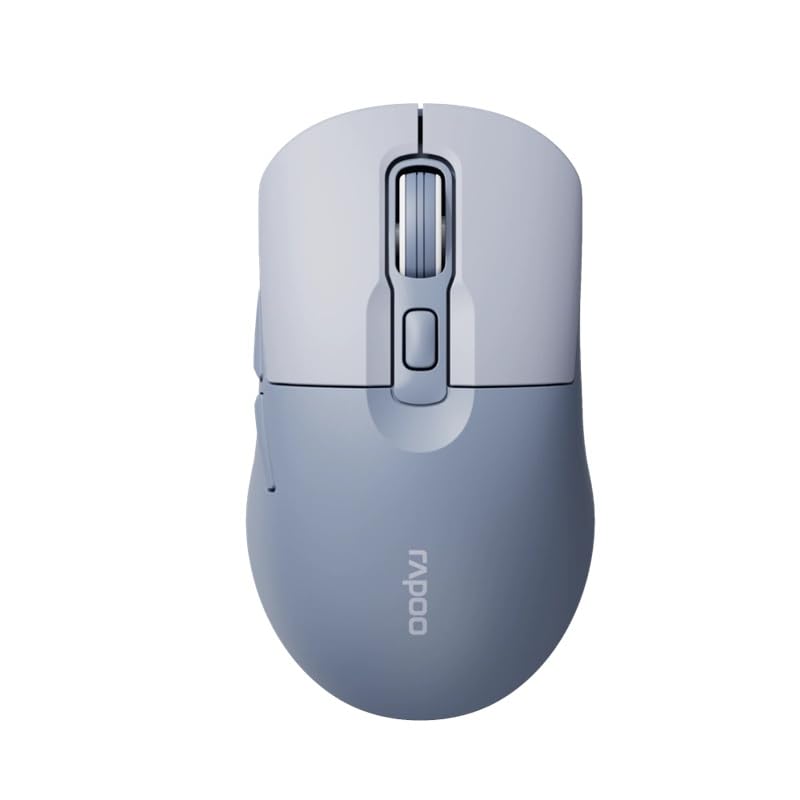
Image: The Rapoo M308 Multi-mode Wireless Mouse in blue, showcasing its ergonomic, ambidextrous design with a scroll wheel and multiple buttons.
- Bọtịnụ aka ekpe: Ọrụ aka ekpe ọkọlọtọ.
- Bọtịnụ aka nri: Ọrụ pịa nri ọkọlọtọ.
- Mpempe akwụkwọ mpịakọta: For scrolling and middle-click function.
- Bọtịnụ DPI: Na-edozi ihe nhụsianya (DPI).
- Mode Switch Button/Indicator: Switches between connected devices (2.4G, Bluetooth 1, Bluetooth 2) and indicates current mode.
- Bọtịnụ akụkụ: Forward/Backward navigation (programmable).
- Akụkụ batrị: Located on the underside, holds 2 AA batteries.
- USB Receiver Slot: Located inside the battery compartment for storage.
Melite
1. Ntinye batrị
- Mepee mkpuchi nke batrị dị n'okpuru òké ahụ.
- Tinye batrị AA abụọ ahụ, hụ na polarity ziri ezi (+/-).
- Mechie mkpuchi oghere batrị.
2. Connecting via 2.4 GHz Wireless
- Remove the USB receiver from its storage slot inside the battery compartment.
- Tinye eriri USB n'ọdụ ụgbọ mmiri dị na kọmputa gị.
- Turn on the mouse. The mouse should automatically connect to your computer. The mode indicator light will show a steady green light for a few seconds.
3. Ijikọ site na Bluetooth
The M308 mouse supports two Bluetooth connections (BT1 and BT2).
- Gbanwuo òké.
- Press the mode switch button to select either Bluetooth 1 (blue light flashes slowly) or Bluetooth 2 (blue light flashes slowly).
- Press and hold the mode switch button for 3 seconds until the blue light starts flashing rapidly. This indicates the mouse is in pairing mode.
- Na kọmputa ma ọ bụ ngwaọrụ gị, gaa na ntọala Bluetooth wee chọọ ngwaọrụ ọhụrụ.
- Select "Rapoo M308" from the list of available devices to pair.
- Once paired, the blue light will become steady for a few seconds and then turn off.
Ntuziaka ọrụ
Ịgbanwe n'etiti ngwaọrụ
The Rapoo M308 allows you to connect to up to three devices (one 2.4G wireless and two Bluetooth devices) and switch between them.
- Briefly press the mode switch button to cycle through the connected devices: 2.4G (green light), Bluetooth 1 (blue light), Bluetooth 2 (blue light).
- The indicator light will briefly illuminate in the corresponding color to confirm the selected mode.
Mmezi DPI
Press the DPI button (usually located behind the scroll wheel) to cycle through different DPI settings. This changes the cursor speed and sensitivity. The indicator light may flash to show the current DPI level (e.g., one flash for low DPI, two for medium, etc.).
Nlekọta
- Nhicha: Jiri akwa dị nro dị nro hichaa òké. Maka unyi isi ike, ntakịrị damp enwere ike iji akwa mee ihe, mana hụ na mmiri adịghị abanye na ngwaọrụ ahụ.
- Ngbanwe batrị: When the mouse performance degrades or the indicator light signals low battery, replace the two AA batteries following the installation steps.
- Nchekwa: When not in use for extended periods, turn off the mouse to conserve battery life. Store the USB receiver inside the mouse to prevent loss.
Nchọpụta nsogbu
- Òké anaghị aza:
- Check if the mouse is turned on.
- Gbaa mbọ hụ na etinyere batrị nke ọma na agwụchabeghị ya. Dochie ma ọ dị mkpa.
- Maka njikọ 2.4G, hụ na e tinyere ihe nnata USB n'ime ọdụ USB na-arụ ọrụ nke ọma. Nwaa ọdụ USB dị iche.
- For Bluetooth connection, ensure the mouse is in the correct Bluetooth mode (BT1 or BT2) and successfully paired with your device. Re-pair if needed.
- Mmegharị cursor adịghị agbanwe agbanwe ma ọ bụ dị nwayọ:
- Hichaa ihe mmetụta anya dị n'okpuru òké ahụ.
- Gbaa mbọ hụ na ị na-eji òké ahụ n'elu ala dabara adaba (anaghị atụgharị, enweghị nghọta).
- Adjust the DPI setting using the DPI button.
- Enweghị ike ịgbanwee n'etiti ngwaọrụ:
- Ensure all devices are properly connected (2.4G receiver plugged in, Bluetooth devices paired).
- Briefly press the mode switch button to cycle through modes. A long press will initiate Bluetooth pairing mode.
Nkọwapụta
| Aha ika | Rapoo |
| Nlereanya | M308 |
| Teknụzụ Njikọta | Bluetooth 5.0, 2.4 GHz Radio Frequency |
| Atụmatụ pụrụ iche | Dị fechaa |
| Nchọpụta ngagharị | Ngwa anya |
| Ọnụọgụ bọtịnụ | 4 |
| Ntuzi aka | Ambidextrous |
| Eji akwadoro | Ụlọ ọrụ |
| Ngwa dakọtara | Kọmputa nkeonwe, Laptọọpụ |
| Ibu Ibu | 50 grams |
| Sistemụ nrụọrụ | Linux, Mac, Windows |
| Ndụ batrị | Ọnwa 12 |
| Ọnụọgụ nke batrị | 2 AA (gụnyere) |
| Isi Iyi Ike | Akwanyere batrị |
| OS kacha nta achọrọ | Mac OS 14 Sonoma, Windows 11 |
| Ihe onwunwe | Plastic |
| Mba onye si | China |
| Ngwa gụnyere | Òké |
Akwụkwọ ikike na nkwado
The Rapoo M308 Multi-mode Wireless Mouse comes with a 2-afọ akwụkwọ ikike site na ụbọchị ịzụrụ. Akwụkwọ ikike a na-ekpuchi ntụpọ nrụpụta na adịghị arụ ọrụ n'okpuru ojiji nkịtị.
For technical support, warranty claims, or further assistance, please refer to the contact information provided on the Rapoo official website or your local distributor's support channels. Please retain your proof of purchase for warranty validation.