
OHAYO X10 Max
OHAYO X10 Max Bluetooth Speaker Instruction Manual
Welcome to your new OHAYO X10 Max Portable Bluetooth Speaker.
1. Ozi nchekwa dị mkpa
- Ewepụla ọkà okwu na oke okpomọkụ ma ọ bụ ìhè anyanwụ kpọmkwem ruo ogologo oge.
- Keep the speaker away from heat sources, sharp objects, and corrosive materials.
- Emela ka ọ gbawaa, rụzie, ma ọ bụ gbanwee okwu ahụ n'onwe gị. Kpọtụrụ ndị ọrụ ruru eru ma ọ bụrụ na ọ dị mkpa.
- Hụ na mkpuchi ọdụ chaja emechiri nke ọma mgbe ị na-eji igwe okwu dị nso na mmiri iji mee ka ọkwa IPX7 ya ghara ịdị mmiri mmiri.
- Jiri naanị eriri nchaji enyere ma ọ bụ eriri USB-C akwadoro maka ịchaji.
2. Ihe ngwugwu
- 1 x OHAYO X10 Max Bluetooth Speaker (White)
- 1 x USB-C Charging Cable (charging plug not contained)
- 1 x 3.5mm AUX USB
- 1 x Akwụkwọ ntuziaka onye ọrụ
- 1 x Lanyard
3. Ngwaahịa gafereview
The OHAYO X10 Max is a versatile portable Bluetooth speaker designed for high-quality audio and durability. It features a powerful 25W sound output with active bass, IPX7 waterproofing, and a long-lasting 24-hour battery. Enjoy dynamic sound with colorful RGB lighting effects, dual pairing for stereo sound, and multiple input modes.
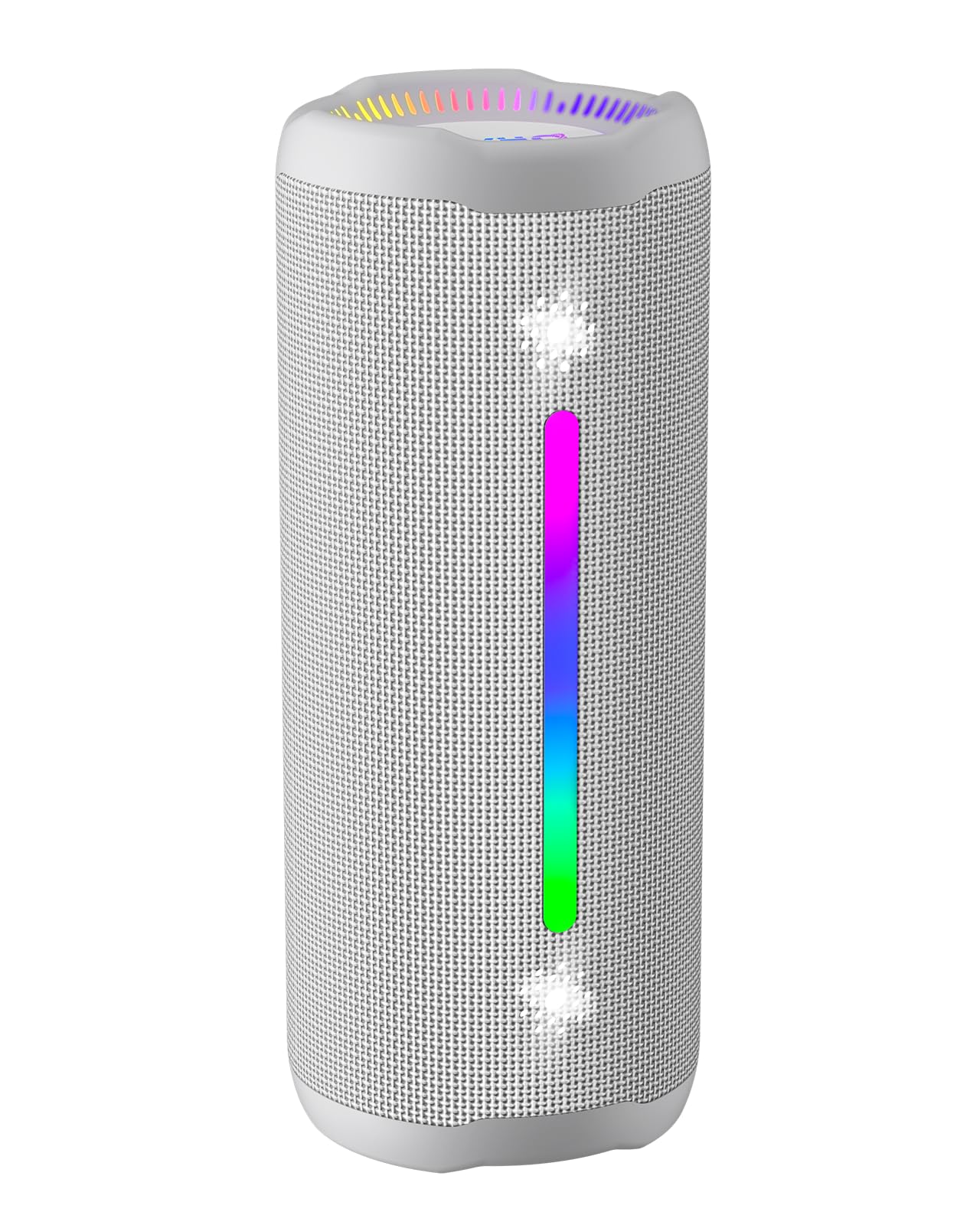
Figure 3.1: OHAYO X10 Max Bluetooth Speaker (White)

Figure 3.2: OHAYO X10 Max Bluetooth Speaker - Fully upgraded from appearance to performance.

Figure 3.3: 25W Deep Bass Sound - Independent channel design for accurate audio performance.

Figure 3.4: 6 Dazzling RGB Light Effects - Syncs with music for an immersive experience.

Figure 3.5: IPX7 Waterproof - Highly sealed design for use in various environments.

Figure 3.6: 24H Ultra-Long Battery Life - 6600mAh battery for extended playback.
4. Njikwa na egosi
The OHAYO X10 Max features intuitive controls for easy operation.

Ọgụgụ 4.1: Ogwe njikwa na ọdụ ụgbọ mmiri
- Bọtịnụ ike: Press and hold to power on/off. Short press to switch between input modes (Bluetooth, AUX, TF Card, USB-Audio).
- Volume Up (>): Obere pịa ka iwelie olu. Pịa ogologo maka egwu ọzọ.
- Volume Down (<): Obere pịa ka ibelata olu. Pịa ogologo maka egwu gara aga.
- Bọtịnụ Bass: Press to activate/deactivate Bass Boost mode.
- Play/Pause/Call Button: Short press to play/pause music. Short press to answer/end calls. Long press to reject calls. Double press to activate voice assistant.
- Ọkụ egosi batrị: Four LED lights indicate battery level.
- RGB Light Strip: Displays various colorful lighting effects.
- Nchaji ọdụ ụgbọ mmiri (USB-C): Maka ịchaji ọkà okwu.
- Ọdụ ụgbọ mmiri AUX: Maka njikọ ọdịyo wired.
- Oghere TF Kaadị: Maka ịkpọ egwu ozugbo site na kaadị MicroSD.
5. Nhazi
5.1 Ịchaji ọkà okwu
Before first use, fully charge the speaker. Connect the provided USB-C charging cable to the speaker's charging port and the other end to a 5V/2A USB power adapter (not included). The battery indicator lights will blink during charging and remain steady when fully charged.
5.2 Gbanyụọ/ gbanyụọ
Press and hold the Power button for approximately 3 seconds to turn the speaker on or off. A voice prompt will confirm the action.
5.3 Njikọ Bluetooth
- Turn on the speaker. It will automatically enter Bluetooth pairing mode, indicated by a blinking blue LED.
- Kwado Bluetooth na ngwaọrụ gị (smartphone, tabletị, wdg).
- Chọọ maka "X10 Max" in your device's Bluetooth list and select it to connect.
- Ozugbo ejikọtara ya, ụda olu ga-akwado ijikọ na-aga nke ọma.
5.4 Ezi ikuku stereo (TWS) ijikọ
To achieve a true wireless stereo experience, you can pair two OHAYO X10 Max speakers together.

Figure 5.1: True Wireless Stereo Pairing
- Ensure both X10 Max speakers are powered on and not connected to any other Bluetooth device.
- On one speaker (this will be the primary speaker), double-press the Power button. It will enter TWS pairing mode.
- The two speakers will automatically connect to each other. A voice prompt will confirm successful TWS pairing.
- Ugbua, jikọọ ngwaọrụ gị na ọkà okwu bụ isi site na Bluetooth dịka akọwara na ngalaba 5.3.
5.5 Connecting via AUX
Use the provided 3.5mm AUX cable to connect the speaker to devices without Bluetooth capability.
Figure 5.2: 4 Input Modes - Including AUX, TF, and USB-Audio.
- Connect one end of the AUX cable to the speaker's AUX-in port.
- Jikọọ nsọtụ nke ọzọ na ihe na-apụta na ngwaọrụ gị.
- The speaker will automatically switch to AUX mode. If not, short press the Power button to cycle through modes until AUX mode is activated.
5.6 Using TF Card
Insert a MicroSD (TF) card with MP3/WAV/FLAC/WMA audio files into the TF card slot. The speaker will automatically switch to TF card mode and begin playback. Short press the Power button to cycle through modes if needed.
5.7 Using USB-Audio
Connect the speaker to a computer using the USB-C cable. The speaker can function as an external audio output device for your computer. Short press the Power button to cycle through modes if needed.
6. Ntuziaka ọrụ
6.1 Ịkpọ egwu
- Gwuo/kwụsịtụ: Short press the Play/Pause/Call button.
- Njikwa olu: Short press the Volume Up (>) or Volume Down (<) buttons.
- Track na-esote: Long press the Volume Up (>) button.
- Gara aga Track: Long press the Volume Down (<) button.
6.2 Bass Boost Function
Press the 'BASS' button to activate or deactivate the enhanced bass mode. This feature provides deeper and richer low frequencies for a more impactful audio experience.
Ụdị ọkụ 6.3 RGB
The speaker features dynamic RGB lighting. The lights will automatically sync with the music beat. To turn the lights on/off, refer to the specific control instructions in your quick start guide or experiment with the mode button if available.
6.4 Oku na-enweghị aka
When connected via Bluetooth to your smartphone, the speaker can be used for hands-free calls.

Foto 6.1: Njirimara oku na-enweghị aka
- Azịza/Kwụsị Oku: Short press the Play/Pause/Call button.
- Jụ oku: Long press the Play/Pause/Call button.
- Mee ka onye enyemaka olu rụọ ọrụ: Double press the Play/Pause/Call button.
7. Nlekọta
- Nhicha: Jiri nwayọ hichaa ọkà okwu, damp akwa . Ejila kemịkalụ siri ike ma ọ bụ ihe mkpocha abrasive.
- Nchekwa: Chekwaa ọkà okwu n'ebe dị jụụ, kpọrọ nkụ pụọ na ìhè anyanwụ kpọmkwem na oke okpomọkụ mgbe ọ naghị eji ya ogologo oge.
- Nlekọta batrị: To prolong battery life, charge the speaker at least once every three months if not used regularly.
8. Nchọpụta nsogbu
| Nsogbu | Ihe nwere ike ime | Ngwọta |
|---|---|---|
| Ọkà okwu anaghị agba ọkụ. | Batrị dị ala. | Chajie ọkà okwu zuru ezu. |
| Enweghị ike ijikọ site na Bluetooth. | Ọkà okwu adịghị n'ụdị njikọta; Bluetooth agbanyụrụ ngwaọrụ; ọ dị oke anya site na ngwaọrụ. | Ensure speaker is in pairing mode (blinking blue LED). Turn on device Bluetooth. Move device closer to speaker (within 10 meters). |
| Enweghị ụda ma ọ bụ obere olu. | Olu dị ala nke ukwuu na igwe okwu ma ọ bụ ngwaọrụ; ọnọdụ ntinye ezighi ezi. | Increase volume on both speaker and device. Check if the correct input mode (Bluetooth, AUX, TF) is selected. |
| Njikọ TWS dara. | Speakers too far apart; one speaker already connected to another device. | Ensure speakers are close to each other. Disconnect any existing Bluetooth connections before TWS pairing. |
| Mgbagwoju anya ụda. | Volume too high; low battery. | Reduce volume. Charge the speaker. |
9. Nkọwapụta
| Njirimara | Nkọwapụta |
|---|---|
| Aha Nlereanya | x10 Max |
| Ụdị Bluetooth | 5.3 |
| Teknụzụ nzikọrịta ozi ikuku | Bluetooth |
| Ike Nwepu kacha elu | 35 Watts (25W effective) |
| Ike batrị | 6600 mAh |
| Oge egwuregwu | Up to 24 hours (varies with volume and light use) |
| Ọkwa Nguzogide mmiri | IPX7 (ihe mgbochi mmiri) |
| Ntinye Voltage | 5 volts (DC) |
| Nzaghachi ugboro ugboro | 20 kHz |
| Signgbaàmà-na-Noise ruru | 80 dB |
| Ụdị ọkwọ ụgbọ ala ọdịyo | Ọkwọ ụgbọala dị ike |
| Dayameta Woofer | 75 millimeters |
| Dayameta Tweeter | 26 millimeters |
| Akụkụ ngwaahịa | 2.95"D x 2.95"W x 7.28"H |
| Ibu Ibu | 450 grams (15.9 ounces) |
| Ihe onwunwe | Acrylonitrile Butadiene Styrene (ABS), Aluminom |
| Usoro njikwa | Pịa bọtịnụ |
| Atụmatụ pụrụ iche | Bass Boost, AUX, Hi-Res Audio, 24-Hour Playtime, IPX7 Waterproof, TF Card Port, Dual Passive Radiators, Hands-free, True Wireless Stereo Pairing, Shockproof |
10. Akwụkwọ ikike na nkwado
The OHAYO X10 Max Bluetooth Speaker comes with an extended warranty. For specific warranty details and to register your product, please refer to the information provided in your quick start guide or contact OHAYO customer support.
For technical support or customer service inquiries, please contact OHAYO Direct. Contact information may be found in your product packaging or on the official OHAYO websaịtị.
11. Official Product Video
Video 11.1: Official OHAYO Portable Bluetooth Speaker overview by OHAYO Direct. This video highlights key features and design elements of the speaker.
Ask a question about this manual
Ask about setup, troubleshooting, compatibility, parts, safety, or missing instructions. Manuals+ will review the question and use this page’s manual context to help answer it.