Okwu mmalite
Daalụ maka ịzụrụasing the MD-1308BT Portable 3-Band Radio. This device offers a classic listening experience combined with modern connectivity options, including FM/AM/SW radio, Bluetooth, USB, AUX, and TF card playback. This manual provides detailed instructions for safe and efficient use of your radio.
Ozi nchekwa
- Etinyela igwe ahụ n'ime mmiri ozuzo, mmiri ozuzo, ma ọ bụ oke okpomọkụ.
- Avoid disassembling the radio. Refer all servicing to qualified personnel.
- Debe ngwaọrụ ahụ pụọ na oghere magnetik siri ike.
- Use only the specified charging cable and power adapter (DC 5V) to prevent damage.
- Tụfuo batrị n'ụzọ ziri ezi dịka iwu obodo siri dị.
Ihe ngwugwu
Biko lelee igbe maka ihe ndị a:
- MD-1308BT Portable Radio
- Igwe nchaji USB
- Antenna mpụga
- Akwụkwọ ntuziaka onye nwe (akwụkwọ a)

Image: The MD-1308BT radio shown alongside its retail packaging and included USB charging cable.
Ngwaahịa gafereview
Familiarize yourself with the main components and controls of your MD-1308BT radio:
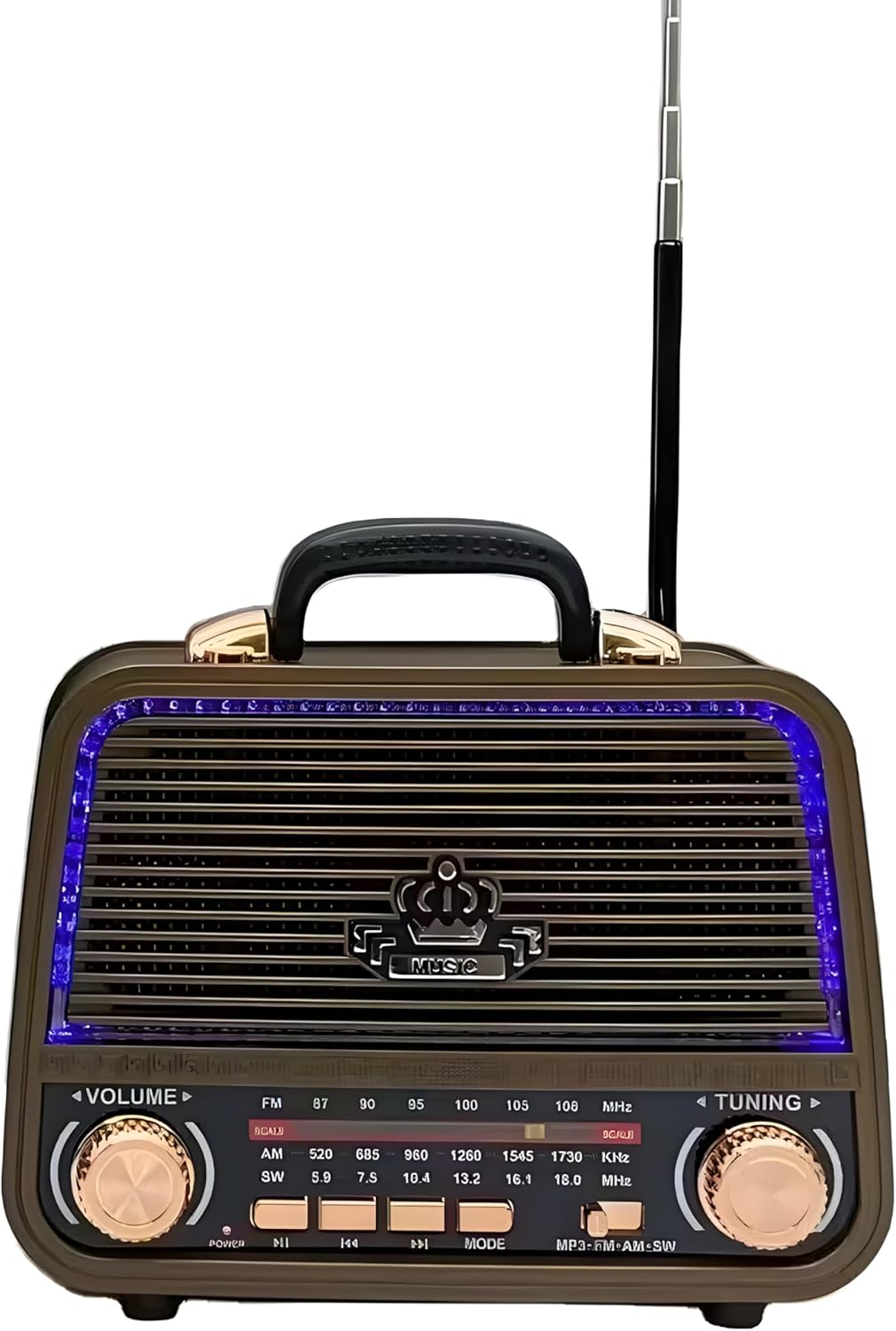
Foto: N'ihu view of the MD-1308BT radio, showing the speaker grille, LED lighting, volume and tuning knobs, and playback control buttons.
Njikwa akụkụ ihu:
- Mpịakọta olu: Rotate to adjust the sound level.
- Ndozi Ngwa: Rotate to tune into radio stations.
- Ihe Nhọrọ Band: Gbanwee n'etiti FM, AM, na SW bands.
- Bọtịnụ Ike/Ịkpọ egwu/Ịkwụsịtụ: Press to power on/off or play/pause media.
- Bọtịnụ egwu gara aga/ na-esote: Navigate tracks in USB/TF/Bluetooth modes.
- Bọtịnụ MODE: Switch between Radio, Bluetooth, USB, AUX, and TF card modes.
- Ikanam Display: Shows frequency or mode information.

Foto: N'azụ view of the MD-1308BT radio, illustrating the battery compartment, USB port, TF card slot, and AUX input.
Rear Panel / Side Ports:
- Ọdụ ụgbọ mmiri USB: Maka ịkpọghachi draịva flash USB.
- Oghere TF Kaadị: Maka ịkpọghachi kaadị TF (MicroSD).
- Ntinye AUX: Maka ijikọ ngwaọrụ ọdịyo mpụga site na eriri 3.5mm.
- Ntinye DC 5V: For charging the internal battery or direct power.
- Akụkụ batrị: Na-edobe batrị enwere ike ịchaji.
- Antenna mpụga: Antenna a na-agbatị agbatị maka nnabata redio ka mma.
Melite
1. Ịchaji batrị
- Connect the supplied USB charging cable to the DC 5V input port on the radio.
- Jikọọ nsọtụ nke ọzọ nke eriri USB na ihe nkwụnye ọkụ USB dakọtara (anaghị etinye ya) ma ọ bụ ọdụ ụgbọ USB kọmputa.
- The LED indicator will show charging status (specific indicator behavior may vary by unit).
- A full charge typically takes several hours. Disconnect the charger once fully charged.
2. Inserting Storage Media (USB/TF Card)
- For USB playback, insert a USB flash drive into the USB port.
- For TF card playback, insert a TF (MicroSD) card into the TF card slot with the contacts facing down.
3. Extending the Antenna
For optimal radio reception, fully extend the external telescopic antenna.
Ntuziaka ọrụ
1. Gbanyụọ / gbanyụọ
Pịa ma jide Ike/Gwuo/kwụsịtụ bọtịnụ ka ịgbanwuo ma ọ bụ gbanyụọ redio.
2. Na-agbanwe olu
Tugharia ihe Mpịakọta bọtịnụ iji bulie ma ọ bụ belata ọkwa ụda.
3. Radio Mode (FM/AM/SW)
- Pịa MODE button until the radio mode (FM, AM, or SW) is selected.
- Jiri ihe Ndị na-ahọrọ Band switch to choose between FM, AM, or SW bands.
- Tugharia ihe NKWUKWU knob to scan for and select radio stations. The frequency will be displayed on the LED screen.
- Extend the external antenna for better reception, especially for FM and SW bands.
4. Ọnọdụ Bluetooth
- Pịa MODE button until "BT" or "Bluetooth" appears on the display. The radio will enter pairing mode.
- Na ekwentị mkpanaaka gị, gbanye Bluetooth wee chọọ ngwaọrụ dị.
- Select "MD-1308BT" from the list to pair. A confirmation sound may be heard.
- Once paired, you can play audio from your device through the radio. Use the radio's playback control buttons (Play/Pause, Previous/Next) or your device's controls.

Image: The MD-1308BT radio wirelessly connected to a smartphone, demonstrating Bluetooth audio playback.
5. Ịkpọghachi kaadị USB/TF
- Fanye draịvụ USB ma ọ bụ kaadị TF nke nwere ọdịyo MP3 files n'ime iche ọdụ ụgbọ mmiri.
- Pịa MODE button to switch to USB or TF card mode. Playback should start automatically.
- Jiri ihe Gwuo/kwụsịtụ na Nke gara aga/ na-esote bọtịnụ iji jikwaa ịkpọghachi.
6. Ụdị ntinye AUX
- Connect an external audio device (e.g., smartphone, MP3 player) to the AUX input port using a 3.5mm audio cable (not included).
- Pịa MODE bọtịnụ ruo mgbe "AUX" pụtara na ngosipụta ahụ.
- Jikwaa ọkpụkpọ egwu na olu site na ngwaọrụ mpụga ejikọtara gị.
Nlekọta
- Clean the radio's exterior with a soft, dry cloth. Do not use abrasive cleaners or solvents.
- Mgbe a naghị eji redio ahụ ruo ogologo oge, debe ya n'ebe dị jụụ ma kpọọ nkụ.
- To prolong battery life, avoid fully discharging the battery frequently and recharge it regularly.
Nchọpụta nsogbu
| Nsogbu | Ihe nwere ike ime | Ngwọta |
|---|---|---|
| Redio anaghị agbanye ọkụ. | Batrị dị ala ma ọ bụ mebie ya. | Chajie redio ahụ site na iji eriri USB. |
| Enweghị ụda ma ọ bụ obere olu. | Volume is too low; incorrect mode selected. | Increase volume using the VOLUME knob; ensure correct mode (Radio, BT, USB, AUX) is selected. |
| Nnabata redio adịghị mma. | A naghị agbatị antenna; akara adịghị ike. | Fully extend the external antenna; try repositioning the radio. |
| Bluetooth anaghị ejikọ. | Radio not in pairing mode; device too far. | Ensure radio is in BT mode; keep devices within 10 meters; unpair and re-pair if necessary. |
| Kaadị USB/TF adịghị egwu. | ezighi ezi file usoro; e tinyeghị kaadị/draịva nke ọma. | Gbaa mbọ hụ files are MP3 format; reinsert the USB drive/TF card; try a different drive/card. |
Nkọwapụta
- Ụdị: MD-1308BT
- Akara: N'ozuzu
- Nkà na ụzụ Tuner: FM/AM/SW (3-Band)
- Njikọta: Bluetooth, USB, AUX, TF Card
- Isi mmalite ike: Rechargeable Battery / DC 5V
- Atụmatụ pụrụ iche: Volume Control, LED Display, Rechargeable, Built-in Speaker, External Antenna
- Agba: Agba aja aja
- Ihe ngwungwu ihe ruru: 10 x 10 x 8.5 cm
Akwụkwọ ikike na nkwado
This product comes with a standard manufacturer's warranty. Please refer to the retailer's policy for specific warranty terms and conditions. For technical support or service inquiries, please contact your point of purchase.


