
Okwu mmalite
The Warmco D4 Pro is an 8-inch ultra-thin rechargeable portable fan designed for versatile use in various environments, including camping, outdoor activities, indoor spaces, and travel. It features a high-capacity 20000mAh battery, fast charging capabilities, an integrated LED light, and a programmable timer. This manual provides essential information for the safe and efficient operation and maintenance of your fan.
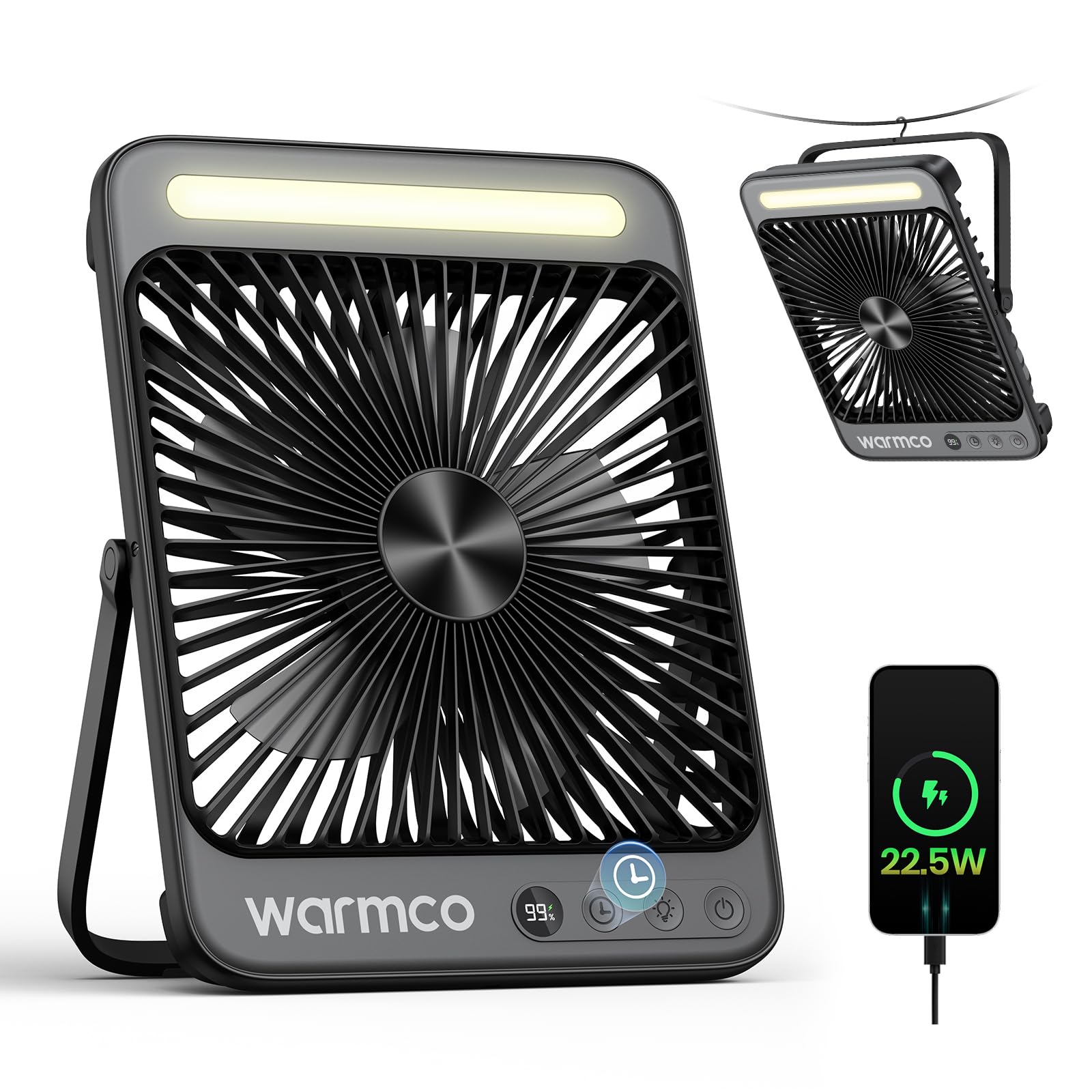
Figure 1: Warmco D4 Pro Portable Fan Overview
Njirimara ngwaahịa
- Batrị nwere ike dị elu: Equipped with a 20000mAh battery, providing 15 to 48 hours of runtime depending on speed settings.
- Nchaji ngwa ngwa: Supports 18W input for a full charge in approximately 7 hours and 22.5W output for efficient device charging.
- Nhazi kọmpat & nke enwere ike ibugharị: Measures 1.77 x 8.27 x 10.71 inches and weighs 1.7 lbs, featuring a foldable stand and a built-in hanging hook for easy placement and transport.
- Ọkụ ọkụ agbakwunyere: A built-in LED light with 3 adjustable brightness levels, suitable for illumination in various settings.
- Ọrụ ntanye-ajụjụ ọnụ: Utilizes an efficient brushless motor to keep noise levels below 45dB, ensuring a peaceful environment.
- Ikuku ikuku nwere ike imeghari: Offers 4 fan speed settings to customize cooling intensity.
- Atụmatụ amamihe: An LED display shows current battery level and selected fan speed.
- Ọrụ ngụ oge: Programmable timer settings for 1, 2, 4, or 8 hours.
- Nlekọta dị mfe: Features a detachable front cover for convenient cleaning of the fan blades.

Figure 2: Extended Battery Life and Capacity

Figure 3: Ultra-thin and Portable Design
Melite
- Unboxing: Carefully remove the fan and all included accessories (USB-C cable, instruction manual) from the packaging.
- Nchaji mbụ: Before first use, fully charge the fan. Connect the provided USB-C cable to the fan's input port and to an 18W (or higher) power adapter (not included). The LED display will show the charging progress. A full charge takes approximately 7 hours.
- Nkwanye:
- Eji Desktop: Extend the foldable stand at the back of the fan to position it on a flat surface.
- Eji nkwudo: Utilize the built-in metal hook at the top of the fan to suspend it in tents, on branches, or other suitable locations.
Vidiyo 1: Nkọwa zuru ezuview of the Warmco D4 Pro fan's features and setup.
Ntuziaka ọrụ
- Gbanyụọ/ Gbanyụọ: Press the power button (usually marked with a power symbol) once to turn the fan on. Press and hold the power button to turn it off.
- Gbanwee ọsọ onye ofufe: While the fan is on, press the fan speed button (often marked with fan blades or 'F') repeatedly to cycle through the 4 available speed settings. The LED display will indicate the current speed.
- Igwe ọkụ ọkụ njikwa: Press the light button (often marked with a light bulb symbol) repeatedly to cycle through the 3 brightness levels of the integrated LED light. Press again to turn the light off.
- Nịm Oge: Press the timer button (often marked with a clock symbol) repeatedly to select a runtime of 1, 2, 4, or 8 hours. The fan will automatically turn off after the selected time.
- Jiri dị ka Power Bank: Connect your external device (e.g., smartphone) to the fan's 22.5W output USB port using an appropriate charging cable. The fan will begin charging your device.

Figure 4: Quiet Performance and Timer Function

Figure 5: Power Bank Functionality
Video 2: Demonstration of the fan's portability and features for travel.
Nlekọta
Nhicha mgbe niile na-eme ka ọ dị mma ma na-agbatị ndụ onye ofufe gị.
- Nhicha Agụba Fan: The front cover of the fan is detachable for easy cleaning. Unscrew the screws on both sides of the fan counter-clockwise to remove the cover. Gently wipe the fan blades with a soft, dry cloth. Do not use abrasive cleaners or immerse the fan in water.
- Nchacha mpụta: Jiri ihe dị nro hichaa mpụta nke fan ahụ, damp akwa .
- Nchekwa: When not in use for extended periods, ensure the fan is clean and fully charged. Store it in a cool, dry place.

Figure 6: Detachable Front Panel for Easy Cleaning
Nchọpụta nsogbu
- Onye ofufe anaghị agbanwu: Ensure the battery is sufficiently charged. Connect the fan to a power source using the USB-C cable and allow it to charge for at least 30 minutes before attempting to power on again.
- Ikuku ikuku adịghị ike: Check the selected fan speed setting and increase it if necessary. Ensure the fan blades are clean and free from obstructions.
- Igwe ọkụ LED anaghị arụ ọrụ: Verify the fan has adequate battery power. Press the light button to cycle through the brightness settings.
- Device Not Charging (Power Bank Function): Ensure the fan has sufficient battery charge. Check that the charging cable is securely connected to both the fan's output port and your device.
Nkọwapụta
| Njirimara | Nkọwapụta |
|---|---|
| Ụdị | Warmco |
| Aha Nlereanya | D4 Pro |
| Akụkụ (D x W x H) | 1.77" x 8.27" x 10.71" |
| Ibu Ibu | 1.76 pound (gram 800) |
| Isi Iyi Ike | Akwanyere batrị |
| Ike batrị | 20000mAh (2 Nonstandard Battery batteries included) |
| Ike ntinye | 18W (Charging time ~7 hours) |
| Ike mmepụta | 22.5W (for charging devices) |
| Ọsọ ndị fan | 4 ọkwa |
| Ọkwa mkpọtụ | 45 decibel |
| Ọkụ ọkụ LED | Integrated, 3 levels |
| Ngụ oge | 1, 2, 4 ma ọ bụ 8 awa |
| Ngwa gụnyere | D4 Pro Portable Fan, Instruction Manual, USB C Cable |
Akwụkwọ ikike na nkwado
The Warmco D4 Pro Portable Fan comes with a Nkwa nnọchi anya afọ 3. For any product inquiries, technical support, or warranty claims, please refer to the contact information provided in your product packaging or visit the official Warmco websaịtị.

Figure 7: 3-Year Replacement Promise