
Okwu mmalite
Daalụ maka ịzụrụasing the Anker Soundcore P31i True Wireless Earbuds. This manual provides detailed instructions on how to set up, operate, and maintain your earbuds to ensure optimal performance and longevity. Please read this manual carefully before use and retain it for future reference.
Kedu ihe gụnyere
Your Soundcore P31i package includes the following items:
- Soundcore P31i Earbuds (Left and Right)
- Nchaji case
- Ear Tips (XS, S, M, L - M size pre-installed)
- USB-C ka eriri USB-A
- Ntuziaka mmalite ngwa ngwa
- Akwụkwọ ntuziaka nchekwa
Ngwaahịa gafereview
The Soundcore P31i earbuds are designed for comfort and high-quality audio. Each earbud features a touch control area and an indicator light. The charging case protects the earbuds and provides additional battery life.
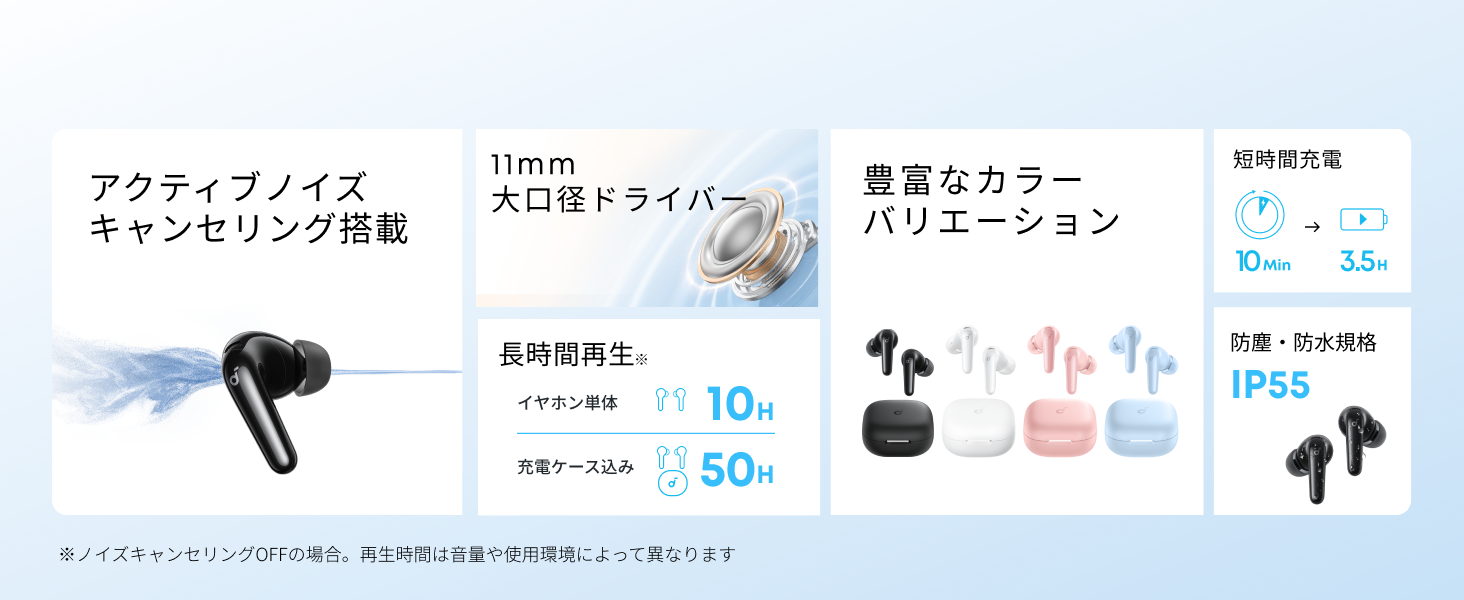
Diagram showing the Soundcore P31i earbuds and charging case with key components labeled.
Akpa ntị: Each earbud is equipped with an 11mm dynamic driver for powerful bass and clear sound. They feature active noise cancellation and AI noise reduction for calls. The ergonomic design ensures a secure and comfortable fit.
Nchaji akpa: The compact charging case not only stores and protects your earbuds but also recharges them on the go. It has a USB-C charging port and a strap hole for portability.
Na-akwụ ụgwọ ihe ntị na akpa gị
Tupu i jiri ya nke mbụ, chajie ma ekweisi na ihe mkpuchi chaja ahụ nke ọma.
- Ịchaji ekwe ntị: Place the earbuds into the charging case. The indicator lights on the earbuds will show charging status.
- Ịchaji ikpe ahụ: Connect the charging case to a power source using the provided USB-C to USB-A cable. A full charge for the case and earbuds takes approximately 3 hours.
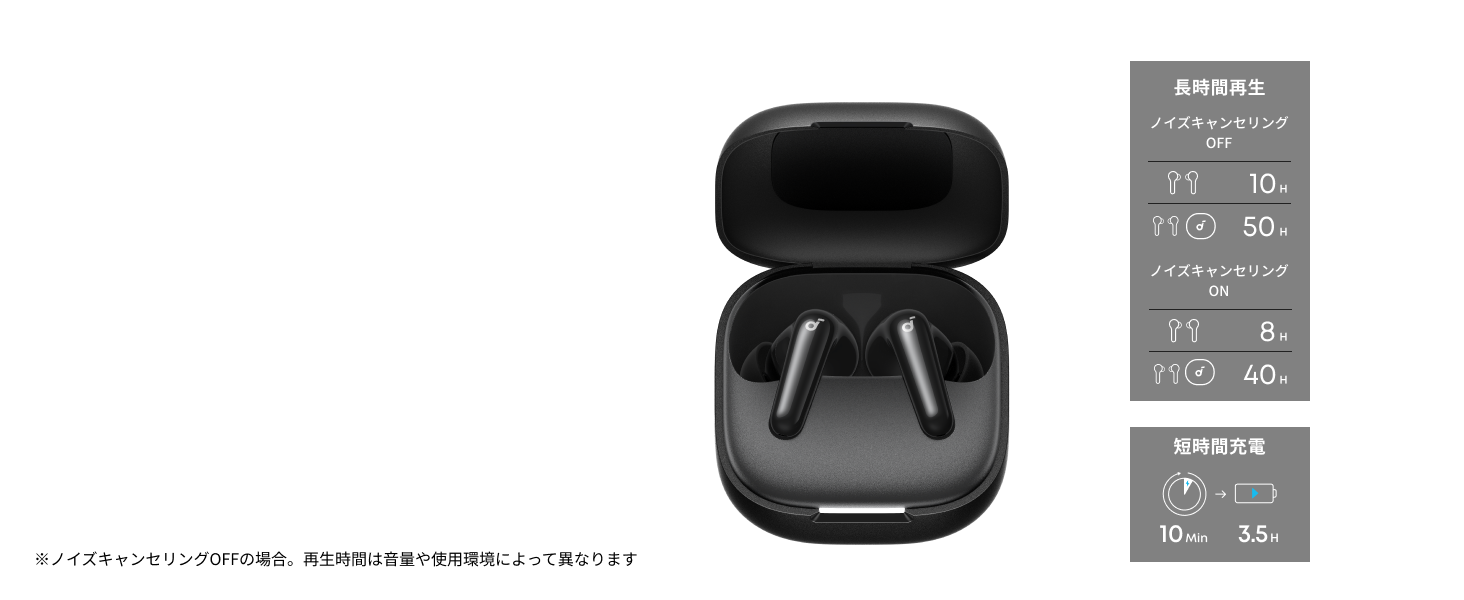
Diagram illustrating charging times and playback duration for Soundcore P31i earbuds.
Ndụ batrị:
- Up to 10 hours of playback on a single charge (earbuds only).
- Ruo awa iri anọ na ise nke egwuregwu zuru oke na akpa chaja.
- A quick 10-minute charge provides up to 3.5 hours of listening time.
Note: Playback time varies depending on volume level and audio content.
Yiri ekwe ntị gị
For optimal sound quality and comfort, it is important to wear your earbuds correctly.
- Họrọ ndụmọdụ ntị ziri ezi: Select the ear tips that provide the best seal and comfort for your ears. Experiment with different sizes (XS, S, M, L) to find the perfect fit.
- Tinye ihe ntị ntị: Jiri nwayọ tinye ntị ntị gị n'ime ọwara ntị gị.
- Twist to Secure: Twist the earbuds slightly until they fit snugly and securely in your ears.

Image showing a person wearing the Soundcore P31i earbuds correctly.
Njikọ Bluetooth
Follow these steps to pair your Soundcore P31i earbuds with your device:
- Njikọ oge mbụ:
- Open the charging case. The earbuds will automatically enter Bluetooth pairing mode. The indicator lights on the earbuds will flash white.
- Na ngwaọrụ gị (ama, mbadamba, wdg), gaa na ntọala Bluetooth.
- Select "Soundcore P31i" from the list of available devices.
- Once connected, the indicator lights on the earbuds will turn solid white for 1 second and then turn off.
- Ijikọ na ngwaọrụ ọzọ:
- Place the earbuds in the charging case and leave the lid open.
- Press and hold the button on the charging case for 3 seconds until the earbud indicator lights flash white rapidly.
- Repeat steps 2 and 3 from "First-Time Pairing" on your new device.
Njikwa
The Soundcore P31i earbuds feature touch controls for managing playback, calls, and other functions. Specific control configurations can often be customized via the Soundcore app.
General Touch Controls (Default):
- Gwuo/kwụsịtụ: Kpatụ otu ntị na ntị ntị.
- Track na-esote: Kpatụ ntị ntị aka nri ugboro abụọ.
- Gara aga Track: Kpatụ ntị ntị aka ekpe ugboro abụọ.
- Azịza/Kwụsị Oku: Kpatụ otu ntị na ntị ntị.
- Jụ oku: Pịa ma jide otu ntị ntị maka sekọnd 2.
- Mee ka onye enyemaka olu rụọ ọrụ: Triple-tap either earbud (may vary).
- Gbanwee ANC/Ụdị Nghọta: Press and hold the right earbud for 2 seconds (may vary).
For detailed and customizable controls, please refer to the Soundcore app or the included Quick Start Guide.
Ịkagbu mkpọtụ mkpọtụ (ANC)
The Soundcore P31i earbuds feature Active Noise Cancelling technology to minimize ambient noise, allowing for an immersive listening experience.

Illustration demonstrating the active noise cancelling feature of the Soundcore P31i earbuds.
ANC detects and reduces various types of noise, such as engine hum on trains or buses, and chatter in cafes. This allows you to enjoy your music or podcasts with greater clarity and fewer distractions.
To switch between ANC, Normal, and Transparency modes, use the touch controls on the earbuds or adjust settings within the Soundcore app.
Ogo ụda
The Soundcore P31i earbuds are engineered to deliver a rich audio experience.

Diagram illustrating the 11mm dynamic driver responsible for the audio output.
- Ndị ọkwọ ụgbọ ala dị ike 11mm: Equipped with large 11mm drivers, these earbuds produce a wide frequency range and detailed sound.
- BassUp™ Technology: Anker's proprietary BassUp™ technology enhances low frequencies, delivering powerful and impactful bass.
You can further customize the sound profile using the equalizer settings within the Soundcore app.
Ogo oku
The Soundcore P31i earbuds ensure clear voice calls and web conferences.

Illustration depicting AI noise reduction technology for clear voice calls.
Mbelata mkpọtụ AI: Integrated AI noise reduction technology effectively filters out background noise, ensuring your voice is transmitted clearly to the person on the other end of the call, even in noisy environments.
Njikọ ọtụtụ ebe
The Soundcore P31i supports multi-point connection, allowing you to connect to two Bluetooth devices simultaneously.

Illustration showing the Soundcore P31i connected to multiple devices simultaneously.
This feature enables seamless switching between devices. For example, you can listen to music on your laptop and instantly switch to answer a call on your phone without manually re-pairing.
To enable multi-point connection, ensure both devices are paired with your earbuds. The earbuds will automatically connect to the last two paired devices when powered on.
Ngwa Soundcore
Download the Soundcore app to enhance your experience with the P31i earbuds. The app offers various features and customization options.

Screenshots of the Soundcore app interface, highlighting customization features.
App Features include:
- Njikwa enwere ike ịhazi: Personalize touch controls for playback, calls, and voice assistant.
- Ntọala nha nha: Gbanwee pro audiofiles to your preference or choose from preset EQs.
- ANC/Transparency Mode Switching: Easily toggle between noise cancelling and transparency modes.
- Mmelite femụwe: Mee ka ntị ntị gị dị ọhụrụ site na iji atụmatụ na mmezi kachasị ọhụrụ.
- AI Translation Function: (Available from Spring 2026, requires Soundcore app ver 4.0.0 or higher).
The Soundcore app is available for download on both iOS and Android devices.
Ngwaahịa gafereview Vidiyo
Ihe ngosi vidiyo ngwaahịa gọọmentịasing the key features and design of the Soundcore P31i True Wireless Earbuds, including active noise cancellation, powerful bass, long battery life, and multi-point connectivity.
Nlekọta na nlekọta
Proper maintenance ensures the longevity and performance of your Soundcore P31i earbuds.
- Nhicha: Jiri akwa dị nro, kpọrọ nkụ na-adịghị na-ehicha ntị ntị na chaja mgbe niile. Ejila kemịkalụ siri ike ma ọ bụ ihe abrasive.
- Ndụmọdụ ntị: Remove the ear tips and clean them with water and mild soap if necessary. Ensure they are completely dry before reattaching.
- Kọntaktị na-akwụ ụgwọ: Debe kọntaktị chajị dị na ntị ekwe ntị na igbe ahụ ka ọ dị ọcha ma kpọọ nkụ iji hụ na chajị ya nke ọma.
- Nchekwa: Mgbe ejighị ya, chekwaa ntị ntị na chaja ha iji chebe ha pụọ na uzuzu na mmebi.
- Nguzogide mmiri: The earbuds are rated IP55 for dust and water resistance. This means they can withstand sweat and light rain, but are not designed for submersion in water. Ensure the earbuds are dry before placing them back in the charging case.

Image showing Soundcore P31i earbuds with water droplets, highlighting their IP55 water resistance.
Nchọpụta nsogbu
If you encounter any issues with your Soundcore P31i earbuds, refer to the following common solutions:
- Igwe ntị anaghị ejikọta:
- Gbaa mbọ hụ na ejirila ekwe ntị abụọ a chaja nke ọma.
- Place earbuds in the case, close the lid, then open it again to re-enter pairing mode.
- Forget "Soundcore P31i" from your device's Bluetooth list and try pairing again.
- Reset the earbuds (refer to the Quick Start Guide for specific reset instructions).
- Only One Earbud Playing Audio:
- Place both earbuds back into the charging case and close the lid for 5 seconds, then open it again.
- Ensure both earbuds have sufficient battery.
- Tọgharịa ntị ntị.
- Ogo ụda adịghị mma:
- Hụ na nsọtụ ntị gị nwere ezigbo akara n'ime ọwara ntị gị. Nwaa nha dị iche iche.
- Hichaa irighiri ihe ọ bụla sitere na nozzles ntị.
- Gaa nso na ngwaọrụ ejikọrọ ka ịzenarị nnyonye anya.
- Okwu ịchaji:
- Lelee eriri nchaji na nkwụnye maka mmebi.
- Ensure the charging contacts on the earbuds and case are clean.
- Gbalịa eriri chaja dị iche ma ọ bụ isi iyi ike.
Nkọwapụta
| Njirimara | Nkọwa |
|---|---|
| Ụdị | Soundcore |
| Aha Nlereanya | P31i |
| Nọmba nlereanya | D1202 |
| Agba | Black (This specific variant) |
| Ụdị Ihe | N'ime ntị |
| Teknụzụ Njikọta | Ikuku (Bluetooth 6.1) |
| Njikwa mkpọtụ | Nkagbu mkpọtụ nọ n'ọrụ |
| Nha ọkwọ ụgbọ ala | 11mm Ndị ọkwọ ụgbọ ala dị ike |
| Oge Mkpọghachi (Earbuds) | Ruo awa iri abụọ |
| Oge Mkpọghachi (na Ikpe) | Ruo awa iri abụọ |
| Nchaji ngwa ngwa | Akwụ ụgwọ nkeji 10 maka elekere iri nkwughachi |
| Charging Time (Full) | Ihe dị ka awa 3 |
| Mmiri Nguzogide | IP55 |
| Njikọ ọtụtụ ebe | Akwadoro |
| UPC | 194644251543 |
| Mba onye si | China |
Akwụkwọ ikike na nkwado ndị ahịa
Soundcore provides a comprehensive warranty for your P31i earbuds.

Image detailing the warranty period and extension for Soundcore P31i.
- Akwụkwọ ikike ọkọlọtọ: An 18-month warranty is provided for products purchased from authorized retailer AnkerDirect.
- Akwụkwọ ikike agbatịkwuru: Anker members can extend their warranty up to a maximum of 24 months.
- Ihe ndetu dị mkpa: Purchases from unauthorized sellers may not be covered under warranty.
For product inquiries, delivery questions, or technical support, please contact Soundcore customer support. Contact details can typically be found on the official Soundcore websaịtị ma ọ bụ na ntuziaka mmalite ngwa ngwa gị.
Ozi nchekwa
Biko gụọ ma soro ntuziaka nchekwa ndị a iji gbochie mmebi ngwaọrụ gị ma ọ bụ imerụ onwe gị ahụ:
- Do not disassemble or modify the earbuds or charging case.
- Debe ngwaọrụ ahụ ka ọ ghara ịdị oke okpomọkụ, ìhè anyanwụ kpọmkwem, na ọkụ mepere emepe.
- Avoid exposing the device to excessive moisture or liquids, beyond its IP55 rating.
- Do not use the device at high volume levels for extended periods to prevent hearing damage.
- Debe ebe ụmụaka na anụ ụlọ na-apụghị iru.
- Tụfuo ngwaahịa ahụ nke ọma dịka iwu mpaghara siri dị.