
1. Ozi nchekwa dị mkpa
Please read all instructions carefully before using this monitor. Keep this manual for future reference.
- Isi mmalite ike: Jiri naanị eriri ọkụ eletrik na ihe nkwụnye ọkụ enyere na ihe nlele ahụ. Hụ na ebe a na-etinye ọkụ eletrik ahụ adabere nke ọma.
- Igwe ikuku: Ekpuchila oghere ikuku. Hapụ oghere zuru oke gburugburu ihe nlele ahụ ka ikuku na-efegharị nke ọma.
- Mmiri: Do not expose the monitor to rain, moisture, or high humidity. Avoid placing liquids near or on the monitor.
- Nhicha: Kwụpụ eriri ọkụ eletrik tupu ị sachaa ya. Jiri ákwà dị nro ma kpọọ nkụ. Ejila ihe nhicha mmiri ma ọ bụ ihe nhicha aerosol.
- Nkwanye: Place the monitor on a stable, flat surface. Avoid direct sunlight or heat sources.
- Ije ozi: Anwala ịnye ngwaahịa a n'onwe gị. Tụtụ aka n'aka ndị ọrụ ruru eru.
2. Ihe ngwugwu
Hụ na ihe niile dị na ngwugwu ahụ tupu ịmalite nhazi ahụ.
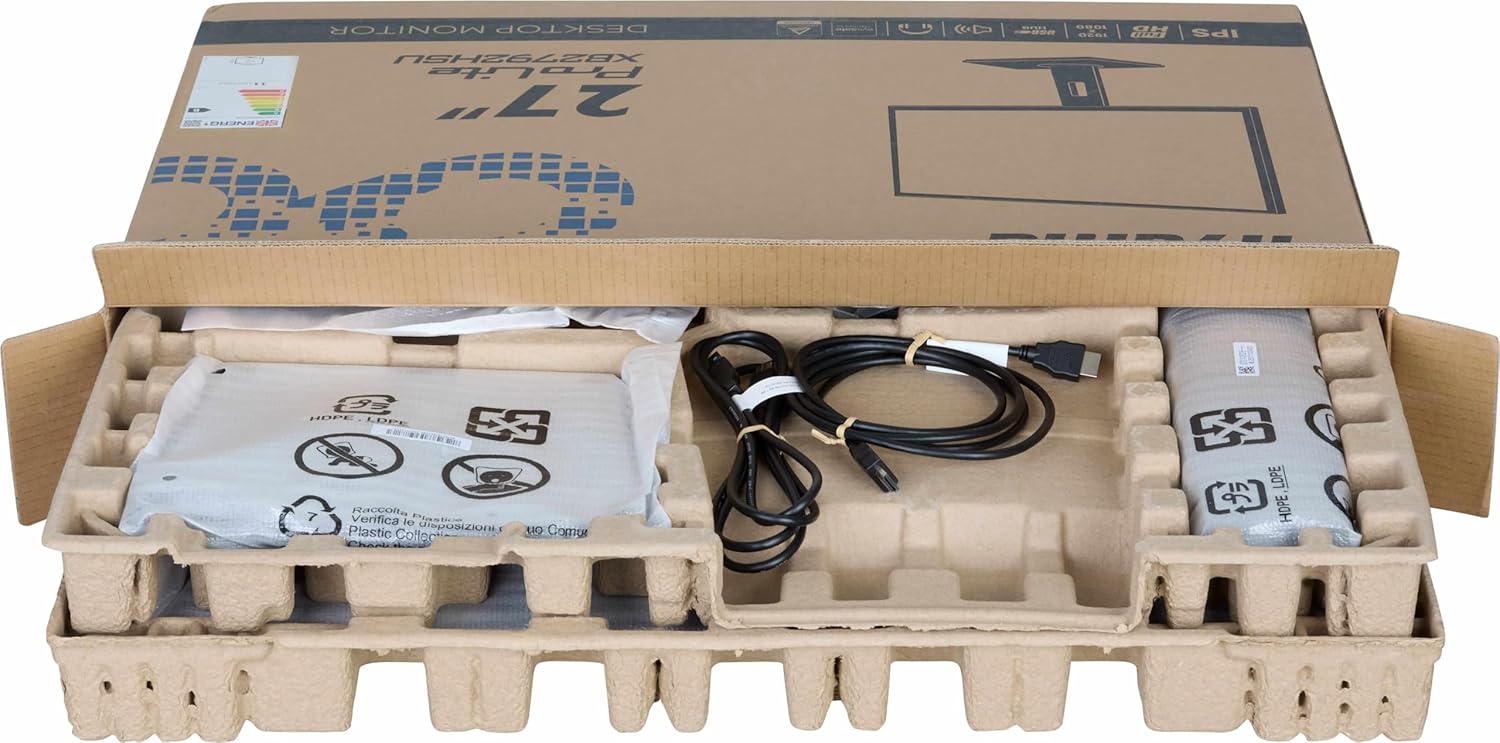
Foto: The iiyama ProLite XB2792QSU-B1 monitor and its accessories, including cables and stand components, neatly packed in the retail box.
- iiyama ProLite XB2792QSU-B1 Monitor
- Nyochaa Stand (Base and Olu)
- Igwe ọkụ ọkụ
- HDMI USB
- USB Cable (for USB hub functionality)
- Quick Start Guide / Safety Guide

Foto: A nso-elu view of the power cable, HDMI cable, and USB cable included with the monitor.
3. Nhazi ntuziaka
3.1 Ịchịkọta Stand
- Carefully remove the monitor from its packaging, keeping it protected on a soft surface (e.g., foam packaging).
- Attach the stand neck to the back of the monitor. Ensure it clicks securely into place or is fastened with screws if provided.
- Attach the stand base to the stand neck. Tighten the thumb screw or screws from the bottom of the base to secure it.

Foto: The rear of the iiyama ProLite XB2792QSU-B1 monitor, showing the stand securely attached to the monitor panel.
3.2 Njikọ eriri
Hụ na monitor na kọmputa gị agbanyụrụla tupu ha emee njikọ ọ bụla.
- Njikọ ike: Jikọọ eriri ọkụ eletrik ahụ na ntinye ike nke ihe nlele ahụ wee jikọọ ya na oghere ọkụ eletrik nke ala.
- Njikọ vidiyo: Connect one end of the HDMI or DisplayPort cable to the corresponding port on your computer's graphics card and the other end to the HDMI or DisplayPort input on the monitor.
- Njikọ USB Hub (Nhọrọ): Connect the supplied USB cable from your computer's USB port to the upstream USB port on the monitor to enable the monitor's built-in USB 3.2 hub.
- Njikọ ọdịyo (Nhọrọ): If you wish to use external speakers or headphones connected to the monitor, connect an audio cable from your computer's audio output to the monitor's audio input, or connect headphones directly to the monitor's audio output jack.

Foto: A zuru ezu view of the monitor's connectivity panel, showing the power input, HDMI ports, DisplayPort, USB 3.2 ports, and audio jack.
3.3 Ike mbido
- Gbanyụọ kọmputa gị.
- Press the power button on the monitor. The power indicator light should illuminate.
- The monitor should automatically detect the input signal. If not, you may need to manually select the input source using the On-Screen Display (OSD) menu.
4. Na-arụ ọrụ nlekota oru
4.1 Ngosipụta Ngosipụta (OSD) NchNhr
The OSD menu allows you to adjust various monitor settings. The control buttons are typically located on the bottom or rear of the monitor.

Foto: N'ihu view of the iiyama ProLite XB2792QSU-B1 monitor, displaying its slim bezel design and the location of the control buttons (usually on the bottom right bezel or rear).
- Pịa bọtịnụ Menu ka imepe OSD.
- Jiri bọtịnụ nsoroụzọ (nke na-abụkarị akụ) gaa n'ihu na nhọrọ menu.
- Press the Select/OK button to confirm a selection or enter a sub-menu.
- Pịa bọtịnụ Ọpụpụ/Alaghachi iji laghachi na menu gara aga ma ọ bụ pụọ na OSD.
4.2 Common OSD Settings
- Foto: Adjust Brightness, Contrast, Sharpness, Gamma, OverDrive.
- Agba: Adjust Color Temperature, RGB levels, or select preset color modes.
- Họrọ ntinye: Jiri aka gbanwee n'etiti ntinye HDMI na DisplayPort.
- Audio: Adjust volume for the built-in speakers or headphone output.
- Ntọala OSD: Adjust OSD language, position, and timeout.
- Ozi: Display current resolution, refresh rate, and model information.
4.3 Mgbanwe Ergonomic
Ihe nguzo ihuenyo na-enye ohere maka mgbanwe dị iche iche iji mee ka ọrụ gị ka mma. viewna -akasi obi.

Foto: A side profile of the iiyama ProLite XB2792QSU-B1 monitor, illustrating its adjustable stand that allows for height, tilt, and swivel movements.
- Ndozi elu: Jiri nwayọ pịa ma ọ bụ dọpụta panel monitor elu ma ọ bụ ala iji gbanwee ogologo ya.
- Ndozi Tilt: Hold the top and bottom edges of the monitor panel and gently tilt it forwards or backwards.
- Ndozi Swivel: Rotate the monitor panel left or right on its stand base.
- Pivot Function: The monitor can be rotated 90 degrees to a portrait orientation. Ensure the monitor is at its maximum height and tilted back slightly before pivoting to avoid hitting the desk.
5. Nlekọta
5.1 Na-ehicha ihe nleba anya
- Wepụ ihe nleba anya mgbe niile na oghere ọkụ tupu ihicha ya.
- Jiri akwa dị nro na-enweghị ntụpọ dampejiri mmiri mee ya ma ọ bụ ihe dị nro, ihe nhicha ihuenyo anaghị emebi emebi.
- Afesakwala ihe nhicha ozugbo na ihuenyo. Buru ụzọ tinye ya na akwa ahụ.
- Avoid using benzene, thinner, ammonia-based cleaners, or abrasive materials, as these can damage the screen or casing.
5.2 Nchekwa
If storing the monitor for an extended period, disconnect all cables and pack it in its original packaging if possible. Store in a cool, dry place away from direct sunlight and extreme temperatures.
6. Nchọpụta nsogbu
Ọ bụrụ na ị hụ nsogbu na ihe nlele gị, lee nsogbu na ngwọta ndị a na-ahụkarị.
| Nsogbu | Ngwọta enwere ike |
|---|---|
| Enweghị ike / gbanyụọ ọkụ LED |
|
| No signal / "No Signal" message |
|
| Onyonyo na-agbagọ ma ọ bụ agbagọ |
|
| Agba ezighi ezi |
|
| Ọdụ ụgbọ mmiri USB anaghị arụ ọrụ |
|
If the problem persists after trying these solutions, please contact iiyama customer support.
7. Nka na ụzụ nkọwa
Below are the key technical specifications for the iiyama ProLite XB2792QSU-B1 monitor.
| Njirimara | Nkọwapụta |
|---|---|
| Nọmba nlereanya | XB2792QSU-B1 |
| Nha ihuenyo | 27 sentimita asatọ |
| Ụdị panel | IPS |
| Mkpebi | 2560 x 1440 (QHD) |
| Ọnụego ume ọhụrụ | 120Hz |
| Akụkụ akụkụ | 16:9 |
| Oge nzaghachi | 5 nkeji |
| Icha ọkụ | 350 cd/m² |
| Viewna n'akuku | 178° (H) / 178° (V) |
| Njikọta ngwaike | 1x HDMI, 1x DisplayPort, 2x USB 3.2 Gen 1, 3.5mm Audio Out |
| Akụkụ ihe (D x W x H) | 8.25"D x 24.25"W x 15.59"H |
| Ibu Ibu | 5.5 kilogram |
| Agba | Nwa |
8. Akwụkwọ ikike na nkwado
This iiyama monitor comes with a manufacturer's warranty. For detailed warranty terms and conditions, please refer to the warranty card included in your product packaging or visit the official iiyama websaịtị.
For technical support, troubleshooting assistance, or service inquiries, please contact iiyama customer support through their official channels. Have your monitor's model number (XB2792QSU-B1) and serial number ready when contacting support.
Official iiyama Websaịtị: www.iiyama.com