
1. Okwu mmalite
The darkFlash AIR NOVA is a full tower E-ATX PC case designed for optimal airflow and component compatibility. This manual provides essential information for the proper installation, operation, and maintenance of your new PC case. Please read through these instructions carefully before beginning assembly.

Foto 1: Mpụga view of the darkFlash AIR NOVA PC Case.
2. Atụmatụ igodo
- Full-Mesh Airflow System: Six-sided ventilation design maximizes airflow and cooling performance, ensuring stable system temperatures.
- E-ATX Compatibility & Dual Radiator Support: Supports E-ATX, ATX, and M-ATX motherboards. Accommodates two 360 mm radiators (top and front) for cooling flexibility.
- Vertical GPU Installation Ready: Includes a dedicated vertical GPU mount and reinforced metal support bracket to prevent GPU sag.
- Back-Connect Motherboard Compatible: Supports next-generation back-connect motherboards for a cleaner cable layout and improved airflow.
- Flexible Storage & Spacious PSU Chamber: Features an adjustable HDD cage for flexible positioning and larger PSU installation. The extended PSU chamber provides ample room for cables.
- Fans etinyegoro mbụ: Comes with 7 x PWM ARGB fans included for immediate cooling performance.

Figure 2: Optimized airflow system for efficient cooling.
3. Ntọala na nwụnye
3.1 Akụkụ karịrịview
Familiarize yourself with the case layout and included components before starting assembly.

Figure 3: Internal layout with pre-installed fans and key dimensions.
3.2 Nwụnye motherboard
The AIR NOVA supports E-ATX, ATX, and M-ATX motherboards. Install standoffs as required for your motherboard size. For back-connect motherboards, ensure proper alignment with the case's cutouts.

Figure 4: Back-connect motherboard support areas for a cleaner build.
3.3 Power Supply and Storage Installation
Install your ATX power supply in the dedicated chamber. The adjustable HDD cage allows for flexible positioning to accommodate larger PSUs or optimize cable routing.

Figure 5: Power supply and adjustable hard disk bay positions.
3.4 Ntinye kaadị eserese
The case supports both standard horizontal and vertical GPU mounting. A dedicated vertical GPU mount and reinforced metal support bracket are included to prevent sag.
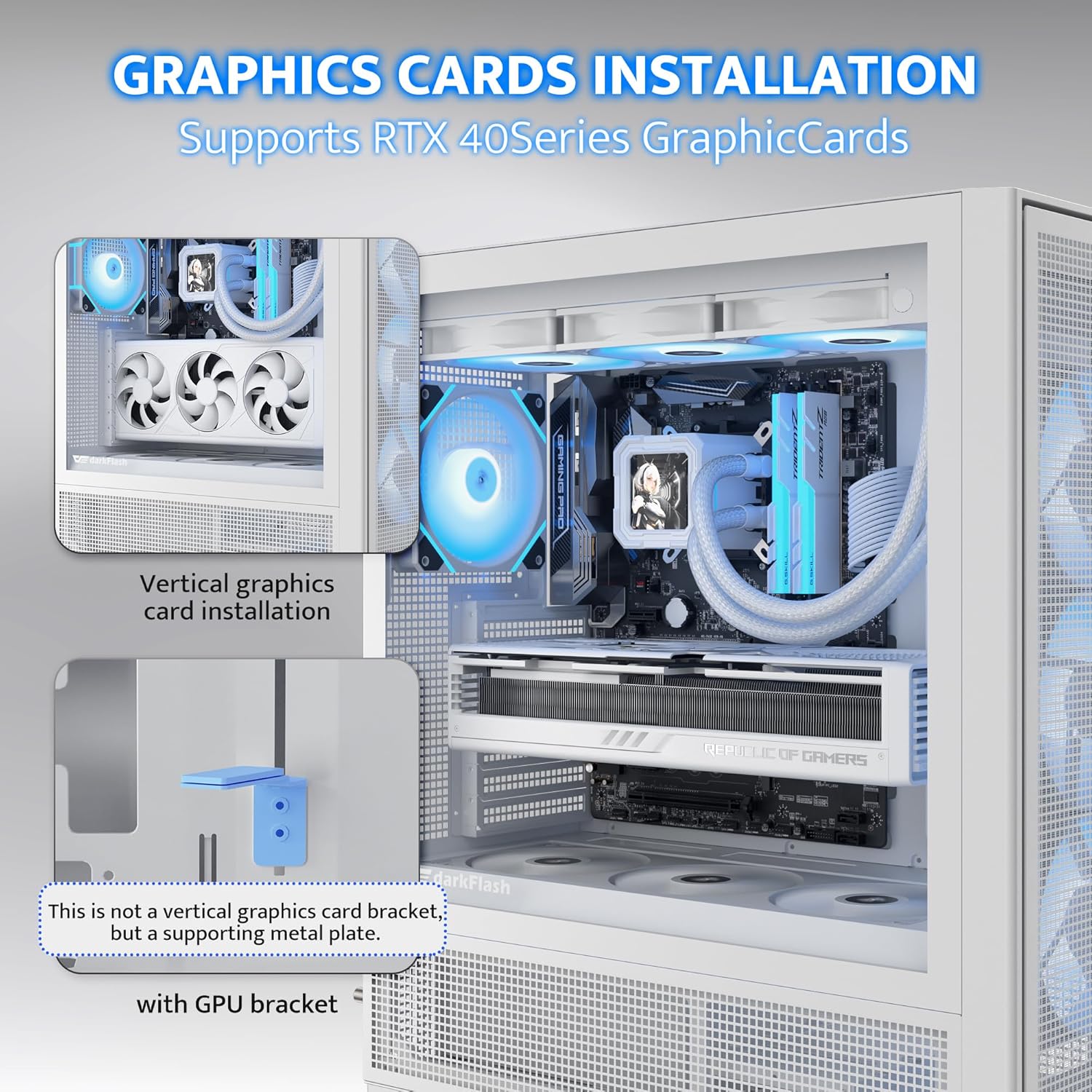
Figure 6: Vertical graphics card installation with supporting bracket.
3.5 Nwụnye sistemu jụrụ oyi
The case supports up to two 360mm radiators (top and front). Ensure proper fan orientation for optimal airflow (intake/exhaust). The case comes with 7 pre-installed PWM ARGB fans.
3.6 Njikwa eriri
Utilize the movable and raised cable cover panel, offset fan mounting, and lowered bottom fan design for efficient cable routing. Velcro straps and cable clips are provided to secure cables.

Figure 7: Cable management features including clips and straps.
3.7 Mgbakọ gafereview Vidiyo
Watch this video for a visual guide on the darkFlash AIR NOVA PC case features and assembly process.
Video 1: darkFlash AIR NOVA Full Tower E-ATX PC Case Overview.
4. Ọrụ
4.1 Na-agbanye ike
Once all components are securely installed and connected, press the power button located on the top I/O panel to start your system.
4.2 Panel I/O n'ihu
Ogwe I/O n'ihu na-enye ohere dị mma maka ọdụ ụgbọ mmiri dị mkpa:
- bọtịnụ ike
- Tọgharịa bọtịnụ
- ọdụ ụgbọ mmiri USB 3.0 (x2)
- HD Audio Jacks
- Type-C Port (1280MB/s)

Figure 8: Front I/O panel layout and connections.
4.3 Njikwa fan
The pre-installed PWM ARGB fans can be controlled via your motherboard's fan headers and compatible software for speed and lighting adjustments. Refer to your motherboard manual for specific instructions.
5. Nlekọta
5.1 Nhicha uzuzu uzuzu
Regularly clean the dust filters to maintain optimal airflow and prevent dust buildup inside the case. The AIR NOVA features easily removable dust filters on multiple sides.
- Ihe nzacha kachasị elu: Gently slide out the magnetic filter from the top panel.
- Nzacha ihu: The front panel grid has a non-removable metal dust mesh. Use compressed air or a soft brush to clean.
- Nzacha Ala: Slide out the filter located at the bottom of the case.
- Side Filters: The side panels feature mesh designs. Clean with compressed air or a soft brush.

Figure 9: Locations of various dust filters for easy maintenance.
5.2 Nhicha mputa
Jiri nwayọ hichaa elu mpụta, damp ákwà. Zere ihe nhicha ma ọ bụ ihe mgbaze nke nwere ike imebi ihe ahụ.
6. Nchọpụta nsogbu
6.1 Sistemụ anaghị arụ ọrụ
- Gbaa mbọ hụ na a na-ejikọta ọkụ eletrik nke ọma na mgbidi mgbidi na ọkụ ọkụ na PSU nọ n'ọnọdụ 'ON'.
- Verify all power cables (24-pin ATX, CPU, GPU) are securely connected to the motherboard and components.
- Check that the front panel power switch cable is correctly connected to the motherboard's front panel header.
6.2 Fans Not Spinning or RGB Not Working
- Confirm that all fan power cables are connected to appropriate fan headers on the motherboard or a fan controller.
- Ensure ARGB cables are correctly connected to 3-pin 5V ARGB headers on the motherboard (do not connect to 4-pin 12V RGB headers).
- Check motherboard BIOS/UEFI settings or fan control software for fan speed and RGB settings.
6.3 Component Fit Issues
- Motherboard: While the case supports E-ATX, ATX, and M-ATX, always double-check your specific motherboard dimensions against the case's internal clearances.
- GPU: The case supports GPUs up to 395mm. Ensure your graphics card length is within this limit.
- Ugwu GPU kwụ ọtọ: The case is designed to support vertical GPU installation and includes a bracket. If you encounter issues, ensure the bracket is correctly installed and compatible with your GPU.
- Ndị redio: The case supports two 360mm radiators. Verify radiator thickness and fan configurations do not interfere with other components.
7. Nkọwapụta
| Njirimara | Nkọwa |
|---|---|
| Ụdị | ọchịchịrịFlash |
| Aha Nlereanya | AIR NOVA |
| Ụdị ikpe | Ulo elu |
| Ndakọrịta Motherboard | E-ATX, ATX, M-ATX |
| Ihe onwunwe | Metal, Plastic, Tempered Glass |
| Agba | Nwa |
| Ibu Ibu | 11.6 pound |
| Akụkụ ngwaahịa (LxWxH) | 15 x 9 x 18.1 sentimita asatọ |
| Ọnụọgụ nke ọdụ ụgbọ mmiri USB 3.0 | 1 (Note: Product description states 2, specifications state 1. Please refer to actual product for accurate count.) |
| Usoro jụrụ oyi | Ikuku, Mmiri |
| Ụdị Nkwanye Ike | Ugwu ala |
| Ndị Fans gụnyere | 7 x PWM ARGB Fans |

Figure 10: Internal component clearance and fan/radiator support.
8. Akwụkwọ ikike na nkwado
8.1 Product Assurance
darkFlash provides a 1-year assurance for this computer case. This warranty covers manufacturing defects and ensures product quality for a professional user experience.
8.2 Nkwado kọntaktị
For technical assistance, warranty claims, or any questions regarding your darkFlash AIR NOVA PC case, please contact darkFlash customer support through their official website or the retailer where the product was purchased. Please have your proof of purchase and product model number ready when contacting support.


