
1. Okwu mmalite
This manual provides essential information for the safe and effective operation of your LASER TREE K1 Mini 5W Laser Engraver. Please read this manual thoroughly before assembly, operation, or maintenance to ensure proper usage and to prevent damage or injury. This device is designed for high-precision engraving and cutting on various materials, offering a 12x12 inch (300x300mm) work area.
2. Ozi nchekwa
The LASER TREE K1 Mini 5W is a Class 4 laser product. Improper use can result in serious injury, including eye damage, skin burns, and fire. Always adhere to the following safety guidelines:
- Nchedo anya: Always wear the provided laser safety goggles when the laser is operating. Never look directly at the laser beam or its reflection.
- Igwe ikuku: Operate the engraver in a well-ventilated area to dissipate fumes and smoke produced during engraving or cutting.
- Ihe ize ndụ ọkụ: Keep a fire extinguisher nearby. Do not leave the machine unattended during operation. Certain materials are highly flammable.
- Ndakọrịta ihe: Only engrave or cut approved materials. Avoid reflective, transparent, or blue/purple/white materials, and non-anodized bare aluminum, as these can cause unpredictable laser behavior or damage.
- Ụmụaka na anụ ụlọ: Debe ụmụaka na anụ ụlọ ka ha ghara ịnọ ebe a na-arụ ọrụ.
- Nkwụsị ihe mberede: Familiarize yourself with the location of the power switch for immediate shutdown in an emergency.
3. Ngwaahịa gafereview
The LASER TREE K1 Mini 5W Laser Engraver features a 5W output power blue laser diode, offering stable and efficient performance for various DIY projects. It boasts a large 300x300mm engraving area and a full metal aluminum design for durability and precision.
Akụkụ ndị bụ isi:
- Powerful 5W Laser: Equipped with a 5W output power blue laser diode for high-efficiency engraving and cutting, with a lifespan of up to 20,000 hours.
- Nke kacha mma: Utilizes beam compressed spot technology for enhanced accuracy, with a fixed 23mm focal length and a spot size of 0.16*0.04mm.
- Ọrụ ngwa ngwa: Supports engraving speeds up to 25,000 mm/min.
- Ndakọrịta ihe sara mbara: Engraves and cuts plywood, pine wood, stone, coated glass, brushed/mirror stainless steel, black acrylic, plastic, leather, anodized aluminum, and lacquered metal.
- Eye Protection Design: Includes safety goggles and a magnetic cover to minimize eye irritation.
- Adjustable Support Feet: Four support feet increase the working height for engraving and cutting operations.
- Easy Focus Adjustment: A dedicated knob allows for simple adjustment of the laser module height to achieve optimal focus based on material thickness.
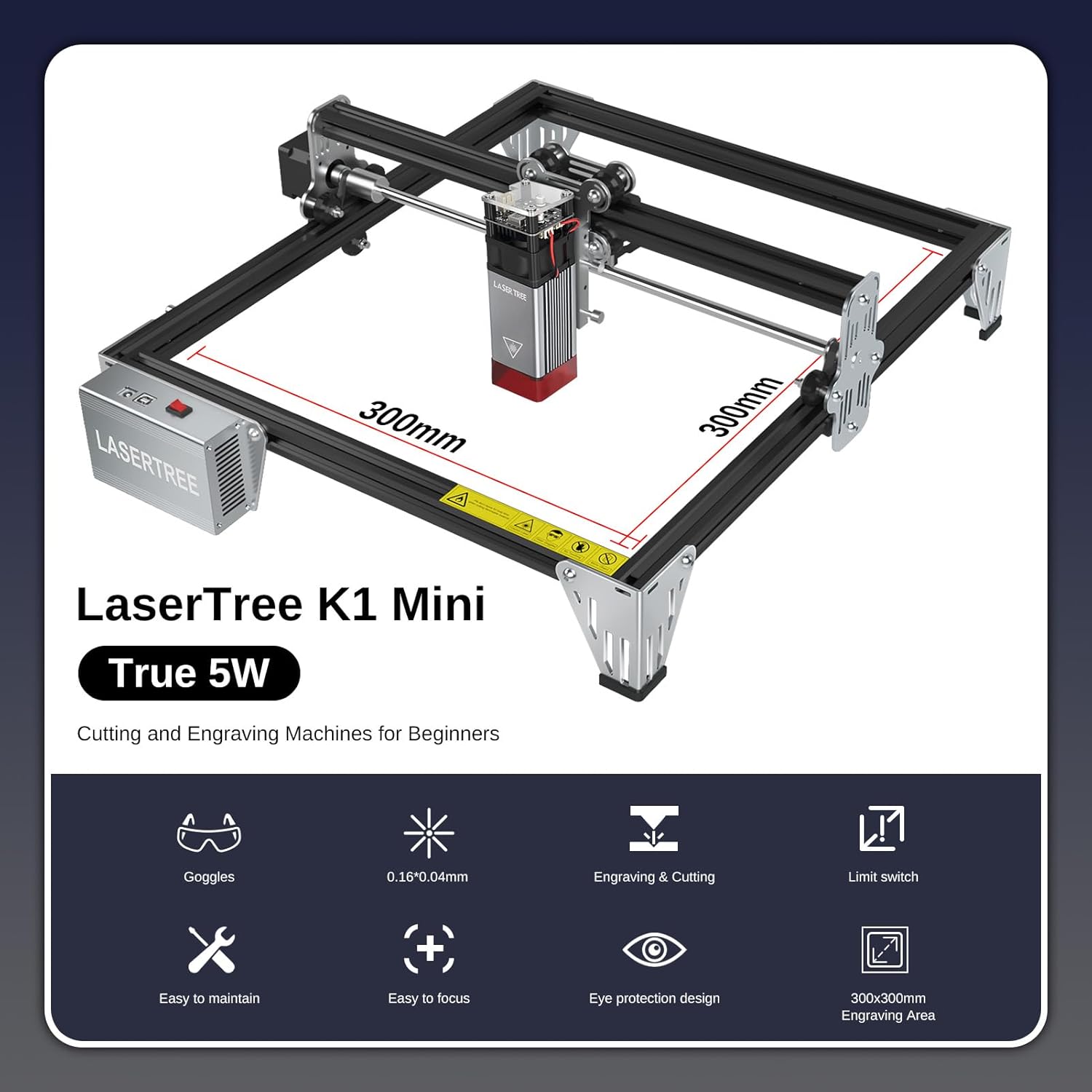
Nyocha 3.1: N'eluview of the LASER TREE K1 Mini 5W Laser Engraver, highlighting its 300x300mm work area.

Figure 3.2: The 5W output power laser module demonstrating its cutting capabilities on various materials such as 3mm acrylic, 3mm MDF, and 4mm plywood.

Figure 3.3: Illustration of the laser's fine spot size (0.16x0.04mm), enabling high-precision engraving.

Figure 3.4: The laser engraver in operation, emphasizing the importance of eye protection with safety goggles and the laser module's protective cover.

Figure 3.5: Detail of the adjustable support feet, designed to increase the working height for various engraving and cutting tasks.
4. Nhazi
The LASER TREE K1 Mini 5W is designed for quick and easy installation. All parts are pre-packaged in clearly labeled bags. Refer to the detailed illustrated user manual included in your package for specific step-by-step assembly instructions.
Nzọụkwụ Mgbakọ Ozuruọnụ:
- Wepu ihe niile ma chọpụta megide ndepụta nkwakọ ngwaahịa.
- Assemble the frame according to the provided diagrams.
- Install the laser module onto the gantry.
- Connect all necessary cables (power, USB).
- Ensure the machine is placed on a stable, level surface in a well-ventilated area.
5. Ntuziaka ọrụ
The K1 Mini 5W laser engraver is compatible with popular engraving software such as LaserGRBL (Windows XP/7/8/10) and LightBurn (Mac OS, Linux). LightBurn is paid software.
Software and Connection:
- Install your preferred software (LaserGRBL or LightBurn) on your computer.
- Connect the engraver to your computer using the provided USB cable.
- Power on the engraver.

Figure 5.1: The LASER TREE 5W laser engraver connects to a computer via USB and is compatible with LightBurn and LaserGRBL software.
Usoro Ọrụ Dị Mkpa:
- Kwadebe ihe: Place your chosen material on the engraving bed.
- Hazie mgbado anya: Use the focus adjustment knob to set the correct focal length for your material. The fixed focal length is 23mm.
- Nhazi Ibu: Open your design file in the engraving software.
- Tọọ oke: Adjust engraving/cutting parameters (speed, power, DPI) based on the material. Refer to the Material Compatibility & Settings section.
- Malite ọrụ: Initiate the engraving or cutting process from the software. Always supervise the machine during operation.
Video 5.1: This video demonstrates the LASER TREE 5W laser engraver in action, showcasing its engraving capabilities on various materials like stainless steel, leather, and wood (zelkova). It highlights the precision and speed of the machine for different applications.
6. Material Compatibility & Settings
The LASER TREE K1 Mini 5W is compatible with a wide range of materials. Optimal settings vary depending on the material type and desired outcome (engraving vs. cutting). Always perform test engravings on scrap material to find the best parameters.
Akụrụngwa dakọtara:
- Plywood, Pine wood, Bamboo, Walnut
- Stone, Coated glass
- Brushed/Mirror stainless steel, Anodized aluminum, Lacquered metal
- Black acrylic, Plastic
- Akpụkpọ anụ
Ngwa na-adabaghị adaba:
- Blue, Purple, White, or Transparent materials
- Non-anodized bare aluminum
Recommended Engraving Parameters:

Figure 6.1: A table outlining recommended settings for different materials, including focus fixed plate distance, speed (mm/min), power (%), and interval/quality (Lines/mm).
| Ihe osise | Focus Fixed Plate (mm) | Recommended Speed (mm/min) | Ike (%) | Interval (mm) / Quality (Lines/mm) |
|---|---|---|---|---|
| Acrylic | 5 | 6,000 | 30 | 0.04/10 |
| Plywood | 5 | 6,000 | 50 | 0.1/10 |
| MDF | 5 | 6,000 | 20 | 0.05/10 |
| Pine board | 5 | 6,000 | 50 | 0.06/10 |
| Achara | 5 | 6,000 | 40 | 0.05/10 |
| Igwe anaghị agba nchara | 5 | 1,200 | 100 | 0.04/10 |
| Alumina nke anodic | 5 | 6,000 | 50 | 0.05/10 |
| Akpụkpọ anụ | 5 | 6,000 | 10 | 0.05/10 |
Note: These parameters are starting points. Fine-tuning may be required for specific material batches or desired effects.
7. Nlekọta
Mmezi mgbe niile na-eme ka onye na-akpụ ihe laser gị dị ogologo ndụ ma na-arụ ọrụ nke ọma.
- Nhicha: Regularly clean the engraving bed, gantry rails, and laser lens. Use a soft, lint-free cloth and appropriate cleaning solutions for the lens.
- mmanu mmanu: Periodically lubricate the moving parts (e.g., linear rails) as recommended in the detailed manual to ensure smooth operation.
- Mmelite femụwe: Check the LASER TREE official websaịtị maka mmelite firmware ọ bụla dị maka ngwaọrụ gị.
8. Nchọpụta nsogbu
If you encounter issues, refer to the following common troubleshooting tips:
- Ọ naghị agba ọkụ site na laser: Check power connection, USB connection, and ensure the laser module is properly seated. Verify software settings for laser power.
- Ọdịmma ihe osise/ịkpụcha adịghị mma: Re-check focus, adjust speed/power settings, ensure material is flat and secure, and clean the laser lens.
- Nsogbu Njikọ Ngwanrọ: Ensure correct drivers are installed, try a different USB port or cable, and restart both the engraver and computer.
- Machine Not Moving: Check cable connections to motors, ensure no physical obstructions, and verify software commands.
For further assistance, contact LASER TREE customer support.
9. Nkọwapụta
| Nkọwapụta | Nkọwa |
|---|---|
| Nọmba nlereanya | K1 Mini 5w |
| Ike mmepụta laser | 5W (5000mW) |
| Mpaghara ọrụ | 12 x 12 sentimita (300 x 300 mm) |
| Akụkụ ngwaahịa | 13 x 13 x 6 sentimita asatọ |
| Ibu Ibu | 9.26 pound |
| Ogologo Focal | Edobere 23 mm |
| Nha Abua | 0.16*0.04mm |
| Ọsọ Ịkpụ Ihe Kachasị Elu | 25,000 mm/min |
| Ngwa ndakọrịta | LaserGRBL (Windows), LightBurn (Mac OS, Linux) |
| Onye nrụpụta | Osisi Laser |
10. Akwụkwọ ikike na nkwado
LASER TREE is committed to providing high-quality products and customer satisfaction. Your product is supported by a professional engineer team ready to provide timely troubleshooting and after-sales support for all pre-sale and usage questions.
For warranty information or technical support, please refer to the contact details provided with your product packaging or visit the official LASER TREE websaịtị.