
1. Okwu mmalite
Welcome to the user manual for your RebotAi A9 8.7-inch Android 15 Tablet. This guide provides essential information on setting up, operating, maintaining, and troubleshooting your device to ensure a smooth and enjoyable user experience. Please read this manual carefully before using your tablet.
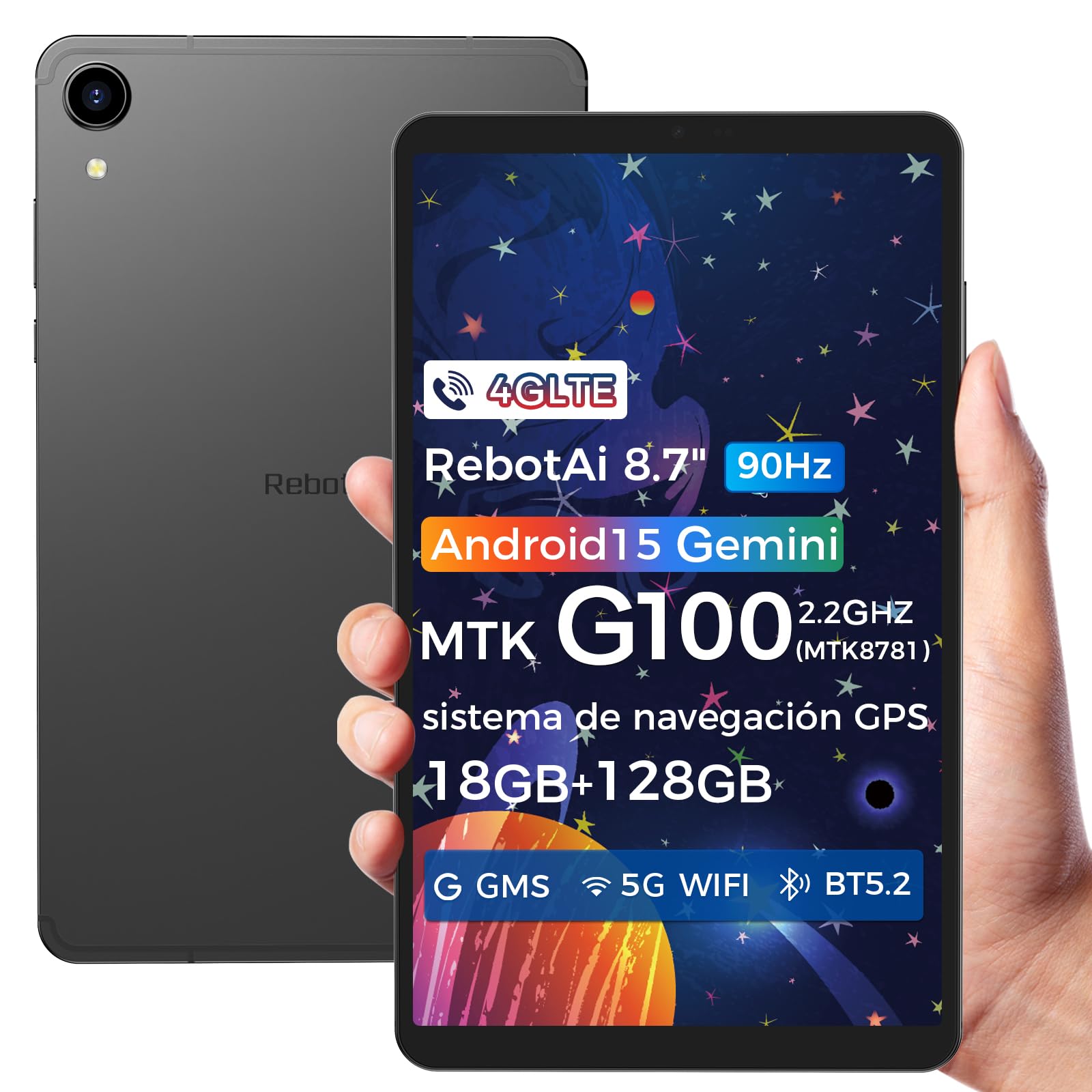
Image: General view of the RebotAi A9 tablet, showcasing ya sleek imewe.
2. Ihe ngwugwu
Mgbe ị na-emepe igbe ahụ, biko hụ na ihe niile dị:
- RebotAi A9 mbadamba
- USB-C eriri USB
- Ngwaọrụ SIM Ejector
- Ntuziaka mmalite ngwa ngwa
- Akwụkwọ ikike kaadị
Mara: In accordance with global environmental guidelines, the RebotAi A9 tablet does not include a power adapter. Please use a compatible USB-C power adapter (not included) for charging.
3. Ngwaọrụ gafereview
Familiarize yourself with the physical components of your RebotAi A9 tablet.

Foto: Ofeview of the RebotAi A9 tablet's key features, including its 8.68-inch display, Android 15 OS, 1340x800 IPS resolution with 90Hz refresh rate, MediaTek Helio G100 processor, slim design, 6GB RAM, 5000mAh battery, 128GB ROM, dual-band Wi-Fi, GPS, Bluetooth 5.2, and Widevine L1 support.
Nhazi anụ ahụ
- Ngosipụta: 8.7-inch IPS screen with 1340 x 800 resolution and 90Hz refresh rate for vibrant colors and smooth visuals.
- Casing: Metallic casing with nano-coating process, offering a smooth feel and elegant appearance, designed for water and impact resistance.
- Akụkụ: Approximately 7.8 mm thin.
- Arọ: Ihe dị ka gram 360.

Image: This image highlights the tablet's durable construction, featuring nano-injection molding technology for advanced water and impact resistance. It shows details of the impermeability specifications and antenna slots designed with nanotechnology.
Audio and Sensors
- Ndị na-ekwu okwu: Dual-BOX speakers for enhanced audio experience.
- Jack ekweisi: Standard 3.5mm headphone jack.
- Ihe mmetụta: High-precision gyroscope, light sensor, and gravity sensor for accurate orientation, automatic screen rotation, and improved navigation.

Image: This image details the tablet's advanced features, including dual-band Wi-Fi (2.4GHz/5GHz), Bluetooth 5.2, dual-box speakers, and a 3.5mm headphone jack. It also highlights fast connectivity and precise positioning with A-GPS and 4-mode GPS, along with a 450 nits bright display.
4. Nhazi
4.1 Ike mbido
- Press and hold the Power button located on the side of the tablet until the RebotAi logo appears.
- Soro mkpali na ihuenyo ka ịhọrọ asụsụ gị, jikọọ na netwọk Wi-Fi, wee guzobe akaụntụ Google gị.
4.2 Ntinye kaadị SIM na kaadị MicroSD
The tablet supports two nano-SIM cards for 4G LTE connectivity and a microSD card for storage expansion.
- Chọta tray kaadị SIM/MicroSD n'akụkụ mbadamba.
- Fanye ngwaọrụ ejector SIM n'ime obere oghere dị n'akụkụ traị ka imepe ya.
- Carefully place your nano-SIM card(s) and/or microSD card into the designated slots on the tray. Ensure the gold contacts are facing down.
- Jiri nwayọọ pịa tray ahụ n'ime mbadamba ahụ ruo mgbe ọ pịrị aka n'ebe ọ nọ.

Image: This image illustrates the tablet's connectivity options, highlighting 4G LTE support, Bluetooth 5.2, dual-band Wi-Fi (2.4GHz and 5GHz), and multi-system GPS (GPS/Galileo/Glonass). A close-up of the dual SIM card slot is also visible, indicating support for mobile data and calls.
5. .rụ ọrụ
5.1 Ngosipụta na ihe ngosi
The 8.7-inch IPS display with 1340 x 800 resolution and 90Hz refresh rate provides a clear and fluid visual experience. With 450 nits brightness, content remains visible even in bright environments. Widevine L1 support ensures high-definition video streaming from compatible services.

Image: An image showing the tablet being used for gaming, emphasizing its smooth performance for games and videos. It highlights the 8.68-inch screen, G100 chip, and 90Hz refresh rate for an uninterrupted and comfortable visual experience.
5.2 Arụmọrụ
Powered by the MediaTek Helio G100 octa-core processor (MT8781), the RebotAi A9 delivers enhanced performance for multitasking, gaming, and media consumption. It features two high-performance Cortex-A76 cores and six low-power Cortex-A55 cores, along with a Mali-G57 MC2 GPU.

Image: An image detailing the MediaTek Helio G100 processor, showing its octa-core CPU architecture (Cortex-A76 and Cortex-A55 cores), Mali-G57 MC2 GPU, and 2.2 GHz frequency. A benchmark comparison chart is included, demonstrating its performance relative to other chipsets.
5.3 Igwefoto
The tablet is equipped with a 13MP rear camera and a 5MP front camera, suitable for online meetings, video calls, and capturing daily moments with clear and natural images.

Image: This image focuses on the tablet's camera system, showing the 5MP front camera and 13MP rear camera. The accompanying text indicates these cameras provide clear and natural images suitable for online meetings and daily recordings.
5.4 Android 15 and AI Features
Running on Android 15 and GMS certified, the RebotAi A9 provides access to a wide range of Google services and applications. Its high-performance hardware and A9 chip are optimized for comfortable use of various AI tools, enhancing user interaction and productivity.

Image: An image depicting the tablet's interface with various app icons, emphasizing its Android 15 operating system and GMS certification. It highlights the high-performance hardware and A9 chip, enabling comfortable use of various AI tools.
6. Njikọta
The RebotAi A9 tablet offers comprehensive connectivity options:
- 4G LTE: Dual nano-SIM support for mobile data and calls, ensuring connectivity on the go.
- 5G WiFi: Dual-band Wi-Fi (2.4GHz and 5GHz) for fast and stable internet connections, ideal for streaming and downloads.
- Bluetooth Bluetooth: For connecting wireless accessories such as headphones, speakers, and keyboards with lower power consumption.
- GPS: Multi-system GPS (GPS/Galileo/Glonass) for precise positioning and navigation.
7. Nchekwa na Arụmọrụ
- RAM: 6GB of installed RAM, expandable virtually by an additional 12GB for a total of 18GB, ensuring smooth multitasking.
- Nchekwa ime: 128GB of internal storage for your apps, photos, and files.
- Nchekwa enwere ike ịgbasa: Supports microSD card expansion up to 1TB, providing ample space for large media files na akwụkwọ.
8. Batrị na Nchaji
The RebotAi A9 is equipped with a 5000mAh high-capacity battery, offering extended usage times.
- Ndụ batrị: Up to 12 hours of general use on a single charge.
- Nchaji ngwa ngwa: Supports 20W PD fast charging, allowing the tablet to be fully charged quickly.
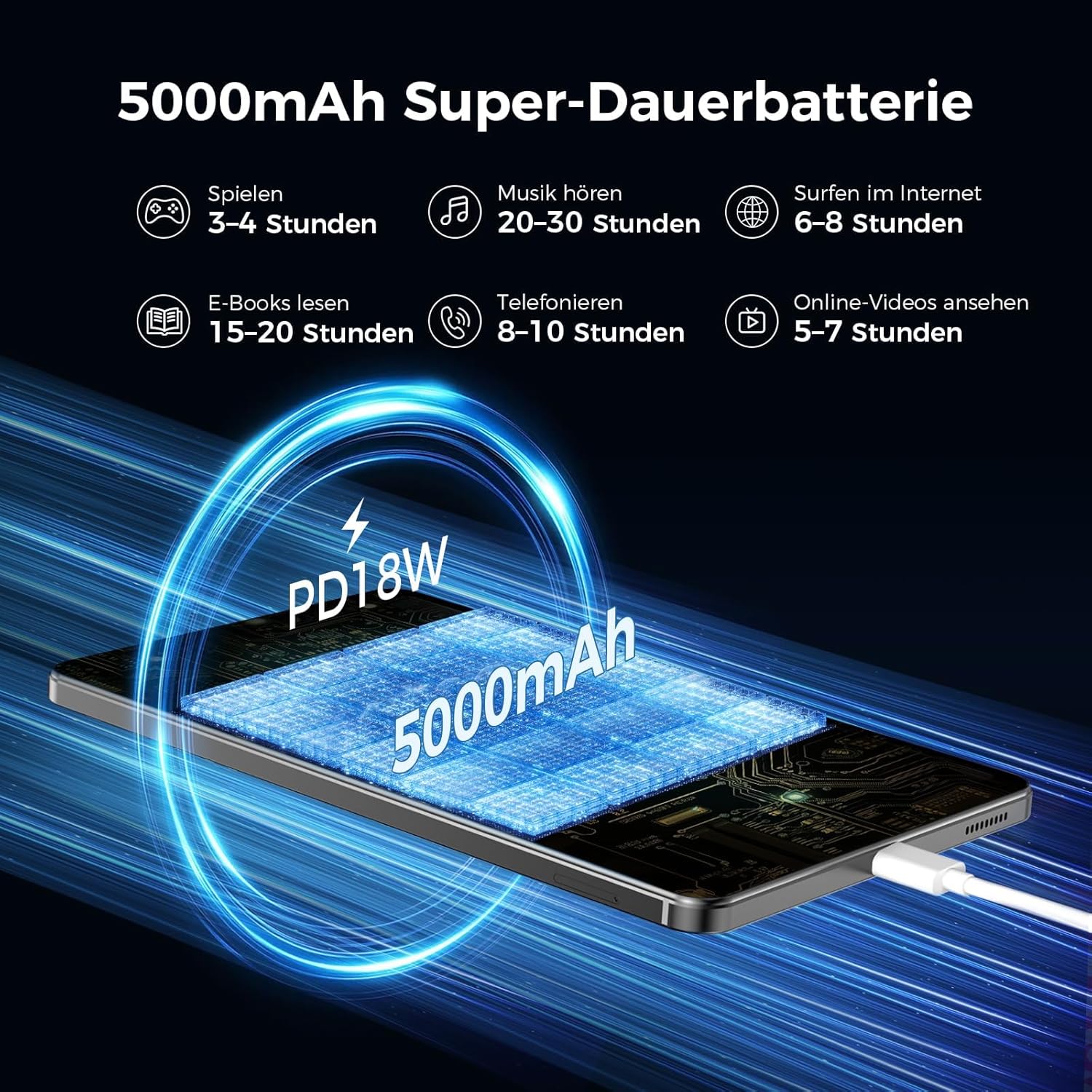
Image: An image illustrating the 5000mAh battery capacity and its estimated usage times for various activities: 3-4 hours gaming, 20-30 hours music, 6-8 hours internet browsing, 15-20 hours e-reading, 8-10 hours calls, and 5-7 hours online videos. It also shows the tablet being charged via PD18W fast charging.
9. Nlekọta
To ensure the longevity and optimal performance of your RebotAi A9 tablet, follow these maintenance guidelines:
- Nhicha: Jiri akwa dị nro na-enweghị lint hichaa ihuenyo na ahụ. Zere ihe na-emebi emebi ma ọ bụ kemịkalụ siri ike.
- Nlekọta batrị: Zere oke okpomọkụ. Ekwela ka batrị ahụ gbapụta nke ọma mgbe niile. Maka nchekwa ogologo oge, chajie batrị ahụ ruo ihe dịka 50%.
- Mmelite ngwanrọ: Regularly check for and install system updates to ensure security and performance improvements.
- Njikwa nchekwa: Na-ekpochapụ oge ụfọdụ na-adịghị mkpa files na ngwa iji wepụta ohere nchekwa ma jikwaa arụmọrụ.
10. Nchọpụta nsogbu
Ọ bụrụ na ị hụ nsogbu na mbadamba gị, gbalịa usoro ndị a na-emekarị iji dozie nsogbu ndị a:
- Mbadamba ụrọ anaghị agbanwu: Ensure the battery is charged. Connect the tablet to a power source and try again.
- Ihuenyo anaghị anabata: Restart the tablet by holding the power button. If unresponsive, force restart by holding the power button for an extended period (usually 10-15 seconds).
- Nsogbu njikọ Wi-Fi/4G: Toggle Wi-Fi/Mobile Data off and on. Restart your router or contact your service provider.
- Ngwa na-akụda: Hichapụ ihe nchekwa nke ngwa nwere nsogbu ma ọ bụ tinyegharịa ya. Hụ na ngwanrọ mbadamba gị dị ọhụrụ.
- Ịrụ ọrụ nwayọ: Close unused apps, clear cache, and ensure sufficient storage space. Consider a factory reset as a last resort (back up your data first).
11. Nkọwapụta
| Njirimara | Nkọwa |
|---|---|
| Ụdị | RebotAi |
| Aha Nlereanya | A9 |
| Sistemụ nrụọrụ | Android 15 |
| Nhazi | MediaTek Helio G100 (MT8781) Octa-Core |
| RAM | 6 GB (nwere ike ịgbasa ruo 18 GB) |
| Ike Nchekwa ebe nchekwa | 128 GB |
| Nchekwa enwere ike ịgbasa | Ruo 1 TB site na kaadị microSD |
| Nha ihuenyo | 8.7 Inches (8.68 Inches) |
| Mkpebi ihuenyo | 1340 x 800 IPS, 90Hz Refresh Rate |
| Mkpebi akwadoro kacha | 2560 Pixels (for content playback) |
| Icha ọkụ | 450 nits |
| Igwefoto azụ | 13 MP |
| Igwefoto ihu | 5 MP |
| Ike batrị | 5000 mAh |
| Ndụ batrị | Ruo awa 12 |
| Ịchaji | 20W PD Fast Charging (cable included, adapter not included) |
| Njikọta | 4G LTE (Dual Nano-SIM), 5G WiFi (2.4GHz/5GHz), Bluetooth 5.2, GPS (GPS/Galileo/Glonass) |
| Agba | Agba ntụ |
12. Akwụkwọ ikike na nkwado
RebotAi offers a 2-afọ akwụkwọ ikike for your A9 tablet. For any technical issues or support inquiries, please contact RebotAi customer service. We guarantee a quick response within 24 hours.
Biko lee kaadị akwụkwọ ikike dị na ngwugwu gị maka usoro na ọnọdụ zuru ezu.