
1. Okwu mmalite
The Unihertz Jelly Star is a compact 3-inch mini smartphone designed for portability and functionality. It operates on Android 13 and features a MediaTek Helio G99 processor, 8GB RAM, and 256GB ROM. This manual provides essential information for the safe and efficient use of your device.

Foto nke 1.1: N'ihu na akụkụ view of the Unihertz Jelly Star Mini Smartphone. This image displays the compact size and design of the device, highlighting its screen and side buttons.
2. Kedu ihe dị na Igbe ahụ
Upon unpacking your Unihertz Jelly Star, please verify that all the following items are included:
- Unihertz Jelly Star Smartphone
- Akpa ekwentị
- Ihe nkwụnye ọkụ
- SIM Tray Ejector
- Screen Protector (one pre-applied, one extra)
- eriri USB (ụdị-C)
- Ntuziaka onye ọrụ (akwụkwọ a)
- Akwụkwọ ikike kaadị
- Ekwentị Lanyard

Foto nke 2.1: Diagram illustrating the contents of the Unihertz Jelly Star retail box, including the phone, case, charger, cables, and documentation.
3. Nhazi
3.1 Ịtinye kaadị SIM
- Locate the SIM tray on the side of your Jelly Star.
- Tinye ngwaọrụ SIM ejector draịvụ n'ime obere oghere dị n'akụkụ tray ahụ wee pịa nwayọ ruo mgbe tray ahụ pụtara.
- Place your Nano SIM card(s) into the tray, ensuring proper orientation. The Jelly Star supports dual Nano SIMs.
- Jiri nlezianya tinyegharịa traị SIM n'ime ekwentị.
3.2 Ike mbido na ịtọlite
- Press and hold the power button (located on the right side) until the Unihertz logo appears.
- Soro mkpali na ihuenyo ka ịhọrọ asụsụ gị, jikọọ na Wi-Fi, wee guzobe akaụntụ Google gị.
- Configure security settings, including fingerprint unlock, for enhanced device protection.
3.3 Verizon Network Activation (Important)
For Verizon users, please note the following specific activation procedure:
- Unihertz phones are unlocked.
- Local Verizon stores may not be able to assist with activation as these phones are not in Verizon's local database.
- Activate your SIM card with another Verizon-certified phone first, then transfer the activated SIM card to your Jelly Star.

Foto nke 3.1: Important instructions for Verizon users regarding SIM card activation with the Unihertz Jelly Star.
4. Ntuziaka ọrụ
4.1 Nsoro ụzọ
The Jelly Star runs on Android 13. Navigate the interface using touch gestures on the 3-inch display. Swipe up from the bottom for the app drawer, swipe down from the top for notifications and quick settings.
4.2 bọtịnụ mmemme
The device features a customizable programmable button. You can assign various functions to this button through the phone's settings, such as launching an app, activating the flashlight, or taking a screenshot.
4.3 LED Notification Light
The transparent back design incorporates a dynamic LED notification light. This light provides visual alerts for incoming calls, messages, and other notifications. Settings for the LED light can be adjusted in the phone's display or notification settings.

Foto nke 4.1: Azu na akụkụ view of the Unihertz Jelly Star, showcasing its transparent design and LED notification light.
4.4 Ojiji igwefoto
The Jelly Star is equipped with a 48MP camera. Open the camera application from the home screen or app drawer. Tap to focus, and press the shutter button to capture photos or videos. Explore the camera settings for various modes and adjustments.
4.5 Mkpọghe mkpịsị aka
To set up fingerprint unlock, go to Settings > Security & privacy > Device unlock > Fingerprint. Follow the on-screen instructions to register your fingerprint(s). Once set up, you can unlock your phone by placing your registered finger on the fingerprint sensor.
4.6 Audio Jack and FM Radio
The device includes a 3.5mm audio jack for connecting headphones or external speakers. To use the FM radio, plug in wired headphones (which act as an antenna) and open the FM Radio application.
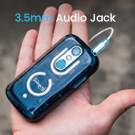
Foto nke 4.2: Close-up of the Unihertz Jelly Star highlighting the 3.5mm audio jack.
4.7 USB On-The-Go (OTG)
The Jelly Star supports USB OTG, allowing you to connect USB devices such as flash drives, keyboards, or mice directly to your phone using a compatible OTG adapter (sold separately).
5. Connectivity & Compatibility
The Unihertz Jelly Star offers versatile connectivity options and broad network compatibility.
- Ndakọrịta netwọk: Compatible with T-Mobile and Verizon networks only. (Refer to Section 3.3 for Verizon activation details). Note: Not compatible with AT&T.
- Ikuku Njikọ: Supports Wi-Fi, Bluetooth, NFC, and Infrared.
- Ntugharị: Integrated GPS for location services.
- Oghere SIM: Dual Nano SIM slots for managing two phone numbers or different carriers.
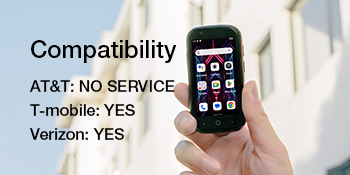
Foto nke 5.1: Visual representation of the Unihertz Jelly Star's network compatibility, indicating support for T-Mobile and Verizon.
Vidio 5.1: An official product video demonstrating the compact size and various features of the Unihertz Jelly Star Mini Phone. This video highlights the phone's design and portability.
6. Nlekọta
6.1 Nlekọta batrị
The Jelly Star is equipped with a 2000mAh battery. To maximize battery life:
- Zere oke okpomọkụ.
- Use the provided power adapter and USB cable for charging.
- Zere ịchaji batrị ugboro ugboro.
- Optimize screen brightness and close unused background applications.
6.2 Na-ehicha ngwaọrụ gị
Use a soft, lint-free cloth to clean the screen and body of your phone. Avoid using harsh chemicals or abrasive materials, which can damage the device.
6.3 Mmelite ngwanrọ
Na-enyocha ma wụnye mmelite ngwanrọ mgbe niile iji hụ na ngwaọrụ gị nwere njirimara kachasị ọhụrụ, ihe mkpuchi nchekwa, na mmezi arụmọrụ. Ị nwere ike ịchọta nhọrọ a na Ntọala> Sistemu> Mmelite sistemụ.
7. Nchọpụta nsogbu
If you encounter issues with your Unihertz Jelly Star, refer to the following common troubleshooting steps:
- Ngwaọrụ anaghị agbanye: Ensure the battery is charged. Connect the phone to the charger and wait a few minutes before attempting to power it on again.
- Nsogbu njikọ netwọkụ:
- Lelee ma etinyere kaadị SIM gị nke ọma (lee Nkebi nke 3.1).
- Verify that your mobile data or Wi-Fi is enabled.
- Malitegharịa ngwaọrụ ahụ.
- For Verizon users, confirm SIM activation as per Section 3.3.
- Ngwa na-akụda ma ọ bụ na-ajụ oyi:
- Close and restart the problematic app.
- Hichapụ cache na data n'ime ngwa ahụ Ntọala > Ngwa > [Aha Ngwa] > Nchekwa na ebe nchekwa.
- Gbaa mbọ hụ na emelitere ngwa ahụ ka ọ bụrụ ụdị kachasị ọhụrụ.
- Ndụ batrị dị mkpụmkpụ:
- Belata nchapụta ihuenyo.
- Gbanyụọ atụmatụ ejighi ya dị ka Bluetooth, GPS, ma ọ bụ Wi-Fi mgbe ọ dịghị mkpa.
- Identify and close power-consuming background apps.
If these steps do not resolve your issue, please contact Unihertz customer support for further assistance.
8. Nkọwapụta
Below are the key technical specifications for the Unihertz Jelly Star Mini Smartphone:
| Aha Nlereanya | Jelly Star |
| Sistemụ nrụọrụ | Android 13.0 |
| Ụdị CPU | MediaTek Helio G99 |
| Ọsọ CPU | 2200 MHz |
| Ogo etinyere ebe nchekwa RAM | 8 GB |
| Ike Nchekwa ebe nchekwa | 256 GB |
| Ngosipụta ihuenyo guzoro ọtọ | 3 sentimita asatọ |
| Mkpebi | 480 x854 |
| Ọnụego ume ọhụrụ | 60 Hz |
| Ike batrị | 2000 ndeamp Oge awa |
| Akụkụ ngwaahịa | 3.75 x 1.95 x 0.74 sentimita asatọ |
| Ibu Ibu | 4.3 ounces |
| Teknụzụ Njikọta | Bluetooth, Infrared, NFC, USB, Wi-Fi |
| Jack ọdịyo | 3.5 mm |
| GPS | Eziokwu |
9. Akwụkwọ ikike na nkwado
9.1 Akwụkwọ ikike ngwaahịa
The Unihertz Jelly Star comes with a one-year warranty from the date of purchase. This warranty covers manufacturing defects and malfunctions under normal use. Please retain your proof of purchase for warranty claims.
9.2 Nkwado nka na ụzụ
Unihertz provides long-term technical support and efficient online customer service. For any technical issues, questions, or support needs not covered in this manual, please visit the official Unihertz websaịtị ma ọ bụ kpọtụrụ ndị ọrụ ndị ahịa ha.
Ị nwere ike ịchọta ozi ndị ọzọ na akụrụngwa nkwado na Unihertz Store on Amazon.