
1. Okwu mmalite
This manual provides detailed instructions for the setup, operation, maintenance, and troubleshooting of the RGBlink NDI PTZ Camera Controller (RGBBKT). This device is designed for professional video production environments, offering comprehensive control over various PTZ cameras using multiple protocols.
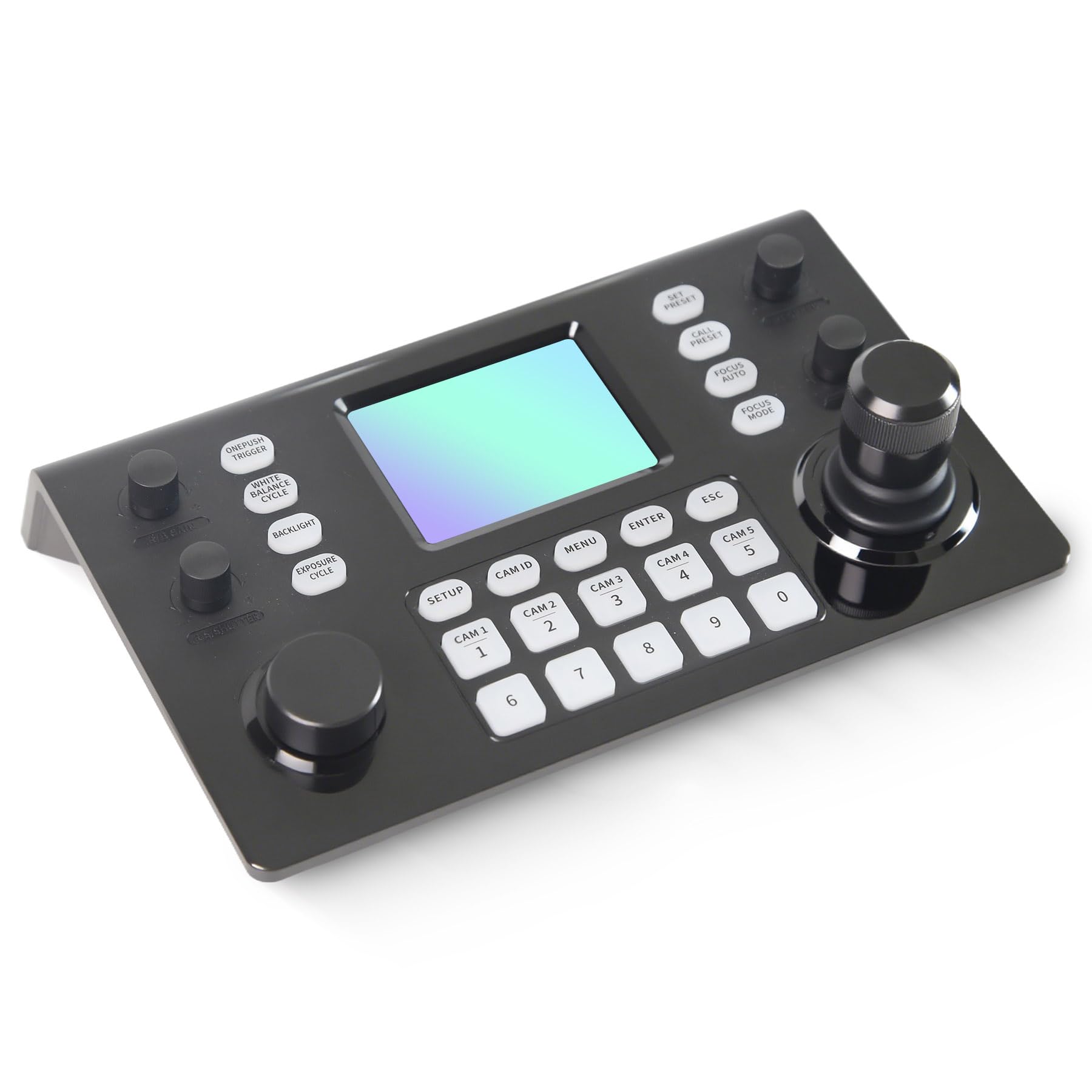
Image 1.1: RGBlink NDI PTZ Camera Controller (RGBBKT).
2. Nhazi
Follow these steps to set up your RGBlink NDI PTZ Camera Controller.
2.1 Mwepu na nyocha izizi
- Jiri nlezianya wepụ ihe niile dị na nkwakọ ngwaahịa.
- Nyochaa na ihe niile edepụtara na listi nkwakọ dị ugbu a.
- Inspect the controller for any signs of physical damage. If damage is found, contact your dealer immediately.
2.2 Ijikọ njikwa
The RGBlink NDI PTZ Camera Controller supports various connection methods for power and camera control.
- Ike n'elu Ethernet (PoE): Connect a single RJ45 Ethernet cable from a PoE-enabled network switch to the controller's LAN port. This provides both power and network connectivity.
- Ihe nkwụnye ọkụ mpụga: If PoE is not available, connect the provided power adapter to the DC 12V input port and to a power outlet.
- Njikọ igwefoto:
- Ethernet (IP Control): Connect PTZ cameras to the same network as the controller via RJ45 Ethernet cables. The controller supports VISCA over IP, ONVIF v2.42, and NDI v5.5 protocols.
- Njikwa Usoro: For cameras supporting serial communication, use RS232, RS422, or RS485 interfaces. Connect the appropriate cables from the controller's serial ports to the cameras.

Image 2.1: Rear panel connections including RS-232, RS-422, LAN (PoE), and Power Input.

Foto 2.2: Ọpụample connection diagram showing PTZ Controller, PoE Switch, PTZ Cameras, Audio Mixer, and Computer.

Image 2.3: Diagram illustrating IP camera connections via a network switch.
2.3 Nhazi netwọkụ
For IP-based camera control, ensure the controller and cameras are on the same network segment. The controller supports automatic detection of NDI-enabled PTZ cameras.
- Access the controller's web interface site na itinye adreesị IP ya n'ime a web browser. (Refer to the device's display or network tools to find the IP address).
- The default login credentials are typically 'admin' with a blank password. It is recommended to set a strong password immediately.
- N'ime web interface, configure camera protocols (e.g., ONVIF, VISCA over IP) and enter camera-specific user credentials if required.

Image 2.4: NDI|HX camera search and control interface on the controller.
3. Ọrụ
This section details the operational functions of the RGBlink NDI PTZ Camera Controller.
3.1 gafereview nke njikwa
The controller features a 3.49" LCD display, a 3D joystick, various knobs, and a numeric keypad for intuitive control.

Image 3.1: The controller's 3.49-inch LCD display.

Foto 3.2: Zuru ezu view of the 3D joystick and multi-function knobs.

Image 3.3: Layout of the controller's buttons and numeric keypad area.
3.2 Nhọrọ igwefoto
- Bọtịnụ Nhọrọ Ngwa Ngwa: Use the dedicated CAM 1-5 buttons for quick selection of up to 5 cameras.
- Ahụigodo ọnụọgụ: For cameras beyond the quick select buttons (up to 255), press the NJ CAM button, then enter the camera number using the numeric keypad, and press Banye.

Image 3.4: The controller's ability to manage multiple cameras.
3.3 PTZ Njikwa
- Joysticks: The 3D joystick controls pan (left/right), tilt (up/down), and zoom (rotate the joystick).
- Knob ọsọ ọsọ PT: Adjusts the gimbal movement speed for pan and tilt.
- Zoom Knob: Provides precise zoom control, especially useful in preview ọnọdụ.
3.4 Image Parameter Adjustment
- IRIS/SHUTTER Knob: Rotate to adjust aperture and shutter speed. Press to switch control modes.
- R/B GAIN Knob: Rotate to adjust red and blue gain. Press to switch control modes.
- FOCUS Button: Pịa AKA NTỤKWUO button to switch the camera to auto focus mode.
- EXPOSURE Button: Cycles through exposure modes (Aperture Priority, Shutter Priority, Gain Priority, Manual Exposure, Auto Exposure).
- BACKLIGHT Button: Toggles the camera's backlight mode.
- WHITE BALANCE CYCLE Button: Cycles through white balance modes (Indoor, Outdoor, Manual, Auto).
- ONE PUSH TRIGGER Button: When white balance is set to "One-Push White Balance", press this button to initiate a one-push white balance calibration.

Image 3.5: Functions of buttons and knobs on the left side of the controller.

Image 3.6: Functions of buttons and knobs on the right side of the controller, including preset controls.
3.5 Atọrọ atọ
- SET PRESET Button: Press to enter preset position mode. Use the numeric keys to enter the preset number (0-9) and press Banye iji chekwaa. Pịa ESC ịpụ apụ.
- CALL PRESET Button: Press to enter preset recall mode. Use the numeric keys to enter the preset number (0-9) and press Banye to recall. Press ESC ịpụ apụ.
- The controller supports saving and recalling up to 255 presets per camera.
3.6 Nsorouzọ NchNhr
- Bọtịnụ MENU: Press to open or close the camera settings menu. In menu control mode, the joystick controls navigation (up, down, left, right), Banye confirms selections, and ESC acts as a back button.
4. Nlekọta
Proper maintenance ensures the longevity and optimal performance of your RGBlink NDI PTZ Camera Controller.
4.1 Nhicha
- Use a soft, dry cloth to clean the exterior of the controller.
- Maka unyi isi ike, ntakịrị dampjiri mmiri ma ọ bụ ihe nhicha dị nro, nke na-anaghị afụ ụfụ kpuchie ákwà ahụ.
- Avoid using harsh chemicals, solvents, or abrasive materials, as these can damage the surface and display.
- Ensure no liquids enter the device through openings or ports.
4.2 Nchekwa
- Mgbe a naghị eji ya ruo ogologo oge, debe ihe njikwa ahụ n'ebe dị jụụ ma kpọọ nkụ, ebe anwụ na-anaghị apụta kpọmkwem ma ọ bụ oke okpomọkụ.
- Chebe ngwaọrụ site na uzuzu na mmiri.
5. Nchọpụta nsogbu
Akụkụ a na-enye azịza maka nsogbu nkịtị ị nwere ike izute.
5.1 Enweghị ike
- Lelee isi iyi ike: Ensure the power adapter is securely connected to both the controller and a working power outlet.
- PoE Check: If using PoE, verify that the Ethernet cable is connected to a PoE-enabled port on your network switch and that the switch is powered on.
- Ịdị n'ezi nke eriri USB: Inspect the power cable and Ethernet cable for any damage.
5.2 Cannot Control Camera
- Njikọ netwọkụ: For IP cameras, ensure the controller and cameras are on the same network and can communicate. Check network cables and IP addresses.
- Nkwekọrịta Protocol: Verify that the correct control protocol (e.g., VISCA over IP, ONVIF, NDI, Pelco-D/P) is selected on both the controller and the camera.
- NJ igwefoto: Ensure the correct camera ID is selected on the controller.
- Asambodo nbanye: If the camera requires authentication, confirm that the correct username and password are configured in the controller's web interface.
- Njikọ Oghere Usoro: For serial control, check RS232/RS422/RS485 cable connections and ensure baud rates and addresses match between the controller and camera.
- Firmware: Ensure both the controller and cameras have the latest firmware installed. Visit the RGBlink support websaịtị maka mmelite.
5.3 LCD Display Issues
- Enweghị Ngosipụta: Gbaa mbọ hụ na agbanyere njikwa ahụ.
- Ngosipụta nhụsianya: Check if there are any brightness settings on the controller that can be adjusted.
6. Nkọwapụta
| Njirimara | Nkọwa |
|---|---|
| Nlereanya | RGBBKT |
| Akụkụ (L x W x H) | 11.4 x 7.8 x 5.9 sentimita (ihe dịka 290 x 200 x 150 mm) |
| Ibu | 2.2 pound (ihe dị ka 1 n'arọ) |
| Ngosipụta | 3.49" LCD |
| Usoro njikwa | VISCA over IP, ONVIF v2.42, NDI v5.5, Pelco-D/P |
| Ọnụ ụzọ | RS232, RS422, RS485, RJ45 Ethernet (PoE) |
| Camera Capacity | Up to 255 PTZ cameras |
| Ntinye ike | PoE or DC 12V (external adapter) |
| Joystick | High-precision Hall sensor 3D joystick |

Image 6.1: Controller dimensions and typical usage environments.

Image 6.2: Visual representation of supported protocols including RJ45, RS485, RS422, RS232, ONVIF, NDI, Pelco-D, Pelco-P, and Visca.
7. Ihe ngosi vidiyo ngwaahịa
Watch the official product video for a visual demonstration of the RGBlink NDI PTZ Camera Controller's features and operation.
Video 7.1: Official demonstration of the RGBlink PTZ Camera Controller Joystick, showcasing multi-camera control and key features.
8. Akwụkwọ ikike na nkwado
For warranty information, technical support, or service inquiries, please contact RGBlink customer service or visit their official websaịtị.
- Onye nrụpụta: Xiamen RGBlink Science & Technology Co.,Ltd.
- Ndị ọchịchị Websaịtị: www.rgblink.com (Rịba ama: Nke a bụ ebe njide ihe URL, please refer to your product packaging or official documentation for the correct support websaịtị.)
- Ozi mkpọtụrụ: Refer to the RGBlink official website for the most current contact details for technical support and warranty claims.