
1. Ntuziaka nchekwa dị mkpa
Please read all instructions carefully before using the Defy DBF300 Bladeless Fan. Retain this manual for future reference.
- Always ensure the fan is placed on a stable, level surface to prevent tipping.
- Do not operate the fan with a damaged cord or plug. If the cord is damaged, it must be replaced by the manufacturer, its service agent, or similarly qualified persons to avoid a hazard.
- Keep hands, fingers, hair, and loose clothing away from the fan's air inlet and outlet openings.
- Do not immerse the fan, cord, or plug in water or other liquids.
- Unplug the fan from the power outlet when not in use, before cleaning, or before moving it.
- Ezubere ngwa a maka iji ndị mmadụ (gụnyere ụmụaka) nwere ike anụ ahụ, mmetụta uche ma ọ bụ nke uche, ma ọ bụ enweghị ahụmịhe na ihe ọmụma, ma ọ bụrụ na enyereghị ha nlekọta ma ọ bụ ntụziaka gbasara iji ngwa ahụ site n'aka onye na-ahụ maka nchekwa ha.
- Ekwesịrị ilekọta ụmụaka ka ha hụ na ha ejighi ngwa eji egwu egwu egwu.
- Do not use the fan outdoors or in wet conditions.
- Do not block air openings or operate near curtains or other objects that could block airflow.
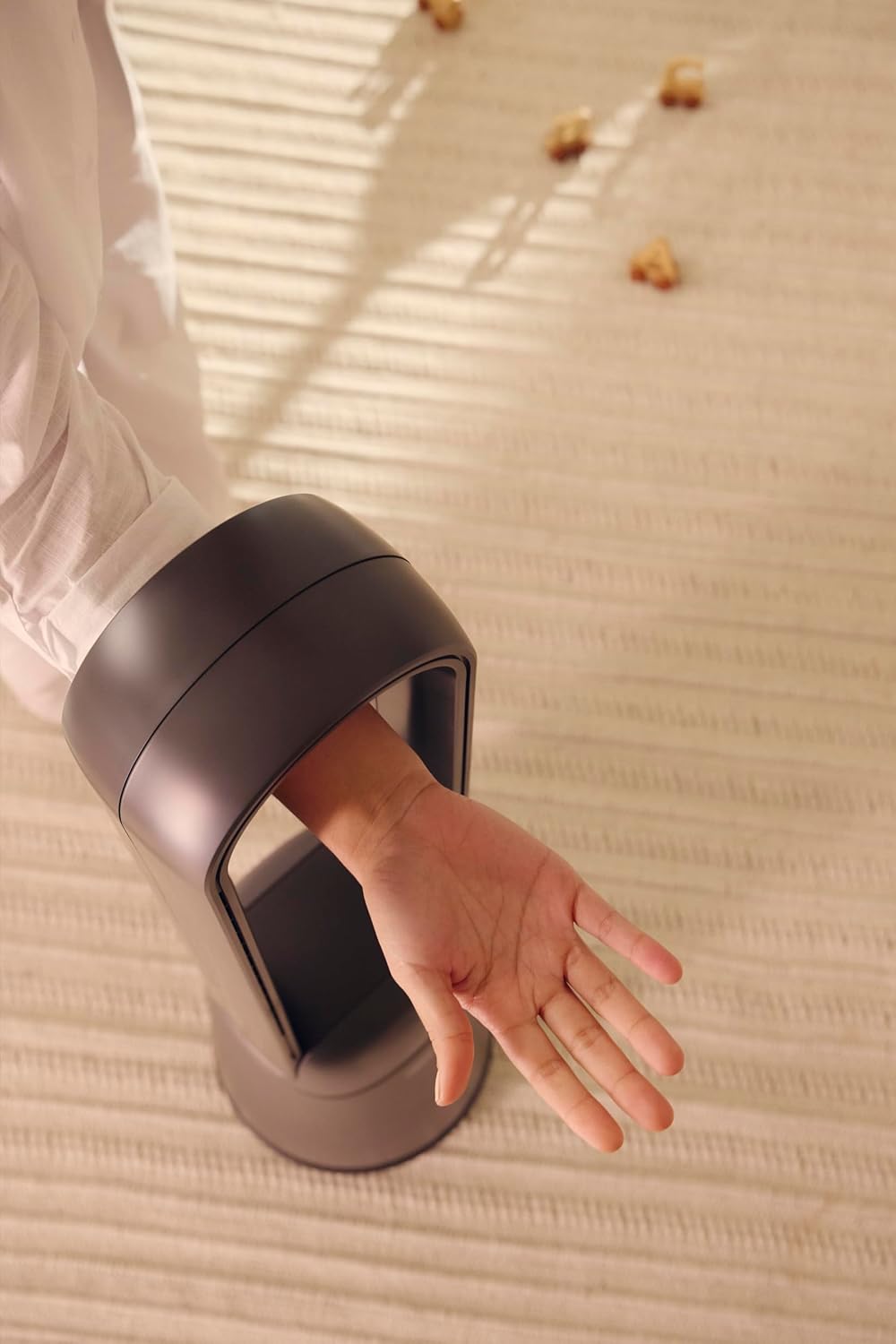
Figure 1: The bladeless design ensures safety, allowing a hand to pass through the air loop without obstruction.
2. Ngwaahịa gafereview
The Defy DBF300 is a bladeless fan designed for efficient and quiet air circulation. It features multiple speed settings, various wind modes, and convenient remote control operation.

Foto 2: N'ihu view of the Defy DBF300 Bladeless Fan.
Akụkụ ndị bụ isi:
- Bladeless design for enhanced safety and easy cleaning.
- Up to 20 wind speed settings for precise airflow control.
- Multiple wind modes: Strong, Natural, Sleep, and Smart adaptive wind.
- Oscillation function with 4 modes for wide area coverage.
- Wireless remote control for convenient operation.
- Integrated touch-sensitive control panel on the unit.
- Timer function for automatic shut-off, adjustable up to 8 hours.
- Whisper-quiet operation.
3. Nhazi
3.1 Nwepu
- Jiri nlezianya wepụ fan ahụ na nkwakọ ngwaahịa ya.
- Check for any signs of damage during transit. If damaged, do not operate and contact customer support.
- Ensure all components are present: the main fan unit and the remote control.
3.2 Ntinye
- Place the fan on a firm, level, and stable surface.
- Ensure there is adequate space around the fan for optimal airflow, avoiding obstructions like walls, furniture, or curtains.
- Do not place the fan in direct sunlight or near heat sources.
- Keep the fan away from areas where it might be exposed to water or high humidity.
3.3 Njikọ ike
- Before plugging in, ensure the power supply voltage dakọtara na akara ọkwa dị na fan ahụ.
- Insert the power plug firmly into a suitable electrical outlet.
4. Ntuziaka ọrụ
The Defy DBF300 Bladeless Fan can be operated using the touch control panel on the unit or the provided remote control.
4.1 Ogwe njikwa gafereview

Figure 3: The fan's touch control panel and digital display.
- Power Button (①): Turns the fan On or Off.
- Speed Adjustment (②): Increases or decreases wind speed.
- Mode Selection (③): Cycles through Strong, Natural, Sleep, and Smart adaptive wind modes.
- Oscillation (④): Activates or deactivates the oscillation function.
- Timer (⑤): Sets the auto shut-off timer.
- Ngosipụta dijitalụ: Shows current speed, mode, or timer setting.
4.2 Ime Remote

Figure 4: The remote control for the Defy DBF300 Bladeless Fan.
The remote control duplicates all functions available on the fan's control panel. Ensure the remote has working batteries (typically 2x AAA, not included) and is pointed towards the fan's receiver for optimal operation.
- bọtịnụ ike: Turns the fan On or Off.
- Ọsọ +/- bọtịnụ: Adjusts the wind speed (1-20).
- Bọtịnụ ọnọdụ: Cycles through Strong, Natural, Sleep, and Smart modes.
- Bọtịnụ oscillation: Toggles oscillation On/Off.
- Bọtịnụ ngụ oge: Sets the auto shut-off timer (1-8 hours).
4.3 Ọrụ izugbe
- Gbanyụọ/ Gbanyụọ: Press the Power button on the control panel or remote. The digital display will illuminate.
- Na-edozi ọsọ ikuku: Use the Speed adjustment buttons on the control panel or the +/- buttons on the remote. The display will show the current speed level (1-20).
- Selecting Wind Mode: Press the Mode button to cycle through the available modes:
- Ụdị siri ike: Provides a consistent, powerful airflow.
- Ụdị eke: Simulates natural breezes by varying wind speed.
- Ụdị ụra: Operates at a lower, quieter speed, gradually decreasing over time for comfortable sleep.
- Smart Adaptive Wind: Adjusts airflow based on ambient conditions (if sensor equipped, otherwise maintains a gentle flow).
- Activating Oscillation: Press the Oscillation button. The fan will begin to rotate horizontally. Press again to stop oscillation. There are 4 oscillation modes, which can be cycled through by repeatedly pressing the oscillation button.
- Ịtọ ngụ oge: Press the Timer button. Each press will increase the timer setting by 1 hour, up to a maximum of 8 hours. The fan will automatically turn off after the set time. To cancel the timer, cycle through until '00' or 'OFF' is displayed, or turn the fan off.
5. Nlekọta
Regular cleaning and proper storage will ensure the longevity and optimal performance of your Defy DBF300 Bladeless Fan.
5.1 Nhicha
- Wepụ ọkpọkọ fan ahụ mgbe niile site na ebe a na-esi n'ọkụ eletrik tupu e hichaa ya.
- Jiri nwayọ hichaa elu mpụta nke fan, damp akwa . Ejila ihe nchacha abrasive ma ọ bụ ihe mgbaze.
- For the air inlet and outlet, use a soft brush or a vacuum cleaner with a brush attachment to remove dust and debris. The bladeless design makes these areas easily accessible for cleaning.
- Ensure no water or liquid enters the internal components of the fan.
- Allow the fan to dry completely before plugging it back in and operating.
5.2 Nchekwa
- If storing the fan for an extended period, clean it thoroughly as per the instructions above.
- Store the fan in its original packaging or cover it to protect it from dust.
- Keep the fan in a cool, dry place, away from direct sunlight and extreme temperatures.
6. Nchọpụta nsogbu
Tupu ịkpọtụrụ nkwado ndị ahịa, biko rụtụ aka na ntuziaka nchọpụta nsogbu ndị a maka okwu nkịtị.
| Nsogbu | Ihe nwere ike ime | Ngwọta |
|---|---|---|
| Onye ofufe anaghị agbanwuo. | Enweghị ọkụ. Agbanyeghi eriri ike nke ọma. | Ensure the fan is plugged into a live electrical outlet. Lelee njikọ eriri ọkụ. |
| Ọkụ ikuku adịghị ike ma ọ bụ enweghị ikuku. | Akpọchiela ụzọ mbata/ụzọ ikuku. Ọsọ ndị fan agbakwaghị oke. | Check for obstructions and clear them. Mee ka ntọala ọsọ fan dịkwuo mma. |
| Njikwa anya anaghị arụ ọrụ. | Batrị anwụọla ma ọ bụ tinye na ezighi ezi. Mgbochi n'etiti ime ime na fan. | Replace batteries (2x AAA). Ensure correct polarity. Remove any objects blocking the signal path. Point remote directly at the fan. |
| Fan na-eme mkpọtụ na-adịghị ahụkebe. | Fan ọ bụghị n'elu larịị. Internal obstruction or damage. | Debe fan ahụ n'elu elu kwụsiri ike, dịkwa larịị. If noise persists, discontinue use and contact customer support. |
7. Nkọwapụta
| Nlereanya | DBF300 |
| Ụdị | Defy |
| Agba | Ọla isi awọ |
| Ike / Wattage | 36 watt |
| Akụkụ ngwaahịa (D x W x H) | 28D x 25W x 97H centimita |
| Ibu Ibu | 6.7 n'arọ |
| Njirimara Pụrụ Iche | Bladeless, Oscillation, Remote Control, Timer |
| Isi Iyi Ike | Igwe ọkụ eletrik |
8. Akwụkwọ ikike na nkwado
For detailed warranty information, please refer to the warranty card included with your product or visit the official Defy websaịtị. Debe ihe akaebe nke ịzụrụ ihe maka akwụkwọ ikike ọ bụla.
If you encounter any issues not covered in this manual or require further assistance, please contact Defy customer support. Contact details can typically be found on the Defy websaịtị ma ọ bụ nkwakọ ngwaahịa gị.
You can visit the Defy Store for more information: Defy Store on Amazon.