
1. Ngwaahịa gafereview
The bmani T16 Wireless Earbuds are designed for active lifestyles, offering an ultra-long 80-hour playtime with their dual LED display charging case. They feature immersive stereo sound with 10mm dynamic drivers, clear calls with dual microphones, and seamless Bluetooth connectivity. The adjustable over-ear hooks ensure a secure and comfortable fit for various activities. Easy button controls provide intuitive management of music and calls.
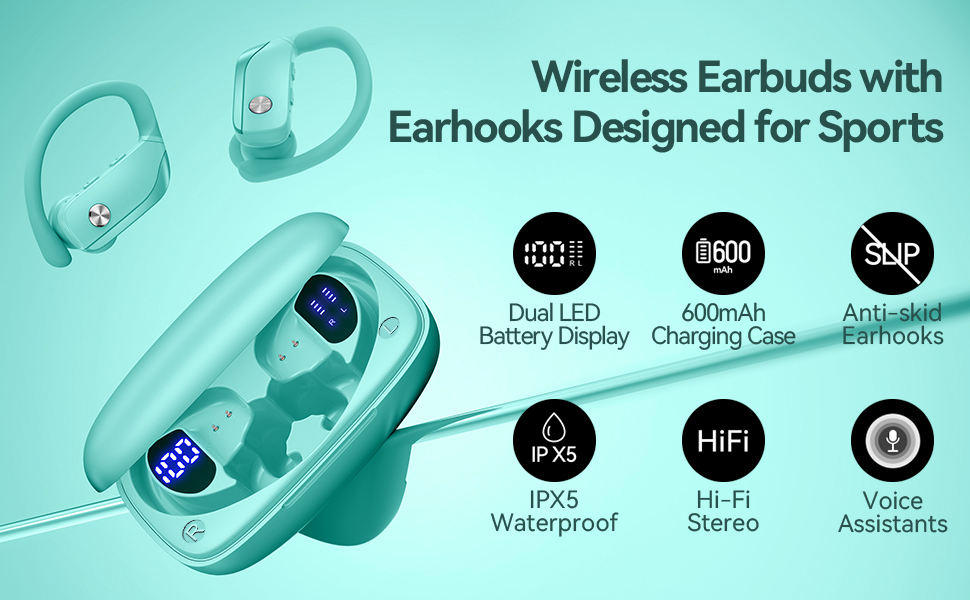
Image: bmani T16 Wireless Earbuds in their charging case, highlighting 80 hours of total playtime and the dual LED battery display.
2. Kedu ihe dị na Igbe ahụ
- bmani T16 Wireless Earbuds (Left and Right)
- Charging Case with LED Display
- Eartips (obere, ọkara, nnukwu nha)
- -Dị-C Nchaji USB
- Akwụkwọ ntuziaka (akwụkwọ a)

Image: The bmani T16 Wireless Earbuds, charging case, and various eartip sizes.
3. Ntọlite na Pairing
The bmani T16 earbuds feature one-step pairing for quick and easy connection to your devices.
- Mmakọ izizi: Mepee igbe nchaji. Igwe ntị ga-agbanye na-akpaghị aka wee banye ọnọdụ njikọta.
- Na ekwentị gị, mbadamba, ma ọ bụ ngwaọrụ ọzọ nwere Bluetooth, gaa na ntọala Bluetooth.
- Chọọ maka available devices and select "T16" from the list.
- Ozugbo ejikọrọ, ị ga-anụ ụda ọsọ ọsọ na-akwado ijikọ na-aga nke ọma.
- Njikọta akpaaka: After the initial pairing, the earbuds will automatically reconnect to the last paired device when removed from the charging case.

Image: Illustration of the one-step pairing process for the bmani T16 earbuds with a smartphone and other compatible devices.
Video: An official seller video demonstrating the features and pairing process of the bmani T16 Wireless Earbuds.
4. Ntuziaka maka iyi uwe
For optimal sound quality and a secure fit, follow these steps to wear your bmani T16 earbuds:
- Choose the correct eartip size (S, M, L) that best fits your ear canal.
- Place the flexible ear hook over the back of your ear.
- Jiri nwayọọ tinye ntị ntị n'ime ọwa ntị gị.
- Adjust the earbud and hook by twisting until you achieve a comfortable and secure fit. The ear hooks are designed to adapt to different ear shapes, minimizing slippage during movement.

Image: Visual guide demonstrating how to correctly position the bmani T16 earbuds with their flexible ear hooks for a secure fit.
5. Njikwa ọrụ
The bmani T16 earbuds feature intuitive physical buttons for easy control of your audio and calls.
- Gwuo/kwụsịtụ: Pịa otu ugboro na ntị abụọ ahụ.
- Track na-esote: Quick double-click on the Right (R) earbud.
- Gara aga Track: Quick double-click on the Left (L) earbud.
- Olu elu: Press the "+" button on the earbud.
- Olu ala: Press the "-" button on the earbud.
- Azịza/Kwụsị Oku: Pịa otu ugboro na ntị abụọ ahụ.
- Jụ oku: Hold either earbud button.
- Mee ka onye enyemaka olu rụọ ọrụ (Siri/onye enyemaka Google): Quick triple-click on either earbud.
- Gbanyụọ/ Gbanyụọ: Hold the button on either earbud.
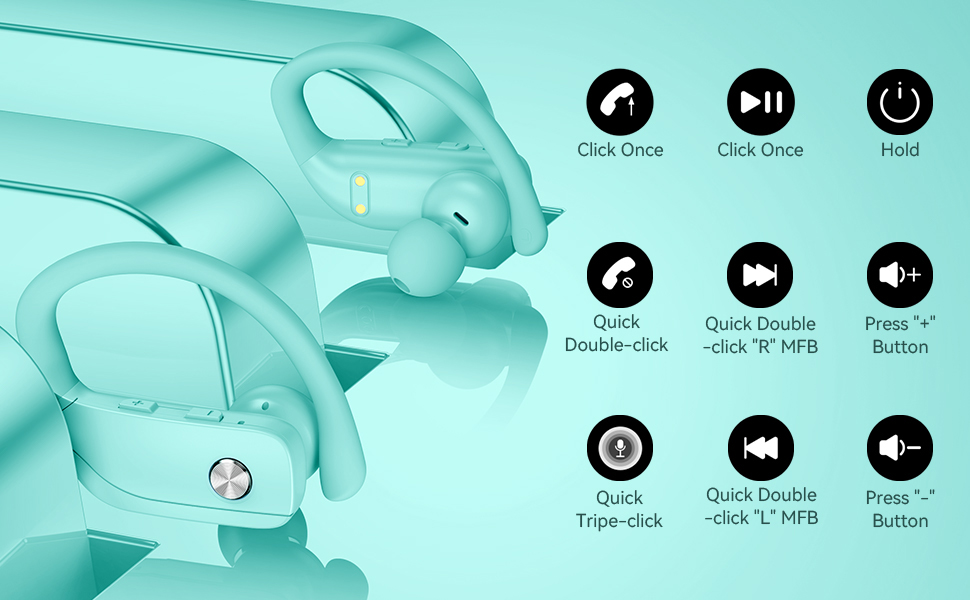
Image: Detailed diagram showing the various button controls on the bmani T16 earbuds for managing audio playback, calls, and voice assistant.
6. Ịchaji
The bmani T16 earbuds and charging case provide an impressive 80 hours of total playtime.
- Nchaji ntị ntị: Place the earbuds back into the charging case. The LED indicators on the case will show the charging status of each earbud. Each earbud offers up to 8 hours of playtime per charge.
- Ileba ikpe: Connect the provided Type-C charging cable to the charging port on the case and to a USB power source. The digital display on the left side of the case will show the remaining power percentage nke akpa nchaji.
- The charging case can recharge the earbuds multiple times, extending total usage to 80 hours.
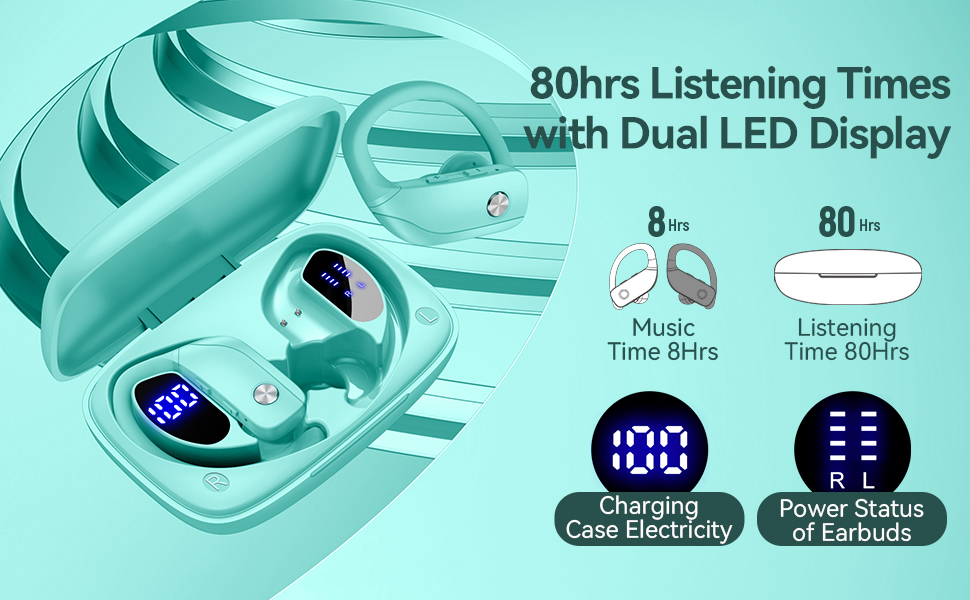
Image: The bmani T16 charging case with its dual LED digital display, indicating the battery percentage of the case and the charging status of each earbud.
Video: An official seller video showcasing the 48-hour playback (note: product features state 80H) and LED display of the bmani T16 Sport Earphones.
7. Nlekọta
- Jiri ákwà dị nro ma kpọọ nkụ hichaa ntị ntị na ihe ndị na-achaji ya mgbe niile iji gbochie uzuzu na ihe ndị na-emebi emebi.
- Avoid exposing the earbuds to extreme temperatures or direct sunlight for prolonged periods.
- Debe ekwe ntị n'ime akpa chaja ha mgbe a naghị eji ha iji chebe ha ma hụ na ha na-achaji chaja.
- The earbuds are sweat-resistant and dust-resistant, but avoid submerging them in water.
8. Nchọpụta nsogbu
- Igwe ntị anaghị ejikọta: Ensure both earbuds are removed from the case and are powered on. Turn off Bluetooth on your device and turn it back on. If issues persist, try resetting the earbuds (refer to the full user manual for specific reset instructions).
- Enweghị ụda: Check the volume level on both your device and the earbuds. Ensure the earbuds are properly connected to your device via Bluetooth.
- Nsogbu ịchaji: Verify that the charging cable is securely connected to both the case and the power source. Ensure the charging contacts on the earbuds and inside the case are clean and free of debris.
- Njikọ anaghị akwụsi ike: Ensure your device is within the Bluetooth range (approximately 33 feet/10 meters) and there are no significant obstacles between the earbuds and your device.
9. Nkọwapụta
| Aha Nlereanya | T16 |
| Teknụzụ Njikọta | Ikuku (Bluetooth 5.0) |
| Oge egwuregwu (Earbuds) | Ruo awa 8 kwa ụgwọ |
| ngụkọta oge egwuregwu (ya na ikpe) | Ruo awa iri abụọ |
| Ụdị ọkwọ ụgbọ ala ọdịyo | 10mm Dynamic ọkwọ ụgbọ ala |
| Atụmatụ Njikwa Mkpọtụ | Noise Cancellation (Dual Mics) |
| Ọkwa Nguzogide mmiri | Sweat-resistant and Dust-resistant |
| Usoro njikwa | Njikwa bọtịnụ |
| Ntinye ntị | N'elu Ntị |
| Ibu Ibu | 2 ounces |
10. Akwụkwọ ikike na nkwado
bmani offers a lifetime warranty for permanent replacement of damaged, defective, upgraded, or lost products. Please refer to the warranty card included in your package for activation details and terms. For further assistance, please contact bmani customer support.