
bmani T16
bmani Wireless Earbuds User Manual
Ụdị: T16
Brand: bmani
Okwu mmalite
Welcome to the bmani Wireless Earbuds user manual. These Bluetooth headphones are designed for comfort and performance, featuring a secure over-ear fit, long battery life, and intuitive controls. This manual will guide you through setting up, operating, and maintaining your new earbuds.
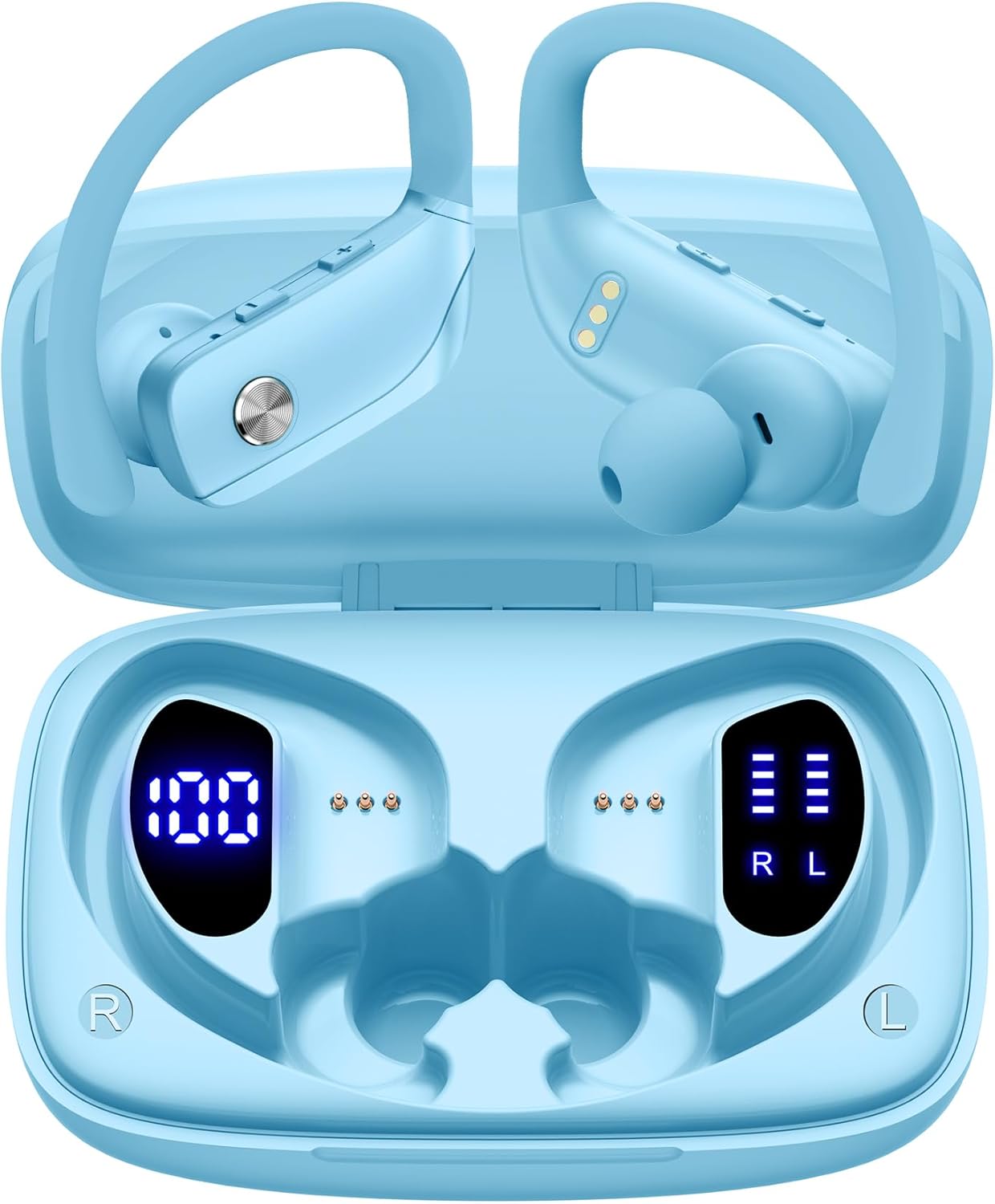
Image: The bmani Wireless Earbuds in their open sky blue charging case, showcasing the earbuds and the case's interior.
Kedu ihe dị na Igbe ahụ
- Igwe ntị ikuku ikuku
- Nchaji case
- Eartips (three size options: L, M, S)
- Ụdị-C USB
- Akwụkwọ ntuziaka (akwụkwọ a)

Image: This image displays all the items included in your bmani Wireless Earbuds package: the two wireless earbuds, their charging case, a set of three different sized eartips (L, M, S), a Type-C charging cable, and the user manual.
Ngwaahịa gafereview & Atụmatụ
The bmani Wireless Earbuds are engineered for an exceptional audio experience with user-friendly features.
Dual LED Displays Charging Case
The charging case features dual LED displays. The left display shows the remaining battery power of the case in percentage. The right side indicates the charging process of each earbud with four grids, each representing 25% of the bud's power. The LED indicator light will flash during charging.

Image: This image highlights the dual LED digital display on the charging case. The left screen shows the charging case's battery capacity as a percentage, while the right screen displays the power status of the left (L) and right (R) earbuds using four bars each.
Ogologo ndụ batrị
Enjoy extended listening sessions with up to 8 hours of music time per earbud and an additional 40 hours provided by the 600mAh charging case, totaling 48 hours of playback.

Image: This diagram illustrates the impressive battery life: 8 hours of music time per earbud (50mAh each) and an additional 40 hours of listening time provided by the 600mAh charging case, totaling 48 hours of playback.
Bluetooth 5.0 and Hi-Fi Stereo Sound Quality
Equipped with advanced Bluetooth 5.0 technology, these earbuds provide a clear and smooth connection with extended range and fewer dropouts, ensuring crystal-clear calls and uninterrupted music listening. The 10mm speakers deliver Hi-Fi stereo sound.

Image: This image visually represents the 10mm speakers within the earbuds, emphasizing their capability to deliver Hi-Fi stereo sound.

Image: This image emphasizes the Bluetooth 5.0 technology, offering extended range and fewer dropouts, and the integration with voice assistants like Siri.
Designed for Sports (IPX5 Water Resistant)
These sport headphones are designed to stay securely in place during long hours of training, preventing shifting or falling out. They come with flexible earhooks and three pairs of ear caps (S, M, L) to ensure a comfortable and suitable fit, even during intense activities like camping, running, or working out. They are also IPX5 water-resistant, protecting them from splashes and sweat.

Image: This image shows a woman wearing the earbuds during exercise, highlighting their secure fit. An inset graphic demonstrates the flexible earhooks and the three included eartip sizes (L, M, S) for personalized comfort.

Image: This infographic summarizes key features: Dual LED Battery Display, 600mAh Charging Case, Anti-skid Earhooks, IPX5 Waterproof rating, Hi-Fi Stereo sound, and Voice Assistant compatibility.
Melite
Ịchaji ihe ntị na akpa
Tupu i jiri ya nke mbụ, chajie ma ekweisi na ihe mkpuchi chaja ahụ nke ọma.
- Connect the provided Type-C cable to the charging port on the back of the case.
- Tinye nsọtụ nke ọzọ n'ime isi iyi ike USB.
- Ngosipụta LED dị na ikpe ahụ ga-egosi ọganihu chaja.
- Once fully charged, the display will show 100% for the case and full bars for both earbuds.
Pairing with Your Device (One-step Pairing)
The bmani earbuds feature automatic pairing for convenience.
- Open the charging case and take out both earbuds. They will automatically power on and attempt to pair with each other.
- On your device (smartphone, tablet, laptop, etc.), enable Bluetooth.
- Chọọ maka "T16" in the list of available Bluetooth devices and select it to connect.
- Ozugbo ejikọrọ, ị ga-anụ ngwa ngwa odiyo, na ntị ntị ga-adị njikere maka ojiji.
- Eriri ntị ndị a ga-ejikọghachi na ngwaọrụ ikpeazụ ejikọtara ozugbo mgbe ewepụrụ ha na akpa ahụ.

Image: This image demonstrates the one-step pairing process, showing the earbuds connected to a smartphone. It also highlights their wide compatibility with various Bluetooth-enabled devices, including notebooks, TVs, desktops, smartwatches, and tablets.
Ntuziaka ọrụ
Yi akwa ntị
For optimal sound and comfort, ensure the earbuds are worn correctly.
- Put the ear hook over the back of your ear.
- Insert the ear cap into your ear canal.
- Adjust by twisting the earbud for a comfortable and secure fit.

Image: This visual guide provides three simple steps for wearing your earbuds: 1. Place the ear hook over your ear. 2. Insert the ear cap into your ear. 3. Adjust the earbud by twisting it for a secure and comfortable fit.
Njikwa
The bmani earbuds feature intuitive button controls.
| Omume | Ọrụ |
|---|---|
| Pịa otu ugboro | Kpọọ/Kwụsị Egwu, Zaa/Kwụsị Oku |
| Quick Double-click (R) | Track na-esote |
| Quick Double-click (L) | Egwu gara aga |
| Press "+" Button | Elu elu |
| Press "-" Button | Mpịakọta ọnụ |
| Quick Triple-click | Mee ka onye enyemaka olu rụọ ọrụ |
| Jide | Gbanyụọ/ Gbanyụọ |

Image: This image illustrates the dual audio controls on the earbuds. It shows the physical volume buttons (+/-) and a diagram explaining single click for play/pause, double click for track navigation, and holding the button for power on/off.

Image: This infographic details the various controls: single click for call answer/end and play/pause, double click for next/previous track, pressing +/- for volume, and triple click for voice assistant.
Nlekọta
To ensure the longevity and optimal performance of your bmani Wireless Earbuds, follow these maintenance guidelines:
- Nhicha: Jiri ákwà dị nro, kpọrọ nkụ, na nke na-enweghị ihe e ji achaji ákwà hichaa ntị na ihe e ji chaja mgbe niile. Ejila kemịkalụ siri ike ma ọ bụ ihe ndị na-eme ka ọ dị nro.
- Ọla ntị: Remove and clean the eartips periodically. You can gently wash them with mild soap and water, then ensure they are completely dry before reattaching.
- Mmiri Nguzogide: The earbuds are IPX5 water-resistant, meaning they can withstand splashes and sweat. Do not submerge them in water or expose them to heavy rain. Ensure they are dry before placing them back in the charging case.
- Nchekwa: When not in use, store the earbuds in their charging case to protect them from dust and damage.
- Ịchaji: Use only the provided Type-C cable for charging. Avoid extreme temperatures during charging and storage.
Nchọpụta nsogbu
If you encounter any issues with your bmani Wireless Earbuds, please refer to the following common solutions:
Earbuds not pairing with each other or with device:
- Gbaa mbọ hụ na ejirila ekwe ntị abụọ a chaja nke ọma.
- Place both earbuds back into the charging case, close the lid, wait a few seconds, then open the lid and take them out again. This often resets the pairing.
- On your device, forget or delete "T16" from your Bluetooth device list. Then, try the pairing process again from step 1.
- Gbaa mbọ hụ na ọ nweghị ngwaọrụ Bluetooth ọzọ na-egbochi njikọ ahụ.
Enweghị ụda ma ọ bụ obere olu:
- Lelee ọkwa olu dị na ma ntị ekwe ntị gị ma ngwaọrụ ejikọrọ gị.
- Gbaa mbọ hụ na ekwe ntị na-anọdụ ala nke ọma na ntị gị.
- Clean any debris from the eartips or earbud speakers.
- Jikọọkwa ntị ntị na ngwaọrụ gị.
Nchaji anaghị akwụ ụgwọ:
- Gbaa mbọ hụ na ejikọrọ eriri Type-C nke ọma na ikpe ahụ yana isi iyi ike.
- Gbalịa ihe nkwụnye ọkụ USB ma ọ bụ ọdụ ụgbọ mmiri dị iche.
- Lelee eriri chaja maka mmebi ọ bụla.
Isi ntị na-ada:
- Try different sizes of eartips provided in the box to find the best fit for your ears.
- Ensure the ear hooks are correctly positioned over your ears.
Nkọwapụta
| Njirimara | Nkọwa |
|---|---|
| Aha Nlereanya | T16 |
| Teknụzụ Njikọta | Ikuku (Bluetooth 5.0) |
| Ndụ batrị | Up to 8 hours (earbuds), 40 hours (with charging case) |
| Ịchaji ikike | 600mAh |
| Ike batrị earbud | 50mAh (nke ọ bụla) |
| Mmiri Nguzogide | IPX5 |
| Ụdị njikwa | Njikwa bọtịnụ |
| Ihe onwunwe | Plastic |
| Ibu Ibu | 2 ounces |
| Akụkụ ngwaahịa | 3.54 x 2.36 x 0.79 sentimita asatọ |
| Ngwa gụnyere | Charging Case, Eartip, Type-C Cable, User Manual, Wireless Earbuds |
| Ngwa dakọtara | All Bluetooth-enabled mobile phones, tablets, laptops, computers, audiobooks, TV, and all devices with Bluetooth 5.0 |
Akwụkwọ ikike & Nkwado
bmani products are designed with quality and reliability in mind. For specific warranty information or technical support, please refer to the contact details provided on the product packaging or visit the official bmani websaịtị. Debe akwụkwọ nnata ịzụrụ maka akwụkwọ ikike.
Ask a question about this manual
Ask about setup, troubleshooting, compatibility, parts, safety, or missing instructions. Manuals+ will review the question and use this page’s manual context to help answer it.