
WUBEN X4
WUBEN X4 EDC Flat Flashlight Instruction Manual
Nlereanya: X4
Okwu mmalite
Thank you for choosing the WUBEN X4 EDC Flat Flashlight. This compact and versatile lighting tool is designed for various applications, offering powerful illumination and multiple functional modes. This manual provides essential information for proper setup, operation, and maintenance to ensure optimal performance and longevity of your device.

Image: The WUBEN X4 EDC Flat Flashlight, showcasing nhazi ya dị obere na isi iyi ọkụ abụọ.
Atụmatụ igodo
- Portable Multi-functional Design: Dual light source with a main light offering up to 1500 lumens and a side light providing warm white and RGB options.
- Njikwa kensinammuo: Features a toggle switch for mode selection (lock, side light, main light, moonlight) and a rotary switch for stepless brightness dimming and RGB color control.
- Mgbanwe ọdụ Tactical: Integrated switch for instant 1500-lumen main light activation.
- Igwe Ọdụdọ Magnetik: Allows for hands-free attachment to metal surfaces.
- Na-adịgide adịgide ma dị fechaa: Constructed from aluminum, weighing only 137 grams (4.8 oz) with batteries, and measuring 1.5 x 1 x 3.8 inches.
- Ogo IP68 enweghị mmiri: Built to withstand immersion in water up to 2 meters for 1 hour, and resistant to drops, dust, and rain.
- Ndụ batrị agbatịkwuru: Up to 285 hours of operation with a 3350mAh high-capacity battery, fully rechargeable in 2.5 hours via USB-C.
- Ihe ngosi batrị: Monitor battery level at any time.
Ihe ngwugwu
Gbaa mbọ hụ na ihe niile dị mgbe ị na-ewepụ igbe:
- WUBEN X4 Flashlight x 1
- USB-C eriri USB x 1
- Lanyard x 1
- Belt Clip x 1 (Pre-installed or included separately)
- Akwụkwọ ntuziaka onye ọrụ x 1
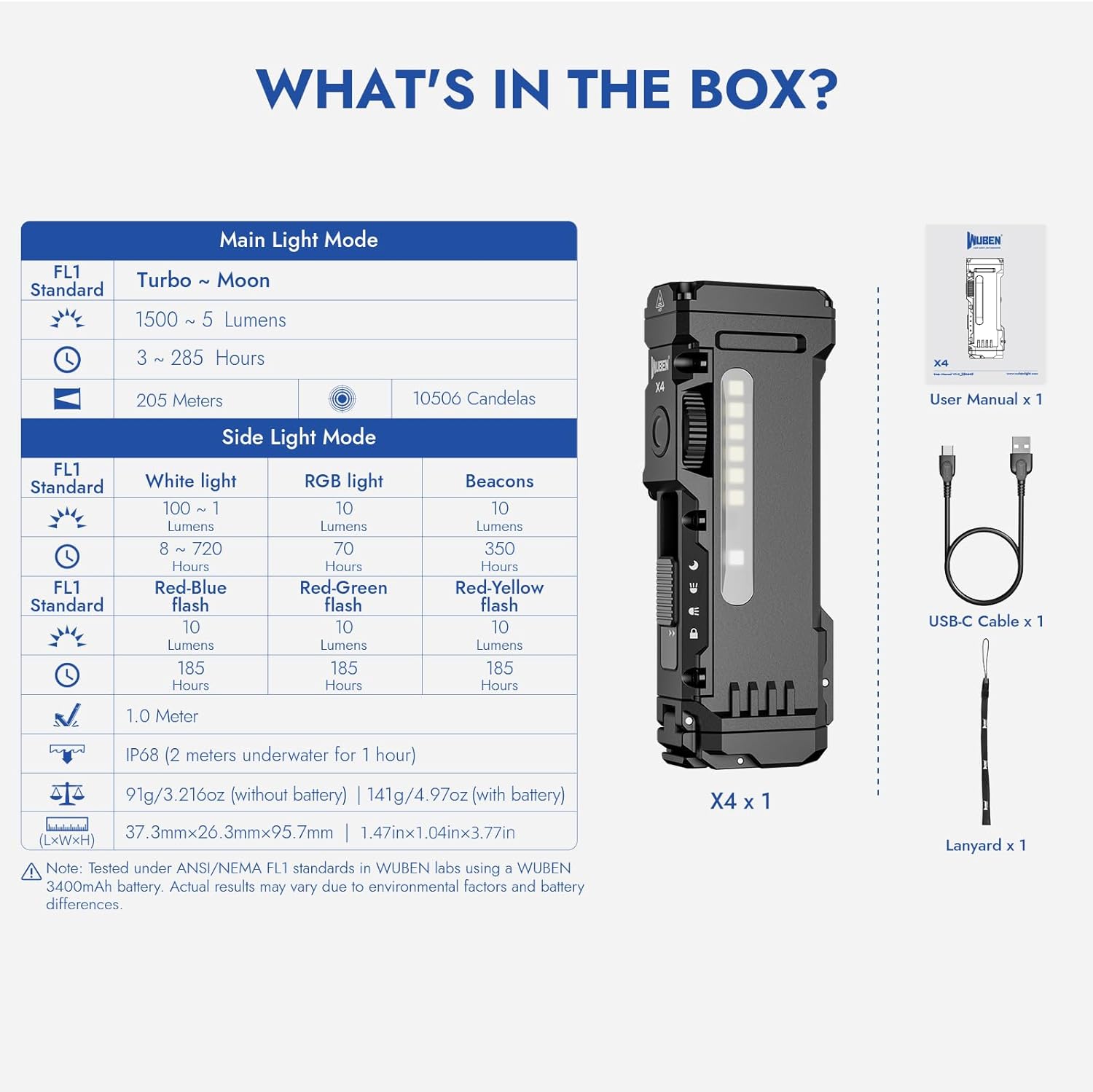
Image: Visual representation of the WUBEN X4 flashlight and its included accessories.
Melite
Ntinye batrị na Nnọchi
- Locate the battery compartment at the tail end of the flashlight.
- Slide the lock switch to the unlocked position (if applicable) and open the battery cap.
- Insert the 18650 Lithium-Ion battery, ensuring the positive (+) and negative (-) terminals align correctly with the markings inside the compartment.
- Close the battery cap securely and slide the lock switch back to the locked position.
Ịchaji
- Slide the mode selection switch to the 'Moonlight' position to expose the USB-C charging port.
- Connect the provided USB-C charging cable to the flashlight's port and a compatible USB power source.
- The battery indicator lights will show the charging status. A full charge typically takes 2.5 hours.
- Once charging is complete, return the mode selection switch to the desired position, ensuring the USB-C port is covered for water resistance.
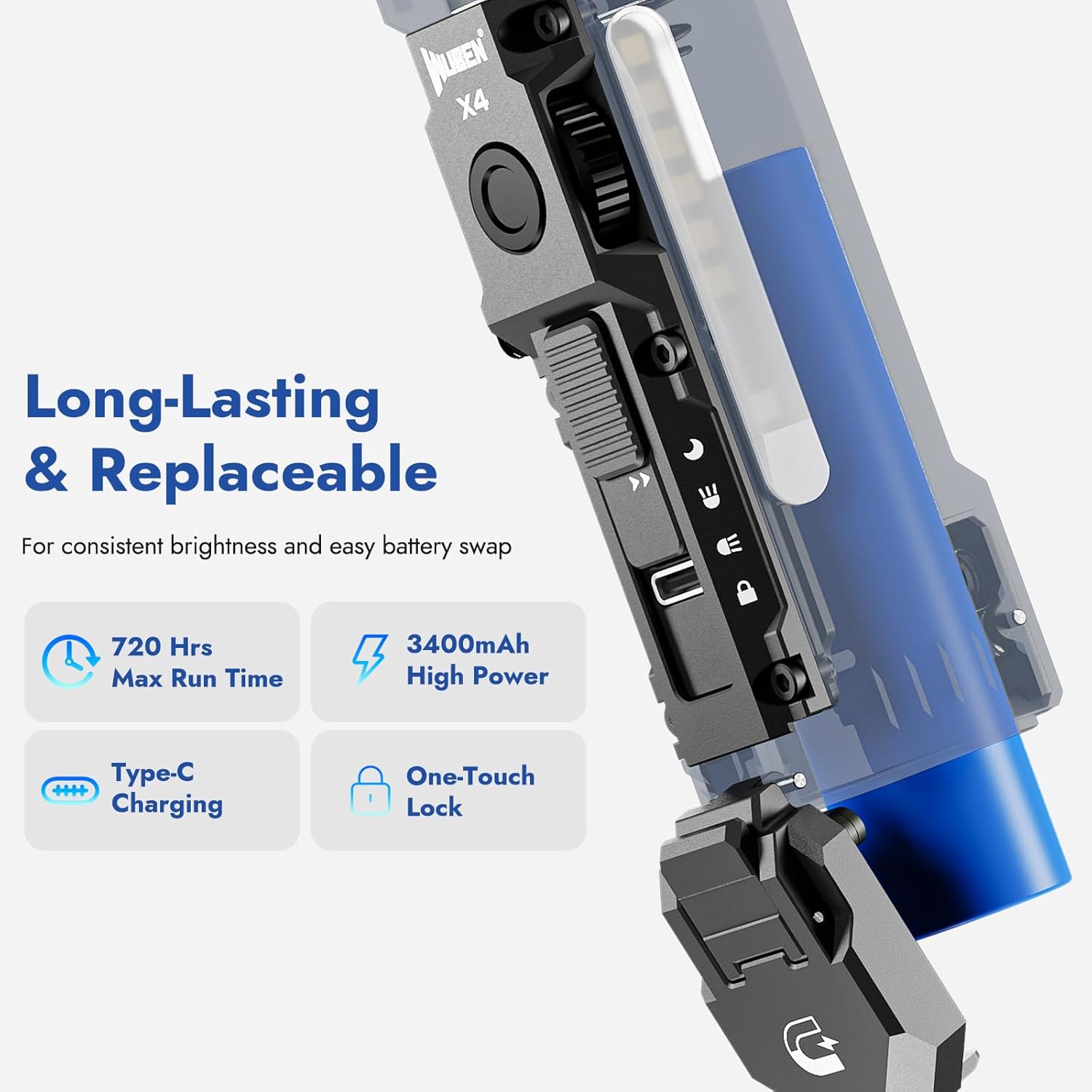
Image: The WUBEN X4 flashlight highlighting its replaceable battery and USB-C charging port.
Ntuziaka ọrụ
Mode Selection (Toggle Switch)
The toggle switch on the side of the flashlight allows you to select between different lighting modes:
- Ụdị mkpọchi: Prevents accidental activation. Ensure the switch is in this position when not in use.
- Ụdị ìhè akụkụ: Activates the side LED panel for area illumination.
- Ụdị ìhè isi: Activates the primary front LED for focused beam illumination.
- Ụdị ìhè ọnwa: Provides a very low light output, ideal for preserving night vision or discreet use. This position also exposes the USB-C charging port.
Brightness Adjustment (Rotary Switch)
Once a light mode (Main or Side) is selected, use the rotary switch to adjust the brightness steplessly. Rotate clockwise to increase brightness and counter-clockwise to decrease it.
RGB Light Modes (Side Light)
In Side Light Mode, press and hold the rotary switch to cycle through different RGB colors. Rotate the switch to fine-tune the color or select specific flashing patterns (e.g., red-blue flash for emergencies).

Image: The WUBEN X4 showcasing its multi-use side light with warm white and RGB color options.
Mgbanwe ọdụ Tactical
The integrated tactical tail switch provides quick access to maximum brightness:
- Instant 1500 Lumens: Press the tactical tail switch to instantly activate the main light at 1500 lumens, regardless of the current mode (Main Light or Side Light).
- Nwa oge na: Lightly press and hold the tactical switch for momentary high output. Release to turn off.
- Ụdị strok: Double-press the tactical switch to activate strobe mode for signaling or self-defense.

Image: Diagram illustrating the functions of the innovative tactical tail switch on the WUBEN X4.
Magnetic Tail Cap and Clip
The magnetic tail cap allows the flashlight to be securely attached to metal surfaces, providing hands-free illumination. The extended clip offers versatile carrying options, allowing attachment to hats, waistbands, or backpacks.
Video: Demonstration of the WUBEN X4's back clip, lanyard, and magnetic tail features for hands-free use.
Nlekọta
- Nhicha: Jiri nwayọ hichaa ahụ ọkụ, damp akwa . Ejila ihe nchacha abrasive ma ọ bụ ihe mgbaze.
- Nlekọta batrị: Recharge the battery regularly to maintain its lifespan. If storing for an extended period, charge the battery to approximately 50% and store in a cool, dry place.
- Nguzogide mmiri: Ensure the USB-C port cover is properly sealed when not charging to maintain IP68 water resistance.
- Nchekwa: When not using the X4 flashlight, always adjust the slide switch to the locked position to prevent accidental activation and battery drain.
Nkọwapụta
| Ụdị | WUBEN |
| Nlereanya | X4 |
| Main Light Output | Ihe ruru 1500 lumens |
| Side Light Output | 1 to 100 Lumens (Warm Light), RGB |
| Ogologo Ogologo | Ruo mita 205 |
| Isi Iyi Ike | Battery Powered (3350mAh Lithium Ion) |
| Nchaji ọdụ ụgbọ mmiri | USB-C |
| Oge Nchaji | Ihe ruru. awa 2.5 |
| Oge Max Na-agba | Ruo awa iri abụọ |
| Mmiri Nguzogide | IP68 (ihe mgbochi mmiri) |
| Ihe onwunwe | Aluminom |
| Akụkụ | 1.5"D x 3.8"W x 1"H |
| Ibu Ibu | 9.9 ounces (0.28 Kilogram) |

Image: The WUBEN X4 flashlight demonstrating its IP68 waterproof capability.
Akwụkwọ ikike & Nkwado
For warranty information, technical support, or any inquiries regarding your WUBEN X4 flashlight, please refer to the official WUBEN websaịtị ma ọ bụ kpọtụrụ ndị ahịa ha ozugbo. Debe akwụkwọ nnata ịzụrụ maka akwụkwọ ikike.
Gaa leta WUBEN Store maka ozi ndị ọzọ.
Ask a question about this manual
Ask about setup, troubleshooting, compatibility, parts, safety, or missing instructions. Manuals+ will review the question and use this page’s manual context to help answer it.