
1. Okwu mmalite
Thank you for choosing the THOMSON WS902DUO Cosy Bookshelf Speakers. These active stereo speakers deliver a powerful 150W audio experience with deep bass from two 10 cm woofers. They offer versatile connectivity options including Bluetooth 5.3, Optical, HDMI (ARC), RCA, and USB playback. The included remote control and side panel adjustments provide precise control over your audio. Please read this manual carefully before use to ensure proper operation and to maximize your listening experience.

Image 1.1: THOMSON WS902DUO Bookshelf Speakers in a living space, showcasing their elegant wood finish.
2. Ntuziaka nchekwa dị mkpa
- Read these instructions thoroughly before operating the product.
- Debe ntuziaka ndị a maka ntụnye aka n'ọdịnihu.
- Ṅaa ntị ịdọ aka ná ntị niile na ngwaahịa yana na ntuziaka ọrụ.
- Soro ntuziaka niile.
- Ejila ngwa a n'akụkụ mmiri.
- Jiri akwa kpọrọ nkụ hichaa naanị.
- Akwụsịla oghere ikuku ikuku ọ bụla. Wụnye dị ka ntuziaka onye nrụpụta si dị.
- Awụnyela n'akụkụ ebe okpomọkụ ọ bụla dị ka radiators, ndekọ okpomọkụ, stovu, ma ọ bụ ngwa ndị ọzọ (gụnyere amplifiers) nke na-emepụta okpomọkụ.
- Emebila ebumnuche nchekwa nke plọg a na-agbapụta ma ọ bụ ntọ ala. Plọg nwere agụba abụọ nwere otu sara mbara karịa nke ọzọ. Ụdị nkwụnye ala nwere agụba abụọ na oghere mgbada nke atọ. A na-enye agụba obosara ma ọ bụ nke atọ maka nchekwa gị. Ọ bụrụ na plọg e nyere adabaghị n'ime oghere gị, kpọtụrụ onye na-ahụ maka ọkụ eletrik ka ọ dochie ebe ahụ ochie.
- Chebe eriri ọkụ ka ị ghara ịgagharị ma ọ bụ tuo ya, ọkachasị na plọg, ebe nchekwa dị mma, na ebe ha si na ngwa ahụ pụta.
- Jiri naanị mgbakwunye / ngwa ndị nrụpụta akọwapụtara.
- Jiri naanị ụgbọ ala, nkwụ, tripod, bracket, ma ọ bụ tebụl nke onye nrụpụta akọwapụtara, ma ọ bụ jiri ngwa ree ya. Mgbe a na-eji ụgbọ ala, jiri nlezianya mee ihe mgbe ị na-ebugharị nchikota cart/ngwa ka ịzenarị mmerụ ahụ site na njedebe.
- Kwupu ngwa a n'oge oke mmiri ozuzo ma ọ bụ mgbe ejighi ya ogologo oge.
- Tụtụ aka n'aka ndị ọrụ ruru eru. A na-achọ ọrụ mgbe ngwa ahụ mebiri emebi n'ụzọ ọ bụla, dị ka eriri ọkụ ma ọ bụ plọg mebiri emebi, mmiri mmiri wụfuru ma ọ bụ ihe dabara n'ime ngwa ahụ, ekpughere ngwa ahụ na mmiri ozuzo ma ọ bụ mmiri, anaghị arụ ọrụ nke ọma. , ma ọ bụ ahapụla ya.
3. Ihe ngwugwu
Biko lelee na etinyere ihe niile edepụtara n'okpuru na ngwugwu gị:
- THOMSON WS902DUO Bookshelf Speakers (2 units)
- Njikwa anya
- Igwe ọkụ ọkụ
- USB Njikọ Ọkà Okwu
- 3.5mm Jack to RCA Adapter Cable
- Akwụkwọ ntuziaka (akwụkwọ a)

Image 3.1: Packaging of the THOMSON WS902DUO Bookshelf Speakers.
4. Ngwaahịa gafereview
4.1. Side Control Panel (Active Speaker)
The active speaker features a side control panel for easy access to essential functions.

Image 4.1: Side control panel.
- Njikwa Bass: Na-agbanwe mmepụta ugboro ole na ole.
- Njikwa Treble: Na-agbanwe mmepụta ugboro ugboro dị elu.
- Njikwa olu: Na-agbanwe olu ụda niile.
- Ike mgba ọkụ: Turns the speakers on or off.
- Ihe ngosi LED: Shows the current status or selected input.
4.2. Ogwe azụ (Ọkà okwu na-arụ ọrụ)
The rear panel of the active speaker provides all necessary input and output connections.
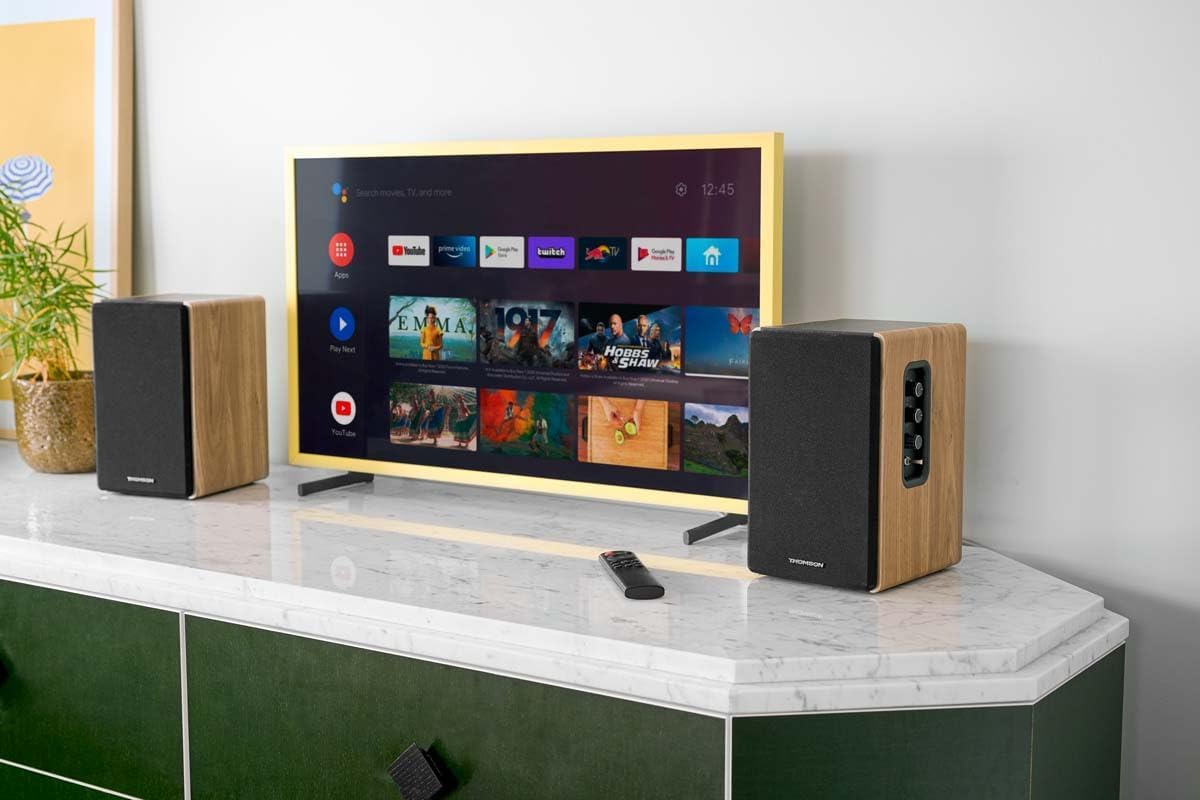
Image 4.2: Rear panel connections.
- Ntinye anya: For connecting digital audio sources like TVs, game consoles, or Blu-ray players.
- Aux In (RCA): For connecting analog audio sources such as turntables, CD players, or PCs. A 3.5mm jack adapter is provided.
- TV Audio (HDMI ARC): For connecting to a TV's HDMI ARC port, allowing TV remote control of the speaker volume.
- Egwuregwu USB: Maka ịkpọ MP3 files ozugbo site na draịvụ USB.
- Wepụ: For connecting an external active subwoofer for enhanced bass.
- Mpụta okwu: Na-ejikọ na ọkà okwu na-anaghị arụ ọrụ.
- Ntinye ike: Jikọọ na isi ike ọkọnọ.
4.3. Remote Control
The remote control provides convenient access to all speaker functions from a distance.

Image 4.3: Remote control.
- Bọtịnụ ike: Na-agbanyụ/gbanyụọ ndị ọkà okwu.
- Oghere bọtịnụ: Mebie/na-ewepụ ụda olu.
- Mpịakọta +/-: Na-edozi ọkwa olu.
- Playback Controls (Play/Pause, Skip): For USB playback.
- Source Selection Buttons (OPT, BT, ARC, USB, LINE): Na-ahọrọ isi iyi ntinye ọdịyo.
- EQ Mode Buttons (MOVIE, MUSIC, DIALOG): Selects preset equalization modes.
5. Nhazi
5.1. Ntinye okwu
Place the speakers on a stable, flat surface such as a bookshelf, desk, or speaker stands. For optimal stereo imaging, position the speakers equidistant from your listening position and at ear level. Ensure there is adequate space around the speakers for ventilation.
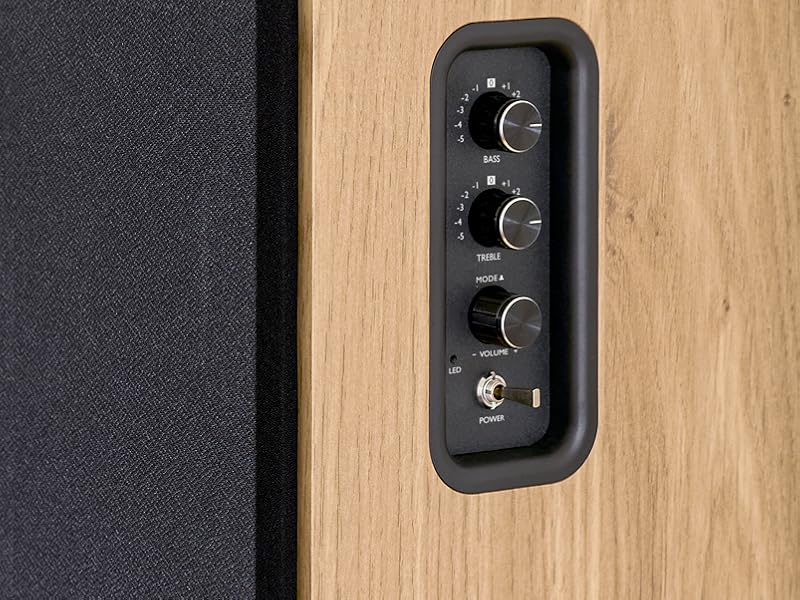
Image 5.1: Recommended speaker placement on a desk.
5.2. Ijikọ ndị ọkà okwu
- Identify the active speaker (with controls and inputs) and the passive speaker.
- Connect the included speaker cable from the speaker output terminals on the active speaker to the input terminals on the passive speaker. Ensure correct polarity (+ to + and - to -).
5.3. Ijikọ Isi mmalite ọdịyo
Connect your desired audio sources to the active speaker using the appropriate cables.
- Ntinye anya: Use an optical cable to connect your TV, game console, or Blu-ray player to the OPTICAL IN port.
- HDMI (ARC) Input: Use an HDMI cable to connect your TV's HDMI ARC port to the TV AUDIO (HDMI) port on the speaker. This allows your TV remote to control the speaker volume.
- RCA (AUX) Input: Use an RCA cable (or the provided 3.5mm jack to RCA adapter) to connect devices like a turntable, CD player, or PC to the AUX IN (RCA) ports.
- Ntinye USB: Fanye draịva USB nwere MP3 files into the USB PLAY port.

Image 5.2: Speakers connected to a television via HDMI ARC.
5.4. Njikọ Bluetooth
- Gbaa mbọ hụ na agbanyere igwe okwu.
- Press the 'BT' button on the remote control or the side panel to select Bluetooth input. The LED indicator will flash, indicating pairing mode.
- Na ekwentị gị, mbadamba, ma ọ bụ kọmputa, mee ka Bluetooth rụọ ọrụ ma chọọ ngwaọrụ dị.
- Select "THOMSON WS902DUO" from the list of devices.
- Ozugbo ejikọtara ya, ihe ngosi LED ga-akwụsị ịcha ọkụ ma nọgide na-esi ike. Ị nwere ike na-enuba audio na ikuku.
5.5. Subwoofer Connection (Optional)
If you wish to enhance bass further, connect an active subwoofer to the 'Sub Out' port on the rear panel of the active speaker using an RCA cable.
6. Ntuziaka ọrụ
6.1. Gbanyụọ / gbanyụọ
Use the power switch on the side control panel or the power button on the remote control to turn the speakers on or off.
6.2. Nhọrọ Isi mmalite
Press the corresponding source button on the remote control (OPT, BT, ARC, USB, LINE) to switch between connected audio inputs. The LED indicator will change to reflect the selected source.
6.3. Njikwa olu
Adjust the volume using the 'Volume' knob on the side control panel or the 'VOL+/-' buttons on the remote control.
6.4. Ndozi ọdịyo
Fine-tune the sound to your preference:
- Bass/Table: Use the 'Bass' and 'Treble' knobs on the side control panel to adjust the low and high frequencies.
- Ụdị EQ: Press the 'MOVIE', 'MUSIC', or 'DIALOG' buttons on the remote control to select preset equalization settings optimized for different content types.
6.5. USB playback
When a USB flash drive with MP3 files is inserted and USB source is selected, the speakers will automatically begin playing. Use the playback control buttons on the remote control (Play/Pause, Skip) to manage your music.
6.6. Bluetooth arụ ọrụ
After successful pairing (see Section 5.4), you can stream audio from your Bluetooth device. Use your device's controls or the speaker's remote control for playback and volume adjustments.
7. Nlekọta
Mmezi kwesịrị ekwesị na-eme ka ndị ọkà okwu gị dị ogologo ma rụọ ọrụ nke ọma.
- Nhicha: Wipe the speaker surfaces with a soft, dry cloth. Do not use liquid cleaners or abrasive materials.
- Igwe ikuku: Gbaa mbọ hụ na egbochighị oghere ikuku iji gbochie ikpo oke ọkụ.
- Nchekwa: If storing the speakers for an extended period, unplug them from the power outlet and store them in a cool, dry place.
- Zere mmiri mmiri: Keep the speakers away from water and high humidity.
8. Nchọpụta nsogbu
Ọ bụrụ na ịnwee nsogbu ọ bụla, rụtụ aka na ntuziaka nchọpụta nsogbu ndị a:
| Nsogbu | Ihe nwere ike ime | Ngwọta |
|---|---|---|
| Enweghị ike | Power cable not connected; Power switch off; Wall outlet not working. | Ensure power cable is securely connected. Turn on the power switch. Test the wall outlet with another device. |
| Enweghị ụda | Incorrect input source selected; Volume too low; Mute function active; Audio cable not connected properly. | Select the correct input source. Increase volume. Press Mute button on remote. Check all audio cable connections. |
| Njikọ Bluetooth ada ada | Speakers not in pairing mode; Device too far; Bluetooth disabled on source device. | Ensure speakers are in Bluetooth pairing mode (flashing LED). Move device closer to speakers. Enable Bluetooth on your source device. |
| Ntugharị USB anaghị arụ ọrụ | USB drive not formatted correctly; Files not MP3; USB drive not inserted properly. | Ensure USB drive is FAT32 formatted. Verify files are in MP3 format. Re-insert USB drive firmly. |
| Mgbagwoju anya ụda | Volume too high; Source audio quality poor; Bass/Treble settings too extreme. | Lower the volume. Test with a different audio source. Adjust Bass and Treble controls. |
9. Nkọwapụta
| Njirimara | Nkọwapụta |
|---|---|
| Ụdị | THỌMSON |
| Nọmba nlereanya | WS902DUO |
| Ike Mmepụta Ọkà Okwu Kachasị Elu | 150 Watt |
| Nzaghachi ugboro ugboro | 60 Hz |
| Teknụzụ Njikọta | Bluetooth, HDMI (ARC), Optical, RCA, USB |
| Ụdị Bluetooth | 5.3 |
| Ọnọdụ mmepụta ọdịyo | Stereo (2.0 channels) |
| Ntinye Voltage | 230 volts (AC) |
| Ụdị nkwụnye | Ugwu Shelf |
| Ụdị Ọkà Okwu | Multimedia Bookshelf |
| Atụmatụ pụrụ iche | Stereo Pairing, USB Port, Sub-Out, Remote Control, EQ Modes |
| Eji akwadoro | Smartphone, Tablet, PC, TV, Game Console, DVD Player, Turntable |
| Agba | Emecha osisi eke |
| Usoro njikwa | Remote Control, Side Panel Knobs |
| Nha Woofer | 10 sentimita asatọ |
| Akụkụ (H x W x D) | 28 cm x 24 cm x 47 cm (approximate, per speaker) |
| Ibu | 5048 Grams (total for pair) |
| Ọnụọgụ nke ihe | 2 |
| Mba onye si | China |
10. Akwụkwọ ikike Ozi
This THOMSON WS902DUO product comes with a Akwụkwọ ikike dị afọ 1 site na ụbọchị azụrụ ya. Akwụkwọ ikike a na-ekpuchi ntụpọ nrụpụta na ọrụ aka n'oge ojiji nkịtị. Ọ naghị ekpuchi mmebi sitere na ojiji na-ezighị ezi, ihe mberede, mgbanwe na-akwadoghị, ma ọ bụ mmebi nkịtị. Biko debe ihe akaebe nke ịzụrụ ihe gị maka nkwupụta akwụkwọ ikike.
11. Nkwado ndị ahịa
For technical assistance, warranty claims, or any questions regarding your THOMSON WS902DUO speakers, please contact your retailer or visit the official THOMSON support website. Please have your model number (WS902DUO) and proof of purchase ready when contacting support.
Nkwado n'ịntanetị: www.thomsonconsumer.com (Please check for regional support contacts)