
1. Okwu mmalite
The FLSUN S1 Pro is an advanced FDM Delta 3D printer designed for high-speed and high-precision additive manufacturing. It features an ultra-fast printing speed of up to 1200mm/s and an acceleration of 40,000mm/s², significantly reducing print times. Equipped with Klipper firmware, a 7-inch smart touch screen, and a 350℃ all-metal hotend, the S1 Pro supports a wide range of filaments, including high-performance engineering materials. Its large build volume of Φ320*320*430 mm³ accommodates substantial projects. This manual provides essential information for setting up, operating, maintaining, and troubleshooting your FLSUN S1 Pro 3D Printer.
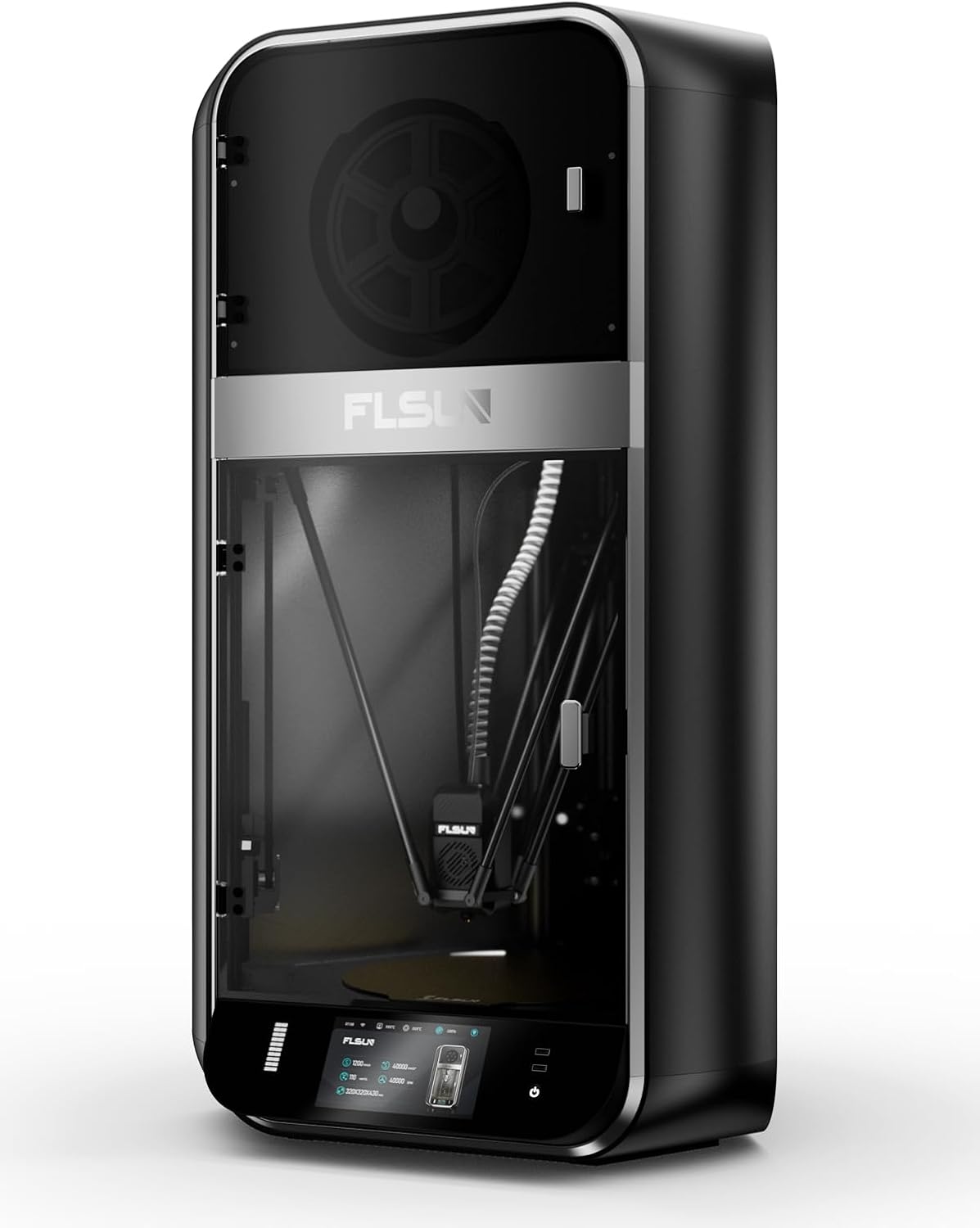
Foto 1.1: N'ihu view of the FLSUN S1 Pro 3D Printer, showcasing its sleek design and enclosed build chamber.
2. Kedu ihe dị na Igbe ahụ
Mgbe ebupuchara, biko chọpụta na akụrụngwa niile dị:
- FLSUN S1 Pro 3D Printer (main unit)
- Igbe nkụ nke filamenti
- Igwe ọkụ ọkụ
- eriri USB
- Tool Kit (various wrenches, screwdrivers, etc.)
- Sampna Filament
- Akwụkwọ ntuziaka (akwụkwọ a)
- Ntuziaka mmalite ngwa ngwa

Image 2.1: The FLSUN S1 Pro 3D Printer and its included accessories, demonstrating its 95% pre-assembled state.
3. Nhazi ntuziaka
The FLSUN S1 Pro is designed for quick setup, being 95% pre-assembled. The initial setup typically takes less than 10 minutes.
- Iwepu: Jiri nlezianya wepụ ihe nbipute na ngwa niile na nkwakọ ngwaahịa.
- Nkwanye: Place the printer on a stable, level surface in a well-ventilated area.
- Mgbakọ: Install the door and glass panels as per the instructions in the detailed Akwụkwọ ntuziaka nwụnye (PDF).
- Njikọ ike: Connect the power cable to the printer and a suitable power outlet.
- Ike izizi: Turn on the printer using the main power switch. The device will perform self-checks to ensure stability.
- Ọkwa akpaaka: The printer features automatic leveling. Follow the on-screen prompts on the 7-inch touch screen to initiate and complete the leveling process. This ensures optimal print bed calibration.
- Na-ebunye eriri: Load your desired filament into the filament dryer box and then guide it into the extruder as instructed on the display.
- Njikọ netwọk: Connect the printer to your local Wi-Fi network via the touch screen interface for remote monitoring and control.
Maka ntuziaka anya zuru ezu, biko gaa na onye ọrụ gọọmentị Akwụkwọ ntuziaka nwụnye (PDF).
4. Ntuziaka ọrụ
4.1 User Interface and Control
The FLSUN S1 Pro utilizes a 7-inch Klipper firmware smart touch screen for intuitive control. The visual operation interface allows for smart adjustment and monitoring directly from the printer. Additionally, with advanced Microtac radar control and Wi-Fi connectivity, you can monitor and control your printer in real-time from mobile phones and PCs.

Image 4.1: Remote control and monitoring capabilities via the FLSUN World app on a mobile device.
- Njikwa anya: Manage your printers remotely from anywhere.
- Tap it, Print it, Like it: Start printing tasks with a quick tap on the FLSUN World app, utilizing cloud storage for G-code files.
- Monitor in Pocket: Real-time checking of your printing progress.
- Smart Reminder: Receive notifications when print errors occur.
4.2 Usoro Mbipụta
- Kwadebe ihe nlereanya: Use compatible slicing software (FLSUN Slicer V2.0 or other slicers like PrusaSlicer, Cura) to prepare your 3D model. Ensure settings are optimized for the S1 Pro's capabilities, including its high speed and acceleration.
- Nyefee File: Nyefee koodu G a gbubiri gbubiri file to the printer via USB or Wi-Fi (FLSUN World app).
- Malite Bipụta: Họrọ nke file on the touch screen or through the app and initiate the print.
- Nleba anya: Utilize the built-in camera for real-time monitoring and time-lapse recording. The printer's low noise level (55dB) ensures a quiet operating environment.
- Power-Off Resume: In case of power interruption, the printer supports power-off continuous printing, resuming from where it left off. Vibration compensation further ensures print quality.

Image 4.2: Illustration of the FLSUN S1 Pro's epic speed capabilities: 1200mm/s max printing speed, 40000mm/s² max acceleration, and 110mm³/s peak flow rate.

Image 4.3: Key features for smooth and consistent printing, including AI-powered functions, auto-leveling, spaghetti detection, and perfect first layer adhesion.

Image 4.4: Advanced features like the Air Filter, Filament Dryer, Built-in camera, Intelligent Zoned Heating, and 16GB EMMC storage.
5. Nlekọta
Regular maintenance ensures the longevity and optimal performance of your FLSUN S1 Pro 3D Printer.
- Nhicha: Regularly clean the print bed, nozzle, and internal components to prevent debris buildup. Use a soft cloth and appropriate cleaning solutions.
- Ihe nzacha ikuku: The printer is equipped with a combined HEPA + activated carbon air filter. Check and replace the filter periodically as needed to maintain air quality and prevent odors.
- Filament Dryer Box: Ensure the filament dryer box is functioning correctly to keep your filament dry, which is crucial for print quality.
- Nyocha nozzle: Periodically inspect the 0.4mm hardened steel nozzle for wear or clogs. Replace if necessary. The all-metal hot end can reach up to 350°C, supporting various high-temperature filaments.
- mmanu mmanu: Refer to the detailed manual for any lubrication requirements for moving parts.

Image 5.1: Diagram illustrating the 350°C hotend, 50°C chamber, and 120°C hot bed for optimal material handling.
6. Nchọpụta nsogbu
Akụkụ a na-eleba anya n'okwu ndị a na-ahụkarị ị nwere ike izute mgbe ị na-arụ ọrụ.
| Nsogbu | Ihe nwere ike ime | Ngwọta |
|---|---|---|
| Print Not Sticking to Bed | Improper bed leveling, dirty print surface, incorrect bed temperature. | Re-run auto-leveling. Clean the print surface with isopropyl alcohol. Adjust hot bed temperature according to filament type (Max 120°C). |
| Filament Clogging | Dust in filament, incorrect hotend temperature, worn nozzle, heat creep. | Ensure filament is dry (use filament dryer). Verify hotend temperature (Max 350°C). Clean or replace nozzle. Check cooling fan operation. |
| "Spaghetti" Prints | Poor bed adhesion, model detaching, extrusion issues. | The S1 Pro features Nchọpụta Spaghetti. Ensure proper bed adhesion. Monitor print progress via the built-in camera. |
| Ihe nbipute anaghị aza | Software glitch, loose connection, power issue. | Restart the printer. Check all cable connections. Ensure stable power supply. |
| Ọdịmma Mbipụta adịghị mma | Incorrect slicing settings, worn nozzle, vibration, wet filament. | Optimize slicing parameters. Replace nozzle if worn. The printer has Nkwụghachi nke ịma jijiji; ensure it's active. Use filament dryer. |

Image 6.1: Features like the 55dB quiet fan and Power Off Resume Print (UPS) contribute to a reliable printing experience.
7. Nka na ụzụ nkọwa
| Otu | Nkọwapụta | Nkọwa |
|---|---|---|
| Izugbe | Ọsọ mbipụta kacha | 1200mm / s |
| Max osooso | 40000mm/s² | |
| Ọnụ ọgụgụ kasị elu | 110mm³/s | |
| Wulite olu | Φ320*320*430 mm³ (Maximum height of the cylinder: 383mm) | |
| Ụlọ | Emechiri | |
| Ọkwa mkpọtụ | 55dB | |
| Isi Ngwá Ọrụ | Nozulu | 0.4mm Hardened Steel Nozzle (supports various nozzle sizes) |
| Max Hot End Temp | 350 ℃ | |
| Dayameta Filament | 1.75mm | |
| Filamenti | Filament akwadoro | Ideal: PLA, PETG, TPU. Satisfactory: ABS, ASA, PA, PC, PET. Capable: Carbon/Glass Fiber Reinforced PLA, PPS-CF, PPA-CF/GF. |
| Active Heating Dry Box | Ee | |
| Nchọpụta Mkpuchi Filament | Ee | |
| Ebe a na-ekpo ọkụ | Mee efere | Plate PEI nwere ederede |
| Max Build Plate Temp | 120 ℃ | |
| Igwe ọkụ mpaghara Smart | Inner Circle Ø220mm, Outer Ring 220-320mm | |
| Eletrọnịkị | Ngosipụta | 7" Color Touch Screen |
| Nchekwa | 16GB EMMC, 32GB USB Flash | |
| Ịnye ọkụ | 110-240V, 50/60Hz | |
| Oriri Ike On-mode | 400 watt | |
| Ngwa ngwa | Nkwalite ngwa ngwa | OTA (N'elu ikuku) |
| Ngwanrọ slicing | FLSUN Slicer V2.0, Other Slicers | |
| OS akwadoro | MacOS, Windows | |
| Atụmatụ | Igwefoto nlekota | Realtime, Timelapse |
| Nchọpụta Filament | Ee | |
| Nkwụghachi nke ịma jijiji | Ee | |
| Nchọpụta irighiri ihe | Ee | |
| Nchọpụta Spaghetti | Ee | |
| Screen Auto Sleep | Ee | |
| Printer Auto Power Off | Ee | |
| Na-akpaghị aka | Ee | |
| Naghachi ike ọnwụ | Yes (Z lift, Backup Battery) | |
| Ihe nzacha ikuku | HEPA + Activated Carbon | |
| Akụkụ anụ ahụ | Akụkụ ngwaahịa (D x W x H) | 23.62"D x 34.25"W x 9.45"H (600mm x 870mm x 240mm approx.) |
| Physical Dimension (Printer) | 550*596*1030mm | |
| Ibu Ibu | 113 pound (ihe dị ka 51.2 n'arọ) | |
| Agba | Nwa |

Image 7.1: Comprehensive technical specifications for the FLSUN S1 Pro 3D Printer.
8. Akwụkwọ ikike na nkwado
FLSUN is committed to providing reliable products and excellent customer service.
- na-alaghachi: The product is eligible for 30-day easy returns. Please refer to the retailer's return policy for specific details.
- Nkwado ndị ahịa: For technical assistance, troubleshooting, or warranty inquiries, please contact FLSUN Customer Support. You can often find support resources and contact information on the official FLSUN websaịtị ma ọ bụ site na onye na-ere ahịa ebe a zụrụ ngwaahịa ahụ.
- Atụmatụ nchebe: Extended protection plans, such as a 4-Year Protection Plan, may be available for purchase separately to provide additional coverage beyond the standard warranty.
- Akụrụngwa dị n'ịntanetị: Gaa leta FLSUN Store on Amazon for additional product information, FAQs, and support.