
1. Okwu mmalite
Thank you for choosing the Schneider 43A1 4K UHD LED TV. This television combines advanced display technology with smart features to provide an immersive viewing experience. Featuring a 4K Ultra High Definition display, QLED-LCD technology with Direct LED backlighting, and the VIDAA Smart TV platform, your new TV offers vibrant colors, deep blacks, and access to a wide range of entertainment.
This manual provides essential information for the safe and efficient use of your television. Please read it thoroughly before operating the device and retain it for future reference.
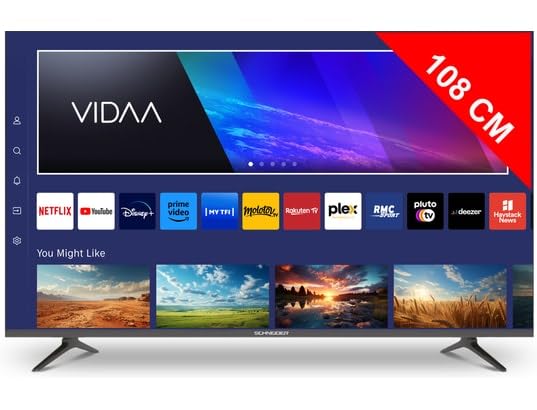
Foto 1.1: N'ihu view of the Schneider 43A1 TV with VIDAA interface.
2. Ozi nchekwa
Iji hụ na ọrụ nchekwa na gbochie mmebi, biko debe ihe nchekwa nchekwa ndị a:
- Nkwanye: Position the TV on a stable, level surface. Avoid placing it in direct sunlight, near heat sources, or in environments with high humidity or dust.
- Igwe ikuku: Ensure adequate ventilation around the TV. Do not block ventilation openings. Maintain a minimum distance of 10 cm from walls or other objects.
- Ịnye ọkụ: Jiri naanị ike ọkọnọ voltage. Ensure the power cord is not pinched or walked on. Disconnect the power plug during lightning storms or when unused for extended periods.
- Nhicha: Kwupuo TV tupu ihicha. Jiri akwa dị nro ma kpọọ nkụ. Ejila ihe nhicha mmiri ma ọ bụ ikuku ikuku.
- Mmiri mmiri: Do not expose the TV to dripping or splashing liquids. Do not place objects filled with liquids, such as vases, on the TV.
- Ụmụaka: Supervise children to ensure they do not climb on the TV or furniture.
- Ịkwanye mgbidi: If wall-mounting, use a VESA compatible bracket (200 x 200 mm) and ensure proper installation by qualified personnel to prevent injury.
3. Ihe ngwugwu
Biko lelee na ihe niile dị na ọ dịkwa mma:
- Schneider 43A1 4K UHD LED TV
- Njikwa anya
- Igwe ọkụ ọkụ
- Ihe nkwụnye TV (2 iberibe)
- Ihe nkedo maka TV Stand
- Akwụkwọ ntuziaka (akwụkwọ a)
4. Nhazi
4.1 Nwepu
Carefully remove the TV from its packaging. It is recommended to keep the original packaging for potential future transport or service needs.
4.2 Nwụnye guzoro
If you are not wall-mounting the TV, attach the included stand pieces to the bottom of the TV using the provided screws. Ensure the stand is securely fastened before placing the TV upright.
4.3 Mgbidi mgbidi (nhọrọ)
The Schneider 43A1 is compatible with VESA 200 x 200 mm wall mounts. For safe installation, it is highly recommended to use a professional installer. Refer to your wall mount's instructions for specific details.
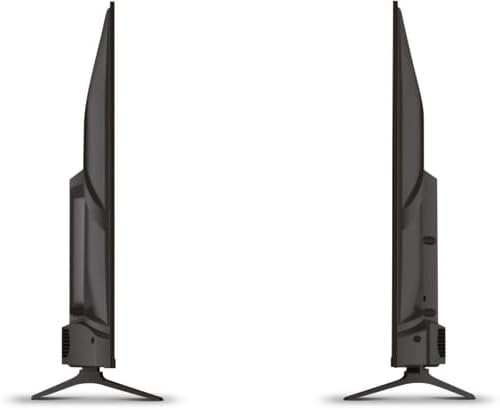
Foto 4.1: Akụkụ view of the Schneider 43A1 TV, illustrating its profile for placement or wall mounting.
4.4 Ijikọ ngwaọrụ mpụga
Your TV offers various connectivity options:
- HDMI: Connect up to three HDMI 2.0 devices (e.g., Blu-ray player, game console, set-top box) to the HDMI ports.
- USB: Two USB ports are available for connecting USB storage devices to play media.
- AV/Audio Input: For older devices requiring composite video and stereo audio.
- Mmepụta Coaxial: For connecting to an external audio system.
- Ntinye Antenna/Cable: Connect your antenna or cable TV signal for DVB-T/T2/C/S2 reception.
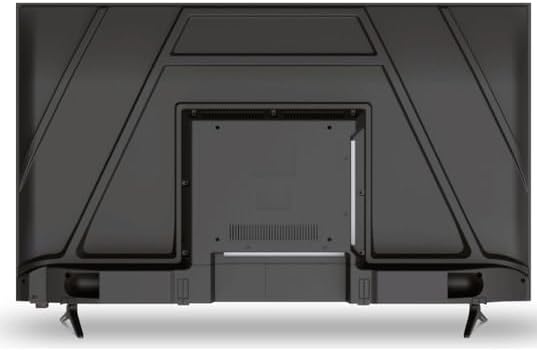
Foto 4.2: N'azụ view of the Schneider 43A1 TV, highlighting connection ports.
4.5 Ijikọ ike
Plug the power cable into the TV's power input, then into a suitable wall outlet.
4.6 Ọkachamara Mbido Mbido
Upon first power-on, the TV will guide you through an initial setup process. This includes selecting your language, connecting to a Wi-Fi network, and scanning for available channels (DVB-T/T2/C/S2).
5. .rụ ọrụ
5.1 Ọrụ njikwa anya
The remote control allows you to navigate the TV's features:
- Bọtịnụ ike: Gbanyụọ ma ọ bụ gbanyụọ TV.
- Elu elu/ala: Na-edozi ọkwa ụda.
- Ọwa elu/ala: Na-agbanwe ọwa TV.
- Ntinye/Isi mmalite: Selects the input source (HDMI, USB, TV Tuner).
- Bọtịnụ igodo nsoroụzọ: Maka igodo menu.
- bọtịnụ Smart TV: Direct access to popular apps like Netflix, Prime Video, YouTube.
5.2 Smart TV (VIDAA)
The integrated VIDAA Smart TV platform provides access to a variety of applications and streaming services. Connect your TV to the internet via Wi-Fi to enjoy features like Netflix, Prime Video, and YouTube. Bluetooth connectivity allows for wireless connection to compatible audio devices.

Foto 5.1: N'ihu akụkụ view of the Schneider 43A1 TV, displaying the VIDAA Smart TV interface.
5.3 Nhọrọ ntinye
Press the 'Input' or 'Source' button on your remote control to switch between connected devices (HDMI 1, HDMI 2, HDMI 3, USB, AV, TV Tuner).
5.4 Ntọala foto na ụda
Access the TV's menu to adjust picture and sound settings. The 4K UHD resolution, QLED-LCD technology, and Direct LED backlighting ensure a high-quality visual experience. The TV also features upscaling to enhance lower-resolution content. Audio is delivered via 2 x 8 W RMS stereo speakers with Dolby Audio support.
5.5 PC Monitor Mode
The TV can be used as a PC monitor by connecting your computer via an HDMI cable. This mode optimizes the display for computer use.
6. Nlekọta
6.1 Ihicha TV
Before cleaning, ensure the TV is unplugged from the power outlet.
- Ihuenyo: Jiri nwayọ hichaa ihuenyo ahụ site na iji akwa dị nro na-enweghị lint. Maka akara ndị isi ike, dị obere dampjiri mmiri ma ọ bụ ihe nhicha ihuenyo pụrụ iche kpuchie ákwà ahụ (anaghị agba ya ozugbo na ihuenyo ahụ).
- Mputa: Jiri akwa dị nro ma kpọọ nkụ hichaa TV casing. Zere ihe nhicha ma ọ bụ ihe mgbaze.
6.2 Mmelite ngwanrọ
Your TV may receive software updates to improve performance and add new features. Ensure your TV is connected to the internet to receive these updates automatically or check for them manually through the settings menu.
7. Nchọpụta nsogbu
Ọ bụrụ na ị na-enwe nsogbu na TV gị, rụtụ aka na nsogbu na ngwọta ndị a na-emekarị:
- Enweghị ike:
- Check if the power cable is securely plugged into the TV and the wall outlet.
- Ensure the wall outlet is functioning (test with another device).
- Pịa bọtịnụ ike na njikwa anya ma ọ bụ na TV n'onwe ya.
- Enweghị foto/ụda:
- Chọpụta isi mmalite ntinye ziri ezi ahọpụtara (dịka, HDMI 1, TV).
- Lelee njikọ niile dị n'etiti TV na ngwaọrụ mpụga.
- Ensure the volume is not muted or set to minimum.
- If using an antenna, check the antenna connection and perform a channel scan.
- Njikwa anya anaghị arụ ọrụ:
- Dochie batrị ndị dị na njikwa anya.
- Gbaa mbọ hụ na onweghị ihe mgbochi n'etiti ime ime na ihe mmetụta IR nke TV.
- Okwu Smart TV/Network:
- Lelee rawụta Wi-Fi gị na njikọ ịntanetị gị.
- Go to the TV's network settings to re-connect to your Wi-Fi network.
- Restart the TV and your router.
Ọ bụrụ na nsogbu ahụ dịgidere mgbe ịnwale azịza ndị a, biko kpọtụrụ nkwado ndị ahịa.
8. Nkọwapụta
| Njirimara | Nkọwapụta |
|---|---|
| Nlereanya | Schneider 43A1 |
| Ngosipụta nha | 109 cm (43 sentimita) |
| Mkpebi | 4K Ultra HD (pikselụ 3840 x 2160) |
| Ngosipụta teknụzụ | QLED-LCD with Direct LED Backlight |
| Ọnụọgụ ọdịiche | 1100:1 |
| Icha ọkụ | 200 cd/m² |
| Mmepụta ọdịyo | 2 x 8 W RMS Stereo |
| Teknụzụ ọdịyo | Dolby Audio |
| ọdụ ụgbọ mmiri HDMI | 3 (HDMI 2.0) |
| ọdụ ụgbọ mmiri USB | 2 |
| Ntinye ndị ọzọ | AV/Audio Input |
| Nsonaazụ | Mmepụta Coaxial |
| Tuner | DVB-T/T2/C/S2 |
| Smart TV Platform | VIDAA (Netflix, Prime Video, YouTube) |
| Njikọ ikuku | Wi-Fi, Bluetooth |
| Ndakọrịta VESA | 200 x 200 mm |
| Ibu | 7.5 kilogram |