
Okwu mmalite
This manual provides detailed instructions for the setup, operation, and maintenance of your AWOL VISION ThunderBeat 4.1.2 All-Wireless Home Theater Sound System. Please read this manual thoroughly before using the product to ensure proper functionality and to maximize your audio experience.
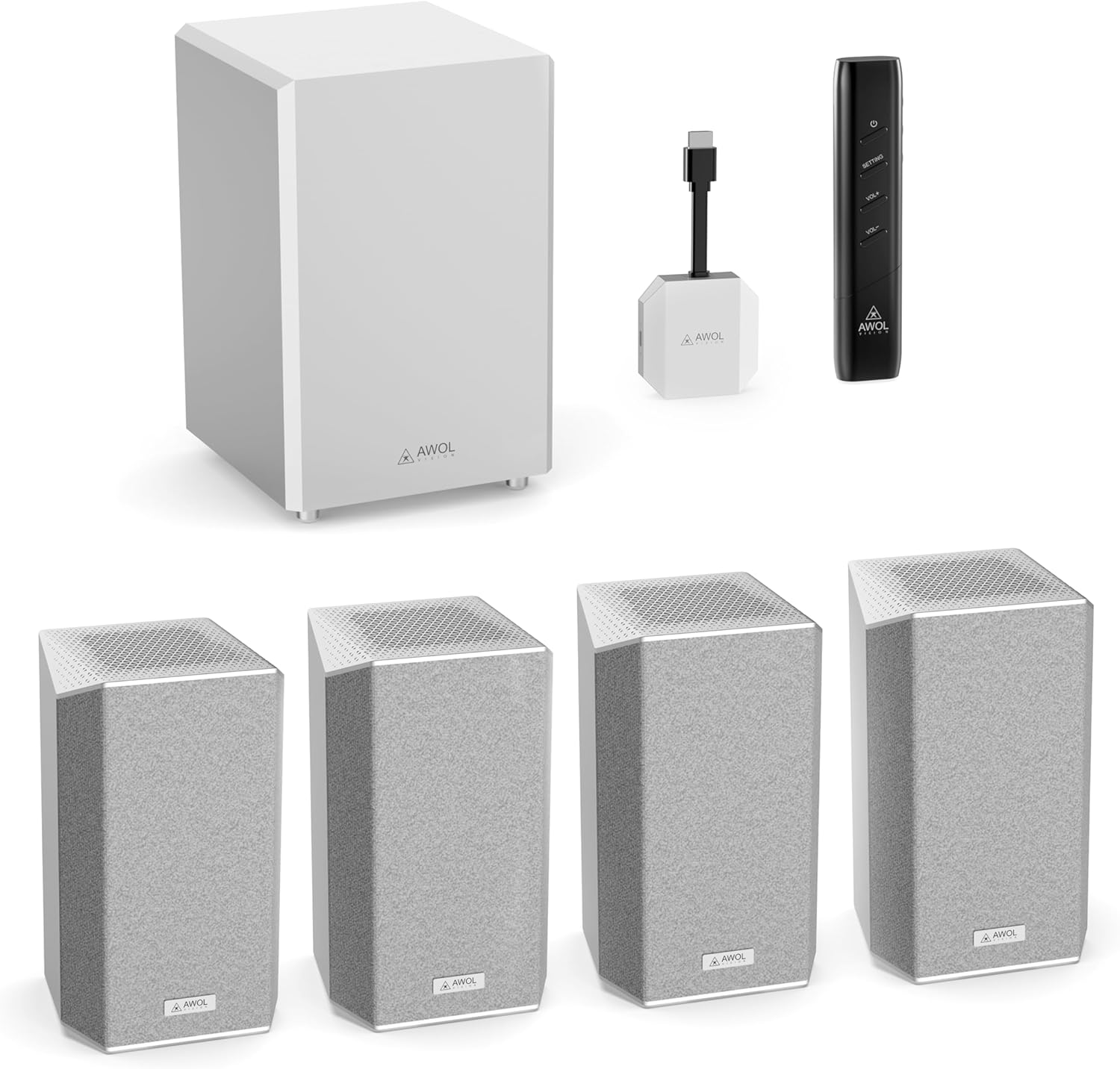
Image: The AWOL VISION ThunderBeat 4.1.2 system, including the subwoofer, four satellite speakers, wireless dongle, and remote control.
Kedu ihe dị na Igbe ahụ
Jiri nlezianya kewaa ihe niile dị na ya ma hụ na ị natara ihe ndị a:
- Subwoofer ikuku
- Satellite Speakers (x4)
- Dongle ikuku
- Njikwa Ime Obodo (gụnyere batrị AAA abụọ)
- Ihe nkwụnye AC
- Igwe ọkụ AC
- RCA ruo 3.5mm Audio Cable
- 3.5mm ka 3.5mm Audio USB
- HDMI eriri ndọtị
- USB-C USB
- Akwụkwọ ntuziaka
- Wall Mount Kit (optional installation)

Image: A visual representation of all items included in the ThunderBeat system packaging.
Melite
1. Component Placement
Optimal placement of your ThunderBeat system components is crucial for an immersive audio experience. Consider the layout of your room and the primary listening area.
- Subwoofers: Place the subwoofer in a location that provides balanced bass response. Experiment with different positions to find the best sound for your room.
- Ndị na-ekwu okwu Satellite: Position the four satellite speakers around your listening area. For a 4.1.2 setup, two speakers typically go to the front-left and front-right, and two to the rear-left and rear-right. Ensure upward-firing speakers are unobstructed for Dolby Atmos effects.

Image: A diagram showing flexible speaker placement options to adapt to different room sizes and configurations.
2. Connecting the Wireless Dongle
The ThunderBeat system utilizes a wireless dongle for simplified connectivity, eliminating the need for extensive cabling.
- Insert the ThunderBeat Dongle into the eARC HDMI port of your AWOL VISION projector or compatible display device.
- Ensure the dongle is securely connected.

Foto: A nso nso view of the wireless dongle, highlighting its power and source status indicators, and available input connections including HDMI eARC, AUX, Bluetooth, and DC.
3. Ịkwanye na ijikọta
- Connect the AC adapter and power cord to the subwoofer and each satellite speaker, then plug them into a power outlet.
- Power on your AWOL VISION projector or display device.
- The ThunderBeat system is designed for instant, perfectly synchronized surround sound upon power-up, with automatic pairing between the dongle and speakers.
- Verify the pairing status indicator on the dongle. A solid light typically indicates a successful connection.

Image: A visual representation of the streamlined, all-wireless setup in a home theater environment, showing the dongle connected to a projector.
Ntuziaka ọrụ
1. Ọrụ njikwa anya
The included remote control allows you to manage all aspects of your ThunderBeat system.
- Bọtịnụ ike: Gbanyụọ ma ọ bụ gbanyụọ sistemụ ahụ.
- Elu elu/ala: Na-edozi olu usoro n'ozuzu ya.
- Bọtịnụ Ntọala: Accesses advanced audio settings, including individual speaker volume and EQ modes.

Image: The sleek remote control for the AWOL VISION ThunderBeat system, designed for intuitive control of your home theater.
2. Individual Speaker Volume Control
For a truly customized audio experience, you can adjust the volume of each speaker independently.
- Pịa Ntọala bọtịnụ na remote njikwa.
- Navigate through the on-screen menu (if available) or use the remote's directional buttons to select individual speaker channels (Left, Right, Subwoofer, Rear Left, Rear Right, Left Top Front, Right Top Front).
- Adjust the volume level for each selected speaker. The indicator light on the speaker will illuminate during adjustment and turn off after approximately 5 seconds.

Image: A graphical display demonstrating the independent volume adjustment feature for each speaker, including left, right, subwoofer, and surround channels.
3. EQ Setting Modes
Optimize your sound for different content types using the built-in EQ modes.
- Pịa Ntọala bọtịnụ na remote njikwa.
- Select the EQ settings option.
- Choose from available presets such as Ihe nkiri, Akụkọ, ma ọ bụ Ihe nkiri, or customize the frequency bands for a personalized sound profile.

Image: A visual representation of the EQ setting mode, offering custom sound control and preset options like Concert, News, and Movie.
Nlekọta
To ensure the longevity and optimal performance of your AWOL VISION ThunderBeat system, follow these maintenance guidelines:
- Nhicha: Use a soft, dry cloth to clean the surfaces of the subwoofer and satellite speakers. Avoid abrasive cleaners, solvents, or chemical sprays.
- Igwe ikuku: Ensure that the speakers and subwoofer have adequate ventilation. Do not block any vents or place the units in enclosed spaces that could restrict airflow.
- gburugburu: Keep the system away from direct sunlight, heat sources, excessive dust, and moisture.
- Gịnị: Periodically check all cable connections for security and signs of wear.
Nchọpụta nsogbu
If you encounter issues with your ThunderBeat system, refer to the following common problems and solutions:
| Nsogbu | Ihe nwere ike ime | Ngwọta |
|---|---|---|
| Enweghị ụda sitere na ndị ọkà okwu | Power not connected; Dongle not properly inserted; Speakers not paired; Incorrect audio source selected. | Check power connections for all components. Ensure the dongle is fully inserted into the eARC port. Verify speaker pairing (indicator lights). Select the correct audio input on your projector/display. |
| Ọdịyo gbagọrọ agbagọ ma ọ bụ nke edoghị anya | Volume too high; Poor audio source quality; Speaker placement issues. | Reduce volume. Test with a different audio source. Adjust speaker placement to optimize sound. |
| Njikwa anya anaghị arụ ọrụ | Dead batteries; Obstruction between remote and system; Remote out of range. | Replace AAA batteries in the remote. Ensure a clear line of sight to the system. Operate the remote within its effective range. |
| Subwoofer anaghị emepụta bass | Subwoofer not powered; Volume too low; Subwoofer settings incorrect. | Check subwoofer power connection. Increase subwoofer volume via remote. Check EQ settings to ensure bass is not reduced. |
If the problem persists after attempting these solutions, please contact AWOL VISION customer support.
Nkọwapụta
| Njirimara | Nkọwa |
|---|---|
| Nọmba nlereanya | ThunderBeat-4.1.2 |
| Nhazi ọwa ụda gburugburu | 4.1.2 (with projector as center channel, effectively 5.1.2) |
| Ike Nwepu kacha elu | 720 Watts (Total System Output) |
| Subwoofer | Dual 8-inch subwoofers (120W each) |
| Teknụzụ Njikọta | Wireless (5.2GHz/5.8GHz), Bluetooth, HDMI eARC, AUX |
| Ọnọdụ mmepụta ọdịyo | Dolby Atmos, Dolby TrueHD, DTS Support |
| Nzaghachi ugboro ugboro | 200 KHz (System) |
| Akụkụ ngwaahịa | 14.57"D x 22.44"W x 22.05"H (N'ozuzu) |
| Ibu Ibu | 37.7 pound |
| Batrị | 2 AAA batteries (for remote, included) |
Akwụkwọ ikike na nkwado
AWOL VISION is committed to providing high-quality products and customer satisfaction.
- Nkwado ngwaahịa: Your AWOL VISION ThunderBeat system comes with 2 Years Product Support.
- Ozi mkpọtụrụ: If you require assistance, please contact our support team:
- Phone / WhatsApp: +1 (888) 891-6866
- Email: support@awolvision.com
- 30-Day Price Protection: Refer to AWOL VISION's official policies for details on price protection.