
1. N'eluview
The Google Pixel 10 Pro is an advanced unlocked Android smartphone designed for seamless performance and intelligent features. It integrates the powerful Gemini AI, boasts an exceptional triple rear camera system, offers fast-charging capabilities with a 24+ hour battery life, and features a vibrant 6.3-inch Super Actua Display. This manual provides essential information for setting up, operating, and maintaining your device.

Image: The Google Pixel 10 Pro, showcasing its modern design and prominent camera bar.
2. Kedu ihe dị na Igbe ahụ
Your Google Pixel 10 Pro package includes the following items:
- Google Pixel 10 Pro ekwentị
- USB-C Cable (1 meter, USB-C to USB-C 2.0)
- Akwụkwọ Nkwado, Nchekwa na Akwụkwọ ikike
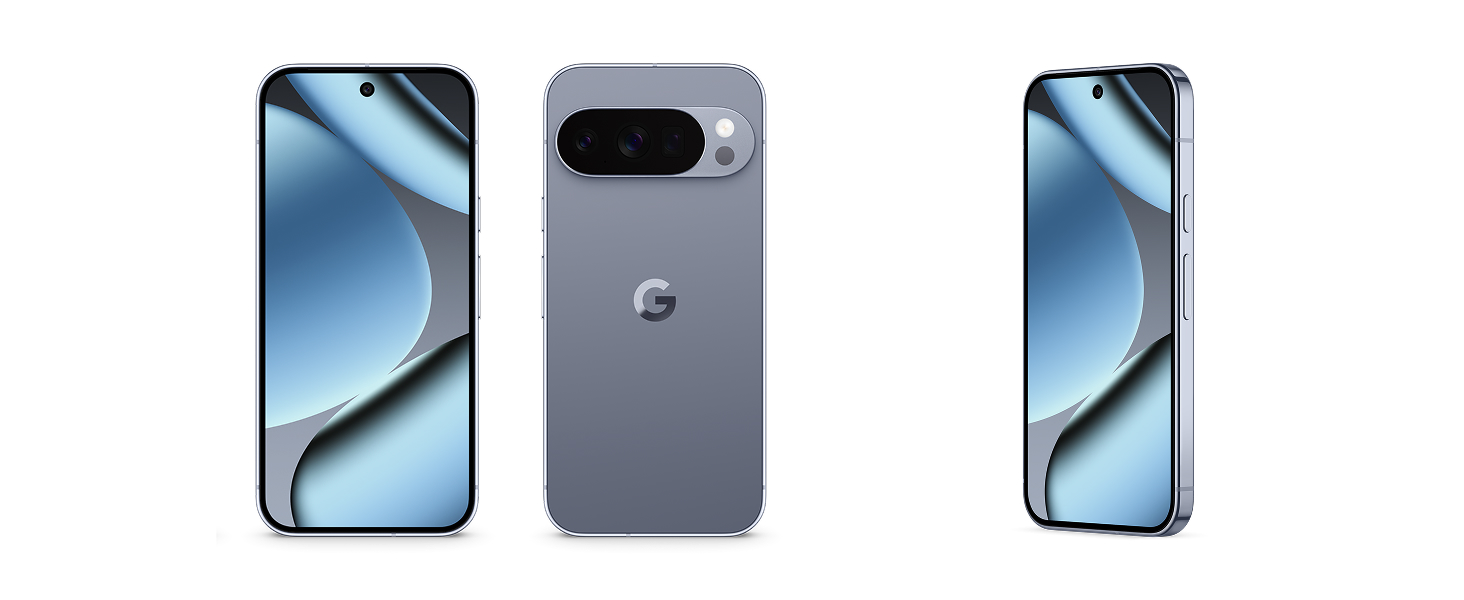
Image: The Google Pixel 10 Pro phone and its accompanying USB-C cable, as typically found in the product packaging.
3. Ihe karịrị anụ ahụview
Familiarize yourself with the key physical components of your Pixel 10 Pro:
- Ngosipụta: 6.3-inch Super Actua Display with 120 Hz refresh rate and 1280 x 2856 pixel resolution.
- Camera Bar: Houses the triple rear camera system (50 MP main, 48 MP ultrawide, 48 MP telephoto) and flash.
- Igwefoto ihu: 42 MP front photo sensor.
- Bọtịnụ: Power button and volume rocker on the side.
- ọdụ ụgbọ mmiri: Ọdụ USB Type-C maka ịchaji na nnyefe data.
- Oghere SIM: eSIM only, no physical SIM card slot.
- Ogologo oge: Built with durable aluminum and Corning Gorilla Glass Victus 2, offering scratch and drop resistance.

Foto: nso nso view of the Google Pixel 10 Pro highlighting its durable construction and the integrated camera bar.
4. Nhazi
Follow these steps to set up your new Google Pixel 10 Pro:
- Ike Na: Press and hold the Power button until the Google logo appears.
- Nhazi izizi: Follow the on-screen prompts to select your language, connect to Wi-Fi, and accept terms and conditions.
- Mee eSIM rụọ ọrụ: The Pixel 10 Pro is eSIM-only. During setup, you will be guided to activate your eSIM digitally. This allows you to switch plans and store multiple numbers without a physical SIM card.
- Akaụntụ Google: Sign in with your Google Account or create a new one to access Google services and apps.
- Nyefee data: You can transfer data from your old phone during the setup process. This typically takes about 20 minutes.
- Ntọala nchekwa: Configure your preferred biometric security features, such as fingerprint recognition.
Image: A close-up of the Google Pixel 10 Pro's back, emphasizing its eSIM capability for digital plan switching.
5. Ijikwa ngwaọrụ gị
The Pixel 10 Pro runs on Android 16, offering an intuitive and customizable user experience.
- Ntugharị: Use gestures or on-screen buttons to navigate the interface.
- Calls and Messages: Make calls and send messages using the default phone and messaging apps.
- Nweta Internetntanetị: Connect to Wi-Fi or use 5G cellular technology for internet browsing.
- Ngwa njikwa: Download and manage apps from the Google Play Store.
- Nhazi onwe: Customize your home screen, widgets, and settings to suit your preferences.
Vidiyo: Mkpebi dị mkpirikpiview of the Google Pixel 10 Pro's interface and general operation, demonstrating its responsiveness and ease of use.
6. Sistemụ igwefoto
The Pixel 10 Pro features a powerful triple rear camera system (50 MP Wide, 48 MP Ultrawide, 48 MP Telephoto) and a 42 MP front camera, enhanced by advanced Google AI models.
- 100x Pro Res Zoom: Capture incredible details from a distance with Pixel's best zoom quality ever.
- Super Steady Videos: The upgraded 50 MP camera can transform high-motion scenes into stable, cinematic 8K videos.
- Onye nkuzi igwefoto: Utilize Gemini to receive helpful suggestions for framing and capturing your best photos.
- Arụmọrụ ọkụ dị ala: The camera system excels in low-light conditions, ensuring amazing results.

Image: A visual representation of the Google Pixel 10 Pro's 100x Pro Res Zoom, showing a distant object captured with high clarity.

Image: A dynamic shot illustrating the Google Pixel 10 Pro's ability to record super steady videos, even during high-motion activities.
7. Gemini AI Assistant
The Pixel 10 Pro integrates Gemini, Google's advanced AI, to enhance your daily interactions and productivity.
- Gemini Live: Engage in natural, free-flowing conversations with Gemini. Point your camera at objects to get information or chat with Gemini to brainstorm ideas and complete tasks across apps.
- Ihe mgbawa Google Tensor G5: The next-gen Google Tensor G5 chip powers breakthrough AI performance, making your device faster and more responsive.

Image: A user interacting with Gemini Live on the Google Pixel 10 Pro, pointing the camera at a shark in an aquarium to receive real-time information.
Video: A short demonstration of the Google Pixel 10's "Pixelsnap" feature, showcasing its AI capabilities and seamless user experience.
8. Nchekwa na nzuzo
The Pixel 10 Pro is designed with robust security features to protect your data and privacy:
- Spam, Scams, and Phishing Protection: Pixel helps protect you against unwanted and malicious communications.
- Mmelite nche: Receive regular security and software updates for 7 years, ensuring your device remains protected against emerging threats.
- Lost or Stolen Device Protection: Your phone will automatically lock if it's lost or stolen, safeguarding your personal information.
- Atụmatụ mberede: Pixel has you covered in case of emergency, even when offline.

Image: Icons representing the security features of the Google Pixel 10, including protection against spam, regular updates, and lost device locking.
9. Njikwa batrị
The Google Pixel 10 Pro is equipped with a 4870 mAh battery, providing over 24 hours of usage on a single charge. With Extreme Battery Saver, it can last over 30 hours.
- Nchaji ngwa ngwa: Supports fast charging to quickly power up your device.
- PixelSnap Wireless Charging: Compatible with Qi2-certified PixelSnap wireless charging for convenient power-ups.
- Nkwalite batrị: The device intelligently adapts to your usage patterns to optimize battery life.

Image: The Google Pixel 10 Pro being wirelessly charged, illustrating its long-lasting battery and efficient power management.
10. Njikọta
Your Pixel 10 Pro offers versatile connectivity options:
- Cellular: Supports 5G cellular technology for fast mobile data. It is unlocked for all major carriers including Google Fi, Verizon, T-Mobile, and AT&T.
- Wi-Fi: Integrated Wi-Fi for high-speed internet access.
- Bluetooth: Connect to wireless accessories like headphones and smartwatches.
- NFC: Near Field Communication for contactless payments and quick pairing.
- USB Ụdị-C: For charging and wired data transfer.
11. Nlekọta na nlekọta
To ensure the longevity and optimal performance of your Pixel 10 Pro, follow these care guidelines:
- Nhicha: Jiri akwa dị nro na-enweghị lint hichaa ihuenyo na ahụ. Zere kemịkalụ siri ike.
- Nguzogide mmiri: The device is water resistant, but not waterproof. Avoid prolonged exposure to water or submersion.
- Okpomọkụ: Mee ngwaọrụ n'ime oke okpomọkụ akwadoro iji gbochie mmebi.
- Mmelite ngwanrọ: Regularly install software updates to benefit from performance improvements and security enhancements.
12. Nchọpụta nsogbu
If you encounter issues with your Pixel 10 Pro, try these common troubleshooting steps:
- Malitegharịa ngwaọrụ: Malitegharịa ekwentị dị mfe nwere ike dozie ọtụtụ mpe mpe mpe akwa ngwanrọ.
- Lelee maka mmelite: Gbaa mbọ hụ na ngwanrọ ngwaọrụ gị emechaala.
- Kpochapụ cache: If an app is misbehaving, try clearing its cache.
- Tọgharia Factory: As a last resort, a factory reset can resolve persistent software issues (back up your data first).
- Nkwado kọntaktị: For complex issues, refer to the Warranty & Support section.
13. Nkọwapụta
| Njirimara | Nkọwa |
|---|---|
| Ụdị | |
| Aha Nlereanya | Pixel 10 Pro |
| Sistemụ nrụọrụ | Android 16 |
| Ụdị CPU | Google Tensor G5 |
| Ọsọ CPU | 3.78 GHz |
| Ebe nchekwa RAM | 16 GB |
| Ike nchekwa | 256 GB (up to 1TB options available) |
| Nha ihuenyo | 6.3 sentimita asatọ |
| Ụdị ngosi | OLED Super Actua Display |
| Mkpebi | 1280 x 2856 pixels (3118 x 1440 max) |
| Ọnụego ume ọhụrụ | 120 Hz |
| Igwefoto azụ | 50 MP (Wide), 48 MP (Ultrawide), 48 MP (Telephoto) |
| Igwefoto ihu | 42 MP |
| Mkpebi ịse vidiyo | 8K |
| Ike batrị | 4870 mAh (24+ hour average life) |
| Oghere kaadi SIM | eSIM |
| Njikọta | 5G, Bluetooth, NFC, Wi-Fi |
| Ọkwa Nguzogide mmiri | Mmiri na-eguzogide mmiri (IP68) |
| Nchekwa biometric | Nchọpụta akara mkpịsị aka |
| Afọ Nlereanya | 2025 |
14. Akwụkwọ ikike na nkwado
Your Google Pixel 10 Pro comes with a 1-Year Manufacturer Warranty. For detailed warranty information, troubleshooting, and additional support, please refer to the included Warranty Booklet or visit the official Google Pixel support websaịtị.
Nkwado n'ịntanetị: g.co/pixel/support
Ozi gbasara iwu: g.co/pixel/legal