
Okwu mmalite
This manual provides comprehensive instructions for the installation, operation, and maintenance of your Dormakaba Rose Biometric Digital Door Lock. Designed for modern access control, this lock offers advanced security features including fingerprint and PIN code access. Please read this manual thoroughly before installation and use to ensure proper function and longevity of your device.
Ozi nchekwa
- Hụ na ihe niile dị na ya dị ma ghara imebi tupu e tinye ya.
- Do not expose the lock to direct water or extreme temperatures.
- Use only specified AAA alkaline batteries. Do not mix old and new batteries.
- Keep fingerprints and PIN codes confidential.
- For emergency power, use a Type C USB cable with a compatible power source.
- This lock is designed for internal doors with a thickness of 32-50mm.
Ngwaahịa gafereview na akụrụngwa
The Dormakaba Rose Biometric Door Lock integrates a fingerprint scanner, a backlit keypad, and a lever handle for secure and convenient access. It is designed for easy installation and reversible for left or right-handed doors.
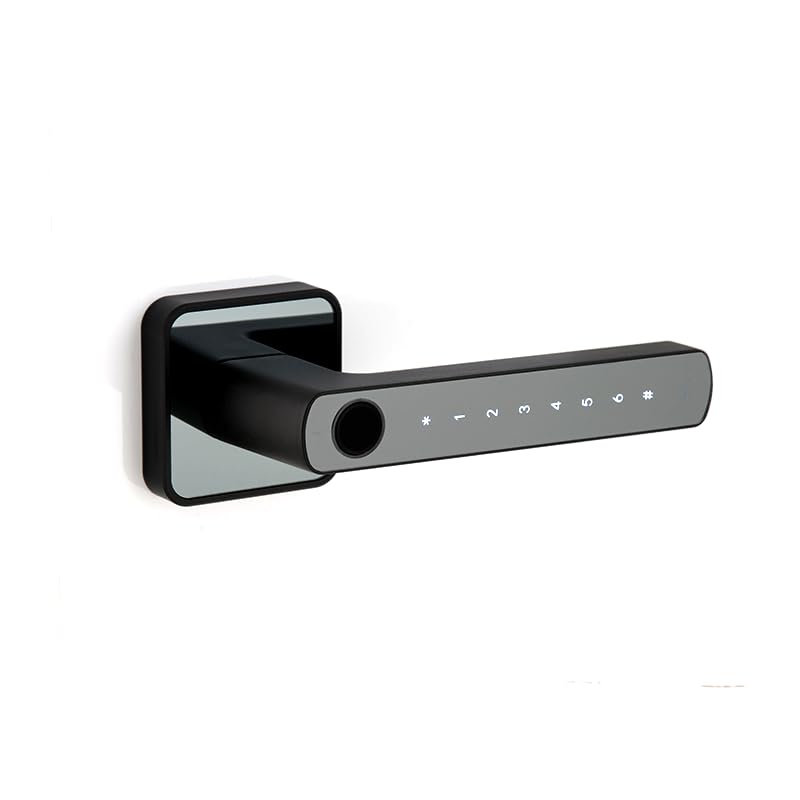
Foto 1: N'ihu view of the Dormakaba Rose Biometric Door Lock, highlighting the fingerprint sensor and keypad.
Isi ihe:
- Mkpisiaka mmetụta: For biometric access.
- Ahụigodo backlit: For PIN code entry (6-10 digits).
- Lever Handle: For manual operation.
- Akụkụ batrị: Holds 3 AAA alkaline batteries.
- Ọdụ USB-C: For emergency power.
- Dormakaba 60mm Tubular Deadlatch: Internal locking mechanism.
Nkọwapụta
| Njirimara | Nkọwa |
|---|---|
| Ụdị | dormakaba |
| Aha Nlereanya | Rose Biometric Silver |
| Ụdị mkpọchi | Biometric Digital Lever Lock |
| Ụdị nnweta | Fingerprint, PIN Code (6-10 digits) |
| Ike onye ọrụ | Up to 200 Fingerprints & PIN Codes |
| Ọkpụrụkpụ ọnụ ụzọ | 32-50mm (Internal Doors) |
| Isi Iyi Ike | 3 x AAA Alkaline batrị |
| Ike mberede | Ụdị C USB |
| Akụkụ (LxWxH) | 14.2 x 2.5 x 5 centimita |
| Ibu | 1.15 kilogram |
| Ihe onwunwe | Ọla |
| Atụmatụ pụrụ iche | Voice Navigation, High Resolution Backlit Keypad, Reversible Handing |
Ntọala na nwụnye
The Dormakaba Rose lock is designed for straightforward installation. It can be installed on both left and right-handed doors. Ensure your door thickness is between 32mm and 50mm.
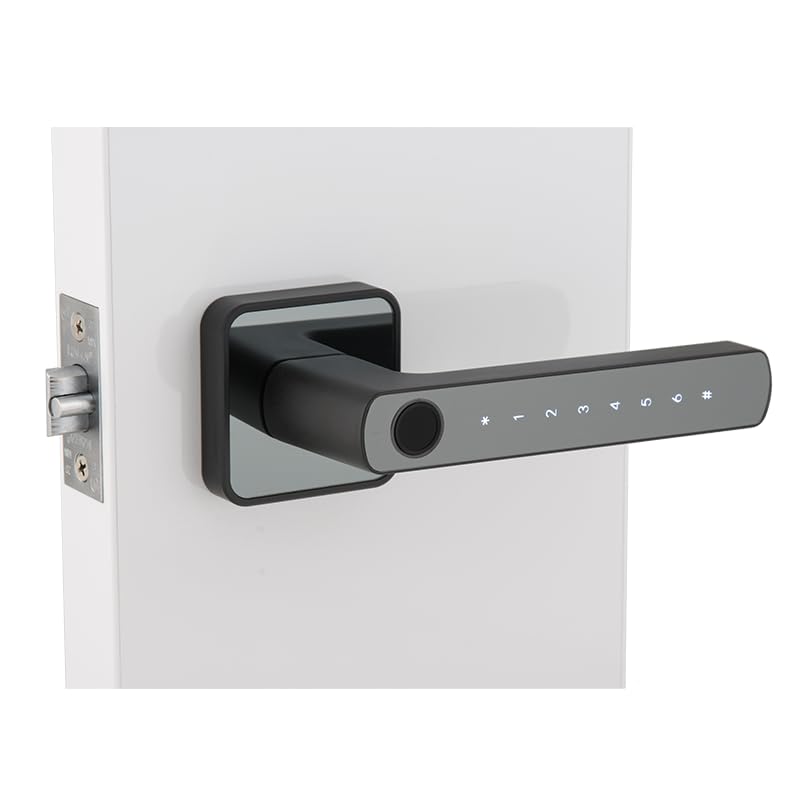
Figure 2: Dormakaba Rose Biometric Door Lock installed on a door.
Nzọụkwụ nwụnye:
- Kwadebe Ọnụ ụzọ: Ensure the door is clean and the existing boreholes are compatible with the lock's dimensions. If necessary, drill new holes according to the provided template (not included in this manual, refer to packaging).
- Wụnye Latch: Insert the dormakaba 60mm tubular deadlatch into the door edge. Secure it with screws.
- Kpebie aka: The lock is reversible. Adjust the lever handle direction if needed before final assembly.
- Mount Exterior Assembly: Feed the spindle and connecting cables through the latch and door. Position the exterior lock assembly.
- Mount Interior Assembly: Connect the cables from the exterior unit to the interior unit. Align the interior unit with the spindle and secure it to the exterior unit using the provided screws.
- Wụnye batrị: Open the battery cover on the interior unit and insert 3 AAA alkaline batteries, observing polarity.
- Ọrụ nnwale: After installation, test the lock's mechanical and electronic functions before closing the door.
Ntuziaka ọrụ
The Dormakaba Rose lock offers multiple access methods and operating modes for enhanced security and convenience.
Initial Setup (First Use):
- Upon first power-up, the lock will prompt for initial administrator setup. Follow the voice navigation prompts.
- Register the first administrator fingerprint and/or PIN code. This administrator will have full control over user management.
Ụdị nnweta:
- Ụkpụrụ ọkọlọtọ: Requires a single valid fingerprint or PIN code to unlock.
- Ụdị ngafe: Allows the door to remain unlocked for continuous access during specific periods. This mode is typically set by an administrator.
- Dual User Mode: Requires two different valid fingerprints or PIN codes to unlock, providing an extra layer of security.
Ịkpọghee ụzọ:
- Iji Mkpisiaka: Place a registered finger on the fingerprint sensor. The lock will verify and unlock if successful.
- Using PIN Code: Enter your registered 6-10 digit PIN code on the backlit keypad, then press the '#' key. The lock will verify and unlock if successful.
Emergency Power Option:
If the batteries are completely drained, the lock can be temporarily powered using a Type C USB cable connected to an external power bank or adapter. Connect the USB-C cable to the port on the exterior unit, then use your fingerprint or PIN code to unlock.
Nlekọta
Regular maintenance ensures the optimal performance and longevity of your Dormakaba Rose lock.
- Nhicha: Wipe the lock surface with a soft, dry cloth. Do not use abrasive cleaners, solvents, or harsh chemicals, as these can damage the finish and electronic components.
- Ngbanwe batrị: Replace all 3 AAA alkaline batteries when the low battery indicator appears or when voice prompts indicate low power. Do not mix old and new batteries.
- Mkpisiaka mmetụta: Keep the fingerprint sensor clean and free of dirt or moisture for accurate readings.
- Mechanical Check: Periodically check that the lever handle operates smoothly and the latch retracts fully.
Nchọpụta nsogbu
This section addresses common issues you might encounter with your Dormakaba Rose Biometric Door Lock.
| Nsogbu | Ihe nwere ike ime | Ngwọta |
|---|---|---|
| Mkpọchi anaghị aza. | Batrị nwụrụ anwụ. | Replace batteries or use emergency Type C USB power. |
| Achọpụtaghị akara mkpịsị aka. | Finger is dirty/wet, sensor is dirty, or fingerprint not properly registered. | Clean finger and sensor. Re-register fingerprint if issue persists. |
| Koodu PIN anaghị arụ ọrụ. | Incorrect PIN entered, or PIN not properly registered. | Ensure correct PIN is entered. Re-register PIN if necessary. |
| Voice navigation is too loud/quiet or off. | Volume settings adjusted. | Refer to the lock's menu for voice volume adjustment. |
| Lock is difficult to install. | Door thickness incompatibility or incorrect drilling. | Verify door thickness (32-50mm). Ensure proper alignment and drilling as per template. |
Akwụkwọ ikike na nkwado
Your Dormakaba Rose Biometric Door Lock comes with a Akwụkwọ ikike afọ 1 site na ụbọchị ịzụrụ. Akwụkwọ ikike a na-ekpuchi ntụpọ nrụpụta na adịghị arụ ọrụ n'okpuru ojiji nkịtị.
Mwepu akwụkwọ ikike:
- Mmebi nke nrụnye na-ezighi ezi ma ọ bụ ndozi na-enweghị ikike kpatara.
- Damage due to misuse, abuse, neglect, or accidents.
- Nkịtị iyi na akwa.
- Damage from natural disasters or power surges.
Nkwado ndị ahịa:
For technical assistance, warranty claims, or further inquiries, please contact Dormakaba customer support. Refer to your product packaging or the official Dormakaba websaịtị maka ozi kọntaktị kacha ugbu a.
Biko dowe ihe akaebe nke ịzụrụ ihe maka nkwado akwụkwọ ikike.