
Blukar K9129
Blukar K9129 Rechargeable Headlamp Akwụkwọ ntuziaka onye ọrụ
Ụdị: K9129
Okwu mmalite
Thank you for choosing the Blukar K9129 Rechargeable Headlamp. This manual provides essential information for the safe and efficient use of your headlamp. Please read it thoroughly before operation and retain it for future reference.
Ngwaahịa gafereview
Atụmatụ igodo
- Dual Color Temperatures: Features both white and warm light options for various environments.
- Ụdị ọkụ ọtụtụ: Offers 12 modes, including standard and motion sensor modes, with XPG White, XPG Warm, COB White, XPG+COB White, COB Red, and COB Red Strobe.
- Njikwa ihe mmetụta ngagharị: Allows hands-free operation by waving your hand within 15cm.
- USB-C enwere ike ịchaji: Built-in 1200mAh battery provides up to 30 hours of runtime on a single charge.
- Icha ọkụ nwere ike ibelata: Stepless dimming from 100% to 30% with memory function.
- Adjustable & Comfortable: 45° mgbanwe lamp head and a comfortable, washable elastic headband.
- Ihe mgbochi mmiri IPX5: Designed to resist water splashes from all angles.
Ihe ngwugwu
- Blukar K9129 Headlamp
- USB-C eriri USB
- Helmet Clips (4x)
- Akwụkwọ ntuziaka (akwụkwọ a)
Melite
1. Nchaji mbụ
Tupu i jiri ya nke mbụ, chajie isi ya nke ọmaamp. Connect the provided USB-C charging cable to the headlamp's charging port and to a USB power source (e.g., AC charger, power bank, computer). The 4 battery indicators will show charging progress. A full charge typically takes 2-3 hours.
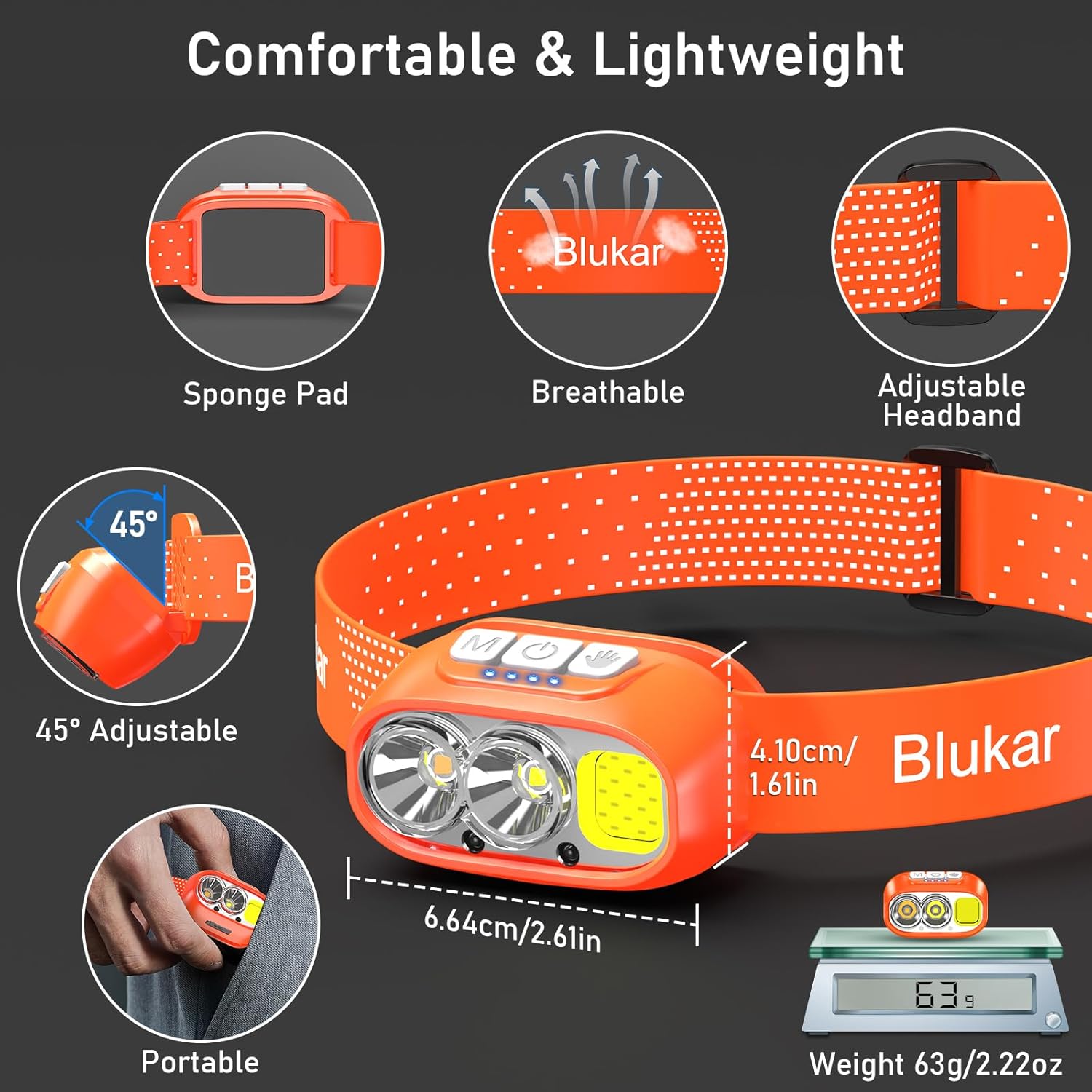
Image: The headlamp being charged via its USB-C port. It can be connected to various USB power sources like an AC adapter, power bank, or computer.
2. Ịhazi eriri isi
The elastic headband is adjustable to fit various head sizes. Adjust the length for a comfortable and secure fit. The headband is also removable and washable for hygiene.

Image: Details of the headlamp's comfortable and lightweight design, showing the adjustable headband, sponge pad, and 45-degree tilt capability.
3. Attaching to a Helmet (Optional)
Use the included 4 helmet clips to securely attach the headlamp to a helmet for a stable fit during activities.
Ntuziaka ọrụ
Ọrụ bọtịnụ

Image: Close-up of the headlamp's top panel, highlighting the three independent control buttons: 'M' for Normal Mode, a hand icon for Sensor Mode, and a power icon for Power & Dimmer.
- Normal Mode Button (M): Short press to cycle through standard lighting modes.
- Sensor Mode Button (Hand Icon): Short press to activate motion sensor mode (green light indicates activation). Once active, wave your hand within 15cm to turn the light on/off.
- Power & Dimmer Button (Power Icon):
- Short press to turn the light on/off.
- Long press to adjust brightness steplessly (100%-30%).
- Features a memory function for the last used brightness and mode.
Dị ọkụ
Isi okwuamp offers 12 lighting modes, accessible via the Normal Mode button and Sensor Mode button.

Image: Visual representation of the 12 lighting modes available, including various white light combinations, red light, and sensor modes. It also illustrates the stepless dimming function.
- Standard Modes (6): XPG White Light, XPG Warm Light, COB White Light, XPG+COB White Light, COB Red Light, COB Red Light Strobe.
- Sensor Modes (6): The same 6 modes as above, activated by the Sensor Mode button.
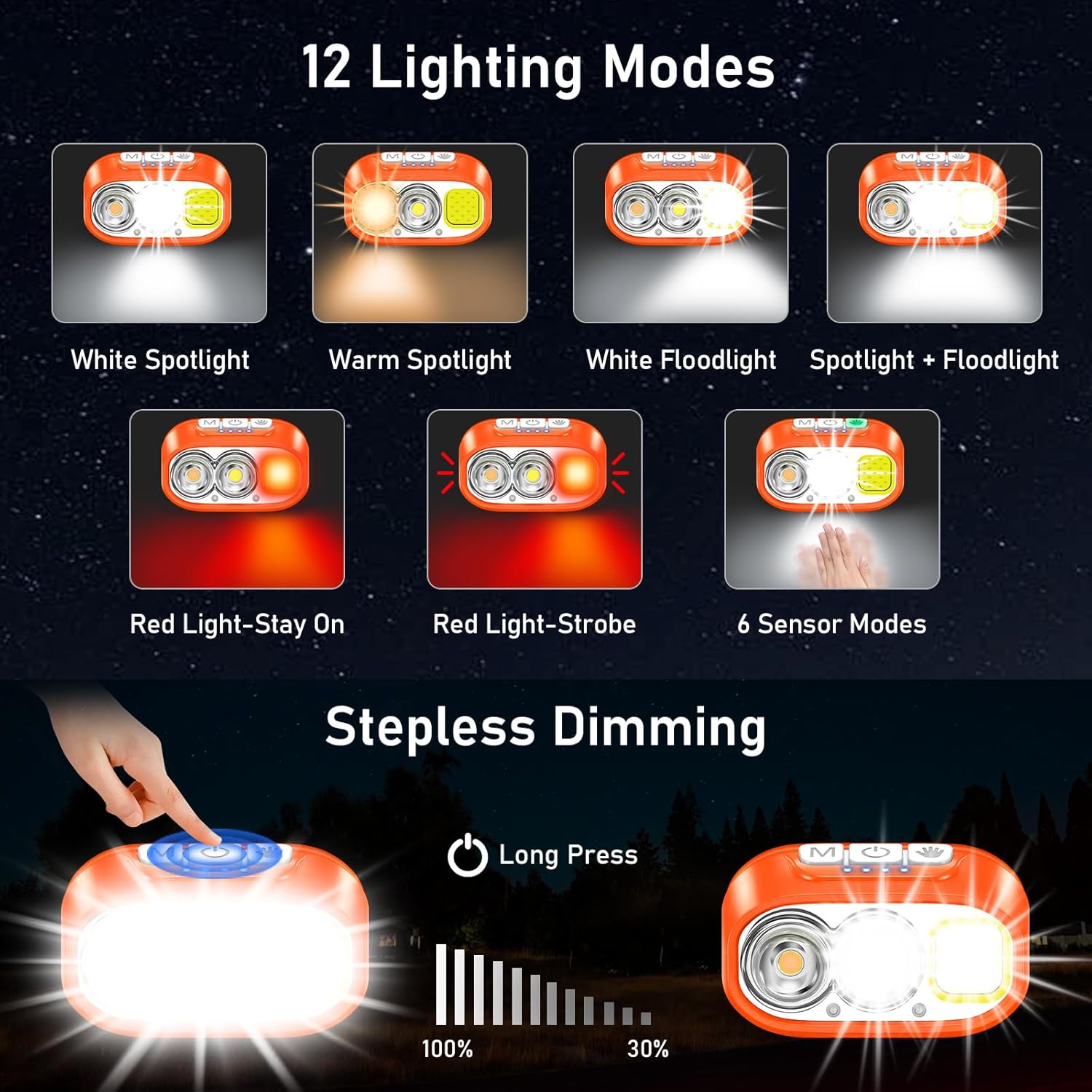
Image: Illustration of the three main light sources: White Light for general use, Warm Light for challenging weather conditions like fog or snow, and Red Light for specialized uses like night fishing or emergency signaling.
Ọrụ Sensọ Motion
To use the motion sensor, press the Sensor Mode button. A green indicator light will illuminate. Once active, simply wave your hand within 15cm (approximately 6 inches) in front of the headlamp to toggle the light on or off without touching the buttons.
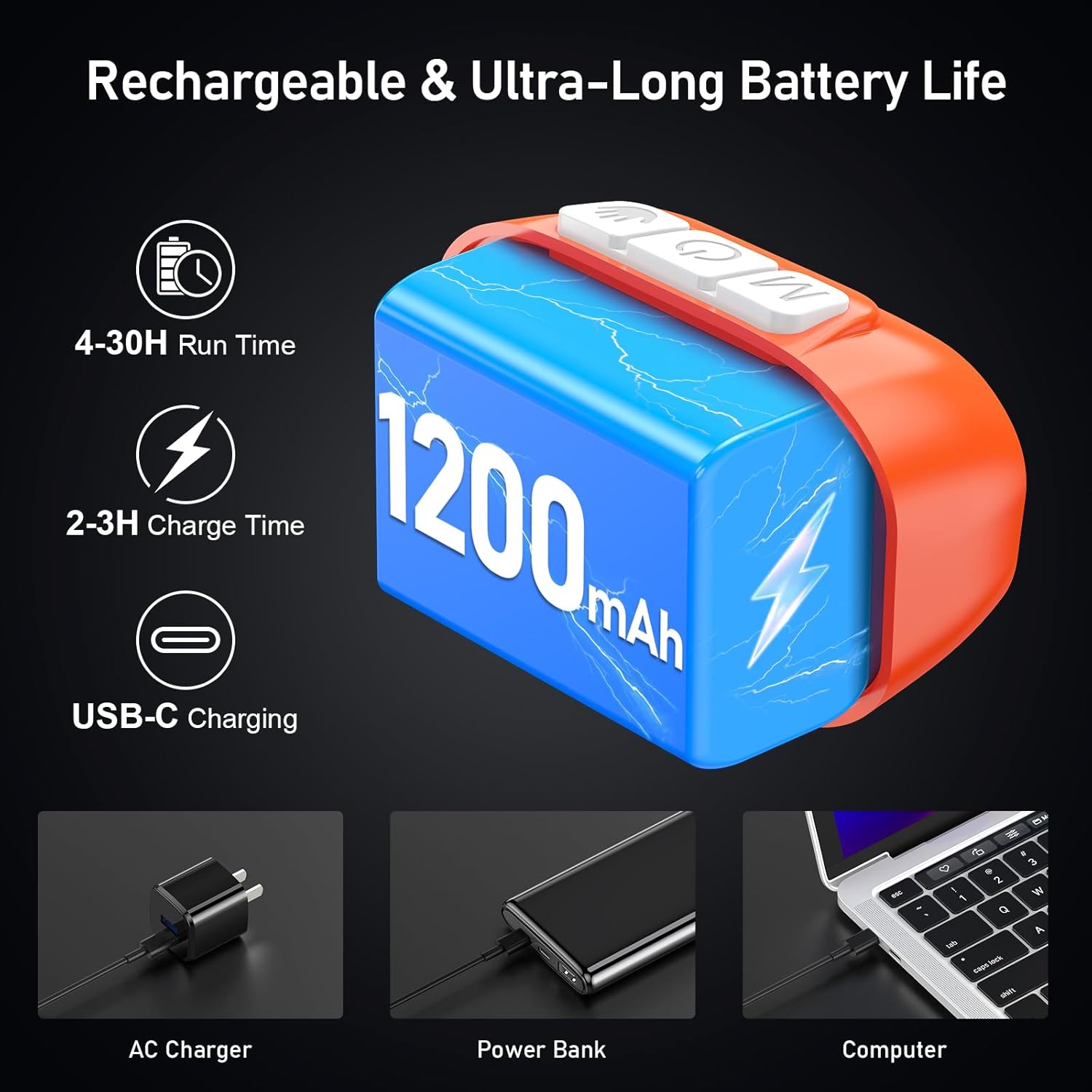
Image: A person demonstrating the motion sensor mode, turning the headlamp on and off with a hand wave while working on a car engine, highlighting the 15cm sensing distance.
Na-emezi Angle Beam
Isi okwuamp unit can be tilted up or down by 45° to direct the light precisely where needed.
Image: The headlamp unit is shown with an arrow indicating its 45-degree adjustable tilt capability.
Nlekọta
- Nhicha: The elastic headband is removable and washable. Clean the headlamp body with a soft, damp akwa . Ejila ihe nchacha abrasive ma ọ bụ ihe mgbaze.
- Nlekọta batrị: To prolong battery life, charge the headlamp regularly, even if not in frequent use. Avoid fully discharging the battery for extended periods.
- Nchekwa: Chekwaa isi isiamp n'ebe dị jụụ, kpọrọ nkụ na-adịghị na ìhè anyanwụ kpọmkwem na oke okpomọkụ.
- Nguzogide mmiri: Isi okwuamp is IPX5 waterproof, meaning it can resist water splashes. Do not submerge the headlamp n'ime mmiri.
Image: The headlamp is shown with water splashing over it, illustrating its IPX5 waterproof capability, which protects against water jets from any direction.
Nchọpụta nsogbu
| Nsogbu | Ihe nwere ike ime | Ngwọta |
|---|---|---|
| Isiamp turns off unexpectedly in sensor mode. | Sensor reacting to unintended movement or objects. | Switch off the sensor mode if not needed, or ensure no objects are passing within 15cm of the sensor. |
| Isiamp adịghị agbanye. | Batrị agwụla. | Kpuchie isi isiamp fully using the provided USB-C cable. |
| Mwepụta ọkụ adịghị ada. | Low battery or dimming function activated. | Recharge the battery. Long press the Power & Dimmer button to increase brightness. |
| Isiamp anaghị akwụ ụgwọ. | Eriri ma ọ bụ isi iyi ọkụ eletrik adịghị mma. | Try a different USB-C cable or a different USB power source. Ensure the cable is securely connected. |
Nkọwapụta
| Nọmba nlereanya | K9129 |
| Ụdị | Blukar |
| Ihe onwunwe | ABS |
| Agba | oroma |
| Akụkụ ngwaahịa | 2.61"D x 1.61"W x 1.38"H |
| Ibu Ibu | 84 grams (2.96 ounces) |
| Ike batrị | 1200mAh |
| Ụdị batrị | Lithium polymer |
| Oge Nchaji | 2-3 awa |
| Oge ịgba ọsọ | Up to 4 hours (ultra-bright mode), up to 30 hours (soft light mode) |
| Ngosi nke enweghị mmiri | IPX5 |
| Ngwa gụnyere | eriri USB |
Akwụkwọ ikike na nkwado
Blukar products are designed for reliability and performance. For any questions, technical support, or warranty inquiries, please contact Blukar customer service through the retailer where the product was purchased or visit the official Blukar websaịtị.
Biko dowe ihe akaebe nke ịzụrụ ihe maka akwụkwọ ikike.
Ask a question about this manual
Ask about setup, troubleshooting, compatibility, parts, safety, or missing instructions. Manuals+ will review the question and use this page’s manual context to help answer it.