
BURCHDA AZ20
BURCHDA AZ20 E-MTB User Manual
Ntuziaka zuru oke maka nhazi, ịrụ ọrụ na mmezi
1. Okwu mmalite
Welcome to the user manual for your new BURCHDA AZ20 E-MTB. This electric mountain bike is designed for versatile use, featuring a full suspension system, powerful motor, and a robust aluminum frame. It is equipped with 20-inch 4.0 fat tires, hydraulic disc brakes, and a 48V20Ah lithium-ion battery, offering a reliable and comfortable riding experience across various terrains. This manual provides essential information for the safe assembly, operation, and maintenance of your E-MTB. Please read it thoroughly before your first ride.

Figure 1.1: The BURCHDA AZ20 E-MTB, showcasing its robust design and included front basket.
2. Ozi nchekwa
Your safety is paramount. Always wear a helmet and appropriate safety gear when riding. Adhere to local traffic laws and regulations.
2.1 Ntuziaka nchekwa izugbe
- Perform a pre-ride inspection before each use, checking brakes, tire pressure, and battery level.
- Ensure all quick-release levers and bolts are securely tightened.
- Anọla n'ụgbọala n'okpuru mmetụta nke mmanya na-egbu egbu ma ọ bụ ọgwụ ọjọọ.
- Mara gburugburu gị wee tụọ anya ihe egwu nwere ike ime.
- Avoid riding in adverse weather conditions, such as heavy rain or snow, if visibility is poor.
2.2 Sistemụ breeki
The BURCHDA AZ20 is equipped with hydraulic disc brakes for reliable stopping power.
- Familiarize yourself with the braking feel and stopping distance in a safe area before riding in traffic.
- Apply both front and rear brakes simultaneously for optimal control and stability.
- The automatic taillight enhances visibility, especially during braking.
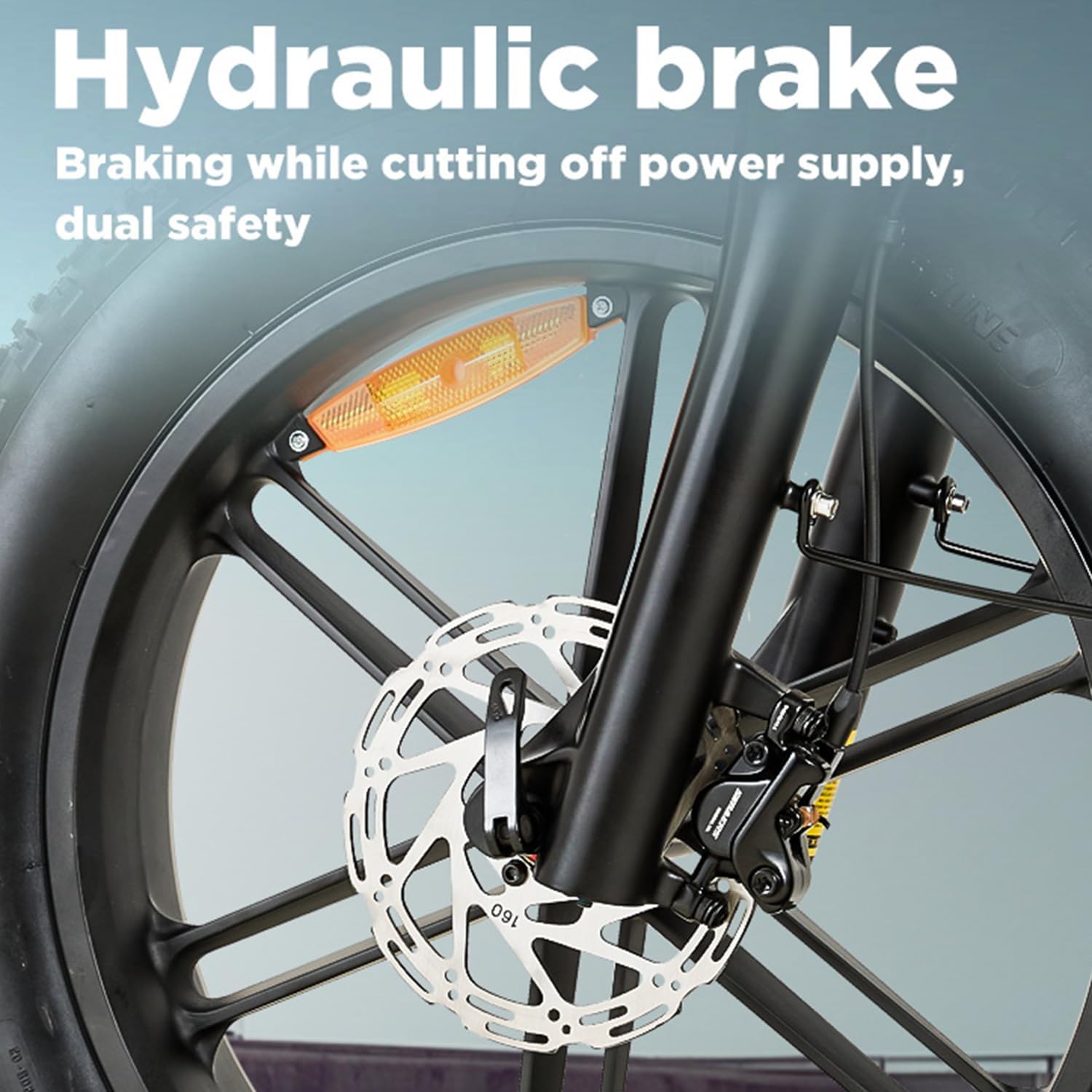
Figure 2.1: Detail of the hydraulic disc brake system, providing strong and consistent stopping power.

Figure 2.2: The integrated warning taillight, designed to improve visibility for vehicles behind the rider.
2.3 Batrị Nchedo
- Only use the charger provided by BURCHDA.
- Do not expose the battery to extreme temperatures or direct sunlight for prolonged periods.
- Avoid puncturing, dropping, or disassembling the battery pack.
- Charge the battery in a well-ventilated area, away from flammable materials.
3. Mgbakọ na Mbido Mbido
Your BURCHDA AZ20 E-MTB comes partially assembled. Follow these steps for final assembly and initial setup. It is recommended to have basic tools available, such as Allen wrenches and a pedal wrench.
3.1 Mwepu na nyocha
- Carefully remove the bicycle and all components from the packaging.
- Inspect for any visible damage during shipping. Contact customer support immediately if damage is found.
- Verify all included components are present: bicycle frame, front wheel, handlebars, seat post, pedals, charger, and any accessories like the basket, horn, reflectors, and fenders.
3.2 Nwụnye Handlebar
- Attach the handlebars to the stem, ensuring proper alignment with the front wheel.
- Tighten the stem bolts evenly and securely.
- Adjust the angle of the brake levers and shifters for comfortable reach.

Figure 3.1: Handlebar assembly with the integrated LCD display and control buttons.
3.3 Ntinye pedal
- Chọpụta pedal aka ekpe (L) na aka nri (R).
- Pedal aka nri (R) na-abanye n'aka crank.
- Pedal aka ekpe (L) na-agbagọ aka ekpe gaa n'akụkụ aka crank.
- Tighten pedals firmly with a pedal wrench.
3.4 Mgbanwe Oche na Saddle
- Tinye ogidi oche ahụ n'ime ọkpọkọ oche nke etiti ahụ.
- Adjust the saddle height so your leg has a slight bend at the knee when the pedal is at its lowest point.
- Secure the quick-release lever or bolt firmly.
- The extra-wide 27cm comfort saddle is designed for ergonomic support.

Figure 3.2: The ergonomically optimized 27cm wide saddle, designed for enhanced comfort during rides.
3.5 Ọnụ ego taya
- Gbanye taya ahụ ruo n'ókè a tụrụ aro ya n'akụkụ mgbidi taya ahụ.
- Proper tire pressure is crucial for safety, performance, and battery range.
4. Ntuziaka ọrụ
Understanding the controls and features of your BURCHDA AZ20 E-MTB will ensure a smooth and enjoyable ride.
4.1 Batrị na Nchaji
- The 48V20Ah Li-Ion battery is integrated into the frame and is removable for charging.
- Oge nchaji dị ihe dịka awa 4-6 maka ụgwọ zuru ezu.
- Ensure the battery is securely locked into the frame before riding.
- A fully charged battery provides a range of 60-70km, depending on terrain, rider weight, and assist level.

Figure 4.1: The 48V20Ah large capacity battery, featuring a Battery Management System (BMS) for multi-functional protection.
4.2 Control System and Display
The E-MTB features a three-part control system: an intelligent display, a smart controller, and a 7-speed gear shift.
- Ngosipụta ọgụgụ isi: Provides real-time data including battery level, speed (KM/H or MPH), mileage, error codes, and current assist level. It also features a USB charging port for external devices.
- Ụdị ịnya ụgbọ ala:
- E-Bike Mode: Full electric power, no pedaling required.
- Assistance Mode: Motor provides assistance as you pedal, with multiple assist levels (e.g., 5-speed).
- Ụdị akwụkwọ ntuziaka: Na-agba ịnyịnya dị ka ịnyịnya ígwè na-enweghị enyemaka moto.
- 7-Speed Gear Shift: Allows you to adjust pedaling resistance for different terrains and speeds.
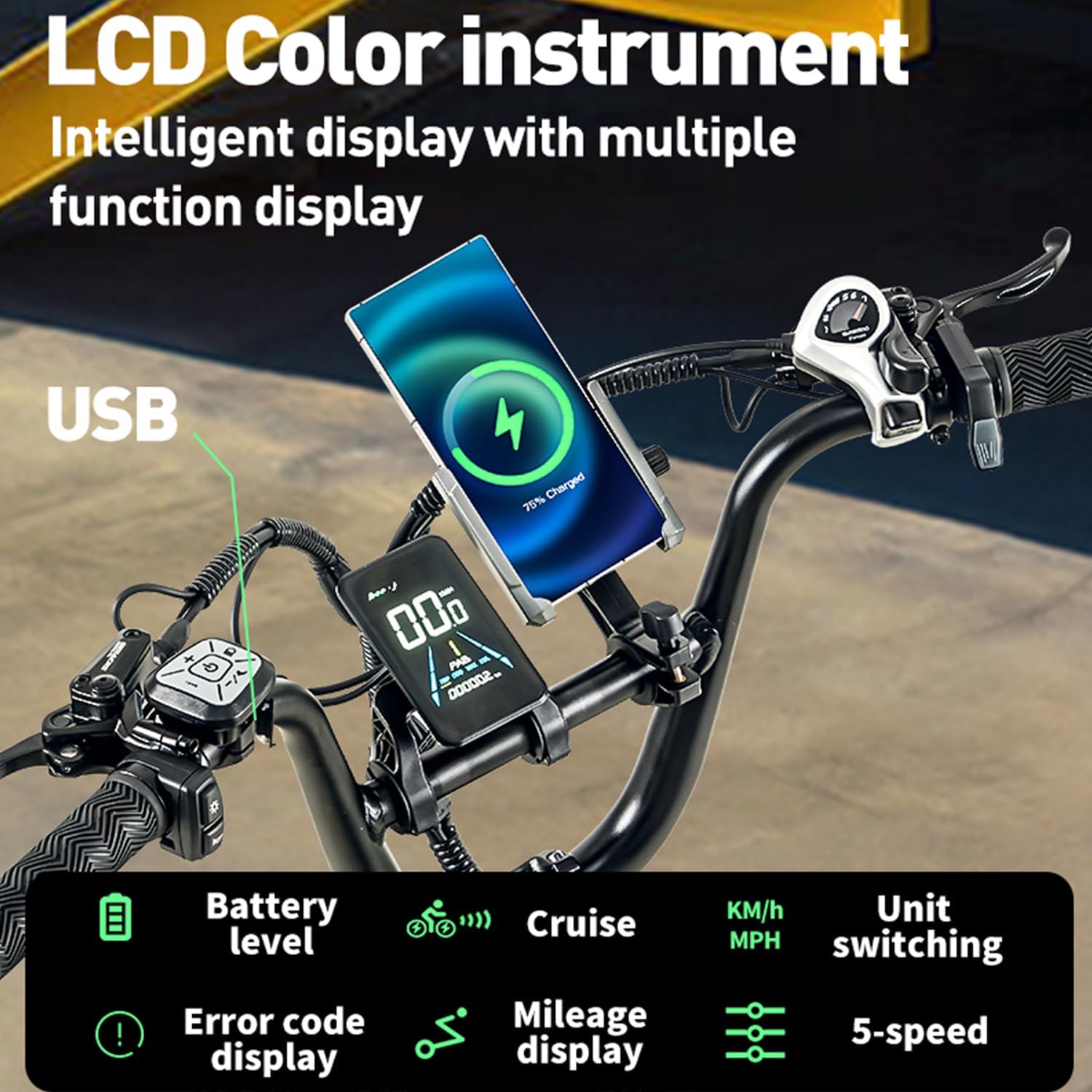
Figure 4.2: The intelligent LCD color instrument display, showing various functions like battery level, cruise control, speed unit switching, error codes, mileage, and 5-speed assist levels.
4.3 Moto na Arụmọrụ
The BURCHDA AZ20 is equipped with a high-power motor designed for strong output and excellent torque.
- The motor provides assistance for climbing hills with ease, supporting up to a 30° incline.
- Adjustable speed settings are available, with a maximum speed of 25km/h (governed by regulations).
- The motor delivers 95 N.m of torque for powerful acceleration.

Figure 4.3: The high-power motor, providing strong output and torque for efficient climbing and acceleration.
4.4 Sistemụ nkwusioru
The dual-suspension system, including a lockable front fork, provides a comfortable ride over varied terrain.
- The front suspension fork can be locked for more efficient pedaling on smooth surfaces.
- The rear suspension absorbs shocks from bumps and uneven ground, enhancing rider comfort and control.

Figure 4.4: Visual representation of the dual shock suspension system, designed to absorb impacts for a smoother ride.
5. Nlekọta
Regular maintenance is crucial for the longevity and safe operation of your E-MTB.
5.1 Nhicha
- Jiri mgbasa ozi na-ehicha igwe kwụ otu ebe mgbe niileamp cloth and mild soap. Avoid high-pressure washers near electrical components.
- Keep the chain and gears clean and lubricated.
5.2 Nlekọta batrị
- Chekwaa batrị n'ebe dị jụụ, kpọrọ nkụ mgbe anaghị eji ya.
- Ọ bụrụ na ị na-echekwa ogologo oge, chaja batrị na 50-70% kwa ọnwa 2-3 ọ bụla.
- Do not fully discharge the battery before recharging.
5.3 Brake and Tire Checks
- Regularly check brake pads for wear and replace them when necessary.
- Ensure brake levers have proper tension and responsiveness.
- Inspect tires for cuts, punctures, and proper inflation before each ride.
5.4 Nlele ihe njide
- Periodically check all bolts, nuts, and quick-release levers for tightness.
- Pay special attention to critical areas like the handlebars, seat post, wheels, and crank arms.
6. Nchọpụta nsogbu
This section addresses common issues you might encounter with your BURCHDA AZ20 E-MTB.
| Nsogbu | Ihe nwere ike ime | Ngwọta |
|---|---|---|
| moto anaghị enyere aka | Battery low or off; assist level set to zero; brake lever engaged. | Check battery charge and power; increase assist level on display; ensure brake levers are fully released. |
| Ngosipụta anaghị agbanye | Battery not connected or dead; loose cable connection. | Ensure battery is fully inserted and charged; check all electrical connections. |
| Brekị adịghị ike | Worn brake pads; air in hydraulic line; misaligned calipers. | Inspect and replace brake pads; consult a bike mechanic for hydraulic bleeding or caliper adjustment. |
| Unusual noises from drivetrain | Dry chain; misaligned derailleur; loose components. | Lubricate chain; adjust derailleur; check for loose bolts. |
| Koodu mperi na ngosi | Sistemu adịghị arụ ọrụ kpọmkwem. | Refer to the display's error code manual (if provided separately) or contact customer support with the specific code. |
7. Nkọwapụta
Detailed technical specifications for the BURCHDA AZ20 E-MTB.
| Njirimara | Nkọwapụta |
|---|---|
| Ụdị | BURCHDA |
| Nọmba nlereanya | AZ20 |
| Ụdị igwe kwụ otu ebe | Fatbike, Multifunctional Bicycle |
| Ogologo afọ | Okenye |
| Frame Ihe | Aluminom Alloy |
| Ụdị nkwusioru | Full Suspension |
| Nha Wheel | 20 sentimita asatọ |
| Nha taya | 20 x 4.0 Inches (Fat Tire) |
| Ọnụọgụ nke Ọsọ ọsọ | 7-Ọsọ |
| Ụdị breeki | Ọkpụkpụ diski Hydraulic |
| Batrị | 48V20Ah Li-Ion (Removable) |
| Oge Nchaji | 4-6 Awa |
| Range (Electric Assist) | 60-70 km |
| Oke Ibu Ibu | 200 n'arọ |
| Ibu Ibu | 35 kilogram |
| Ngwa gụnyere | Reflectors, Horn, Basket, Luggage Rack, Fenders |
| Atụmatụ pụrụ iche | Dual Disc Brake, Multi-Speed, Taillight, Dual Suspension, Digital Display |

Figure 7.1: Product dimensions and recommended rider height (5'2"-6'0") for the BURCHDA AZ20 E-MTB.
8. Akwụkwọ ikike na nkwado
For warranty information and customer support, please refer to the documentation included with your purchase or visit the official BURCHDA websaịtị.
- Debe ihe akaebe nke ịzụrụ ihe maka akwụkwọ ikike.
- For technical assistance or spare parts, contact BURCHDA customer service.
Ask a question about this manual
Ask about setup, troubleshooting, compatibility, parts, safety, or missing instructions. Manuals+ will review the question and use this page’s manual context to help answer it.