
1. Okwu mmalite
The ACMER Ascarva 3S is a precision CNC router designed for engraving and milling various materials such as wood, metal, and acrylic. This manual provides essential information for the safe and efficient operation of your machine, including assembly, setup, operation, maintenance, and troubleshooting.

Image 1.1: The ACMER Ascarva 3S CNC Router is capable of cutting plastics, soft aluminum, woods, acrylics, PVCs, and PCBs, making it suitable for a wide range of projects and materials.
2. Ozi nchekwa
Operating a CNC router involves moving parts and sharp tools. Adhere to the following safety guidelines to prevent injury and damage to the machine:
- Nchedo anya: Always wear safety glasses to protect your eyes from flying debris.
- Ihe mkpuchi uzuzu: Use a dust mask, especially when working with wood or other materials that produce fine particles.
- Nkwụsị ihe mberede: Familiarize yourself with the location and function of the emergency stop switch. Activate it immediately in case of any malfunction or hazard.
- Kpochapụ oghere ọrụ: Keep your work area clean and free of obstructions.
- Secure Material: Ensure the material being worked on is securely clamped iji gbochie mmegharị n'oge ọrụ.
- Kpupu mgbe ejighi ya: Disconnect the power supply when performing maintenance or when the machine is not in use.
3. Ihe ngwugwu
Verify that all components are present in the package before assembly:
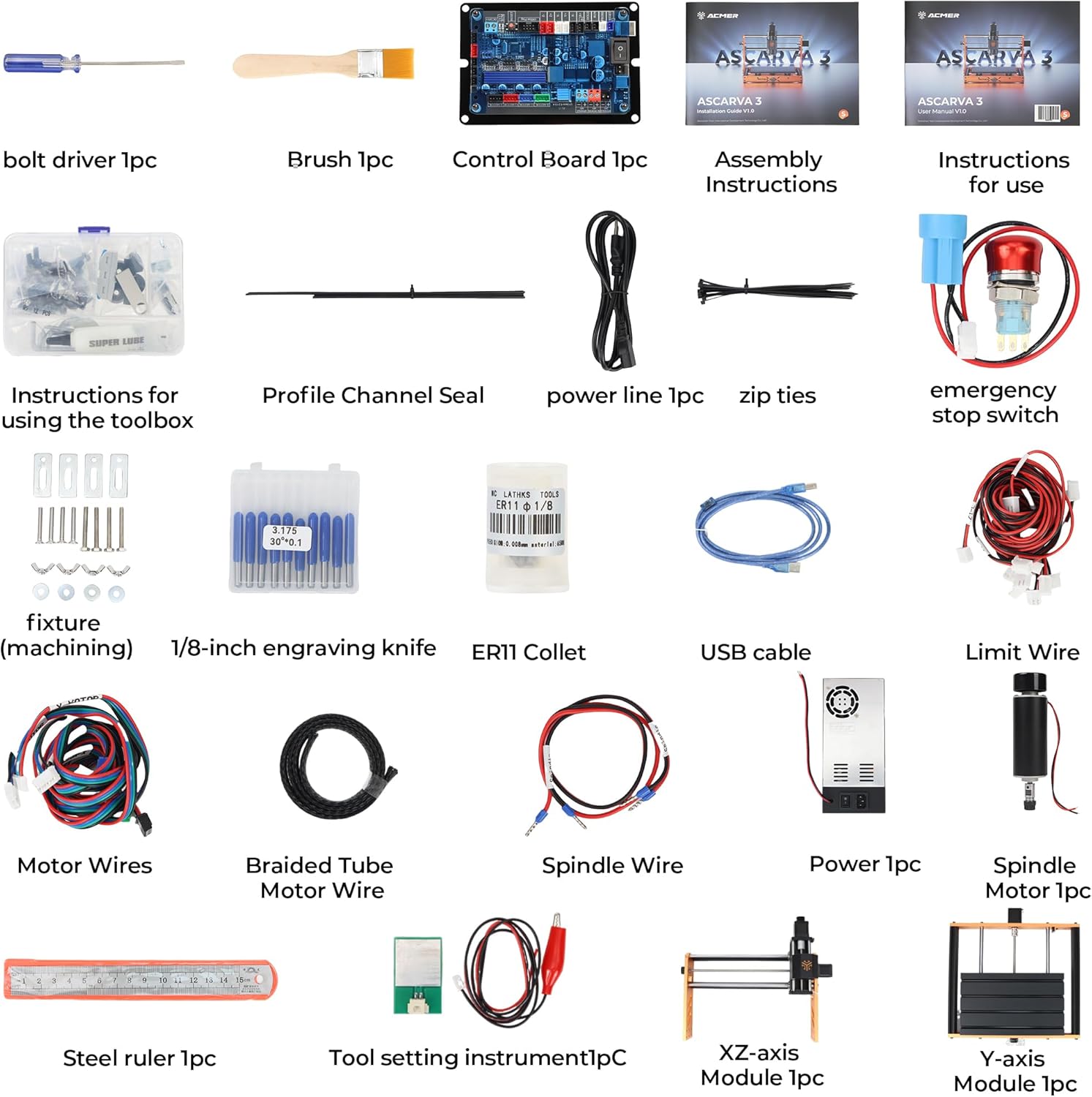
Image 3.1: All components included in the ACMER Ascarva 3S package.
- 1x Bolt Driver
- 1x ahịhịa
- 1x Control Board
- 1x Assembly Instructions
- 1x Ntuziaka maka ojiji
- 1 x Profile Channel Seal
- 1x Power Line
- Ieszọ Zip
- 1x Emergency Stop Switch
- Fixtures (machining)
- 10x 1/8-inch Engraving Knives (Carbide Milling Cutters)
- 1x ER11 Collet
- 1 x eriri USB
- Limit Wires
- Waya moto
- Braided Tube Motor Wire
- Spindle Wire
- 1x Ike Tụkwasịnụ
- 1x Spindle Motor
- 1x Steel Ruler
- 1x Tool Setting Instrument
- 1x XZ-axis Module
- 1x Y-axis Module
4. Mgbakọ
The ACMER Ascarva 3S features a modular design for straightforward assembly. Most parts are pre-built, requiring minimal effort to set up the machine.
- Attach the Upright Section: Secure the upright gantry section to the base using the provided machine screws.
- Jikọọ Wiring: Connect all motor wires, limit switch wires, and the spindle wire to the control board as indicated in the assembly instructions.
- Install Emergency Stop: Mount and connect the emergency stop switch.
- Njikọ ike: Connect the power supply to the control board and plug it into a suitable power outlet.
Ensure all connections are firm and secure. The machine's robust full metal body structure provides stability and rigidity, which is crucial for precise operation.
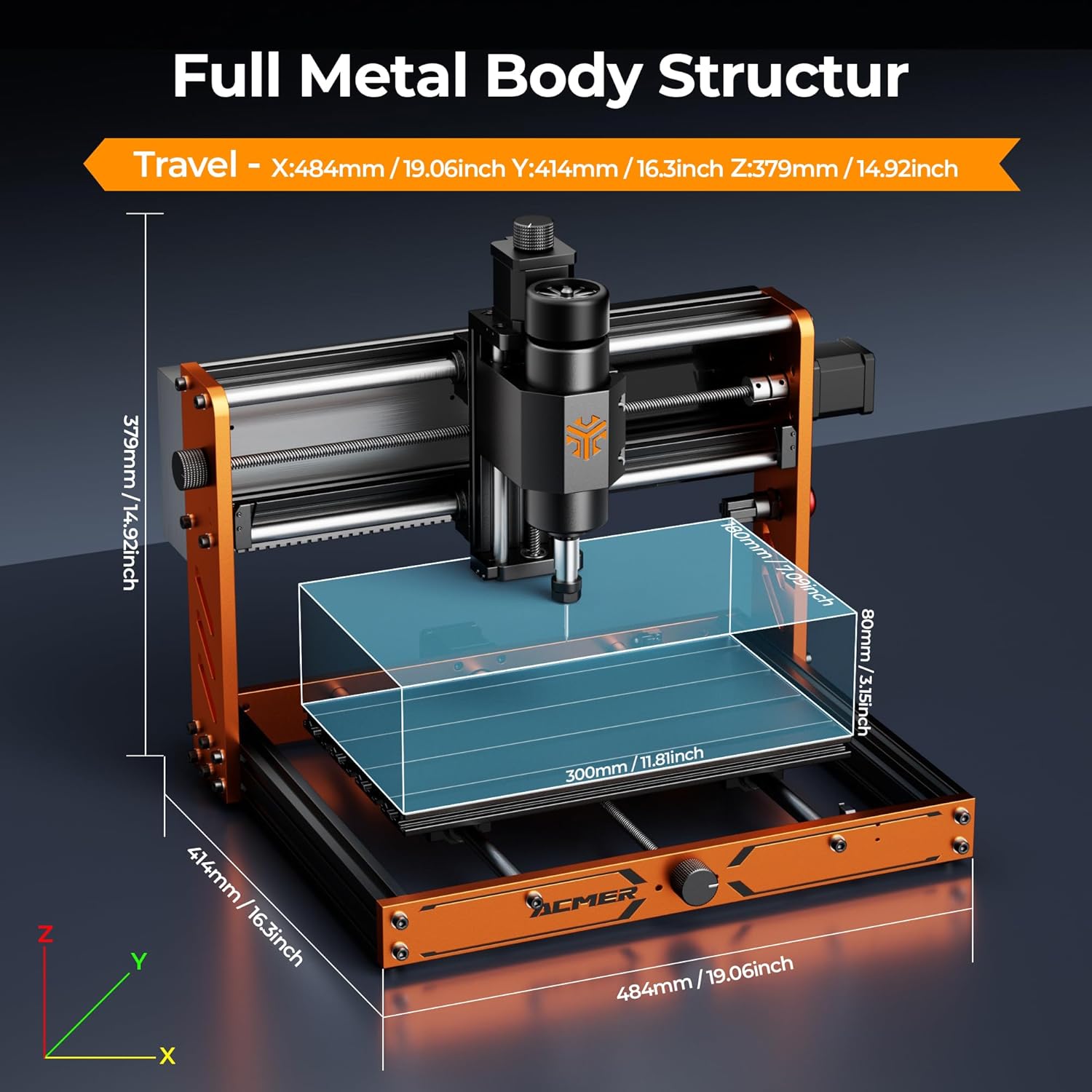
Image 4.1: Full metal body structure and dimensions of the ACMER Ascarva 3S.
5. Nhazi
The Ascarva 3S is designed for ease of use with cross-platform compatibility.
- Nwụnye ngwanrọ: The machine operates with GRBL-compatible software such as Candle, UGS (Universal Gcode Sender), or Easel. Install your preferred software on your computer (Windows, macOS, or Linux).
- Njikọ USB: Connect the CNC router to your computer via the provided USB cable. The machine is plug-and-play, requiring no complex setup for basic connectivity.
- Z-axis Calibration: Perform automatic Z-axis calibration to reduce setup time and ensure accurate depth control. Refer to your chosen software's instructions for this process.
- Nwụnye akụrụngwa: Insert the desired engraving knife or milling bit into the ER11 collet and tighten it securely.

Image 5.1: The ACMER Ascarva 3S is compatible with GRBL control software on various operating systems.
6. Ntuziaka ọrụ
The Ascarva 3S features a 500W high-torque spindle motor (0-12000 RPM) for efficient material removal.

Image 6.1: High accuracy and stability features including the 500W spindle motor.
- Nkwadebe ihe: Secure your material (e.g., wood, acrylic, soft metal) onto the workbed. The effective work area is 300 x 180 x 78 mm.
- Design and G-code Generation: Create your design using CAD/CAM software and generate the corresponding G-code file.
- Load G-code: Load the G-code file into your GRBL control software.
- Set Origin: Manually or automatically set the X, Y, and Z origin points for your job.
- Malite ọrụ: Initiate the carving or milling process through the software. The machine supports engraving speeds up to 2000 mm/min and movement speeds up to 5000 mm/min.
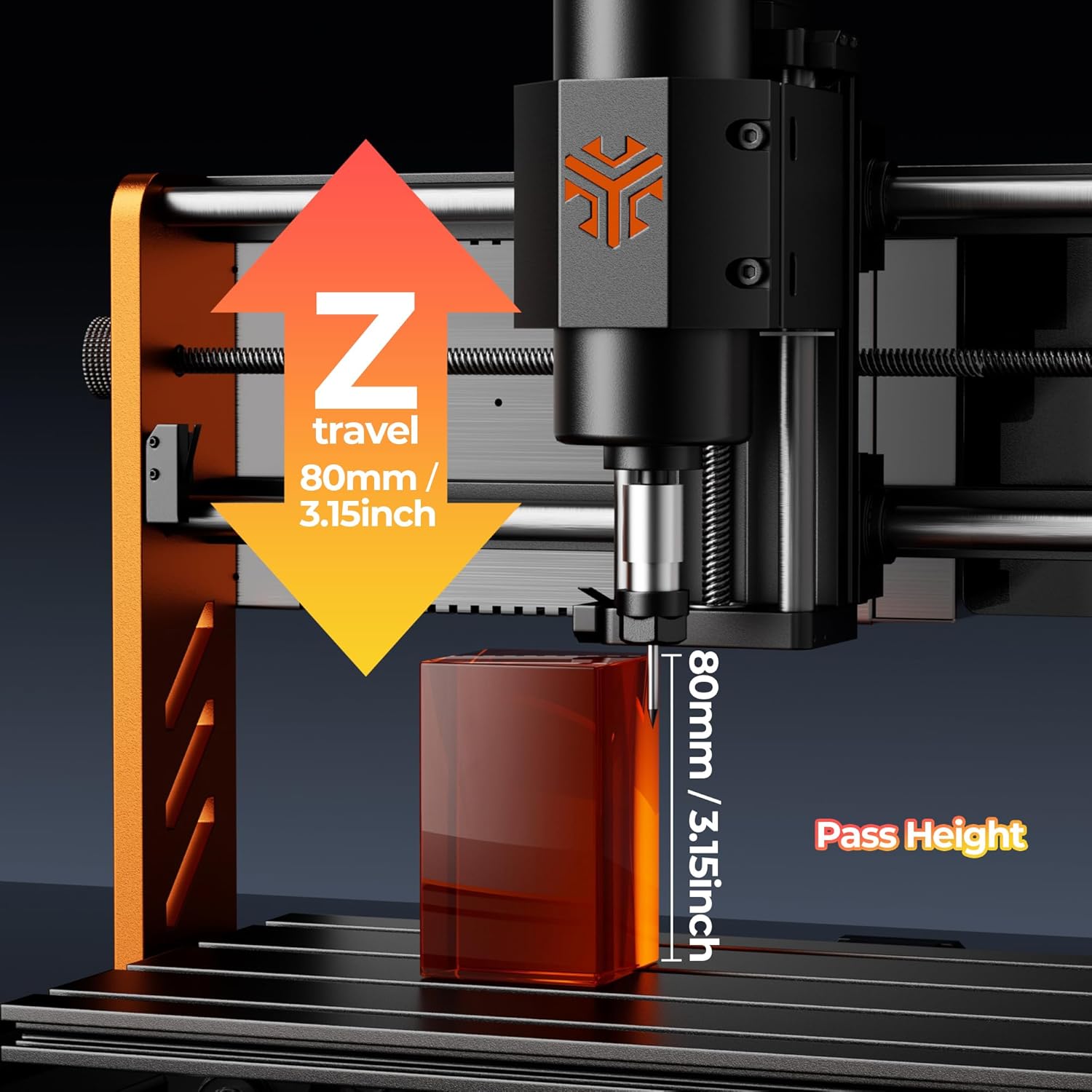
Image 6.2: Z-axis travel and pass height.
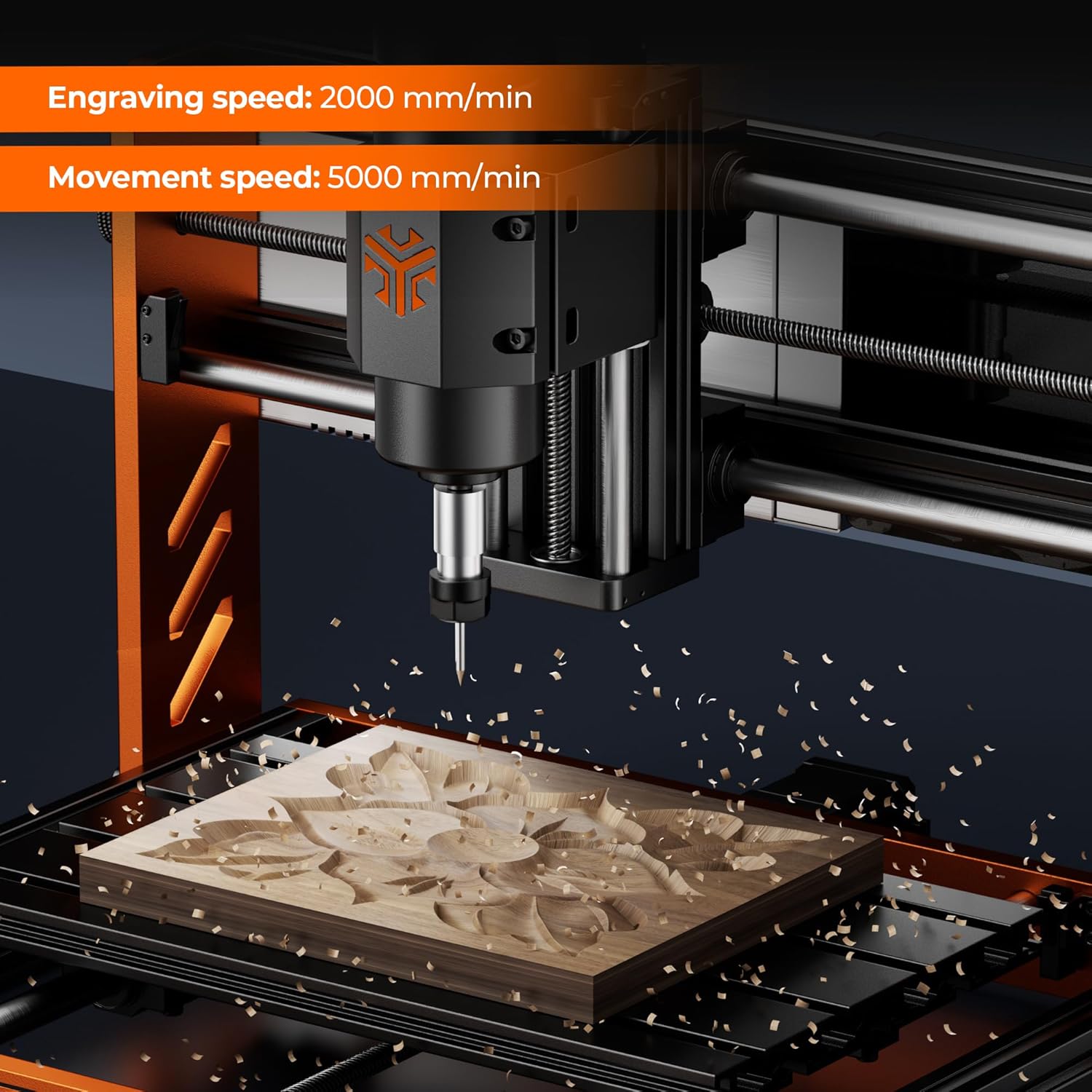
Image 6.3: Engraving in progress, demonstrating operational speeds.
6.1. Recommended Parameters
Refer to the following table for general sculpt and milling parameters. These are starting points and may require adjustment based on specific material properties and desired finish.
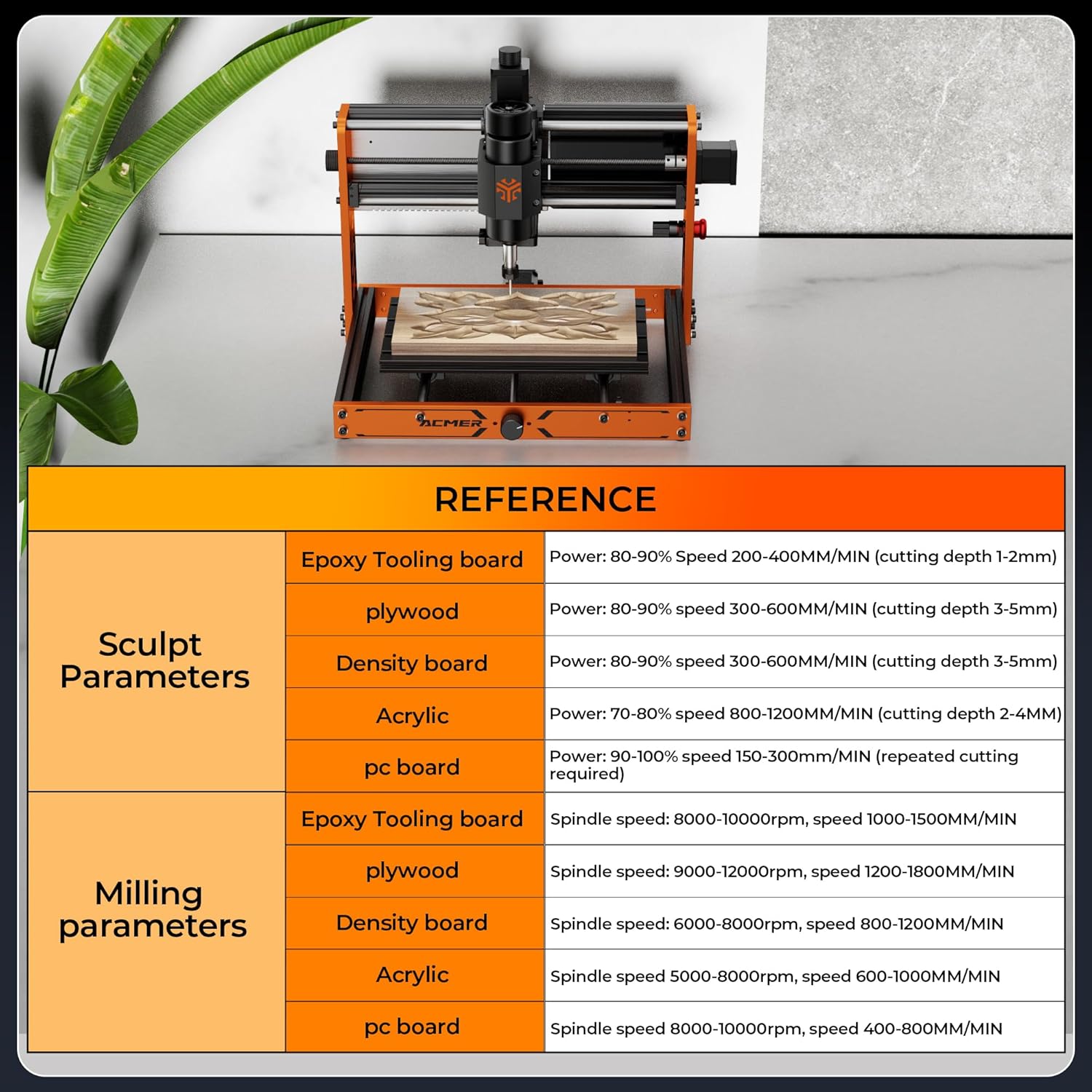
Image 6.4: Reference parameters for various materials.
7. Nlekọta
Regular maintenance ensures the longevity and performance of your CNC router.
- Nhicha: After each use, clean the work area, lead screws, and guide rails to remove dust and debris. A brush is included for this purpose.
- mmanu mmanu: Periodically apply a small amount of lubricant to the lead screws and linear bearings to ensure smooth movement.
- Nyocha akụrụngwa: Regularly inspect engraving knives and milling bits for wear or damage. Replace dull or broken tools to maintain cut quality and prevent machine strain.
- Njikwa uzuzu: Consider using an optional dust hood (sold separately) to minimize dust accumulation in your workspace and on machine components.
8. Nchọpụta nsogbu
Ọ bụrụ na ị na-enwe nsogbu, tụlee usoro nchọpụta nsogbu ndị a na-emekarị:
- Igwe anaghị aza: Check all power connections and USB cable. Ensure the emergency stop button is not engaged. Verify that the correct COM port is selected in your control software.
- Poor Cut Quality: This can be due to dull tools, incorrect cutting parameters (speed, depth), or insufficient material clamping. Adjust parameters, replace tools, and ensure material is secure.
- Ịkwụsị moto: Reduce cutting depth or feed rate. Ensure the spindle motor is running at an appropriate speed for the material.
- Software Connectivity Issues: Restart both the machine and your computer. Reinstall USB drivers if necessary. Ensure no other programs are interfering with the COM port.
- Mkpọtụ na-adịghị ahụkebe: Stop the machine immediately. Inspect for loose components, debris on lead screws, or damaged bearings.
The ESP32 control and 6-axis limit switches are designed to enhance stability and safety. If problems persist, consult the ACMER Maker Hub for further assistance.
9. Nkọwapụta
| Njirimara | Nkọwapụta |
|---|---|
| Onye nrụpụta | ACMER |
| Nọmba nlereanya | CNC-3SLB |
| Akụkụ ngwaahịa | 300 x 300 x 7.8 cm |
| Ibu ngwaahịa | 12.9 n'arọ |
| Ihe onwunwe | High-strength aluminum alloy plate, High-strength aluminum profile |
| Isi Iyi Ike | AC_DC (Wired Electric) |
| Ike Spindle | 500W |
| Ọsọ Spindle | 0-12000 RPM |
| Work Area (X, Y, Z) | 300 x 180 x 78 mm (11.8 x 7 x 3.07 inch) |
| Engraving Precision | ±0.025 mm |
| Engraving Speed (Max) | 2000 mm/min |
| Movement Speed (Max) | 5000 mm/min |
| Sistemụ njikwa | ESP32, GRBL compatible |
| Ụdị Collet | ER11 |
| Sistemu eji arụ ọrụ | Windows, macOS, Linux |
10. Akwụkwọ ikike na nkwado
ACMER provides lifetime support for the Ascarva 3S CNC Router. For exclusive tutorials, firmware updates, and community engagement, join the ACMER Maker Hub. Additionally, a free material cutting database and LightBurn profiles are available to assist with your projects.