
1. Okwu mmalite
This manual provides detailed instructions for the safe and efficient assembly, operation, and maintenance of your SpeaKa Professional SP-TVS-600 TV Floor Stand. Please read this manual thoroughly before installation and retain it for future reference.
The SP-TVS-600 is designed to support televisions and monitors ranging from 37 to 86 inches, with a maximum load capacity of 45 kg. It features tool-free tilt adjustment, adjustable height for the screen (900 to 1100 mm), and an integrated cable management system. An additional height-adjustable storage shelf (200 to 910 mm) is included for media devices.
2. Ozi nchekwa
Ịdọ aka ná ntị: Failure to read, understand, and follow all instructions can result in serious personal injury, property damage, or voiding of your warranty.
- Ensure the floor stand is placed on a stable, level surface.
- Agafela ikike ibu kacha nke 45kg (99 lbs).
- Verify that your TV's VESA mounting pattern is compatible with the stand (100x100 to 600x400 mm).
- Always use two people for lifting and positioning the TV onto the stand.
- Debe ụmụaka na anụ ụlọ n'ebe dị anya n'ebe a na-adọba ụgbọala mgbe a na-ezukọ ma na-arụ ọrụ.
- Do not hang on the stand or TV.
- Regularly check all screws and connections to ensure they remain secure.
- Tụfuo ihe nkwakọ ngwaahịa nke ọma.
3. Ihe ngwugwu
Please check that all components are present and undamaged before beginning assembly. If any parts are missing or damaged, contact your retailer.
- TV Floor Stand (disassembled components)
- Akwụkwọ ntuziaka (akwụkwọ a)
- Mpempe akwụkwọ data nchekwa
- Hardware Kit (screws, washers, spacers, tools for assembly)

Foto 1: N'ihu view of the SpeaKa Professional SP-TVS-600 TV Floor Stand.
4. Ntọala na Mgbakọ
Follow these steps carefully to assemble your TV floor stand. It is recommended to have a second person assist with assembly, especially when mounting the television.
- Wepu akụrụngwa: Jiri nlezianya wepụ akụkụ niile dị na ngwugwu ahụ ma tinye ha n'elu dị nro ma dị ọcha iji gbochie ọkọ.
- Kpọkọta ntọala: Attach the main support column to the base plate using the provided screws and tools. Ensure all connections are tight and secure.
- Install TV Brackets: Attach the VESA mounting brackets to the back of your television using the appropriate screws, washers, and spacers from the hardware kit. Refer to your TV's manual for specific screw requirements. Ensure the brackets are level and securely fastened.
- Wụnye TV ahụ: With assistance, carefully lift the television and hook the TV brackets onto the main support column's mounting plate. Secure the TV in place using the safety screws or locking mechanisms provided.
- Tinye Shelf: Install the media shelf onto the main support column at your desired height. Secure it with the designated fasteners.
- Njikwa USB: Route all TV and device cables through the integrated cable management system within the stand's column for a tidy appearance.
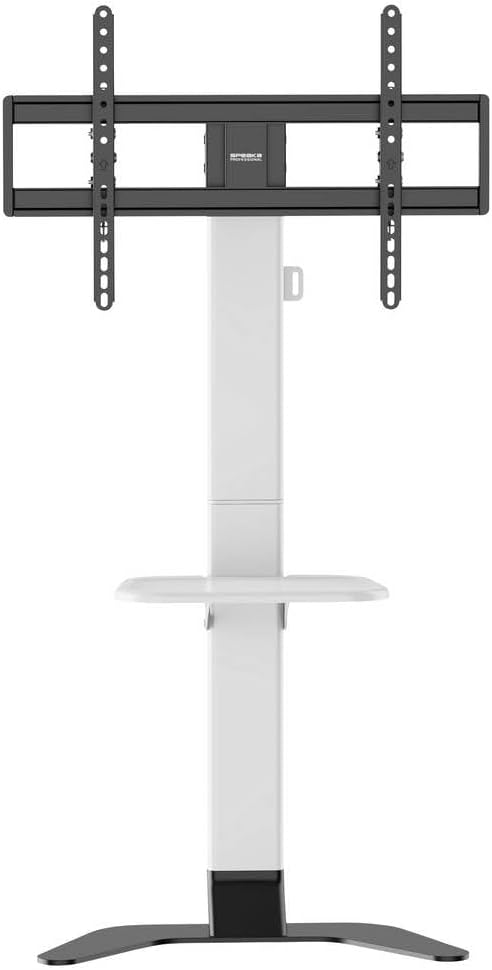
Foto 2: N'ihu view of the stand showing the adjustable shelf.

Foto 3: Akụkụ view of the stand, illustrating the profile na nkwụsi ike.
5. Ntuziaka ọrụ
5.1 Adjusting TV Height
The TV mounting plate can be adjusted in height from 900 mm to 1100 mm. To adjust, loosen the height adjustment screws on the main column, carefully slide the TV to the desired height (with assistance), and then securely tighten the screws.
5.2 Adjusting TV Tilt
The stand features tool-free tilt adjustment. Gently push or pull the top or bottom of the TV to achieve your desired viewing angle. The mechanism will hold the TV in place.
5.3 Ịgbanwe Ogologo Shelf
The media shelf can be adjusted in height from 200 mm to 910 mm. Loosen the shelf adjustment screws, move the shelf to the preferred height, and then re-tighten the screws firmly.
6. Nlekọta
- Nhicha: Use a soft, dry cloth to clean the stand. For stubborn marks, a slightly damp cloth with mild detergent can be used, followed by drying. Avoid abrasive cleaners or solvents.
- Nyocha oge: Regularly inspect all screws, bolts, and connections to ensure they are tight and secure. Re-tighten if necessary.
- Mmebi: If any part of the stand becomes damaged, discontinue use immediately and contact customer support for replacement parts or advice.
7. Nchọpụta nsogbu
| Nsogbu | Ihe nwere ike ime | Ngwọta |
|---|---|---|
| Nkwụsi ike na-ama jijiji ma ọ bụ ejighị n'aka. | Skrọ ndị ahụ tọgbọrọ chakoo; ihe a na-eguzo n'elu ebe na-adịghị nhata; ibu karịrị akarị. | Ensure all assembly screws are tightened. Move stand to a level surface. Verify TV weight is within 45 kg limit. |
| TV does not tilt smoothly or stays in position. | Tilt mechanism needs adjustment or is obstructed. | Check for any obstructions. Ensure the tilt mechanism is clean. |
| Cables are not neatly managed. | Cables not routed through the designated channels. | Gbanwee eriri ndị ahụ site na sistemụ njikwa eriri agbakwunyere na kọlụm isi. |
8. Nkọwapụta
- Ụdị: SP-TVS-600
- Nọmba akụkụ: SP-13382656
- Akara: SPEAKA PROFESSIONAL
- Ụdị nkwụnye: Nkwụsị ala
- Ụdị mmegharị: Tiltable
- Ihe: Alloy Steel
- Agba: Ọcha/Oji
- Nha TV dakọtara: 37 - 86 sentimita asatọ na ise (94.0 cm - 218.4 cm)
- Ndakọrịta VESA: 100x100, 200x100, 200x200, 300x200, 400x200, 300x300, 400x300, 400x400, 600x400 mm
- Oke ibu kacha: 45 n'arọ (99 lbs)
- TV Height Adjustment: 900-1100 mm
- Shelf Height Adjustment: 200-910 mm
- Ngwa dakọtara: Television, Monitor
- Ibu ihe: 12.505 n'arọ (12505 grams)
- Mba onye si: China
9. Akwụkwọ ikike na nkwado
9.1 Ozi akwụkwọ ikike
This SpeaKa Professional product comes with a 2-year manufacturer's warranty. Please refer to the terms and conditions provided with your purchase or visit the official SpeaKa Professional website for full details. Keep your proof of purchase for warranty claims.
9.2 Nkwado ndị ahịa
For technical assistance, missing parts, or warranty inquiries, please contact your retailer or SpeaKa Professional customer support. Contact information can typically be found on the product packaging or the official brand websaịtị.