
Okwu mmalite
This user manual provides detailed instructions for the safe and efficient operation of your WUBEN PL01 Pen Light and WUBEN E7 Mini Flashlight bundle. Please read this manual thoroughly before using the products and retain it for future reference. These devices are designed for everyday carry (EDC), outdoor activities, and professional use, offering reliable illumination and robust construction.

Image: The WUBEN PL01 Pen Light and WUBEN E7 Mini Flashlight, showcasing their compact designs.
Ngwaahịa gafereview
WUBEN PL01 Pen Light
- Mmepụta Lumen dị elu: Delivers up to 650 lumens for powerful illumination.
- Ụdị ọtụtụ: Features 4 lighting modes: High (650LM), Medium (150LM), Low (50LM), and Moonlight (1LM).
- Nnyenye ike abụọ: Can be powered by a built-in USB-C rechargeable battery or two AAA batteries (not included).
- Ihe owuwu na-adịgide adịgide: IP68 waterproof and 2-meter drop resistant, made from aerospace-grade aluminum alloy.
- Convenient Clip: Equipped with a dual-direction clip for versatile attachment to pockets, hats, or gear.

Image: The WUBEN PL01 Pen Light illustrating its dual power supply capability with a rechargeable battery and AAA battery slots.
WUBEN E7 Mini Flashlight
- Mmepụta dị ike: Maximum lumen output of 400 lumens with an irradiation distance of up to 82 meters.
- Nhazi kọmpat: Small and lightweight, measuring 1.47 in x 0.59 in x 2.44 in and weighing only 52.3g.
- Dual-Bead System: Features an LED dual-bead system with multiple lighting modes.
- Ọkụ dị iche iche: Includes cold white light with 3 adjustable modes (low, medium, high) and RGB light with 7 colors (red, orange, yellow, green, cyan, blue, purple). Beacon Mode is also available.
- Robust and Waterproof: IP68 waterproof and 2-meter drop resistant, suitable for various outdoor and emergency situations.

Image: The WUBEN E7 Mini Flashlight attached magnetically to a metal surface, highlighting its IP68 waterproof design in a rainy environment.
Melite
PL01 Battery Installation & Charging
- Ebube mbụ: Before first use, fully charge the built-in USB-C rechargeable battery. Unscrew the tail cap to access the USB-C charging port. Connect the provided USB-C cable to a power source. The indicator light will show charging status.
- AAA Battery Option: For backup power, unscrew the tail cap and insert two AAA batteries (not included) with the correct polarity.
E7 Battery Installation & Charging
- The WUBEN E7 comes with a built-in rechargeable battery. Connect the flashlight to a USB-C charging cable to charge.
Ntuziaka ọrụ
WUBEN PL01 Pen Light
- Gbanyụọ/ Gbanyụọ: Fully press the tail switch to turn the flashlight on or off.
- Ụdị mgbanwe: With the light on, half-press the tail switch to cycle through modes: Moonlight → Low → Medium → High. The flashlight will remember the last used mode.
- Ojiji clip: The dual-direction clip allows for attachment to pockets, backpack straps, or the brim of a cap for hands-free use.
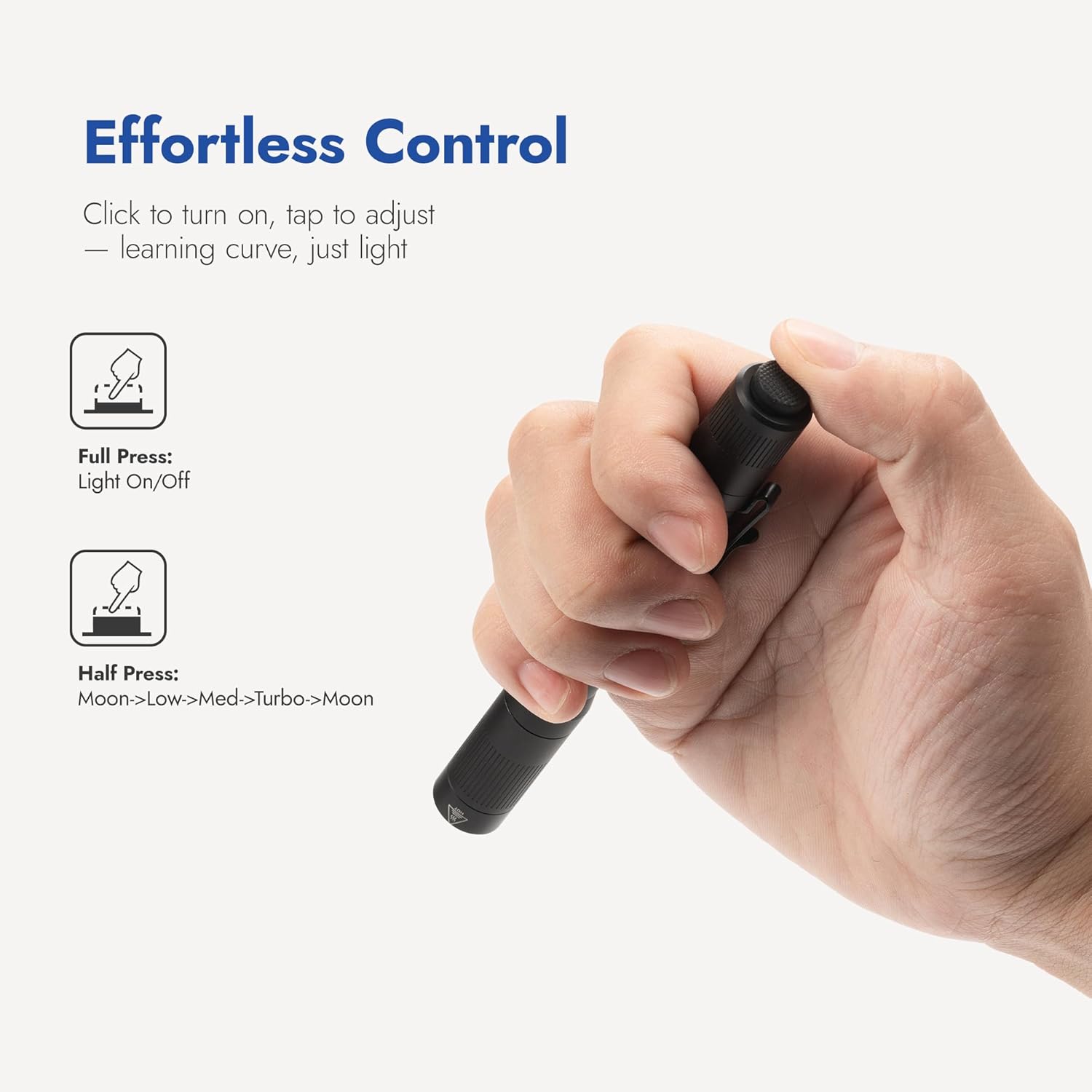
Image: A hand demonstrating the full press for on/off and half-press for mode adjustment on the WUBEN PL01 Pen Light.
WUBEN E7 Mini Flashlight
- Ụdị Ọcha Ọcha: Use the pulley switch to select between Low, Medium, and High cold white light modes.
- Ụdị ọkụ RGB: Slide the pulley switch to cycle through 7 different RGB colors.
- Ụdị mgbama: In RGB mode, double-click the button to activate the beacon flashing mode.

Image: The WUBEN E7 Mini Flashlight depicted in various configurations, including with a headlight strip and an extension tube, demonstrating its versatility.
Nlekọta
- Nhicha: Na-ehicha ahụ ọkụ mgbe niile site na iji ihe dị nro, damp akwa . Zere kemịkalụ siri ike.
- Mgbaaka O: Inspect O-rings periodically for wear and tear. Replace if damaged to maintain waterproof integrity. Lubricate with silicone grease as needed.
- Nlekọta batrị: For rechargeable batteries, avoid complete discharge and store in a cool, dry place. If using AAA batteries, remove them if the flashlight will not be used for an extended period to prevent leakage.
- Nchekwa: Store the flashlights in a dry, cool environment away from direct sunlight and extreme temperatures.
Nchọpụta nsogbu
- Ìhè anaghị agbanwu:
- Lelee ọkwa chaja batrị.
- Gbaa mbọ hụ na etinyere batrị na polarity ziri ezi.
- Clean battery contacts if dirty.
- For PL01, ensure the tail cap is screwed on tightly.
- Ọrụ na-adịte aka:
- Tighten all parts of the flashlight.
- Clean battery contacts and threads.
- Mbelata ìhè ma ọ bụ oge ọrụ:
- Battery may be low or nearing end of life. Recharge or replace.
- Gbaa mbọ hụ na oghere ahụ dị ọcha.
Nkọwapụta
WUBEN PL01 Pen Light
| Njirimara | Nkọwa |
|---|---|
| Icha ọkụ | Ihe ruru 650 lumens |
| Ụdịdị | Moonlight (1LM), Low (50LM), Medium (150LM), High (650LM) |
| Isi Iyi Ike | Built-in USB-C Rechargeable Battery or 2x AAA Batteries |
| Ihe onwunwe | Aluminium Alloy-ọkwa ikuku |
| Mmiri Nguzogide | IP68 (submersible in 2m water for 1 hour) |
| Wepu Nguzogide | 2 mita |
| Atụmatụ pụrụ iche | Dual-direction clip, Mode memory |
WUBEN E7 Mini Flashlight
| Njirimara | Nkọwa |
|---|---|
| Icha ọkụ kacha | 400 Lumen |
| Oke Ogologo Mgbasa Ọbara | 82 mita |
| Akụkụ | 1.47 n'ime x 0.59 na x 2.44 inch |
| Ibu | 52.3g |
| Dị ọkụ | Cold White (Low, Medium, High), RGB (7 colors), Beacon Mode |
| Mmiri Nguzogide | IP68 |
| Wepu Nguzogide | 2 mita |
Akwụkwọ ikike na nkwado
WUBEN products are designed for durability and performance. For warranty information, technical support, or service inquiries, please refer to the official WUBEN websaịtị ma ọ bụ kpọtụrụ ndị ahịa ha ozugbo. Debe nnata nzụta gị dị ka ihe akaebe nke ịzụrụ maka nkwupụta ikike.