
1. Okwu mmalite
The EARU Automatic Voltage Protector (Model EARU-1005) is an advanced electrical safety device designed to protect your valuable home and office appliances from damaging power fluctuations. This device offers comprehensive protection against over-voltage, n'okpuru-voltage, and overcurrent conditions, ensuring the longevity and safe operation of your electrical equipment. It features adjustable thresholds and an auto-reconnect function for convenience and continuous protection.
2. Atụmatụ igodo
- All-in-One Protection: Safeguards appliances from power surges, over-voltage (above 275V), under-voltage (below 175V), and adjustable overcurrent (1A-63A).
- Ndozi nkenke: Customizable cut-off thresholds for over-voltage (200V-275V) and under-voltage (175V-200V) to suit specific grid conditions and appliance needs.
- Ọrụ tọgharịa akpaaka: Automatically restores power within 60-300 seconds once grid voltage stabilizes within the set safe range, eliminating manual intervention.
- Superior Conductivity: Constructed with 100% pure copper conductors for minimal resistance, efficient operation, and enhanced long-term reliability under heavy 63A loads.
- Nwụnye DIN Rail: Designed for easy and secure integration into standard 2-Pole, 36mm width DIN Rail electrical panels.
- Nchekwa zuru oke: Provides robust protection for an entire household against unpredictable voltage mgbanwe na surges.
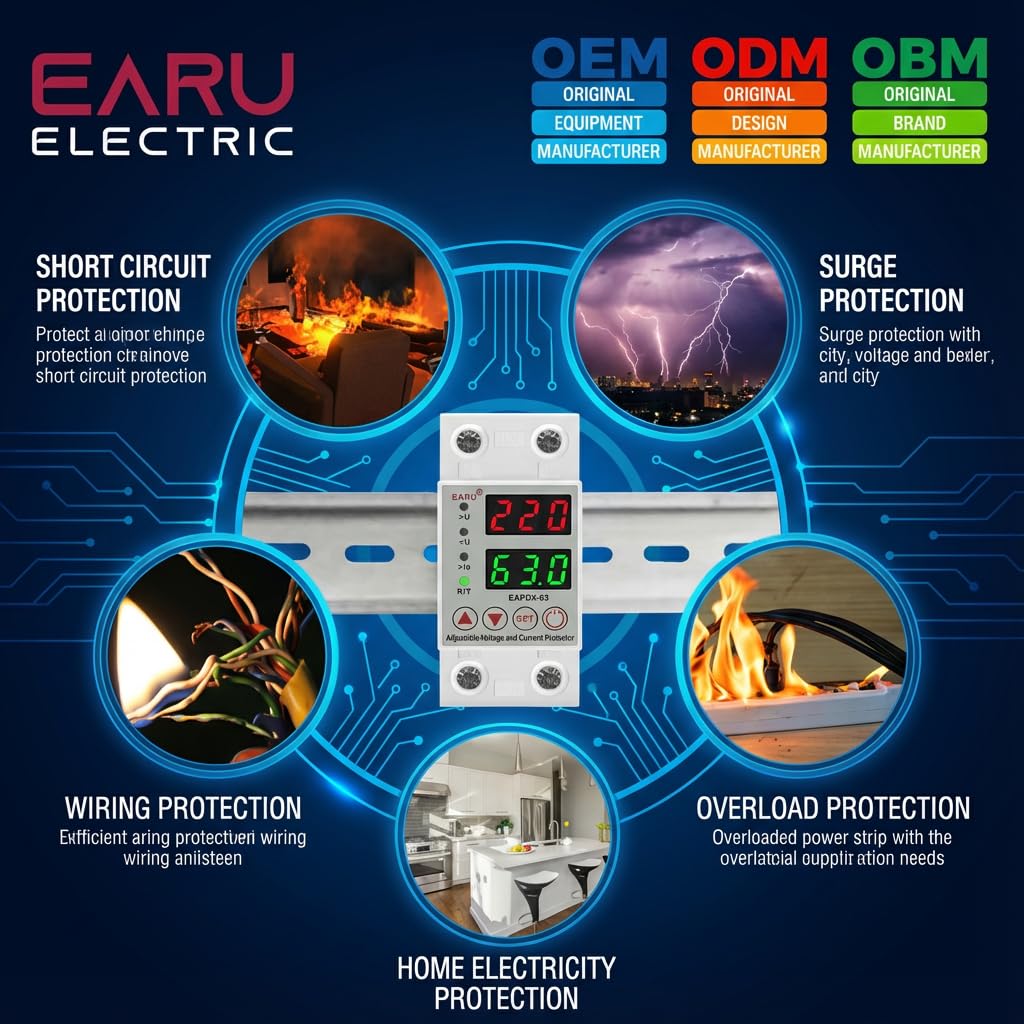
Foto 2.1: Ofeview of the protection capabilities of the EARU Automatic Voltage Nchebe.
3. Ozi nchekwa
Please read and understand all safety instructions before installing or operating the device. Failure to do so may result in electric shock, fire, or serious injury.
- Ọ bụ naanị onye ọrụ ọkụ eletrik ruru eru ka a ga-arụnye ya dịka iwu na ụkpụrụ eletrik mpaghara si dị.
- Ensure the main power supply is disconnected before any installation or maintenance work.
- Ejila ngwaọrụ ahụ rụọ ọrụ ma ọ bụrụ na o yiri ka ọ mebiri emebi ma ọ bụ na ọ dị mmiri mmiri.
- Verify correct wiring connections (Line and Neutral) to prevent malfunction or damage.
- Emebere ngwaọrụ a maka naanị ime ụlọ.
- Do not exceed the maximum current rating of 63A.
4. Ngwaahịa gafereview
4.1. Ihe mejupụtara na Ngosipụta
The EARU Automatic Voltage Protector features a clear digital display and intuitive control buttons for easy monitoring and adjustment.
- Voltage ngosi: Shows the current line voltage.
- Ngosipụta ugbu a: Shows the current load in Amperes.
- Ọkụ egosi:
>U: Over-voltagihe ngosi.<U: Under-voltagihe ngosi.>Ie: Overcurrent indicator.R/T: Reset/Time indicator.
- bọtịnụ njikwa:
- Up Arrow (▲) / Down Arrow (▼): Used to adjust parameter values.
- Bọtịnụ SET: Press and hold for 3 seconds to enter setting mode.
- Ike On / Gbanyụọ Button: Toggles power to the protected circuit.
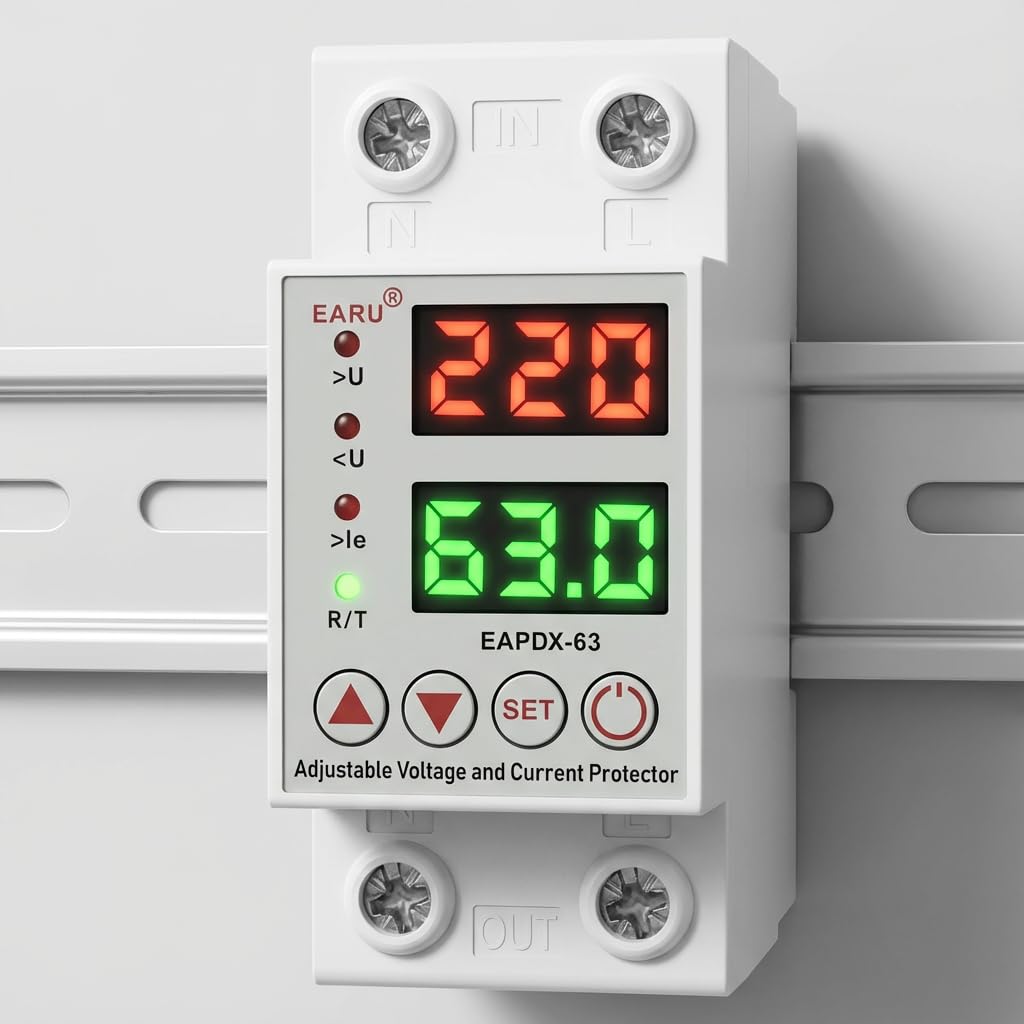
Foto 4.1: N'ihu view of the EARU Automatic Voltage Protector, highlighting its digital display and control buttons.
5. Ntọala na nwụnye
The EARU Automatic Voltage Protector is designed for DIN Rail mounting. Ensure proper wiring and secure installation.
5.1. Ịkwanye
Mount the device onto a standard 36mm width DIN Rail within your electrical panel. Ensure it is securely clipped into place.
5.2. eserese Wiring
Connect the incoming power supply (Line and Neutral) to the "IN" terminals and the outgoing load to the "OUT" terminals. Refer to the diagram below for correct wiring.

Foto 5.1: Ọpụample wiring configuration for DIN Rail installation.

Image 5.2: Device dimensions for installation planning.
6. Ntuziaka ọrụ
The device allows for precise adjustment of protection parameters. Follow these steps to configure your voltage nche.
6.1. Parameter Setting Mode
- Gbaa mbọ hụ na agbanyere ngwaọrụ ahụ.
- Pịa ma jide SET button for approximately 3 seconds until the display changes to show "P-1" or a similar setting indicator. This indicates you are in parameter setting mode.
- Jiri ihe Akụ Elu (▲) na Akụ Ala (▼) buttons to navigate through the different parameters (P-1 to P-6).
- Once you have selected a parameter, press the SET button briefly to enter its adjustment mode.
- Jiri ihe Akụ Elu (▲) na Akụ Ala (▼) bọtịnụ ịgbanwe uru.
- Pịa SET button again to confirm the value and move to the next parameter, or wait a few seconds for the device to automatically save and exit the setting mode.
6.2. Parameter Nkọwa
| Oke | Nkọwa | Oke nwere ike idozi |
|---|---|---|
| P-1 | N'elu voltage ntọala | 240V - 300V (or OFF) |
| P-2 | N'okpuru-voltage ntọala | 140V - 200V (or OFF) |
| P-3 | Overcurrent setting | 1A - 40A / 63A / 80A (depending on model) |
| P-4 | Reset/start delay | 1s - 300s |
| P-5 | Relay recovery delay | 1s - 300s |
| P-6 | Overcurrent recovery delay | 1s - 300s |
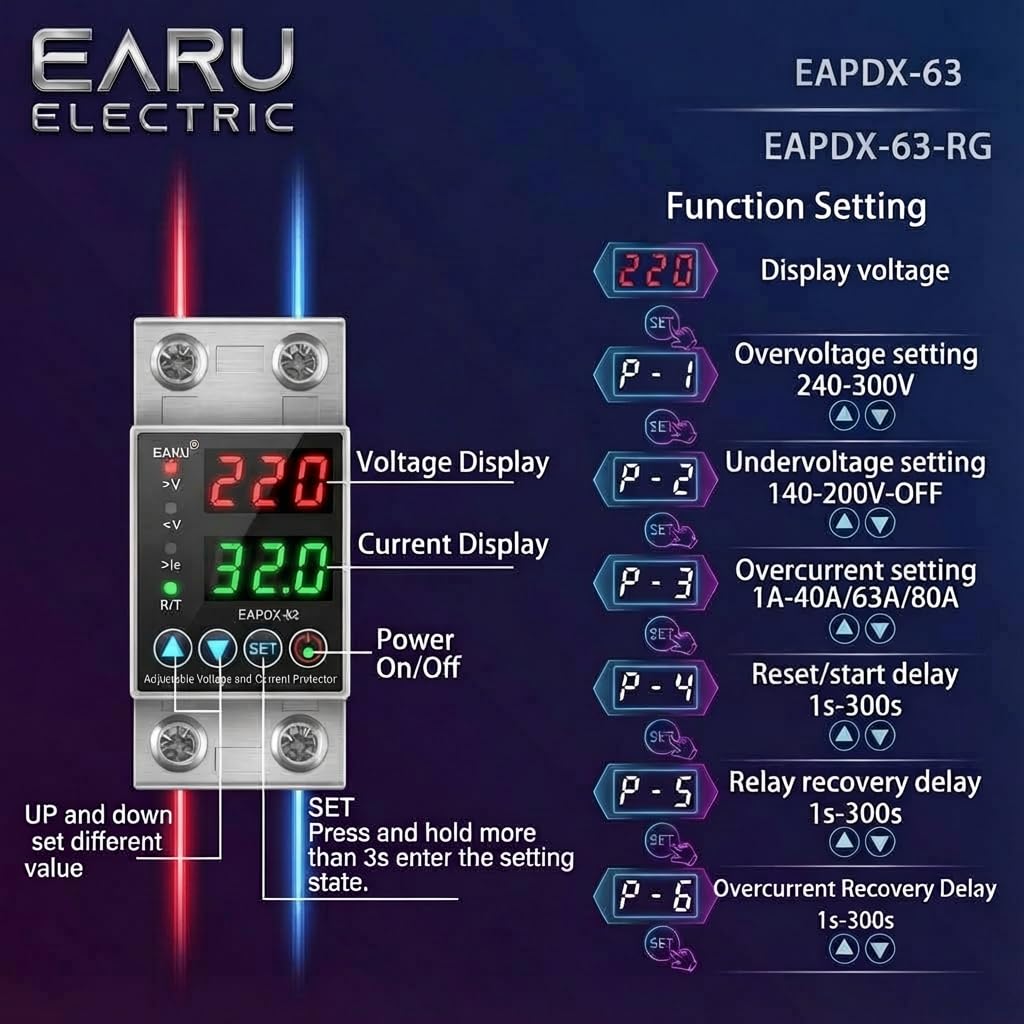
Image 6.1: Function setting guide for the device.
6.3. Video Guide: Setting Parameters
Video 6.1: This video demonstrates how to adjust the over-voltage, n'okpuru-voltage, overcurrent, and recovery delay settings on the EARU Automatic Voltage Protector. It shows the step-by-step process of entering the setting mode and modifying each parameter.
7. Nlekọta
The EARU Automatic Voltage Protector requires minimal maintenance. Regular checks can ensure optimal performance.
- Periodically inspect the device for any visible damage or loose connections.
- Ensure the ventilation slots are clear of dust and debris to prevent overheating.
- Clean the exterior with a dry, soft cloth. Do not use liquid cleaners or solvents.
- Do not attempt to open or repair the device yourself. Refer to qualified personnel for servicing.
8. Nchọpụta nsogbu
If you encounter issues with your EARU Automatic Voltage Protector, refer to the following common troubleshooting steps:
| Nsogbu | Ihe nwere ike ime | Ngwọta |
|---|---|---|
| Ngwaọrụ anaghị agbanye ọkụ | No input power; incorrect wiring; internal fault. | Check main power supply. Verify wiring connections. If problem persists, contact support. |
| Power cuts off frequently | Voltage/current outside set thresholds; unstable grid. | Check current voltage/current readings. Adjust P-1, P-2, P-3 settings if necessary. Monitor grid stability. |
| Device does not auto-reconnect | Recovery delay (P-4, P-5, P-6) set too long; persistent fault. | Verify recovery delay settings. Ensure grid conditions have stabilized. Manually reset if safe to do so. |
| Vol ezighi ezitage/current reading | Calibration issue; faulty sensor. | Kpọtụrụ nkwado ndị ahịa maka enyemaka. |
9. Nkọwapụta
| Njirimara | Nkọwa |
|---|---|
| Ụdị | EARU |
| Nlereanya | EARU-1005 |
| Akụkụ ngwaahịa (LxWxH) | 7.7 x 3.5 x 6.5 cm |
| Ibu Ibu | 450 g |
| Ntinye Voltage | 230 volts AC |
| Max Wattage | 13800 Watt |
| Max Ugbu a | 63 Amperes |
| N'elu voltage Nchekwa Oke | Adjustable 200V-275V (Cut-off above 275V default) |
| N'okpuru-voltage Nchekwa Oke | Adjustable 175V-200V (Cut-off below 175V default) |
| Auto-Reconnect Delay | Nhazi 60-300 sekọnd |
| Ụdị nkwụnye | DIN Rail (2-Pole, 36mm width) |
| Ihe nduzi ihe | 100% Pure Copper |
| Mba onye si | India |
10. Akwụkwọ ikike na nkwado
The EARU Automatic Voltage Protector (Model EARU-1005) is backed by a 1-Year Manufacturer Warranty. This warranty covers defects in materials and workmanship under normal use.
- For warranty claims or technical support, please contact EARU customer service.
- Keep your purchase receipt as proof of purchase for warranty validation.
- Ndozi ma ọ bụ mgbanwe na-enwetaghị ikike ga-emebi akwụkwọ ikike.