
1. Okwu mmalite
This manual provides instructions for the safe assembly, operation, maintenance, and troubleshooting of your EYESUN Exercise Bike Model QM-530W. Please read this manual thoroughly before using the product and retain it for future reference.
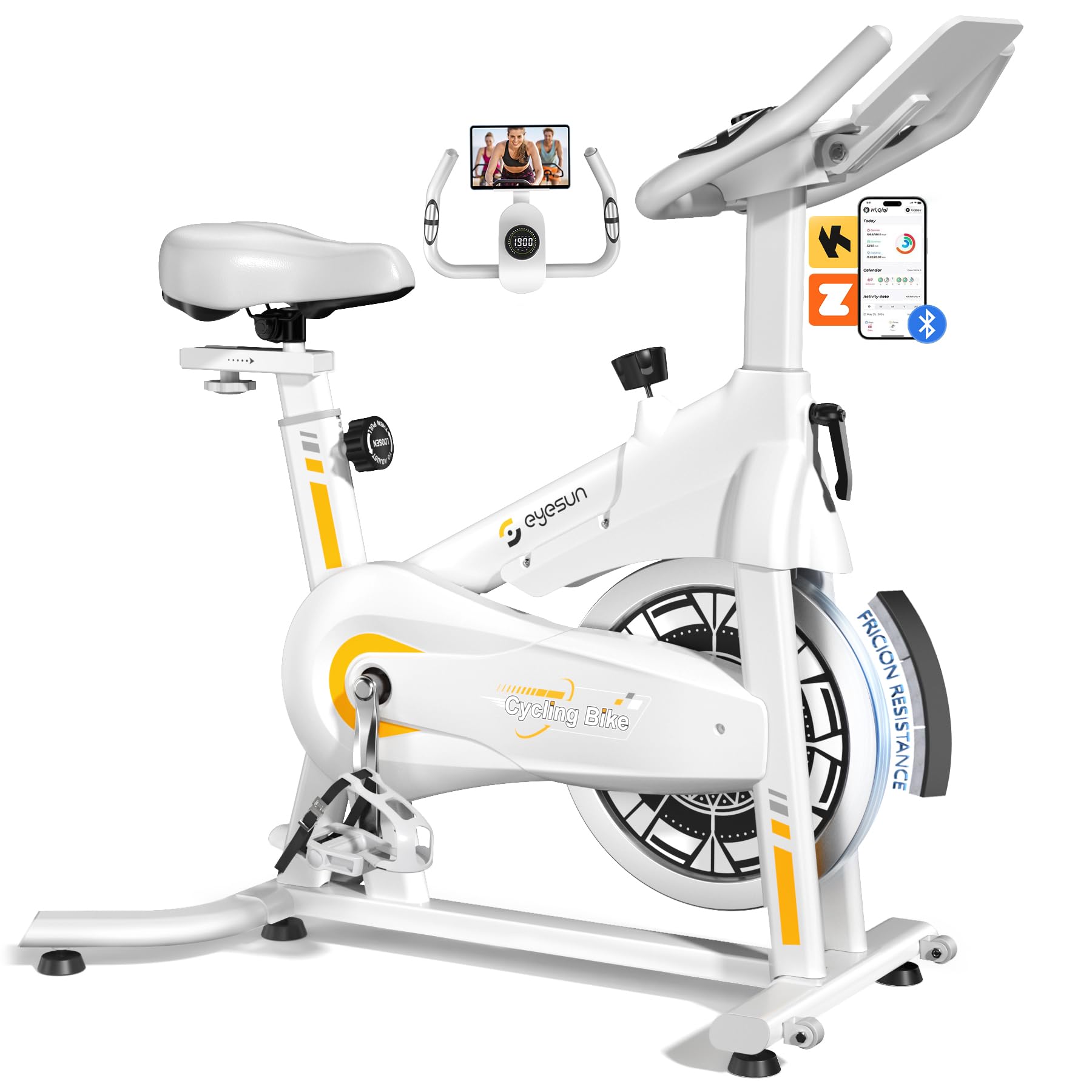
Image 1: EYESUN Exercise Bike QM-530W, White & Yellow model.
2. Ozi nchekwa
Before beginning any exercise program, consult with your physician. It is essential to understand and follow all safety precautions to prevent injury and ensure proper operation of the exercise bike.
- Gbaa mbọ hụ na etinyere akụkụ niile nke ọma tupu ejiri nke ọ bụla.
- Place the exercise bike on a flat, stable surface. Use a mat underneath to protect flooring and reduce noise.
- Debe ụmụaka na anụ ụlọ n'ebe akụrụngwa nọ mgbe a na-arụ ọrụ.
- Yiri akpụkpọ ụkwụ na uwe egwuregwu kwesịrị ekwesị. Zere uwe ndị na-adịghị mma nke nwere ike ịdaba n'ime akụkụ ndị na-agagharị agagharị.
- The maximum user weight capacity for this bike is 330 lbs (150 kg).
- The resistance bar functions as an emergency stop. Press it down firmly to stop the flywheel immediately.
- Adjustable cage pedals are designed to keep your feet secure during exercise. Ensure your feet are properly secured before starting.
- Do not dismount the bike until the flywheel has completely stopped.

Image 2: Illustration of the exercise bike's sturdy construction and body muscles engaged during use.
3. Ihe ngwugwu
Nyochaa na akụrụngwa niile dị tupu ịmalite mgbakọ. Ọ bụrụ na akụkụ ọ bụla na-efu ma ọ bụ mebie, kpọtụrụ nkwado ndị ahịa.
- Main Frame (pre-assembled)
- Mgbakọ Handlebar
- Oche na Oche
- Ihu na azụ stabilizers
- Pedal (aka ekpe na aka nri)
- LCD Nyochaa
- Ngwa ngwaike (bolts, washers, nuts, tools)
- Akwụkwọ ntuziaka onye ọrụ
4. Ntuziaka Mgbakọ
The EYESUN Exercise Bike is designed for quick assembly, with approximately 80% of the unit pre-assembled. Typical assembly time is around 25 minutes.
- Gbakwunye ndị na-eme ihe ike: Secure the front and rear stabilizers to the main frame using the provided bolts and washers. Ensure they are tightened firmly.
- Wụnye pedals: Chọpụta pedal aka ekpe (L) na aka nri (R). Pedal aka ekpe na-akpụgharị n'akụkụ aka ekpe, pedal aka nri na-akpụgharị n'akụkụ aka ekpe. Kechie ha n'ime ogwe aka crank ma jiri wrench sie ike nke ọma.
- Oche Ugwu: Insert the seat post into the main frame and adjust to your desired height. Secure with the adjustment knob. Attach the seat to the seat post.
- Gbakwunye Aka Aka: Slide the handlebar assembly into the front post. Adjust the height and secure with the adjustment knob.
- Jikọọ LCD Monitor: Connect the sensor cable from the main frame to the back of the LCD monitor. Ensure the connection is vertical and perpendicular to the flywheel for accurate data tracking. Mount the LCD monitor onto the handlebar post.
Video 1: Detailed assembly guide for the EYESUN Exercise Bike. This video demonstrates step-by-step installation of components.
5. Ndozi
Proper adjustment of the bike ensures comfort and effectiveness during your workout.
5.1 Ndozi oche
- Ogologo: Loosen the adjustment knob on the vertical seat post. Raise or lower the seat until your leg has a slight bend at the knee when the pedal is at its lowest point. Tighten the knob securely.
- Iga n'ihu/Azu: Loosen the adjustment knob under the seat. Slide the seat forward or backward to achieve a comfortable position relative to the handlebars. Ensure your knees are aligned with the balls of your feet when pedals are horizontal. Tighten the knob securely.
5.2 Ndozi Aka Ogwe Aka
- Loosen the adjustment knob on the handlebar post. Raise or lower the handlebars to a comfortable height that allows for a relaxed upper body posture. Tighten the knob securely.
5.3 Mgbanwe Nguzogide
- The resistance knob is located on the main frame. Turn the knob clockwise to increase resistance and counter-clockwise to decrease resistance.
- Iji tinye brek mberede, pịa bọtịnụ iguzogide ahụ nke ọma.

Image 3: Visual guide for adjusting handlebar and seat positions for various user heights.
Video 2: Demonstration of adjusting the seat and handlebar for optimal user comfort.
6. Operating the Exercise Bike
Ọrụ Nyocha LCD 6.1
The upgraded LCD monitor tracks your workout data in real-time.
- Oge: Ogologo oge mgbatị ahụ gị.
- Ọsọ: Ọsọ ịgba ígwè ugbu a.
- Ogologo: Mkpokọta anya kpuchie n'oge mgbatị ahụ.
- Kalori: Kalori echere n'ọkụ.
- Pulse: Heart rate (if connected to a compatible sensor, not included).
- Odometer: Ngụkọta anya achịkọtara.
Ensure the APP sensor cable is correctly connected to the flywheel for accurate data tracking.

Image 4: Close-up of the digital LCD display and proper sensor cable connection.
6.2 Njikọta Ngwa
The exercise bike supports Bluetooth connectivity for integration with fitness applications.
- Ngwa dakọtara: FantomFite, KINOMAP, and Zwift.
- Mmekọrịta data: Supports syncing with Google Fit and Apple Health for comprehensive fitness tracking.
- Ihe njide mbadamba nkume: Use the built-in tablet holder to enjoy music or videos while riding, or to view your fitness app.

Image 5: Illustration of the exercise bike's compatibility with popular fitness applications.
Vidiyo 3: Agafeeview of the LCD monitor and Bluetooth connectivity features.
7. Nlekọta
Nlekọta anya mgbe niile na-eme ka ogologo ndụ na ọrụ nchekwa nke igwe mgbatị ahụ gị dị.
- Nhicha: Jiri mgbasa ozi hichapụ igwe kwụ otu ebeamp ákwà mgbe ọ bụla iji wepụ ọsụsọ na ájá. Zenarị ndị na-ehicha ihe abrasive.
- Nyocha: Lelee bolts niile, mkpụrụ, na akụkụ ndị na-akpụ akpụ maka njigide na iyi. Mechie ihe nkedo ọ bụla rụrụ arụ.
- mmanu mmanu: The belt drive system is designed to be low maintenance and quiet. No lubrication is typically required for the belt.
- Nchekwa: When not in use, store the bike in a dry, cool place away from direct sunlight and moisture. The built-in transport wheels allow for easy relocation.

Image 6: Features like the smooth belt drive and stable U-shaped bottom contribute to low maintenance and durability.

Image 7: The space-saving design and transport wheels facilitate easy movement and storage.
8. Nchọpụta nsogbu
If you encounter issues with your EYESUN Exercise Bike, refer to the following common problems and solutions.
| Nsogbu | Ihe nwere ike ime | Ngwọta |
|---|---|---|
| Mkpọtụ ma ọ bụ mkpọtụ n'oge ọrụ | Loose components; debris in flywheel area; worn belt. | Check and tighten all bolts and nuts. Inspect flywheel area for foreign objects. If noise persists, contact support. |
| Inaccurate LCD monitor readings | Sensor cable not connected properly; low battery in monitor. | Ensure the APP sensor cable is securely and vertically connected to the monitor. Replace monitor batteries if necessary. |
| Nguzogide anaghị agbanwe | Nsogbu sistemu mgbanye mgbochi. | Check if the resistance knob is fully engaged. If the mechanism feels loose or unresponsive, contact support. |
| Wobbly seat or handlebars | Adjustment knobs not tightened sufficiently. | Ensure all seat and handlebar adjustment knobs are tightened firmly after positioning. |
9. Nkọwapụta
| Njirimara | Nkọwa |
|---|---|
| Nọmba nlereanya | QM-530W |
| Akụkụ ngwaahịa | 100.08 x 50.55 x 106.93 cm (39.4 x 19.9 x 42.1 inch) |
| Ibu Ibu | 21.32 n'arọ (47 lbs) |
| Ikike ịdị arọ kacha | 330 lbs (150 n'arọ) |
| Sistemụ mbanye | Eriri mbanye |
| Ihe onwunwe | Alloy Steel |
| Usoro mgbochi | Friction (Adjustable Brake Pad) |
| Atụmatụ pụrụ iche | Adjustable Pedal, Adjustable Resistance Level, Adjustable Seat, Flywheel |
| Ogologo Onye Ọrụ Akwadoro | 4'8" to 6'1" (142 cm to 185 cm) |
| Inseam Range | 25"–35" (63.5 cm – 89 cm) |
| Power Source (Monitor) | Battery Powered (Batteries Included) |
10. Akwụkwọ ikike na nkwado
EYESUN provides a Akwụkwọ ikike ọnwa 24 enweghị nchekasị for your exercise bike. This warranty covers manufacturing defects and ensures product quality.
For any questions, concerns, or warranty claims, please contact EYESUN customer service:
- Email: support@eyesun.net
- Customer support is available 24/7.