
Okwu mmalite
This manual provides detailed instructions for the setup, operation, maintenance, and troubleshooting of your ONNAIS Quick-Access Gun Safe and Portable Lock Box Bundle. Please read this manual thoroughly before using the products to ensure proper function and safety. Keep this manual for future reference.
Ozi nchekwa dị mkpa
- Always store firearms unloaded and secured.
- Keep keys and access codes in a secure location, away from children and unauthorized users.
- Do not store ammunition inside the safe with the firearm unless specifically designed for such storage and in a separate compartment.
- Ensure the safe is mounted or secured properly to prevent unauthorized removal.
- Regularly check battery levels and replace them as needed to ensure continuous operation.
- The portable lock box is designed for temporary secure storage and transport. It is not a substitute for a full-sized gun safe.
- Do not store a chambered firearm in the portable lock box.
Ngwaahịa gafereview
ONNAIS Quick-Access Gun Safe
The Quick-Access Gun Safe provides rapid access to your firearm using biometric fingerprint recognition, a programmable keypad, or an override key. It is constructed from durable carbon steel for enhanced security.

Image: The Quick-Access Gun Safe open, displaying its interior capacity for firearms and ammunition, along with the biometric scanner and keypad.
ONNAIS Portable Lock Box
The Portable Lock Box offers secure, on-the-go storage for a single firearm or valuables. It features a key lock and can be secured to stationary objects using the included security cable.

Image: The Portable Lock Box with a handgun, illustrating its compact form factor and key access mechanism.
Ntuziaka nhazi
Quick-Access Gun Safe Setup
1. Ntinye batrị
- Locate the battery compartment, typically on the inside of the safe door or rear panel.
- Insert the required number of AA batteries (usually 4) according to the polarity indicators (+/-).
- Mechie mkpuchi nke batrị batrị nke ọma.
2. Initial Code Programming
- Open the safe using the override key.
- Locate the reset button inside the safe (often a small red button). Press and release it.
- Enter your desired 4-8 digit code on the keypad, then press the 'OK' button.
- Test the new code with the safe door open before closing it.
3. Fingerprint Registration

Foto: Zuru ezu view of the biometric fingerprint scanner, illustrating its advanced technology.
- With the safe open, press the 'Add' button (or follow specific instructions for your model, often near the reset button).
- Place your finger on the biometric scanner. The indicator light will flash.
- Lift and reposition your finger multiple times (typically 5-8 times) from different angles until the indicator light confirms successful registration.
- Repeat for additional fingerprints as desired.
4. Nhọrọ nrịgo
The Quick-Access Gun Safe can be mounted in various locations for convenient access. Use the provided mounting hardware to secure the safe to a solid surface.

Foto: Examples of the Quick-Access Gun Safe mounted under a desk, beside a bed, and inside a closet, demonstrating flexible placement.
Portable Lock Box Setup
1. Key Lock Operation
- Fanye igodo n'ime cylinder mkpọchi.
- Turn the key to the unlock position to open the lid.
- To lock, close the lid and turn the key to the lock position. Remove the key.
2. Security Cable Attachment
- Loop the security cable around a secure, stationary object (e.g., car seat frame, bed frame).
- Feed the end of the cable through the designated slot on the lock box.
- Close and lock the lid of the lock box to secure the cable.
Ntuziaka ọrụ
Quick-Access Gun Safe Operation
1. Opening with Fingerprint
- Place a registered finger firmly on the biometric scanner.
- The safe will unlock rapidly if the fingerprint is recognized.
2. Opening with Keypad
- Enter your programmed 4-8 digit code.
- Press the 'OK' button. The safe will unlock.
3. Opening with Override Key
- Insert the override key into the keyhole, usually located behind a cover.
- Turn the key to unlock the safe.

Image: The Quick-Access Gun Safe positioned next to a bed, demonstrating its fast unlock capability via fingerprint for immediate access.
Portable Lock Box Operation
1. Opening with Key
- Tinye igodo n'ime mkpọchi.
- Turn the key to the unlock position and lift the lid.

Image: A handgun being placed into the Portable Lock Box within a vehicle, highlighting its utility for secure transport.
Nlekọta
- Nhicha: Wipe the exterior surfaces of both safes with a soft, damp akwa . Zere ihe nhicha ma ọ bụ ihe mgbaze.
- Battery Replacement (Quick-Access Safe): Replace batteries annually or when the low battery indicator activates. Use only new, high-quality AA alkaline batteries.
- Usoro mkpọchi: Do not lubricate the lock mechanisms. If the lock feels stiff, contact customer support.
- Mkpisiaka mmetụta: Debe ihe mmetụta mkpịsị aka dị ọcha ma kpọọ nkụ maka arụmọrụ kacha mma.
Nchọpụta nsogbu
| Nsogbu | Ihe nwere ike ime | Ngwọta |
|---|---|---|
| Quick-Access Safe does not open with fingerprint. | Fingerprint not registered; dirty sensor; incorrect placement; low batteries. | Ensure finger is clean and dry. Re-register fingerprint. Clean sensor. Replace batteries. Use keypad or override key. |
| Quick-Access Safe does not open with keypad. | Incorrect code entered; low batteries. | Verify the code. Replace batteries. Use fingerprint or override key. |
| Portable Lock Box key is stiff or won't turn. | Debris in lock; incorrect key. | Ensure you are using the correct key. Do not force the key. Contact support if issue persists. |
| Safe emits beeping sounds. | Ịdọ aka ná ntị batrị dị ala. | Replace all batteries in the Quick-Access Gun Safe immediately. |
Nkọwapụta
| Njirimara | Nkọwa |
|---|---|
| Ụdị | ONNAIS |
| Lock Type (Quick-Access Safe) | Biometric, Keypad, Key |
| Lock Type (Portable Lock Box) | Igodo |
| Ihe onwunwe | Carbon ígwè |
| Mounting Type (Quick-Access Safe) | Freestanding, Mountable |
| Power Source (Quick-Access Safe) | Batrị AA (anaghị etinye ya) |
| ASIN | B0FC2FWLK4 |
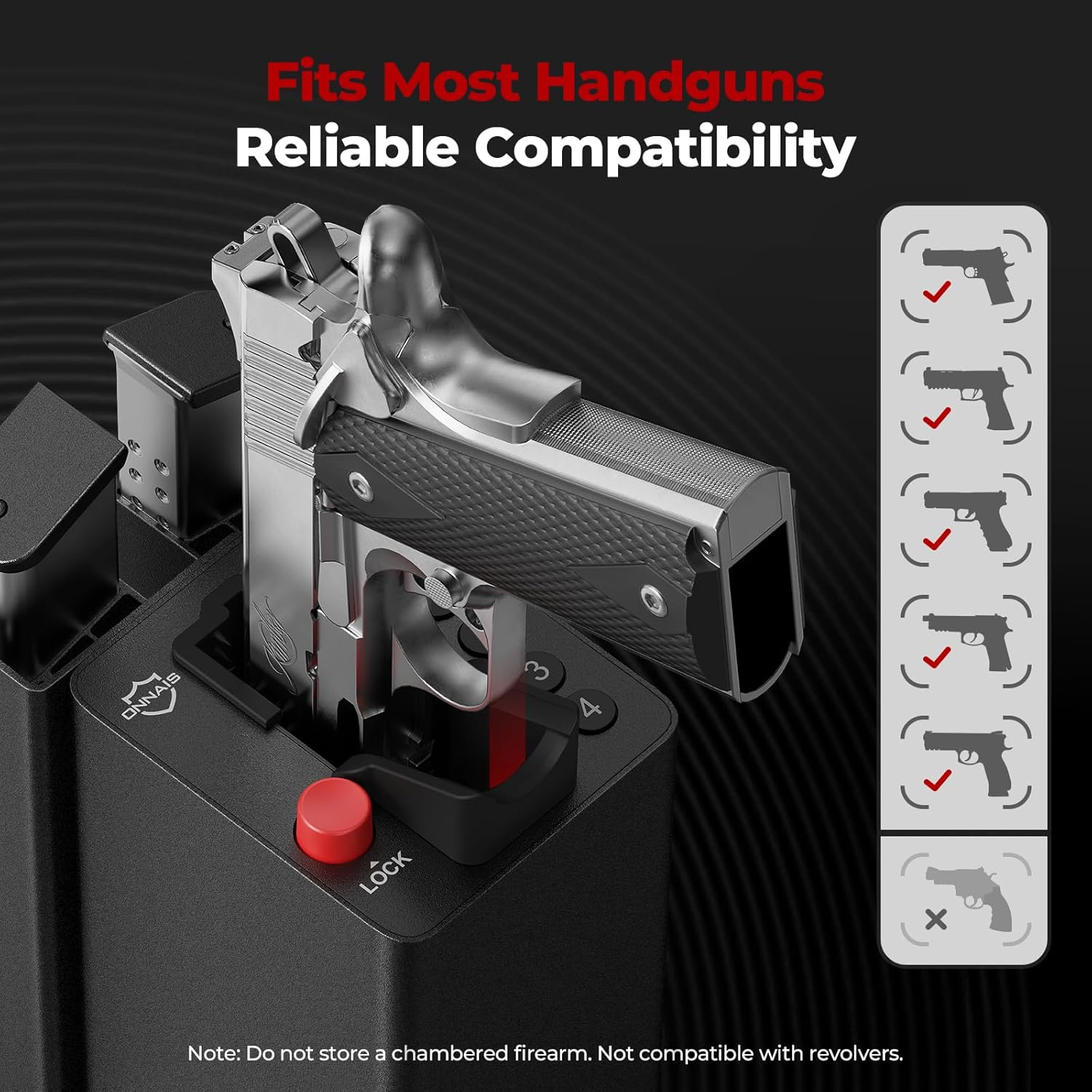
Image: The Portable Lock Box illustrating its compatibility with most handguns, with a specific note regarding revolvers.
Akwụkwọ ikike na nkwado
For warranty information or technical support, please refer to the documentation included with your purchase or visit the official ONNAIS website. Ensure you have your product model number and purchase date available when contacting support.