
Okwu mmalite
This manual provides detailed instructions for the installation, operation, and maintenance of your Bietrun 50A 12V/24V MPPT Solar Charge Controller. Please read this manual thoroughly before using the product to ensure proper function and safety. This controller is designed to efficiently manage power from your solar panels to charge various battery types in RVs, off-grid systems, and other solar applications.
Ngwaahịa gafereview na Njirimara igodo
The Bietrun MPPT Solar Charge Controller offers advanced features for optimizing your solar power system:
- Njikwa ngwa Smart: Monitor and adjust settings in real-time via Bluetooth or Wi-Fi using the "Smart Life - Smart Living" app. Access 30-day performance history, update firmware, and configure alerts.
- Ịrụ ọrụ dị elu: Features MPPT tracking efficiency greater than 99% and a conversion efficiency of up to 98%, maximizing energy harvest from solar panels.
- Ndakọrịta Batrị dị iche iche: Supports 12V/24V LiFePO4, SLD, Gel, FLD, and AGM batteries with auto-recognition.
- Nchedo siri ike: Equipped with 9-layer intelligent protection, including input power limitation, PV over-voltage, PV short-circuit, PV reverse polarity, load over-power, load short-circuit, nighttime reverse charging, TVS lightning, and over-temperature protection.
- Otutu interface: Includes Solar Panel Input, Battery Output, 12V DC Output, and two 5V/3A USB Outputs.
- Nhazi kọmpat: Space-saving dimensions (9 x 7.3 x 2.9 inches, 3.5 lbs) with an IP21 waterproof rating, suitable for various environments.

Foto: Ofeview of the controller's professional performance specifications, including 50A rated charging current, 12V/24V output, 100V VOC input, >98% conversion efficiency, >99% tracking efficiency, 20A rated load current, 600W/1200W max output, IP21 rating, 5V/3A USB, and 12V DC output.
Ntọala na nwụnye
1. Nwụnye anụ ahụ
The controller features a compact design, making it suitable for installation in various locations such as RVs, yachts, homes, and outdoor solar setups. Ensure the installation location is dry and well-ventilated, as the device has an IP21 waterproof rating, meaning it is protected against vertically falling drops of water and solid objects larger than 12.5mm. Avoid damp gburugburu iji gbochie mmebi.

Image: The controller mounted on a wall, showing its compact dimensions (9 inches length, 7.3 inches width, 3 inches height) and weight (3.5 lbs).
2. Njikọ njikọ
Connect the components in the following order to ensure safety and proper operation:
- Njikọ batrị: Connect the battery to the controller's battery terminals. Ensure correct polarity (positive to positive, negative to negative). The controller will auto-recognize 12V or 24V systems.
- Njikọ anyanwụ panel: Connect the solar panels to the controller's PV input terminals. Observe correct polarity. The maximum PV input voltage is 100V VOC.
- Njikọ Ibu Ibu: Connect your DC loads to the controller's load output terminals.
- USB mmepụta: Two 5V/3A USB ports are available for charging small electronic devices.
- 12V DC mmepụta: A dedicated 12V DC output port is available for specific 12V loads.
Ihe dị mkpa: Always connect the battery first, then the solar panels, and finally the load. Disconnect in the reverse order.

Image: Diagram illustrating the various connection ports on the controller: Solar Input, Battery Output (12V/24V), 12V DC Output, and USB Output (5V/3A).
3. App Control Setup
To utilize the smart app control features:
- Budata ngwa: Scan the QR code on the controller or search for "Smart Life - Smart Living" in the Google Play Store or Apple App Store.
- Jikọọ: Once installed, open the app and connect to the MPPT controller via Bluetooth or Wi-Fi. Follow the in-app instructions for pairing.
- Nyochaa ma dozie: The app provides real-time data insights, a 30-day performance history, and allows you to adjust settings, update firmware, and configure alerts.

Image: A smartphone displaying the "Smart Life - Smart Living" app interface for monitoring the solar charge controller, with Bluetooth and Wi-Fi logos.
Ntuziaka ọrụ
1. Battery Type and Charging Parameter Settings
Before charging, it is crucial to confirm your battery type and configure the corresponding battery type and charging voltage in the app or using the device's settings button. Incorrect settings can lead to incomplete charging or damage to your batteries.
The controller supports various battery types, including LiFePO4, Sealed Lead-acid (SLA), Gel, Flooded (FLD), and AGM batteries. Batteries should only be connected in parallel, not in series.

Image: A table detailing single battery voltage parameters for various 12V and 24V battery types, including Boost voltage, Charge cut-off voltage, Discharge recovery voltage, and Discharge cut-off voltage.
2. Monitoring and Display
The integrated LCD display provides real-time information about your solar system's status. You can view PV voltage, batrị voltage, load current, and other parameters. The app offers a more detailed interface for monitoring and historical data.

Foto: nkọwa zuru ezu view of the controller's LCD display, showing various indicators for PV, Battery, and Load, including voltage, current, power, battery percentage, and fault prompts.
Nlekọta
Regular maintenance ensures the longevity and optimal performance of your solar charge controller:
- Ịdị ọcha: Keep the controller clean and free from dust and debris. Use a dry cloth for cleaning.
- Njikọ: Periodically check all wiring connections to ensure they are secure and free from corrosion. Loose connections can lead to power loss or overheating.
- Igwe ikuku: Ensure adequate airflow around the controller to prevent overheating. Do not block ventilation openings.
- Mmelite femụwe: Check the "Smart Life - Smart Living" app for available firmware updates to ensure your controller has the latest features and bug fixes.
Nchọpụta nsogbu
If you encounter issues with your Bietrun MPPT Solar Charge Controller, refer to the following common troubleshooting steps:
- Enweghị Ike/Ngosipụta:
- Check battery connections and ensure they are secure and correctly polarized.
- Nyochaa voltaji batrịtage is within the operating range (12V/24V).
- No Charging from Solar Panels:
- Ensure solar panel connections are secure and correctly polarized.
- Lelee volta ntinye PVtage (Max 100V VOC) and current.
- Verify there is sufficient sunlight reaching the panels.
- Inspect for any shading on the solar panels.
- Ibu Anaghị arụ ọrụ:
- Lelee njikọ ibu ma hụ na ha dị nchebe.
- Verify the load current does not exceed the rated 20A.
- Lelee batrị voltage; if too low, the load output may be disconnected by protection features.
- Okwu Njikọta ngwa:
- Ensure Bluetooth or Wi-Fi is enabled on your device.
- Confirm the controller is powered on.
- Restart the app and attempt to reconnect.
- Ensure your phone is within Bluetooth range or connected to the same Wi-Fi network as the controller.
- Incorrect Charging Parameters:
- Access the app or device settings to verify the correct battery type and charging voltages are selected. Refer to the "Battery Type and Charging Parameter Settings" section.
- Nchekwa oke okpomọkụ:
- Ensure the controller has adequate ventilation and is not installed in an enclosed space without airflow.
- Belata okpomọkụ gburugburu ma ọ bụrụ na ọ ga-ekwe omume.
The controller includes 9-layer intelligent protection. If a fault occurs, the LCD display or app may indicate a specific protection mode. Address the underlying cause before resuming operation.
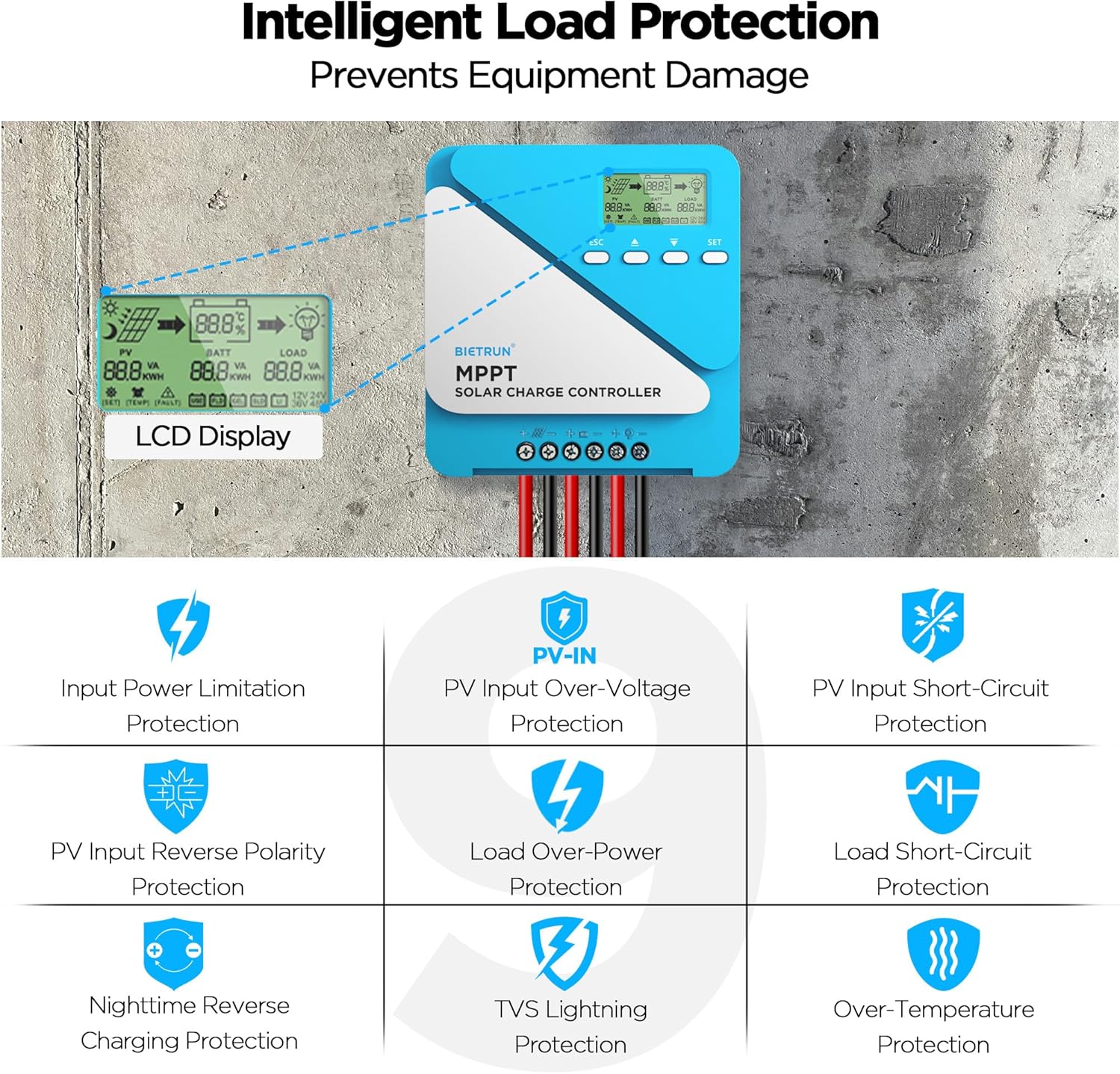
Image: Diagram illustrating the 9-layer intelligent protection features of the controller, including input power limitation, PV over-voltage, PV short-circuit, PV reverse polarity, load over-power, load short-circuit, nighttime reverse charging, TVS lightning, and over-temperature protection.
Nkọwapụta
| Njirimara | Nkọwapụta |
|---|---|
| Enyere nchaji ugbu a | 50A |
| Mmepụta Voltage | 12V/24V (Auto Recognition) |
| Ihe ntinye kacha PV Voltage | 100V VOC |
| Enyere ibu dị ugbu a | 20A |
| Ike kacha mma | 600W (12V) / 1200W (24V) |
| Ntugharị arụmọrụ | ≤98% |
| Ịrụpụta arụmọrụ MPPT | > 99% |
| Ngosi nke enweghị mmiri | IP21 |
| Ndenye USB | 2 x 5V/3A |
| Akụkụ ngwaahịa (L x W x H) | 9" x 7.3" x 3" |
| Ihe onwunwe | Ọla, plastik |
| Ụdị ngosi | LCD |
Akwụkwọ ikike na nkwado
For warranty information and technical support, please refer to the documentation included with your purchase or visit the official Bietrun websaịtị. Debe nnata nzụta gị dị ka ihe akaebe nke ịzụrụ ihe maka akwụkwọ ikike ọ bụla.
If you encounter issues not covered in this manual or require further assistance, please contact Bietrun customer service through their official channels.