
1. Okwu mmalite
The MiBOXER ML5 5-in-1 LED Controller is designed for versatile smart lighting applications, integrating Matter over WiFi and 2.4GHz wireless control. This controller supports five output modes: RGB, RGBW, RGB+CCT, CCT, and single color, offering flexibility for various LED strip configurations. It is compatible with the Matter protocol, enabling broad interoperability with smart home ecosystems such as Apple Home, Google Home, Amazon Alexa, and Samsung SmartThings. This manual provides essential information for the safe installation, operation, and maintenance of your ML5 controller.
2. Ozi nchekwa
- Ensure power is disconnected before installation or maintenance to prevent electric shock.
- Emebere ngwaọrụ a maka ojiji n'ime ụlọ naanị. Zere ka mmiri ghara iru gị ala ma ọ bụ oke okpomọkụ.
- Agafela ndenye akọwapụtara voltage (DC12V~48V).
- Consult a qualified electrician if you are unsure about any installation steps.
- Debe ngwaọrụ ahụ n'ebe ụmụaka nọ.
3. Ngwaahịa gafereview
3.1 Atụmatụ
- Certified Matter Over WiFi: Supports Matter standard protocol for multi-platform collaboration.
- Wide Compatibility: Works with products from different brands that comply with the Matter ecosystem.
- Simple Configuration: Easy pairing via QR code.
- 5-in-1 Functionality: Supports RGB, RGBW, RGB+CCT, CCT, and single color LED strips.
- 2.4G RF Wireless Control: Allows control via MiBOXER 2.4GHz remotes.
- Ntinye Voltage: DC12V~48V.
3.2 Kedu ihe dị na igbe ahụ
- 1 x MiBOXER ML5 5-in-1 LED Controller
3.3 Ngwa ngwaahịa

Foto nke 3.3.1: N'elu view of the MiBOXER ML5 controller, showing input terminals, output terminals, and control buttons (Link, Frequency, Mode).

Foto nke 3.3.2: N'akuku view of the MiBOXER ML5 controller, highlighting its compact design and connection points.

Foto nke 3.3.3: The MiBOXER ML5 controller alongside its retail packaging and a small instruction leaflet.
4. Nkọwapụta
| Njirimara | Nkọwa |
|---|---|
| Ụdị | MGBE |
| Nọmba nlereanya | ML5 |
| Agba | Ọcha |
| Ojiji ime ime/n'èzí | Ime ụlọ |
| Njirimara Pụrụ Iche | 2.4G RF wireless, Matter Over WiFi |
| Ụdị isi iyi ọkụ | Ikanam |
| Isi Iyi Ike | DC12V~48V (LED) |
| Ihe onwunwe | Plastic |
| Ibu Ibu | 2.72 ounces |
| Ogologo ihe | 30 Meters (Control Distance) |

Foto nke 4.1: Dimensional drawing of the ML5 controller (124mm x 38mm x 23mm) and its packaging (125mm x 39mm x 29mm), with a gross weight of 0.078 KGS.
5. Ntọala na nwụnye
5.1 eserese waya
The ML5 controller supports various LED strip configurations. Ensure correct polarity and voltage matching for your LED strips. Connect the DC12V~48V power supply to the input terminals and the LED strip to the corresponding output terminals.

Foto nke 5.1.1: Connection diagrams for Single Color (V+, W), Dual White (V+, CW, WW), and RGB (V+, R, G, B) LED strip configurations. An AC to DC power adapter is shown connecting to the controller's input.

Foto nke 5.1.2: Connection diagrams for RGBW (V+, R, G, B, W) and RGB+CCT (V+, R, G, B, CW, WW) LED strip configurations. An AC to DC power adapter is shown connecting to the controller's input.
5.2 Pairing and Network Connection
The ML5 controller supports Matter over WiFi and 2.4GHz RF pairing.
- Ijikọ ihe Long press the "Link" button for 3 seconds to activate Matter pairing mode. Follow the instructions in your Matter-compatible smart home app (e.g., Apple Home, Google Home, Amazon Alexa, Samsung SmartThings) to scan the QR code on the device for easy pairing.
- 2.4GHz RF Remote Pairing: Short press the "Link" button 3 times to activate 2.4GHz remote pairing mode. Refer to your MiBOXER 2.4GHz remote's manual for specific pairing instructions.
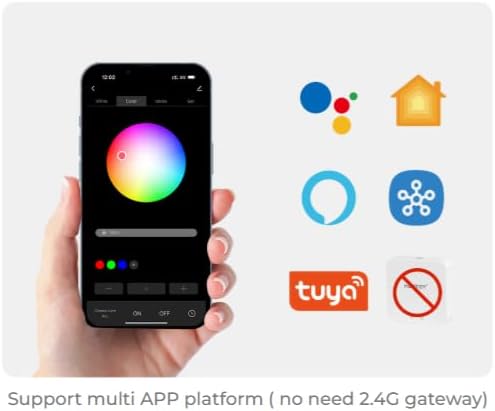
Foto nke 5.2.1: Illustration of a smartphone app interface for controlling LED lighting, featuring a color wheel and compatibility logos for Google Home, Apple Home, Amazon Alexa, Samsung SmartThings, and Tuya.
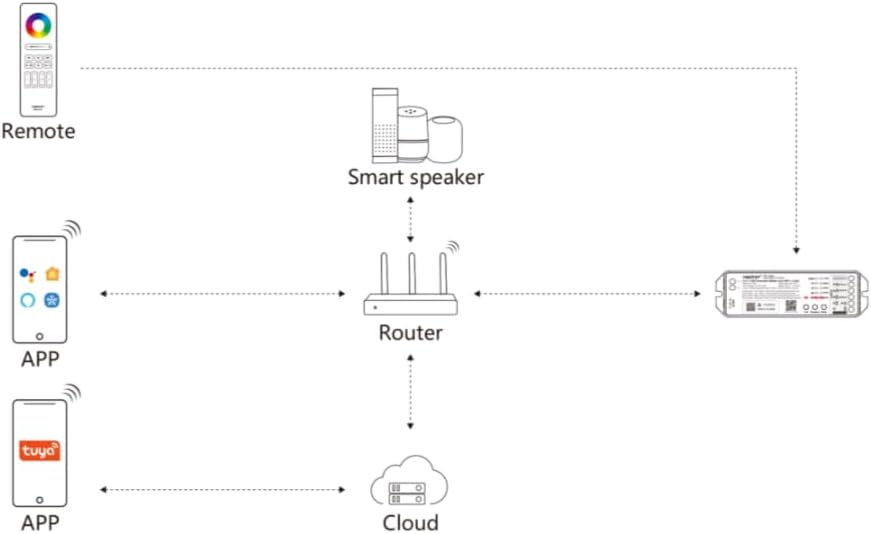
Foto nke 5.2.2: Diagram illustrating the ML5 controller's connectivity: it connects to a router, which then allows control via mobile apps (Matter-compatible and Tuya) and smart speakers (e.g., Alexa, Google Assistant).
6. Ntuziaka ọrụ
6.1 Nhọrọ ọnọdụ
- Ụdị mmepụta ihe na-agbanwe: Short press the "Mode" button to cycle through the five output modes (RGB, RGBW, RGB+CCT, CCT, Single Color). Ensure the connected LED strip matches the selected mode.
6.2 Njikwa ngwa
Once paired with your smart home ecosystem via Matter, you can control the ML5 controller using your preferred smart home app. Functions typically include:
- Turning lights On/Off.
- Adjusting brightness (dimming).
- Changing colors (for RGB, RGBW, RGB+CCT modes).
- Adjusting color temperature (for CCT, RGB+CCT modes).
- Setting scenes and schedules.
6.3 2.4GHz RF Remote Control
If paired with a MiBOXER 2.4GHz RF remote, you can control the controller directly. Refer to your specific remote's manual for detailed button functions, which typically include:
- Gbanyụọ/ Gbanyụọ.
- Ndozi ihie.
- Color selection.
- Mode switching (e.g., dynamic effects).
7. Nlekọta
- Jiri akwa dị nro hichaa ngwaọrụ ahụ. Ejila kemịkalụ siri ike ma ọ bụ ihe mkpocha abrasive.
- Ensure proper ventilation around the controller to prevent overheating.
- Regularly check all connections for security and integrity.
8. Nchọpụta nsogbu
| Nsogbu | Ihe nwere ike ime | Ngwọta |
|---|---|---|
| LED strip not lighting up. | No power, incorrect wiring, faulty LED strip. | Check power supply connection. Verify wiring matches the selected mode. Test LED strip with another power source if possible. |
| Cannot pair with Matter app. | Controller not in pairing mode, WiFi issue, incorrect QR code scan. | Long press "Link" button for 3 seconds. Ensure your smartphone is on the same 2.4GHz WiFi network. Rescan QR code. |
| 2.4GHz remote not working. | Remote not paired, remote battery low, interference. | Short press "Link" button 3 times to enter pairing mode, then pair with remote. Replace remote battery. Reduce interference sources. |
| Incorrect colors or modes. | Wrong output mode selected. | Short press "Mode" button to cycle to the correct output mode for your LED strip. |
9. Akwụkwọ ikike na nkwado
MiBOXER products are designed for reliability and performance. For warranty information and technical support, please refer to the official MiBOXER websaịtị ma ọ bụ kpọtụrụ onye na-ere ahịa gị. Debe akwụkwọ nnata ịzụrụ maka akwụkwọ ikike.
Maka enyemaka ọzọ, ị nwere ike ịga na MiBOXER Store on Amazon.