
SONICWARE LVN-090
SONICWARE LIVEN Evoke Acoustronic Synthesizer with Granular Effect - Instruction Manual
Ụdị: LVN-090
1. Okwu mmalite
The SONICWARE LIVEN Evoke is a portable acoustronic synthesizer designed for cinematic ambient and post-classical music production. It features a unique Acoustronic Flux Oscillator, Granular Effect (Grain FX), and a versatile 4-track sequencer, allowing for the creation of organic and richly fluctuating soundscapes.
2. Ozi nchekwa
Please read and understand the following safety precautions before operating your LIVEN Evoke synthesizer:
- Etinyela igwe ahụ n'ime mmiri ozuzo, mmiri ozuzo, ma ọ bụ oke okpomọkụ.
- Zere idobe nkeji n'akụkụ ebe okpomọkụ ma ọ bụ na ìhè anyanwụ.
- Use only the specified power source (6xAA batteries or optional 9V DC AC adapter).
- Anwala ịkwasa ma ọ bụ gbanwee unit ahụ. Kpọtụrụ ndị ọrụ ruru eru ọrụ niile.
- Debe ebe ụmụaka na-apụghị iru.
3. Ihe ngwugwu
Gbaa mbọ hụ na ihe niile dị mgbe ị na-ewepụ igbe:
- SONICWARE LIVEN Evoke Synthesizer (Model LVN-090)
- Akwụkwọ ntuziaka (akwụkwọ a)
- Note: AA batteries and AC adapter are not included and must be purchased separately.
4. Ngwaahịa gafereview
The LIVEN Evoke is a compact and powerful synthesizer. Familiarize yourself with its layout and controls.
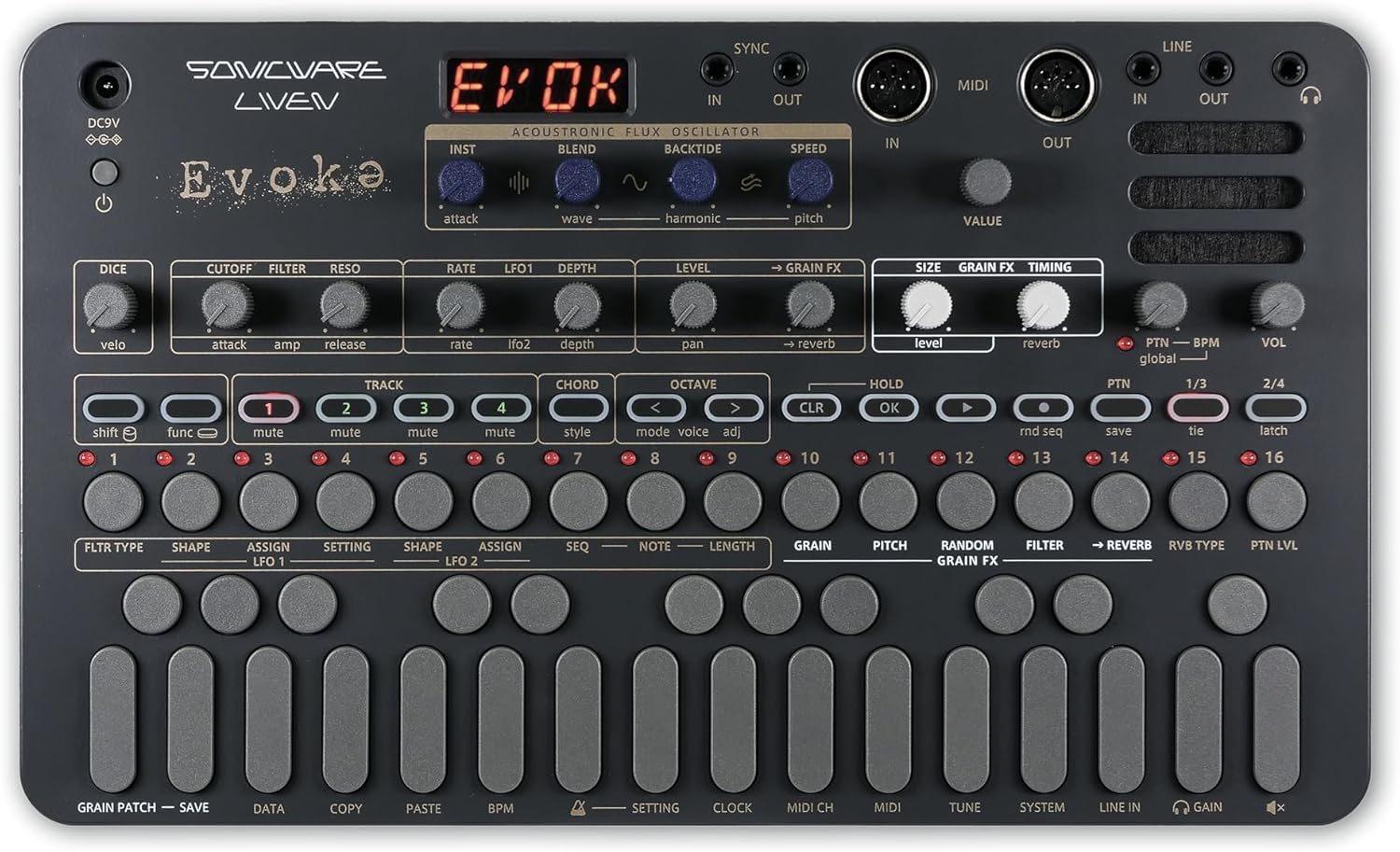
Ọgụgụ 4.1: N'elu-ala view of the LIVEN Evoke, highlighting the control panel and connectivity options.

Ọgụgụ 4.2: N'akuku view of the LIVEN Evoke, illustrating its portable form factor.
4.1. Atụmatụ igodo
- Acoustronic Flux Oscillator: Combines 34 acoustic instrument tones with 20 wavetables (+ 2 noise types) for organic sound creation.
- Grain FX Granular Effect: Up to 12 grains, tempo-synced harmonization and randomization. Applicable to internal and external sources.
- 10 Reverb Types: Deep and multi-dimensional reverbs for immersive soundscapes.
- 4-Track Sequencer: Supports step and real-time recording, parameter locking, and random/probability playback.
- One-Finger Chord Mode: Play chords easily with 16 selectable chord styles.
- Enwere ike ibugharị: Battery-powered (6xAA), built-in speaker, lightweight for on-the-go music production.
5. Nhazi
5.1. Ịkwanye Unit
The LIVEN Evoke can be powered by either AA batteries or an optional AC adapter.
- Ike batrị: Insert 6xAA batteries into the battery compartment on the underside of the unit. Ensure correct polarity.
- AC nkwụnye: Connect a 9V DC AC adapter (not included) to the DC9V input jack.
5.2. Njikọ
The unit offers various input and output options:
- Akara/Ọpụpụ: Connect external audio sources or output the synthesizer's audio.
- MIDI N'IME/N'ỌPỤTA: Connect to other MIDI devices for synchronization and control.
- SYNC IN/OUT: Use for analog clock synchronization with compatible devices.
- Jack ekweisi: For private monitoring.
6. Ntuziaka ọrụ
6.1. Acoustronic Flux Oscillator
This newly developed synth engine combines acoustic instrument tones with wavetables and noise types to create unique sounds. Use the INST, BLEND, Ebili mmiri, ỌR .A, na NKWUKWU controls to sculpt your sound.

Figure 6.1: Acoustronic Flux Oscillator architecture.
6.2. Grain FX Granular Effect
The Grain FX allows for granular synthesis, creating musical textures with up to 12 grains. Parameters like SIZE, GRAIN FX, and TIMING can be adjusted. This effect can also be applied to external audio sources connected via LINE IN.

Figure 6.2: Grain FX controls on the LIVEN Evoke.
Video 6.2.1: Demonstration of instantly applying multiple Grain FX on the Sonicware Liven Evoke.
6.3. Reverbs
The LIVEN Evoke includes 10 deep and multi-dimensional reverb types. These can be combined with Grain FX to build immersive, dreamlike soundscapes. Adjust the REVERB knob to control the amount of reverb.

Figure 6.3: Reverb controls on the LIVEN Evoke.
6.4. 4-Track Sequencer
The built-in 4-track sequencer supports both step and real-time recording. It features parameter locking, random/probability playback, and can be synchronized with other gear via SYNC and MIDI connections.
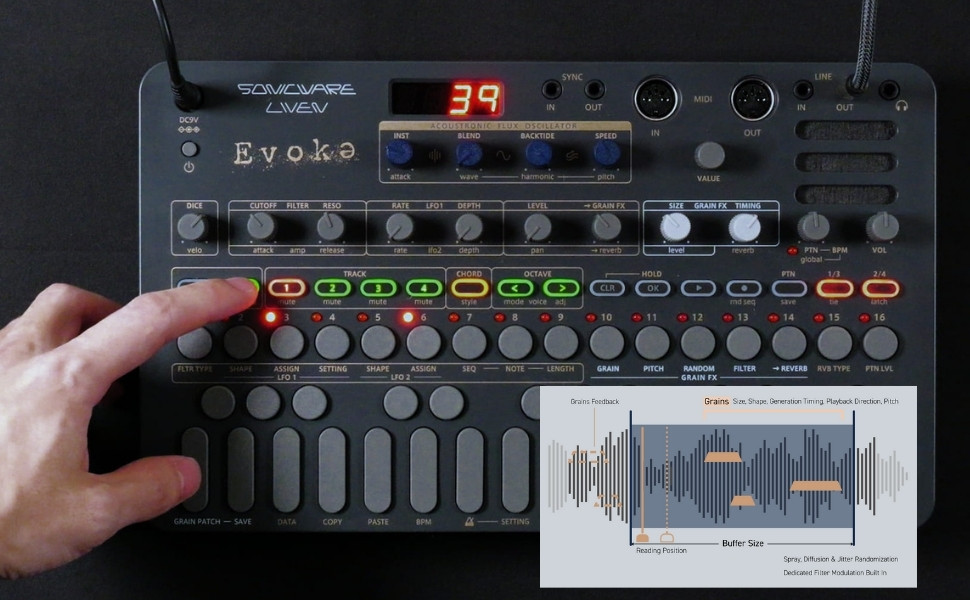
Figure 6.4: 4-Track Sequencer controls on the LIVEN Evoke.
Video 6.4.1: Demonstration of preset patterns on the Sonicware Liven Evoke.
6.5. One-Finger Chord Mode
The One-Finger Chord Mode allows you to play chords with a single finger, offering 16 different chord styles for quick and expressive performance.

Figure 6.5: One-Finger Chord Mode in action.
Video 6.5.1: Demonstration of layering sounds on the Sonicware Liven Evoke.
7. Nlekọta
To ensure the longevity and optimal performance of your LIVEN Evoke:
- Nhicha: Jiri akwa dị nro dị nro hichaa otu ahụ. Zere ihe nhicha ma ọ bụ ihe mgbaze.
- Nchekwa: Store the unit in a cool, dry place away from direct sunlight and extreme temperatures. If storing for extended periods, remove batteries to prevent leakage.
- Ijikwa: Handle with care to avoid physical damage to controls and connections.
8. Nchọpụta nsogbu
If you encounter issues with your LIVEN Evoke, refer to the following common solutions:
| Nsogbu | Ihe nwere ike ime | Ngwọta |
|---|---|---|
| Unit anaghị agbanye ọkụ. | Low or dead batteries; AC adapter not connected or faulty. | Replace batteries or check AC adapter connection and functionality. |
| Enweghị mmepụta ụda. | Volume too low; incorrect audio connections; internal speaker muted. | Increase volume; verify LINE OUT/headphone connections; check internal speaker settings. |
| Sequencer not playing. | No pattern recorded; sequencer stopped; external sync issue. | Record a pattern; ensure sequencer is playing; check SYNC/MIDI connections. |
For further assistance, please visit the official SONICWARE support websaịtị.
9. Nkọwapụta
- Aha nlereanya: LIVEN Evoke
- Nọmba Nlereanya ihe: LVN-090
- Akara: SOICWARE
- Ihe arụ: Plastic
- Agba: Ọchịchịrị Grey
- Ibu ihe: 1.74 pound (gram 790)
- Akụkụ ngwaahịa (L x W x H): 6.93 x 11.69 x 1.89 sentimita asatọ
- Batrị: Batrị 6 AA achọrọ (anaghị etinye ya)
- Ụdị njikọ: 5-pin DIN MIDI, Auxiliary
10. Akwụkwọ ikike & Nkwado
The SONICWARE LIVEN Evoke comes with a standard manufacturer's warranty. For detailed warranty information, product registration, and technical support, please visit the official SONICWARE websaịtị ma ọ bụ kpọtụrụ ndị ahịa ha ọrụ.
For additional resources and community support, you may also explore the SONICWARE Store on Amazon.
Ask a question about this manual
Ask about setup, troubleshooting, compatibility, parts, safety, or missing instructions. Manuals+ will review the question and use this page’s manual context to help answer it.