
Okwu mmalite
This manual provides detailed instructions for the VINABTY Voice Remote Control, designed as a direct replacement for various OK. QLED TV models. This remote control features voice search capabilities, an ergonomic design, and durable construction for reliable performance. Please read this manual carefully to ensure proper setup and operation.
Melite
1. Ntinye batrị
Njikwa remote ahụ chọrọ batrị AAA abụọ (anaghị etinye ya). Soro usoro ndị a iji wụnye ha:
- Mepee mkpuchi nke batrị dị n'azụ njikwa ime obodo.
- Tinye batrị AAA abụọ, hụ na njedebe ndị dị mma (+) na nke na-adịghị mma (-) kwekọrọ na eserese dị n'ime ngalaba ahụ.
- Mechie mkpuchi nke batrị batrị nke ọma.

Foto: N'azụ view nke njikwa dịpụrụ adịpụ nke e wepụrụ mkpuchi batrị ahụ, na-egosi ebe kwesịrị ekwesị maka batrị AAA abụọ.
2. Pairing with Your TV
This remote control is designed for easy use and typically requires no programming. However, for voice search functionality, it must be paired with your TV. Refer to your TV's user manual for specific pairing instructions for a new remote control. Generally, this involves:
- Jide n'aka na agbanyere TV gị.
- Navigate to the TV's settings menu, usually under 'Remotes & Accessories' or 'Bluetooth Settings'.
- Select 'Add new device' or 'Pair remote control'.
- Follow the on-screen prompts to complete the pairing process. This may involve holding down specific buttons on the remote.

Image: The VINABTY remote control positioned beside a television, highlighting its ready-to-use nature and material quality.
Ntuziaka ọrụ
The VINABTY Voice Remote Control offers intuitive control over your OK. QLED TV. Below are the primary functions:
- bọtịnụ ike (⏻): Gbanyụọ ma ọ bụ gbanyụọ TV.
- Igodo ọnụọgụ (0-9): Họrọ ọwa TV ozugbo.
- Mpempe igodo nsoroụzọ (elu, ala, aka ekpe, aka nri, OK): Gaa na menu wee chọpụta nhọrọ ndị ị họọrọ.
- Elu elu/ala (+/-): Gbanwee olu TV.
- Channel Up/Down (P^/P˅): Gbanwee ọwa TV.
- bọtịnụ ogbi (🔇): Mute or unmute the TV audio.
- Bọtịnụ azụ (←): Laghachi na ihuenyo gara aga ma ọ bụ menu.
- Bọtịnụ ụlọ (🏠): Access the TV's home screen or smart hub.
- Bọtịnụ Njikwa Olu (🎤): Press and hold to activate voice search or commands (requires successful pairing).
- Bọtịnụ nweta ngwa ngwa: Dedicated buttons for popular streaming services like Netflix, YouTube, Prime Video, and Google Play for direct access. A USB button is also included for media playback.
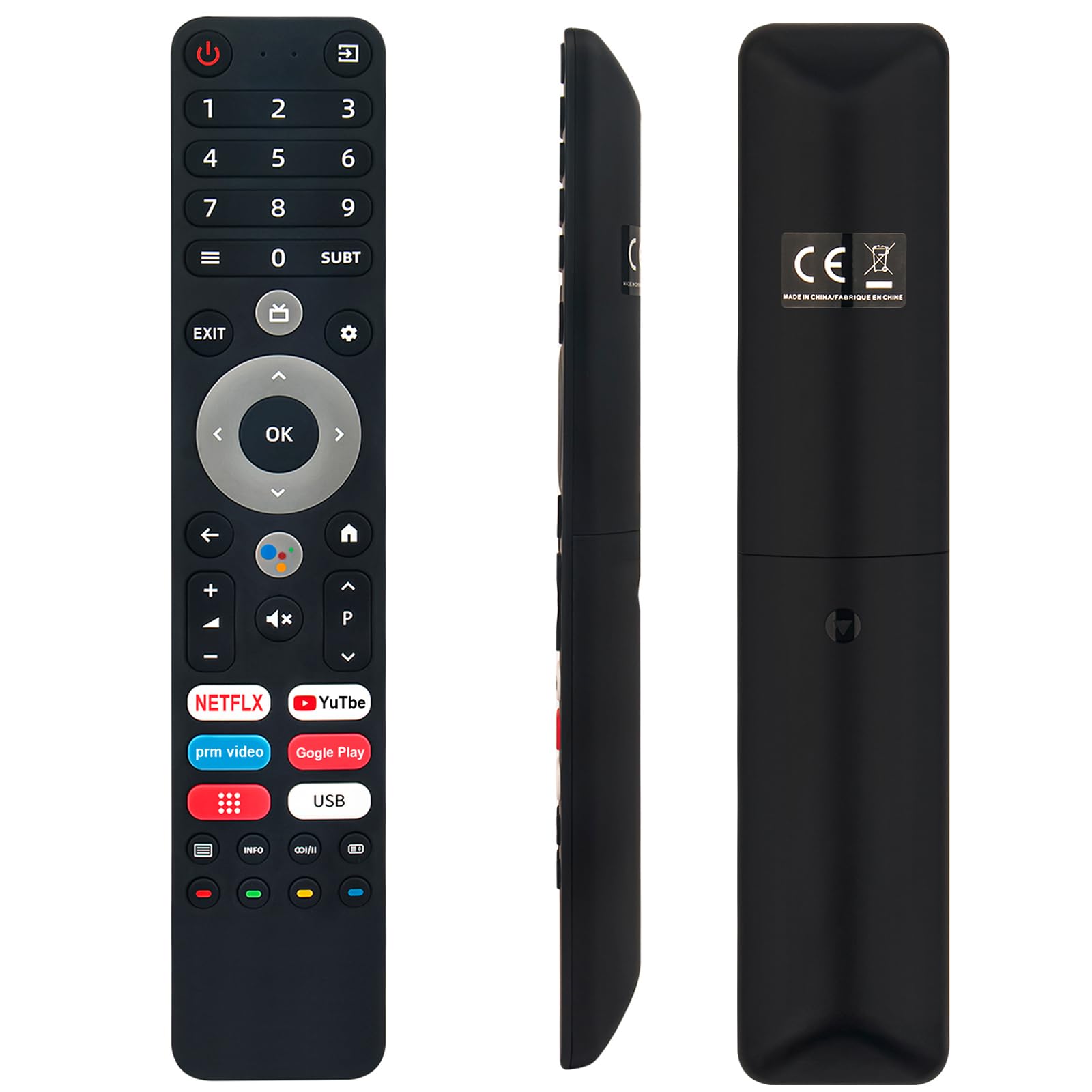
Image: The remote control with a visual emphasis on the voice command button, indicating its functionality.
Nlekọta
To ensure the longevity and optimal performance of your VINABTY Voice Remote Control, follow these maintenance guidelines:
- Nhicha: Use a soft, dry cloth to clean the remote control. Avoid using liquid cleaners, aerosols, or harsh chemicals, as these can damage the surface or internal components.
- Ngbanwe batrị: Replace batteries when the remote's response becomes sluggish or it stops functioning. Always replace both batteries at the same time with new ones of the same type (AAA).
- Nchekwa: Store the remote control in a cool, dry place away from direct sunlight, extreme temperatures, and high humidity. If the remote will not be used for an extended period, remove the batteries to prevent leakage.
- Ijikwa: Avoid dropping the remote control or subjecting it to strong impacts, as this can damage internal circuitry.
Nchọpụta nsogbu
If you encounter issues with your VINABTY Voice Remote Control, try the following solutions:
- Remote anaghị aza:
- Lelee ma arụnyere batrị ndị ahụ nke ọma ma ọ gwụbeghị. Dochie ha ma ọ dị mkpa.
- Ensure there are no obstructions between the remote control and the TV's infrared receiver.
- Gbaa mbọ hụ na a tụrụ anya na igwe onyonyo ozugbo na TV.
- Njikwa olu anaghị arụ ọrụ:
- Verify that the remote control is successfully paired with your TV. Refer to the 'Pairing with Your TV' section or your TV's manual.
- Ensure your TV's internet connection is stable, as voice commands often rely on online services.
- bọtịnụ anaghị arụ ọrụ:
- Clean the remote control, especially around the buttons, to remove any dirt or debris that might be causing sticking.
Ọ bụrụ na usoro ndị a akwụsịghị nsogbu ahụ, biko kpọtụrụ nkwado ndị ahịa maka enyemaka ọzọ.
Nkọwapụta
| Njirimara | Nkọwa |
|---|---|
| Ụdị | VINABTY |
| Ụdị dakọtara | OK. QLED TV OTV 55AU-5023C, OTV43AU-5023C, OTV50AU-5023C, OTV 43AU-5023C, OTV 50AU-5023C |
| Teknụzụ Njikọta | Infrared |
| Oke kacha | 10 mita |
| Ụdị batrị | 2 x AAA (anaghị etinye ya) |
| Ihe onwunwe | ABS (body), Soft Rubber (buttons) |
| Agba | Nwa |
| Akụkụ (L x W x H) | 18 cm x 3 cm x 1.5 cm (ihe dị ka 7.09 x 1.18 x 0.59 inch) |
| Ibu | 60 grams |
| Atụmatụ pụrụ iche | Voice Control, No Programming Required, Ergonomic Design |

Image: The remote control displayed with its precise length and width measurements.
Nkwado
For any questions regarding the VINABTY Voice Remote Control, or if you are unsure about its compatibility with your specific TV model, please contact our customer support team. We are committed to providing assistance and ensuring your satisfaction.
If you received a remote control that does not function as expected, or if you require further technical support, please reach out to us via email. We will respond promptly to address your concerns.