
Ntuziaka nchekwa dị mkpa
Biko gụọ ma ghọta ntuziaka nchekwa niile tupu i jiri ngwaahịa a. Debe akwụkwọ ntuziaka a maka ntụaka n'ọdịnihu.
- Igwe ikuku: Hụ na ikuku na-abata nke ọma. Ekpuchila oghere ikuku ọ bụla.
- Mmiri na mmiri: Etinyela ihe ndị e ji mmiri mee, dị ka ite, n'elu ihe a.
- Isi mmalite ọkụ: Awụnyela n'akụkụ ebe okpomọkụ ọ bụla dị ka radiators, ndekọ okpomọkụ, stovu, ma ọ bụ ngwa ndị ọzọ (gụnyere amplifiers) nke na-emepụta okpomọkụ.
- Isi mmalite ike: Use only power supplies specified by the manufacturer. Ensure the power cord is protected from being walked on or pinched.
- Nhicha: Jiri akwa kpọrọ nkụ hichaa naanị.
- Ije ozi: Anwala ịnye ngwaahịa a n'onwe gị. Tụtụ aka n'aka ndị ọrụ ruru eru.
Ihe ngwugwu
Nyochaa na etinyere ihe niile edepụtara n'okpuru na ngwugwu gị:
- Kuephom CD-X2A Boombox
- Igwe ọkụ AC
- Akwụkwọ ntuziaka onye ọrụ (akwụkwọ a)
- Njikwa anya
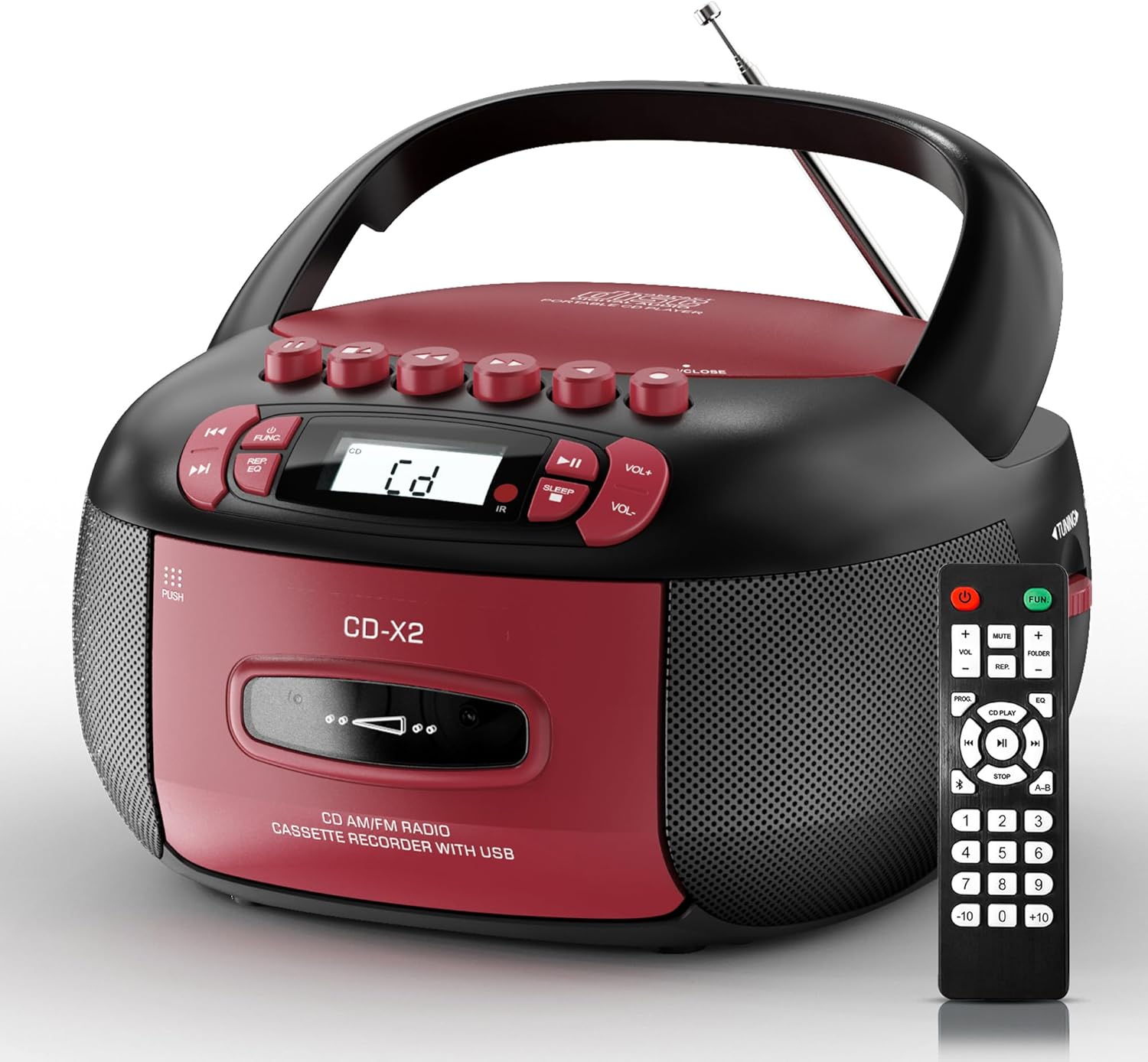
Image: The Kuephom CD-X2A Boombox with its included remote control, showcasing its compact design and red/black color scheme.
Ngwaahịa gafereview
Familiarize yourself with the various components and controls of your Kuephom CD-X2A Boombox.
Njikwa Ogwe ihu
- Bọtịnụ ike/ọrụ: Press and hold to power on/off. Press to cycle through modes (CD, USB, Bluetooth, Radio, AUX, Tape).
- Mpịakọta +/- bọtịnụ: Gbanwee olu nkwughachi.
- Bọtịnụ Kwụsị/Kwụsị: Start or pause playback for CD, USB, Bluetooth, or Tape.
- Kwụsị bọtịnụ: Kwụghachi ọkpụkpọ.
- Skip/Search Buttons: Navigate between tracks on CD/USB or fast forward/rewind on tape.
- EQ bọtịnụ: Họrọ atọrọ nhazi nhazi.
- Bọtịnụ ngụ oge ụra: Tọọ oge ihi ụra.
Njikwa akụkụ akụkụ
- Knob ntughari: Manually tune AM/FM radio stations.
- Jack ekweisi: Jikọọ ekweisi maka ige ntị nkeonwe.
- Ọdụ ụgbọ mmiri AUX: Jikọọ ngwaọrụ ọdịyo mpụga.
- Ọdụ ụgbọ mmiri USB: Insert USB drives for MP3/WMA playback.
Atụmatụ Panel kacha elu
- Ngalaba CD: Top-loading compartment for CDs.
- Cassette Compartment: Ebe a na-etinye ihe n'ihu maka teepu kaseti.
- Antenna telescopic: Extend for improved radio reception.

Image: The boombox highlighting its multiple functions including CD/MP3, Bluetooth, Type I/II tape, USB, FM/AM Radios, Sleep timer, Remote, Phone jack, AUX, and Tape recording.

Foto: nso nso views of the boombox's phone jack, top-loading CD player, telescopic antenna, and tape play/record buttons.
Melite
Ịkwalite Boombox
Ike AC
- Connect the supplied AC power cord to the AC IN jack on the back of the boombox.
- Plug the other end of the power cord into a standard AC wall outlet (120V~60Hz).
Ike batrị
- Open the battery compartment cover located on the bottom of the boombox.
- Insert 6 x 'C' size batteries (not included), ensuring correct polarity (+/-).
- Mechie mkpuchi nke batrị batrị nke ọma.
- When operating on battery power, disconnect the AC power cord.

Image: The boombox demonstrating both AC power connection and the use of 6 C-size batteries for portable operation.
Njikwa anya
- Insert 2 x 'AAA' batteries (not included) into the remote control, observing polarity.
- Point the remote control towards the boombox's IR sensor for optimal operation.

Image: An individual comfortably operating the boombox using the remote control from a distance.
Ntuziaka ọrụ
Ọrụ izugbe
- Gbanyụọ/ Gbanyụọ: Press and hold the Power/Function button to turn the unit on or off.
- Nhọrọ ọrụ: Press the Power/Function button repeatedly to switch between CD, USB, Bluetooth, Radio (AM/FM), AUX, and Tape modes.
Ịkpọghachi CD
- Mepee mkpuchi nke CD ahụ.
- Place a CD (CD, CD-R, MP3, WMA compatible) onto the spindle with the label side facing up.
- Mechie mkpuchi akụkụ CD.
- Press the Power/Function button to select 'CD' mode.
- Pịa bọtịnụ Play/kwụsịtụ ka ịmalite ịkpọghachi.
- Use the Skip/Search buttons to navigate tracks.
- Press the Repeat button to repeat a single track, folder, or all tracks.
- Press the Program button to program a custom playback sequence.

Image: The boombox's display showing 'CD' mode, with icons indicating compatibility with CD, CD-R, CD-RW, WMA, and MP3 formats, along with single cycle, repeat folder, repeat all, random play, and play in order options.
Mkpọgharị na Ndekọ Kaseti
- Press the 'OPEN/CLOSE' button on the cassette compartment to open it.
- Fanye teepu cassette.
- Mechie oghere cassette.
- Press the Power/Function button to select 'TAPE' mode.
- Pịa bọtịnụ Play ka ịmalite ịkpọghachi.
- Use the Fast Forward/Rewind buttons to navigate the tape.
- Edekọ: In TAPE mode, select the desired source (CD, Bluetooth, USB, or AM/FM radio). Press the Record button to begin recording onto the cassette. The unit features an auto-stop function when the tape reaches its end.

Image: A hand inserting a cassette tape into the boombox's front-loading compartment, with controls for tape operation visible.
AM/FM Redio
- Press the Power/Function button to select 'RADIO' mode. Press again to switch between AM and FM bands.
- Extend the telescopic antenna for better FM reception. For AM, rotate the unit for best reception.
- Use the Tuning knob on the side to manually tune to your desired station. The frequency will be displayed on the screen.

Image: A man relaxing on a couch with the boombox, which displays various FM/AM radio frequencies, indicating good reception.
Njikọ Bluetooth
- Press the Power/Function button to select 'BT' (Bluetooth) mode. The display will show 'BT' and flash, indicating it's in pairing mode.
- On your mobile device, enable Bluetooth and search for 'CD-X2A'.
- Select 'CD-X2A' to pair. Once paired, the 'BT' indicator will stop flashing.
- You can now stream audio wirelessly from your device to the boombox.

Image: A woman in a living room wirelessly streaming audio from her smartphone to the boombox via Bluetooth 5.1, indicating a stable connection.
USB playback
- Insert a USB flash drive into the USB port on the side of the boombox.
- Press the Power/Function button to select 'USB' mode.
- The boombox will automatically detect and play compatible MP3/WMA files.
- Jiri bọtịnụ Play/Pause, Kwụsị, na Skip/Search iji chịkwaa ọkpụkpọ egwu.
Ntinye aka AUX
- Connect an external audio device (e.g., smartphone, MP3 player) to the AUX-in port using a 3.5mm audio cable (not included).
- Press the Power/Function button to select 'AUX' mode.
- Control playback directly from your connected external device.
Oge ihi ụra
- While the unit is playing, press the Sleep Timer button.
- Repeatedly press the button to cycle through available sleep timer durations (e.g., 15, 30, 60, 90 minutes).
- The unit will automatically power off after the selected time.

Image: A man sleeping in bed with the boombox on his nightstand, illustrating the sleep timer feature which allows the device to turn off automatically.
Nlekọta
- Nhicha: Use a soft, dry cloth to clean the exterior of the boombox. Do not use abrasive cleaners or solvents.
- Nlekọta CD: Jiri ákwà dị nro nke na-enweghị ihe e ji ehicha CD hichaa CD ruru unyi, na-ehicha ya site n'etiti gaa n'ihu.
- Nlekọta Kaseti: Keep cassette tapes away from direct sunlight and heat. Periodically clean the tape heads with a specialized cassette head cleaner.
- Nchekwa: When not in use for extended periods, disconnect the power cord and remove batteries. Store the unit in a cool, dry place.
Nchọpụta nsogbu
Ọ bụrụ na ị hụ nsogbu, lee tebụl dị n'okpuru maka nsogbu na ngwọta ndị a na-ahụkarị.
| Nsogbu | Ihe nwere ike ime | Ngwọta |
|---|---|---|
| Enweghị ike | Ejikọghị eriri AC; Batrị agwụla ma ọ bụ tinye ezighi ezi. | Check AC connection; Replace or correctly insert batteries. |
| Enweghị ụda | Volume too low; Incorrect function mode selected; Headphones connected. | Increase volume; Select correct mode; Disconnect headphones. |
| CD skips or doesn't play | CD dirty or scratched; CD inserted incorrectly; Incompatible CD format. | Clean or replace CD; Insert CD correctly; Ensure CD is compatible (CD, CD-R, MP3, WMA). |
| Nnabata redio na-adịghị agbanwe agbanwe/adịghị mma | Antenna anaghị agbatị/n'ọnọdụ ya; Mgbaàmà adịghị ike. | Extend and adjust telescopic antenna; Try repositioning the unit. |
| Bluetooth anaghị ejikọta | Boombox not in pairing mode; Device Bluetooth off; Device too far. | Ensure boombox is in 'BT' mode and flashing; Enable Bluetooth on device; Move device closer. |
| Cassette anaghị egwu/na-edekọ | Tape inserted incorrectly; Tape heads dirty; Auto-stop engaged. | Insert tape correctly; Clean tape heads; Check tape end. |
Nkọwapụta
| Njirimara | Nkọwa |
|---|---|
| Nọmba nlereanya | CD-X2A |
| Akụkụ ngwaahịa (L x W x H) | 8.39 x 4.8 x 8.54 sentimita asatọ |
| Ibu Ibu | 3.45 pound |
| Isi Iyi Ike | AC 120V~60Hz or 6 x 'C' size batteries |
| Teknụzụ Njikọta | Enyemaka, Bluetooth, USB |
| Ụdị Ọkà Okwu | Stereo (2W+2W output) |
| Ụdị diski akwadoro | CD, CD-R, MP3, WMA |
| Supported Tape Types | Type I/II Cassette |
| Ndị otu redio | AM/FM |
| Atụmatụ pụrụ iche | Tape Recording, Sleep Timer, Earphone Jack, Remote Control |
Akwụkwọ ikike na nkwado
Kuephom products are designed for reliability and performance. This product comes with a standard manufacturer's warranty against defects in materials and workmanship under normal use.
For warranty claims, technical assistance, or any questions regarding your Kuephom CD-X2A Boombox, please contact Kuephom customer support. Refer to the contact information provided with your purchase documentation or visit the official Kuephom websaịtị maka nkọwa nkwado.
We are committed to providing lifetime service support and 7/24 customer assistance for our products.