
1. Okwu mmalite
Thank you for choosing the UREVO S1 Under Desk Treadmill. This manual provides essential information for the safe and effective use, setup, operation, and maintenance of your new walking pad. Please read this manual thoroughly before first use and retain it for future reference.
2. Ntuziaka nchekwa dị mkpa
WARDỌ AKA NA NT:: Iji belata ihe ize ndụ nke ọkụ, ọkụ, ọkụ eletrik, ma ọ bụ mmerụ ahụ nye ndị mmadụ, gụọ nlezianya na ozi ndị a dị mkpa tupu ị rụọ ọrụ igwe na-azọ ụkwụ.
- Debe ihe eji egwuri egwu ahụ mgbe niile n'elu ebe dị larịị ma kwụsie ike.
- Debe ụmụaka na anụ ụlọ n'ebe a na-azọ ụkwụ n'ebe a na-arụ ọrụ.
- Ensure the power cord is not pinched or damaged. Use only the provided power adapter.
- Do not operate the treadmill if it has been damaged or submerged in water.
- Yiri akpụkpọ ụkwụ egwuregwu kwesịrị ekwesị.
- Akwụsịla ma ọ bụ pụọ na igwe mgbada mgbe eriri na-agagharị.
- Use the remote control to adjust speed gradually.
- In case of emergency, press the stop button on the remote or power off the unit.
- Oke onye ọrụ kacha: 242 lbs (110 n'arọ).
3. Ngwaahịa gafereview
The UREVO S1 Under Desk Treadmill is designed for convenient walking and light jogging in home or office environments. Its compact design and quiet operation make it ideal for integrating physical activity into your daily routine.
Akụkụ ndị bụ isi:
- 6-Point Knee Protection & Quiet Cushioning: Features a 6-point shock absorbing system with 5-layer anti-slip belts and 6 silicone absorbers to reduce impact and noise.
- Powerful & Ultra-Quiet 2.5HP Motor: Engineered for reliable performance with noise levels under 45dB.
- Versatile Walking/Jogging (0.6-4 mph): Easily adjust speed to match fitness goals.
- Compact & Lightweight Body Design: Weighs 35.3 lbs (16 kg) with built-in transport wheels for easy movement and storage.
- Convenient LED Display & Remote Control: Tracks real-time workout progress (time, distance, calories, speed) and allows easy setting adjustments.

Figure 3.1: UREVO S1 Under Desk Treadmill, compact and ready for use.
4. Akụrụngwa
The UREVO S1 Under Desk Treadmill package includes the following items:
- UREVO S1 Walking Treadmill
- Njikwa anya
- Ngwá Ọrụ Hex
- Akwụkwọ ntuziaka (akwụkwọ a)
- Mmanụ mmanụ (maka mmezi)

Figure 4.1: Included accessories: remote control, hex tool, lubricant, and user manual.
5. Nhazi
- Ịkwapu: Carefully remove the treadmill and all accessories from the packaging.
- Nkwanye: Place the treadmill on a firm, level surface, ensuring adequate space around the unit for safe operation.
- Njikọ ike: Plug the power cord into the treadmill and then into a grounded electrical outlet.
- Nyocha mbụ: Ensure the safety key (if applicable, though not explicitly mentioned for this model, it's a common treadmill feature) is in place.
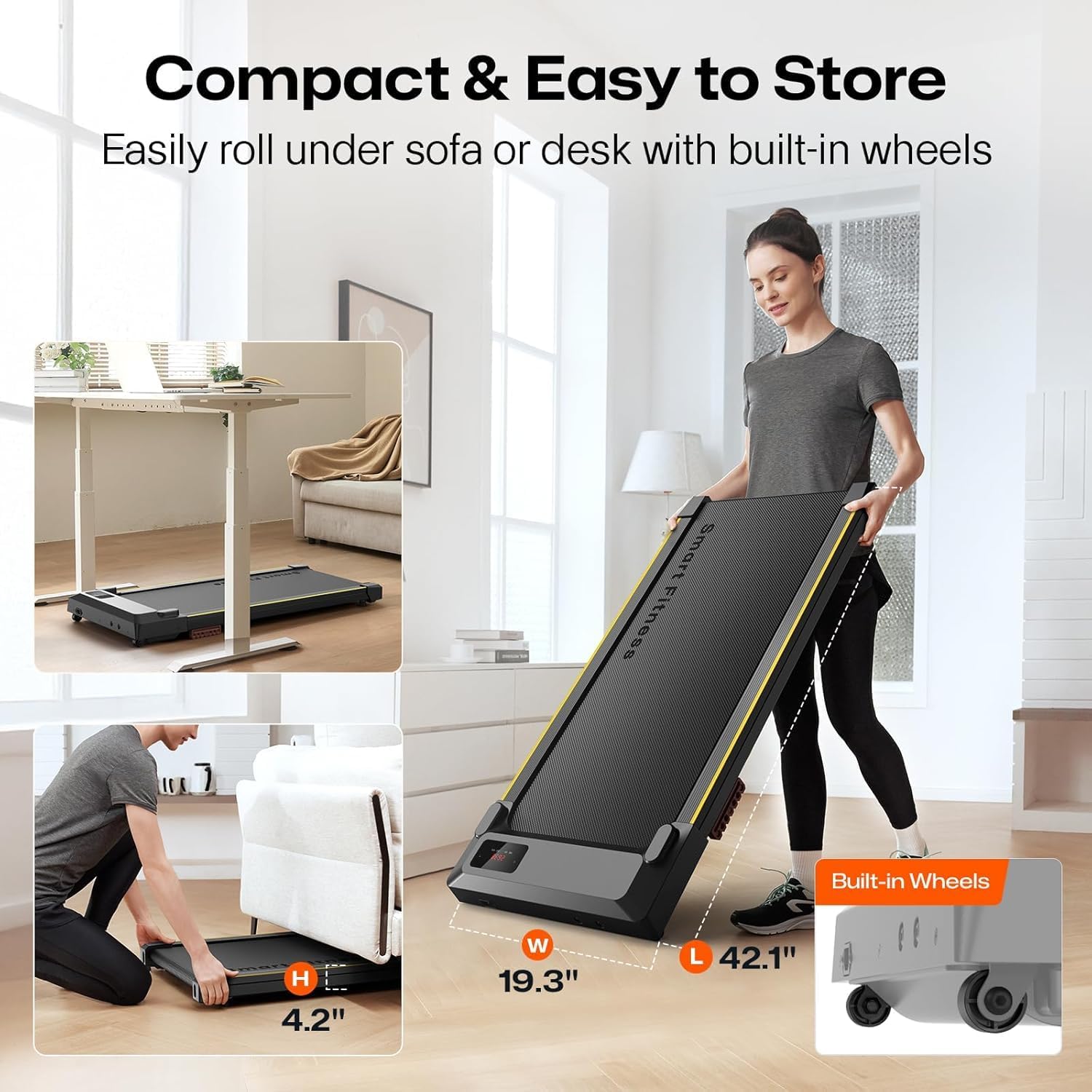
Figure 5.1: The UREVO S1 treadmill features built-in wheels for easy movement and compact storage under furniture.
6. Ntuziaka ọrụ
6.1 Gbanyụọ/ gbanyụọ
- Ike Na: Locate the power switch on the treadmill (usually near the power cord) and flip it to the 'ON' position. The LED display will illuminate.
- Gbanyụọ: To completely power off the treadmill, flip the power switch to the 'OFF' position.
6.2 Iji njikwa anya
The remote control allows you to start, stop, adjust speed, and change modes. Ensure the remote is pointed towards the treadmill's display for optimal response.
- Malite/kwụsịtụ: Press the Play/Pause button (▶/‖) to start or pause the treadmill. The treadmill will count down from 3 before starting.
- Ndozi ọsọ ọsọ: Use the '+' button to increase speed and the '-' button to decrease speed. Speed ranges from 0.6 to 4 mph.
- Ụdị: Press the 'MODE' button to cycle through different display metrics (Time, Distance, Calories, Speed).
- Mechie: Press the 'MUTE' button to silence any beeping sounds from the treadmill.

Figure 6.1: The LED display shows real-time workout data, controlled by the included remote.
6.3 Ikanam Display
The integrated LED display provides real-time feedback on your workout:
- OGE: Ogologo oge mgbatị ahụ gị.
- DIST.: Ogologo ya dị kilomita.
- Ọsọ: Ọsọ ije/ịgba ọsọ ugbu a na mph.
- KCAL: Kalori echere n'ọkụ.
6.4 Manual Incline Adjustment
The UREVO S1 features a manual incline adjustment to increase workout intensity. To adjust the incline:
- Gbaa mbọ hụ na agbanyụrụ igwe a na-azọ ụkwụ ma wepụ ya.
- Locate the adjustable feet at the rear of the treadmill.
- Manually adjust the height of these feet to achieve the desired incline level. Ensure both feet are set to the same level for stability.
- Plug in and power on the treadmill to resume your workout.
Video 6.1: Demonstration of the UREVO S1 walking pad in use, highlighting its quiet operation and compact design.
Vidiyo 6.2: Mkpebi dị mkpirikpiview of the UREVO S1 walking pad's features and usage in a home office setting.
7. Nlekọta
Regular maintenance ensures the longevity and optimal performance of your UREVO S1 treadmill.
- Nhicha: Jiri mgbasa ozi hichaa treadmill ahụamp cloth after each use. Avoid harsh chemicals.
- mmanu eriri: Lubricate the running belt every 3 months or after 50 hours of use, whichever comes first. Use the provided lubricant or a 100% silicone treadmill lubricant. Refer to the detailed instructions in the separate lubrication guide (if provided) or general treadmill lubrication procedures.
- Ndozi eriri: Periodically check the running belt for proper tension and alignment. Adjust if necessary according to the instructions in the full manual.
8. Nchọpụta nsogbu
If you encounter any issues with your UREVO S1 treadmill, please refer to the following common problems and solutions:
| Nsogbu | Ihe nwere ike ime | Ngwọta |
|---|---|---|
| Treadmill anaghị arụ ọrụ. | Ejikọghị eriri ọkụ nke ọma; mgbanyụ ọkụ gbanyụrụ; mgbanyụ ọkụ sekit agbanyụrụ. | Check power connections; ensure power switch is ON; reset circuit breaker. |
| Agbụ na-agba ọsọ na-akwụsị ma ọ bụ na-amị amị. | Belt na-atọpụkwa oke; mmanu mmanu ezughị oke; oke moto. | Adjust belt tension; lubricate the belt; reduce user weight or speed. |
| Mkpọtụ na-adịghị ahụkebe n'oge arụ ọrụ. | Loose components; belt friction; motor issue. | Check and tighten all screws; lubricate belt; contact customer support if noise persists. |
| Njikwa anya anaghị aza. | Dead batteries; remote not pointed correctly; interference. | Replace batteries; ensure direct line of sight to display; remove obstructions. |
If the problem persists after attempting these solutions, please contact UREVO customer support.
9. Nkọwapụta
- Akara: UREVO
- Aha nlereanya: URTM025 (S1)
- Agba: BLACK S1
- Akụkụ ngwaahịa: 46.8"D x 19.3"W x 4.8"H
- Ibu ihe: Pound 37.5 (17 n'arọ)
- Ihe: Alloy Steel
- Ọsọ kachasị: 4 kilomita kwa elekere
- Ike inyinya kacha elu: 2 HP
- Nkwanye ịdị arọ kachasị: Pound 242 (110 n'arọ)
- Ụdị ngosi: Ikanam
- Isi mmalite ike: Igwe ọkụ eletrik
- Atụlela Metrik: Distance, Speed, Time, Calories
10. Akwụkwọ ikike na nkwado
The UREVO S1 Under Desk Treadmill comes with a 1-afọ akwụkwọ ikike site na ụbọchị ịzụrụ, na-ekpuchi ntụpọ nrụpụta. Biko dowe ihe akaebe nke ịzụrụ ihe maka akwụkwọ ikike.
For technical support, troubleshooting assistance, or warranty inquiries, please visit the official UREVO store or contact their customer service department.