
1. Okwu mmalite
Thank you for choosing the Ströme Gliding Grille Bladeless 2-in-1 Tower Fan and Air Purifier. This innovative appliance combines efficient air circulation with advanced air purification, providing a healthier and more comfortable indoor environment. Please read this manual thoroughly before use to ensure proper operation and maintenance.
2. Ntuziaka nchekwa
Iji belata ihe egwu nke ọkụ, ujo eletrik, ma ọ bụ mmerụ ahụ, na-agbaso usoro nchekwa nchekwa ndị a mgbe niile:
- Gbaa mbọ hụ na ọkọnọ ike dabara na voltage kpọmkwem na ngwa.
- Ejila eriri ma ọ bụ plọg mebiri emebi arụ ọrụ fan.
- Debe ngwa ahụ na mmiri ma ọ bụ mmiri mmiri ndị ọzọ.
- Do not insert fingers or objects into the grille while the fan is operating.
- Wepụ ihe mkpuchi fan ahụ tupu ị sachaa ma ọ bụ rụzie ihe ọ bụla.
- Ngwa a bụ naanị maka ime ụlọ.
- Debe ebe ụmụaka na-apụghị iru.
3. Ihe ngwugwu
Chọpụta na ihe niile dị na ngwugwu:
- Ströme Gliding Grille Bladeless 2-in-1 Tower Fan and Air Purifier
- Njikwa anya
- Akwụkwọ ntuziaka onye ọrụ
4. Ngwaahịa gafereview
Familiarize yourself with the components of your new appliance.
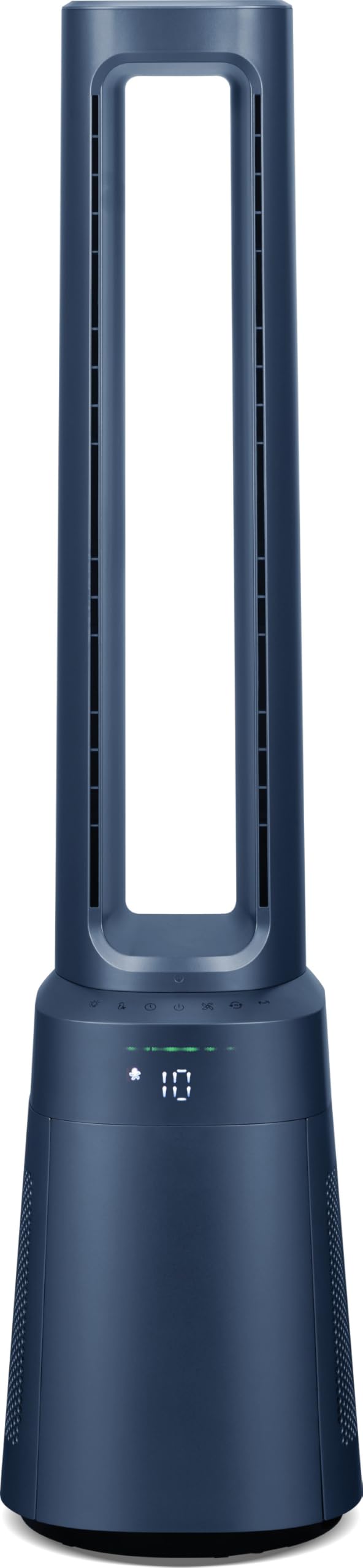
Foto 4.1: N'ihu view of the Ströme Gliding Grille Bladeless 2-in-1 Tower Fan and Air Purifier, showing the sleek, dark blue bladeless design and the digital display on the base.

Foto 4.2: Akụkụ view of the Ströme Gliding Grille Bladeless 2-in-1 Tower Fan and Air Purifier, highlighting its slim profile and air intake grille.

Figure 4.3: Close-up of the touch control panel and LED display, showing various function icons and the current fan speed setting.

Foto 4.4: View of the open filter compartment, revealing the HEPA H13 filter ready for installation or replacement.
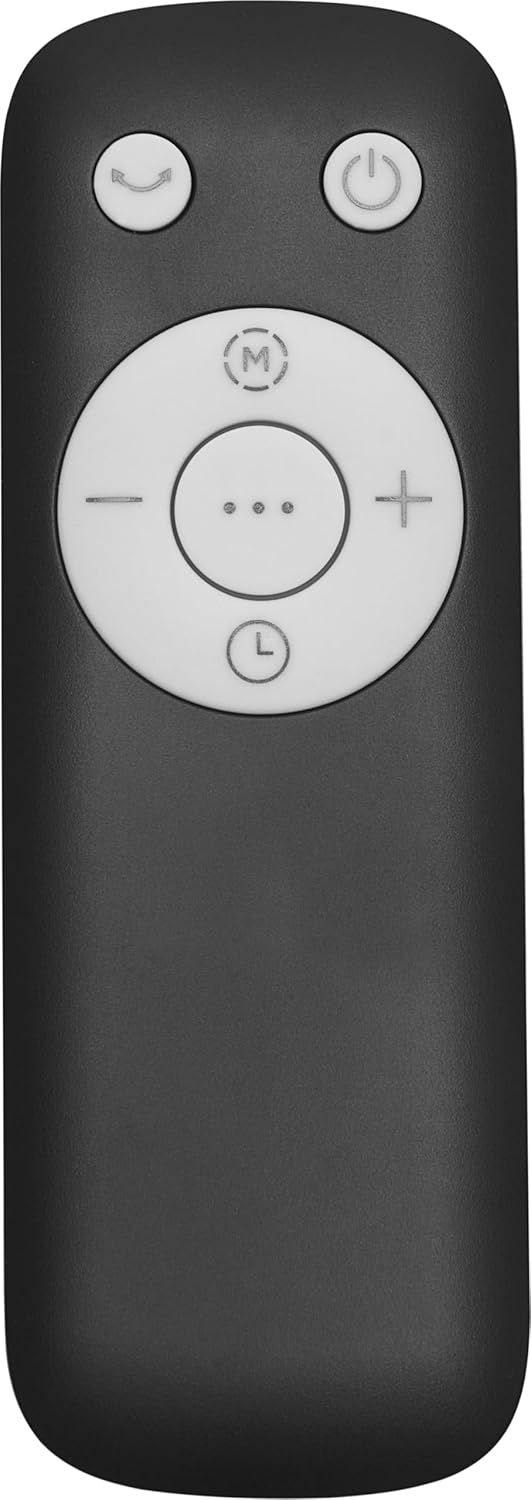
Figure 4.5: The compact remote control with clearly labeled buttons for power, oscillation, mode selection, and fan speed adjustment.
5. Nhazi
- Iwepu: Jiri nlezianya wepụ ngwa ahụ na ihe niile dị na ngwugwu ahụ. Debe ngwugwu ahụ maka nchekwa ma ọ bụ ibuga n'ọdịnihu.
- Ntinye nyocha:
- Locate the filter compartment cover on the lower part of the fan (refer to Figure 4.4).
- Open the cover and insert the HEPA H13 filter(s) according to the 'FRONT' markings.
- Mechie mkpuchi ahụ nke ọma.
- Nkwanye: Place the fan on a firm, level surface. Ensure there is adequate space around the unit for proper air intake and circulation. Avoid placing it near curtains or other objects that could obstruct airflow.
- Njikọ ike: Tinye eriri ọkụ n'ime oghere eletrik ọkọlọtọ.
6. Ntuziaka ọrụ
The fan can be controlled via the touch panel on the unit or the magnetic remote control.
6.1. Gbanyụọ / gbanyụọ
- Pịa bọtịnụ ike () on the touch panel or remote control to turn the unit on or off.
6.2. Mmezi ọsọ ọsọ fan
- Jiri ihe '+' na '-' buttons on the remote or the corresponding icons on the touch panel to adjust the fan speed. There are 10 speed levels available.
6.3. Ọrụ Oscillation
- Pịa bọtịnụ oscillation () to activate or deactivate the 60° oscillation feature, which distributes air evenly.
6.4. Nhazi oge
- Pịa bọtịnụ ngụ oge () to set the automatic shut-off timer. The timer can be set for up to 12 hours.
7. Ụdị na Ntọala
The fan offers three distinct operating modes:
- Ụdị nkịtị: Standard operation with adjustable fan speeds.
- Ụdị abalị: Designed for quiet operation during sleep. The fan speed will automatically decrease, and the display will dim or turn off after 60 seconds of inactivity.
- Ụdị nwa: Provides gentle airflow and purification, ideal for sensitive environments.
Iji gbanwee n'etiti ụdịdị, pịa bọtịnụ bọtịnụ ọnọdụ () on the control panel or remote control.
7.1. Digital Air Quality Display
The LED screen displays real-time air quality information. The display automatically turns off after 60 seconds of inactivity to save energy and reduce light disturbance, especially in Night Mode. The unit also features a memory function that recalls your last settings upon restart.
8. Nlekọta
Ndozi mgbe niile na-eme ka ngwaọrụ gị rụọ ọrụ nke ọma ma nwee ogologo oge.
8.1. Na-ehicha Mpụga
- Kwupuo fan mgbe niile tupu ihicha ya.
- Jiri nwayọ hichaa elu mpụta, damp akwa . Ejila ihe nchacha abrasive ma ọ bụ ihe mgbaze.
- Gbaa mbọ hụ na ọ nweghị mmiri na-abanye n'ime akụrụngwa.
8.2. Mgbanwe nzacha HEPA
The Ströme Gliding Grille uses two HEPA H13 filters for effective air purification. The filters are not washable and must be replaced periodically.
- The filter life depends on usage and air quality. Replace filters when the air quality indicator consistently shows poor readings despite operation, or approximately every 6-12 months.
- To replace, open the filter compartment cover (refer to Figure 4.4), remove the old filters, and insert new ones, ensuring correct orientation.
- Tụfuo ihe nzacha ejiri mee ihe n'ụzọ kwesịrị ekwesị.
9. Nchọpụta nsogbu
If you encounter issues, refer to the following table before contacting support.
| Nsogbu | Ihe nwere ike ime | Ngwọta |
|---|---|---|
| Onye ofufe anaghị agbanwuo | Enweghị ọkụ | Lelee ma ọ bụrụ na etinyere eriri ọkụ na ebe nchekwa na-arụ ọrụ. |
| Ikuku ikuku adịghị ike | Ihe nzacha ruru unyi ma ọ bụ gbochiri | Check and replace the HEPA filters if necessary. Ensure air intake is not obstructed. |
| Mkpọtụ na-adịghị ahụkebe | Obstruction in the air outlet or base | Turn off and unplug the unit. Carefully check for any foreign objects and remove them. |
| Njikwa anya anaghị arụ ọrụ | Akwụsịla batrị ma ọ bụ tinye na ezighi ezi | Replace the remote control batteries (sold separately) and ensure correct polarity. |
10. Nkọwapụta
| Njirimara | Nkọwapụta |
|---|---|
| Ụdị | Ströme |
| Aha Nlereanya | Gliding Grille Bladeless 2-in-1 |
| Agba | Acha anụnụ anụnụ |
| Akụkụ ngwaahịa | 25.5 x 25.5 x 105.6 cm |
| Ihe onwunwe | Plastic |
| Ọnụọgụ nke Ọsọ ọsọ | 10 |
| Ọkwa mkpọtụ | 59.8 decibel |
| Ụdị nkwụnye | Ala Ugwu |
| Ụdị njikwa | Remote Control, Touch Panel |
| Ojiji Ngwaahịa Akwadoro | Ebe obibi |
| Ụdị Ihe | Ụlọ elu |
| Nchacha ikuku | 2x HEPA H13 Filters |
| Oscillation Angle | 60° |
| Ngụ oge | 12 - elekere |
11. Akwụkwọ ikike na nkwado
This Ströme product comes with a standard manufacturer's warranty. For detailed warranty information, please refer to the warranty card included with your purchase or visit the official Ströme website. For technical support, troubleshooting assistance, or to inquire about replacement parts, please contact your retailer or the Ströme customer service department.