
1. Okwu mmalite
Thank you for choosing the KLIM KLCD-0582 CD Cassette Boombox. This versatile audio system combines classic and modern features, allowing you to enjoy music from various sources including CDs, cassette tapes, AM/FM radio, Bluetooth-enabled devices, USB drives, and auxiliary input. This manual provides detailed instructions for safe operation, setup, and maintenance of your device. Please read it thoroughly before use and retain it for future reference.
2. Ntuziaka nchekwa dị mkpa
- Gụọ ntuziaka ndị a nke ọma tupu ị rụọ ọrụ ahụ.
- Debe ntuziaka ndị a maka ntụnye aka n'ọdịnihu.
- Ṅaa ntị ịdọ aka ná ntị niile na ngwaahịa yana na ntuziaka ọrụ.
- Soro ntuziaka niile.
- Ejila ngwa a n'akụkụ mmiri.
- Jiri akwa kpọrọ nkụ hichaa naanị.
- Akwụsịla oghere ikuku ikuku ọ bụla. Wụnye dị ka ntuziaka onye nrụpụta si dị.
- Awụnyela n'akụkụ ebe okpomọkụ ọ bụla dị ka radiators, ndekọ okpomọkụ, stovu, ma ọ bụ ngwa ndị ọzọ (gụnyere amplifiers) nke na-emepụta okpomọkụ.
- Chebe eriri ọkụ ka ị ghara ịgagharị ma ọ bụ tuo ya, ọkachasị na plọg, ebe nchekwa dị mma, na ebe ha si na ngwa ahụ pụta.
- Jiri naanị mgbakwunye / ngwa ndị nrụpụta akọwapụtara.
- Kwupu ngwa a n'oge oke mmiri ozuzo ma ọ bụ mgbe ejighi ya ogologo oge.
- Tụtụ aka n'aka ndị ọrụ ruru eru. A na-achọ ọrụ mgbe ngwa ahụ mebiri emebi n'ụzọ ọ bụla, dị ka eriri ọkụ ma ọ bụ plọg mebiri emebi, mmiri mmiri wụfuru ma ọ bụ ihe dabara n'ime ngwa ahụ, ekpughere ngwa ahụ na mmiri ozuzo ma ọ bụ mmiri, anaghị arụ ọrụ nke ọma. , ma ọ bụ ahapụla ya.
3. Ihe ngwugwu
Biko lelee ngwungwu maka ihe ndị a:
- KLIM CD Cassette Player (KLCD-0582)
- eriri ọkụ (AC cable)
- AAA alkaline batteries * 2 (for remote control)
- KLIM envelope
- Akwụkwọ ntuziaka (akwụkwọ a)
4. Ngwaahịa gafereview
Familiarize yourself with the main components and controls of your KLIM KLCD-0582 boombox.
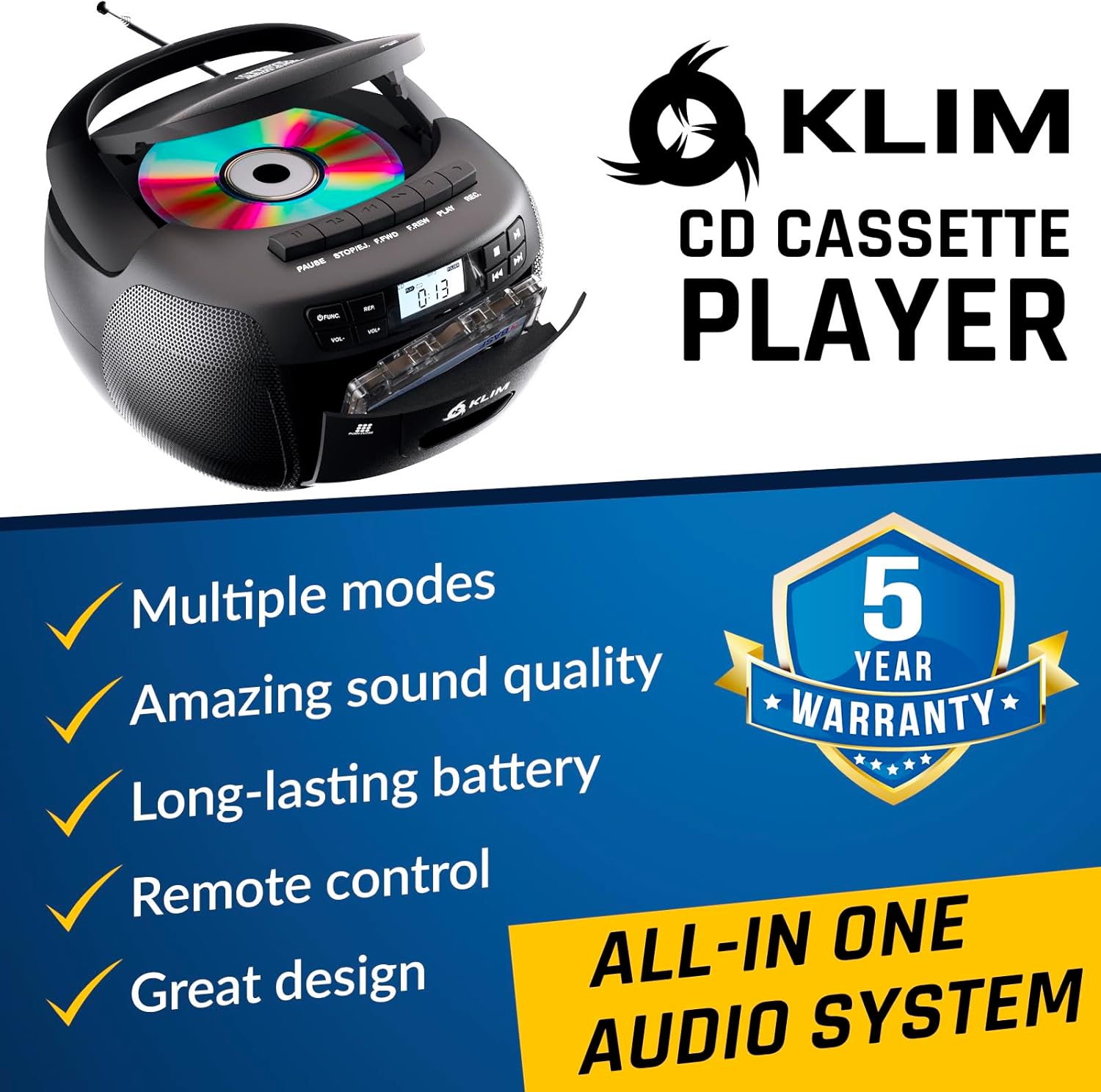
Foto 4.1: N'ihu view of the KLIM KLCD-0582 CD Cassette Boombox, showing the CD lid, cassette deck, and control buttons.
Njikwa akụkụ ihu:
- Bọtịnụ ike: Gbanyụọ ma ọ bụ gbanyụọ unit ahụ.
- Function/Mode Button: Switches between CD, Cassette, Radio, Bluetooth, USB, and AUX modes.
- Njikwa Olu (VOL+/-): Na-edozi olu nkpọghachi.
- Play/Pause Button (CD/USB): Na-amalite ma ọ bụ na-akwụsị ịkpọgharị CD/USB.
- Stop Button (CD/USB/Cassette): Kwụsị ịkpọghachi ya.
- Wụpụ/Chọọ bọtịnụ (<< / >>): Skips tracks or searches within a track (CD/USB). Tunes radio stations.
- Repeat Button (CD/USB): Na-emegharị egwu dị ugbu a ma ọ bụ egwu niile.
- Program Button (CD/USB): Programs track order for CD/USB playback.
- Record Button (Cassette): Initiates recording to cassette tape.
- Eject Button (Cassette): Opens the cassette deck.
- Ngosipụta LCD: Na-egosi ụdị dị ugbu a, nọmba egwu, ugboro redio, wdg.

Ọgụgụ 4.2: Zuru ezu view of the LCD display and speaker area, highlighting the digital interface.
Side/Rear Panel Connections:
- Ntinye ike AC: Jikọọ eriri ọkụ AC.
- Akụkụ batrị: Holds 6 C-size batteries for portable use.
- Ọdụ ụgbọ mmiri USB: Maka ịkpọ ụda files site na draịvụ USB.
- Ntinye AUX (3.5mm): Na-ejikọ ngwaọrụ ọdịyo mpụga.
- Jack ekweisi (3.5mm): Maka ige ntị nkeonwe.
- Antenna telescopic: For AM/FM radio reception.

Figure 4.3: Product label on the bottom of the unit, indicating model number and electrical ratings.
5. Nhazi
5.1 Ịkwado Ngalaba ahụ
Ike AC ma ọ bụ batrị nwere ike inye ike site na boombox gị.
AC Power (Indoor Use):
- Gbaa mbọ hụ na agbanyụrụ unit ahụ.
- Connect the supplied AC power cord to the AC power input on the rear of the boombox.
- Plug the other end of the AC power cord into a standard wall outlet (110-120V, 60Hz).
DC Power (Battery Operation - Portable Use):
- Gbaa mbọ hụ na agbanyụrụ otu ahụ wee kepụ ya na ike AC.
- Mepee mkpuchi nke batrị dị n'ala nke ngwaọrụ ahụ.
- Insert 6 C-size (UM-2) batteries, ensuring correct polarity (+/-) as indicated inside the compartment.
- Mechie mkpuchi nke batrị batrị nke ọma.
Mara: Wepu batrị ma ọ bụrụ na agaghị eji nkeji ahụ ruo ogologo oge iji gbochie ntapu na mmebi.
5.2 Nwụnye batrị dịpụrụ adịpụ
- Mepee oghere batrị dị n'azụ nke njikwa anya.
- Insert 2 AAA alkaline batteries, observing the correct polarity.
- Mechie mkpuchi oghere batrị.

Figure 5.1: The boombox shown with its remote control, which requires AAA batteries.
5.3 Ntọala antenna
Maka nnabata redio FM kacha mma, gbasaa antenna telescopic ahụ nke ọma. Maka nnabata AM, tụgharịa ngwaọrụ ahụ maka akara kacha mma.
6. Ọrụ
6.1 Njikwa ntọala
- Gbanyụọ/ Gbanyụọ: Pịa IKE bọtịnụ.
- Họrọ Ụdị: Pịa Ọrụ or MODE button repeatedly to cycle through CD, Cassette, Radio (AM/FM), Bluetooth, USB, and AUX modes.
- Gbanwee olu: Jiri ihe VOL+ na Vol- bọtịnụ.
6.2 CD ịkpọghachi
- Pịa Ọrụ bọtịnụ ka ịhọrọ ọnọdụ CD.
- Open the CD compartment lid.
- Place a CD (audio CD or MP3/WMA CD) with the label side facing up.
- Close the CD compartment lid. The unit will read the disc and begin playback automatically or display the total number of tracks.
- Pịa KWURU/Kwụsịa iji malite ma ọ bụ kwụsịtụ ọkpụkpọ egwu.
- Pịa KWỤSỊ ịkwụsị ịkpọghachi.
- Jiri WỤPỤ (<< / >>) buttons to skip tracks. Hold to fast forward/rewind within a track.
- Egwuregwu mmemme: Na ọnọdụ nkwụsị, pịa Mmemme. Jiri MAKA to select desired tracks, then press Mmemme again to confirm each track. Press KWURU ịmalite ịkpọ egwu nke e mere na mmemme.
- Tinyegharịa egwuregwu: Pịa Tinyegharịa once for single track repeat, twice for all tracks repeat.
6.3 Mkpọgharị na Ndekọ Kaseti
- Pịa Ọrụ button to select TAPE mode.
- Pịa KPỤTA button to open the cassette deck.
- Insert a cassette tape and close the deck.
- Pịa KWURU ibido playback.
- Jiri FAST FORWARD (FFWD) or REWIND (REW) bọtịnụ iji chịgharịa teepu ahụ.
- Pịa KWỤSỊ ịkwụsị ịkpọghachi.
Ndekọ na kaseti:
- Insert a blank, recordable cassette tape.
- Select the desired source (CD, Radio, AUX, Bluetooth, USB).
- Start playback on the source (e.g., play a CD track, tune to a radio station).
- Pịa Dekọọ button on the boombox. The KWURU button will also engage. Recording will begin.
- Pịa KWỤSỊ kwụsị ndekọ.
Ihe dị mkpa: Ensure the cassette tape has its record-protection tabs intact for recording.
Redio 6.4 nke Ụtụtụ/FM
- Pịa Ọrụ button to select RADIO mode.
- Extend the telescopic antenna for FM reception. For AM, rotate the unit.
- Jiri ihe NKWUKWU mkpịsị aka ma ọ bụ WỤPỤ (<< / >>) buttons to tune to your desired station. The frequency will be displayed on the LCD.
6.5 Njikọ Bluetooth
- Pịa Ọrụ button to select BLUETOOTH mode. The LCD will display "BT" and the unit will enter pairing mode, indicated by a flashing Bluetooth icon.
- Na ngwaọrụ Bluetooth gị (dịka ọmụmaatụ, ekwentị mkpanaaka, mbadamba), mee ka Bluetooth rụọ ọrụ ma chọọ ngwaọrụ dị.
- Select "KLIM Boombox" from the list of devices.
- Once paired, the Bluetooth icon on the boombox's LCD will stop flashing. You can now play audio from your device through the boombox.
- Control playback (play/pause, skip tracks) either from your connected device or using the boombox's controls.
6.6 USB playback
- Fanye eriri USB n'ọdụ ụgbọ mmiri USB.
- Pịa Ọrụ bọtịnụ iji họrọ ọnọdụ USB. Ngwaọrụ ahụ ga-achọpụta ozugbo ma malite ịkpọ ọdịyo dakọtara. files (MP3/WMA).
- Jiri KWURU/Kwụsịa, KWỤSỊ, na WỤPỤ (<< / >>) buttons to control playback, similar to CD mode.
- Egwuregwu mmemme: Na ọnọdụ nkwụsị, pịa Mmemme. Jiri MAKA to select desired tracks, then press Mmemme again to confirm each track. Press KWURU ịmalite ịkpọ egwu nke e mere na mmemme.
Ntinye AUX 6.7
- Connect an external audio device (e.g., MP3 player, smartphone) to the AUX input jack using a 3.5mm audio cable (not included).
- Pịa Ọrụ button to select AUX mode. The LCD will display "AUX".
- Malite ịkpọghachi egwu na ngwaọrụ mpụga gị. A ga-esi na igwe okwu boombox bugharịa ọdịyo ahụ.
- Volume can be adjusted on both the boombox and the external device. Playback controls are managed on the external device.
6.8 Iji njikwa anya
The included remote control allows convenient operation from a distance of up to 20 feet. Ensure line of sight to the boombox's front panel.
- Ike (Bọtịnụ Uhie): Gbanyụọ/gbanyụọ unit
- Mechie: Mebie/na-ewepụ ụda olu.
- VOL +/-: Na-edozi olu.
- FUNC: Cycles through modes (CD, TAPE, FM, AM, BT, USB, AUX).
- REP: Repeat function for CD/USB.
- ProG: Program function for CD/USB.
- PLAY/PAUSE, STOP, FFWD, REW: Playback controls for CD/USB/Cassette.
- Number Buttons (0-9, -10, +10): Direct track selection for CD/USB.
7. Nlekọta
7.1 Na-ehicha ngalaba ahụ
- Kwupuo unit na isi iyi ike tupu ihicha.
- Jiri akwa dị nro dị nro hichaa ihe dị n'èzí.
- Ejila ihe nchacha, waxes, ma ọ bụ ihe mgbaze ka ha nwere ike imebi njedebe.
- Maka oghere CD, jiri diski pụrụ iche nke na-ehicha oghere CD.
- Maka oche nke cassette, na-ehicha isi teepu na tuko na-eji owu swab obere oge dampetinyere ya na mmanya isopropyl.
7.2 Nchekwa
When not in use for extended periods, store the unit in a cool, dry place away from direct sunlight and extreme temperatures. Remove batteries from both the main unit and the remote control to prevent leakage.
8. Nchọpụta nsogbu
If you encounter issues with your boombox, please refer to the following common problems and solutions before contacting support.
| Nsogbu | Ihe nwere ike ime | Ngwọta |
|---|---|---|
| Enweghị ike | Ejikọghị eriri AC; Batrị agwụla ma ọ bụ tinye ezighi ezi. | Lelee njikọ eriri AC; Dochie batrị ma ọ bụ hụ na polarity ziri ezi. |
| Enweghị ụda | Volume too low; Mute function active; Incorrect mode selected; Headphones connected. | Increase volume; Press MUTE on remote; Select correct mode; Disconnect headphones. |
| CD anaghị egwu egwu / njehie "NO DISC" | CD inserted incorrectly; CD dirty or scratched; CD compartment not closed; Unit in wrong mode. | Insert CD label side up; Clean or replace CD; Close CD lid securely; Select CD mode. |
| Teepu kaseti anaghị akpọ/edekọ | Tape inserted incorrectly; Tape damaged; Record-protection tab missing (for recording); Unit in wrong mode. | Insert tape correctly; Use a new tape; Cover record-protection tab with tape; Select TAPE mode. |
| Nnabata redio adịghị mma | Antenna adịghị agbatị; Ọnọdụ otu. | Mgbatị antenna FM zuru oke; Tụgharịa otu maka nnabata AM ka mma. |
| Ọdịda ijikọ Bluetooth | Boombox not in pairing mode; Device Bluetooth off; Device too far. | Ensure boombox is in BT mode and flashing; Enable Bluetooth on device; Move device closer (within 30 ft). |
| Njikwa anya anaghị arụ ọrụ | Batteries depleted or incorrectly inserted; Obstruction between remote and unit. | Replace batteries; Ensure clear line of sight to the unit's front panel. |
9. Nkọwapụta
| Njirimara | Nkọwa |
|---|---|
| Nọmba nlereanya | KLCD-0582 |
| Ụdị | KLIM |
| Teknụzụ Njikọta | Auxiliary, Bluetooth 5.1, USB |
| Agba | Nwa |
| Akụkụ ihe (L x W x H) | 8.5 x 8.39 x 4.92 sentimita asatọ |
| Ibu Ibu | 1.5 kilogram |
| Isi Iyi Ike | Corded Electric (AC 110-120V/60Hz), 6 x C-size batteries (DC 9V) |
| Ngwa dakọtara | MP3 Player, Bluetooth-enabled devices |
| Ụkpụrụ akwadoro | CD, MP3, WMA |
| Ụdị ọdịyo akwadoro | CD-DA, MP3, WMA |
| Ndị na-ekwu okwu | 3W Dual Speakers |
| Ndị otu redio | AM/FM |
10. Akwụkwọ ikike na nkwado
10.1 Ozi akwụkwọ ikike
The KLIM KLCD-0582 CD Cassette Boombox comes with a 5-afọ akwụkwọ ikike. This warranty covers manufacturing defects and ensures the product meets its specified performance. Please retain your proof of purchase for warranty claims.
10.2 Nkwado ndị ahịa
For any questions, technical assistance, or warranty claims, please contact KLIM customer support. You can typically find contact information on the manufacturer's website or through the retailer where you purchased the product. KLIM offers 24/7 customer support to assist you.
For more information, visit the official KLIM websaịtị ma ọ bụ rụtụ aka na nkọwa kọntaktị enyere na nkwakọ ngwaahịa gị.