
WUBEN PL01
WUBEN PL01 Pen Light Instruction Manual
Ụdị: PL01
1. Okwu mmalite
The WUBEN PL01 is a compact, high-performance pen light designed for various applications including home use, outdoor activities, emergencies, and inspections. It features a bright 650-lumen output, dual power options (rechargeable battery or AAA batteries), IP68 waterproof rating, and a durable aluminum alloy construction. This manual provides detailed instructions for its safe and effective use.

Image 1.1: The WUBEN PL01 Pen Light, showcasing nhazi ya mara mma na obere nha.
2. Kedu ihe dị na Igbe ahụ
Please verify that all items are present upon opening the package:
- WUBEN PL01 Pen Light x 1
- Rechargeable Battery (pre-installed or separate) x 1
- Ụdị-C eriri USB x 1
- Lanyard x 1
- Spare O-rings x 2
- User Manual (this document) x 1

Image 2.1: Contents of the WUBEN PL01 package, including the pen light, charging cable, lanyard, and spare O-rings.
3. Nhazi
3.1 Ntinye batrị
The WUBEN PL01 supports two power sources: the included rechargeable battery or two standard AAA batteries (not included). Ensure correct polarity during installation.
- Mepee okpu ọdụ nke ọkụ ọkụ.
- Insert the rechargeable battery or two AAA batteries with the positive (+) end facing towards the head of the flashlight.
- Securely re-screw the tail cap until it is fully tightened.

Image 3.1: Illustration of the dual power options for the WUBEN PL01, showing both the rechargeable battery and AAA battery configuration.
3.2 Ịchaji batrị enwere ike ịchaji
The included rechargeable battery features a built-in USB-C charging port. The flashlight itself does not have an integrated charging port.
- Unscrew the tail cap and remove the rechargeable battery from the flashlight.
- Connect the provided USB-C charging cable directly to the charging port on the battery.
- Jikọọ nsọtụ nke ọzọ nke eriri USB-C na isi iyi ike USB dakọtara (dịka ọmụmaatụ, ihe nkwụnye mgbidi, ọdụ USB kọmputa).
- A red indicator light on the battery signifies that it is charging.
- Ọkụ na-egosi ga-atụgharị akwụkwọ ndụ akwụkwọ ndụ mgbe batrị chajịchara.
- Charging typically takes approximately 1.5 hours.
- Once charged, reinsert the battery into the flashlight and secure the tail cap.
4. Ntuziaka ọrụ
4.1 Gbanyụọ ma ọ bụ gbanyụọ
To turn the WUBEN PL01 on or off, perform a full press of the tail switch button.
4.2 Ngbanwe ọnọdụ
With the light turned on, half-press the tail switch button to cycle through the available brightness modes in the following sequence:
- Ọnwa: 1 Lumen
- Ala: 50 Lumen
- Ọkara: 150 Lumen
- Elu: 650 Lumen
The flashlight features a mode memory function, meaning it will activate in the last used brightness mode when turned on again.
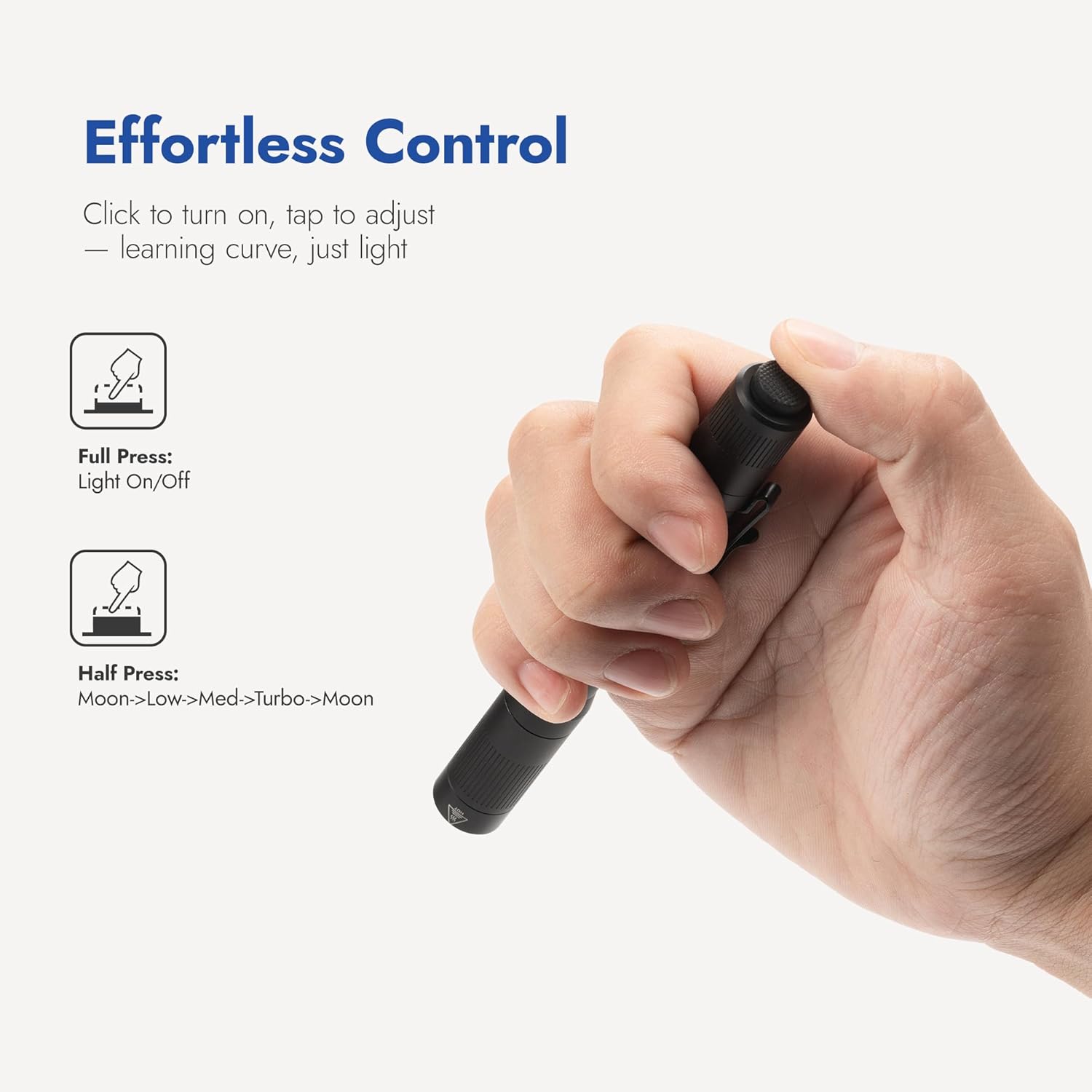
Image 4.1: Diagram illustrating the tail switch operation for power on/off and mode cycling.

Foto 4.2: Ọpụamples of the WUBEN PL01's four brightness modes in various practical scenarios, from facial examination to night walking.
4.3 Dual-Direction Clip Usage
The WUBEN PL01 is equipped with a versatile two-way clip, allowing for secure attachment to various items for hands-free lighting.
- Pocket Carry: Attach the clip to a shirt pocket or pants pocket for easy access.
- Backpack Strap: Secure the flashlight to a backpack strap for illumination during hikes or walks.
- Cap Mount: Clip the flashlight to the brim of a cap to convert it into a temporary headlamp.

Image 4.3: Demonstrates the versatility of the dual-direction clip, showing the flashlight attached to a pocket, backpack strap, and cap.
5. Nlekọta
5.1 Nhicha
Iji nọgide na-arụ ọrụ na ọdịdị kacha mma:
- Jiri ihe dị nro hichaa ahụ ọkụ eletrik ahụ, damp akwa . Zere kemịkalụ siri ike ma ọ bụ ihe na-emebi emebi.
- For the lens, use a clean, soft cloth specifically designed for optical surfaces.
5.2 O-ring Replacement
The PL01's IP68 waterproof rating relies on properly sealed O-rings. Periodically inspect them for any signs of wear, cracks, or damage.
- If O-rings appear damaged, replace them with the provided spare O-rings.
- Apply a thin layer of silicone grease to the O-rings to ensure a better seal and prevent drying.
5.3 Nlekọta batrị
- If the flashlight will not be used for an extended period, remove the batteries to prevent potential leakage and damage.
- For the rechargeable battery, recharge it every 3-6 months to maintain its overall lifespan and capacity.

Image 5.1: The WUBEN PL01's Type III hard-anodized aluminum body, highlighting its scratch, rust, and impact resistance.

Image 5.2: The WUBEN PL01 demonstrating its IP68 waterproof and 2-meter impact resistance, suitable for demanding environments.
6. Nchọpụta nsogbu
If you encounter issues with your WUBEN PL01, please refer to the following common problems and solutions:
- Ìhè anaghị agbanwu:
- Ensure the batteries are installed with correct polarity.
- Check if the rechargeable battery is charged, or if AAA batteries are new.
- Verify that the tail cap is fully tightened. A loose tail cap can prevent electrical contact.
- Clean the battery contacts and the contact points inside the flashlight with a clean cloth.
- Ọkụ na-enwu ma ọ bụ na-ebelata na mberede:
- The battery level may be low. Recharge the included battery or replace AAA batteries.
- Ensure the tail cap is securely tightened.
- Clean battery contacts and internal contact points.
- Water ingress (if exposed to water):
- Immediately turn off the flashlight and remove the batteries.
- Inspect the O-rings for any damage, tears, or improper seating. Replace if necessary.
- Ensure the tail cap was fully tightened before exposure to water.
- Allow the flashlight to dry completely before reassembling and attempting to use it.
If the problem persists after attempting these solutions, please contact WUBEN customer support.
7. Nkọwapụta
| Njirimara | Nkọwa |
|---|---|
| Nlereanya | PL01 |
| Ụdị mmepụta | High (650 Lumens), Medium (150 Lumens), Low (50 Lumens), Moon (1 Lumen) |
| Oge ịgba ọsọ | High: 1 hour, Medium: 2.5 hours, Low: 7 hours, Moon: 125 hours |
| Ụdị batrị | Rechargeable (Included) / 2 x AAA Battery (Not Included) |
| Ogologo Ogologo | 110 mita |
| Ọnụ ọgụgụ kasị elu Beam | 3000 CD |
| Ikanam | 1 x 315D |
| Ngosi nke enweghị mmiri | IP68 (Submersible in 2m water for 1 hour) |
| Nguzogide mmetụta | 2 mita |
| Ibu | 1.59 oz (ya na batrị) |
| Akụkụ (L x D) | 5.31 sentimita asatọ x 0.59 sentimita asatọ |
| Ihe onwunwe | Aluminom anodized |
| Okpomọkụ agba | 5000 Kelvin |

Image 7.1: Diagram illustrating the internal components of the WUBEN PL01, focusing on the 315D LED emitter and optical system.
8. Akwụkwọ ikike Ozi
WUBEN products typically come with a manufacturer's warranty. For specific warranty terms, conditions, and registration details, please refer to the official WUBEN webma ọ bụ kpọtụrụ ndị ahịa ha. Debe risit ịzụrụ ihe gị dị ka ihe akaebe nke ịzụrụ ihe maka akwụkwọ ikike ọ bụla.
9. Nkwado ndị ahịa
For further assistance, product inquiries, or technical support, please visit the official WUBEN website or contact their customer service department. You can often find FAQs, troubleshooting guides, and contact information on their websaịtị.
Official WUBEN Store: WUBEN Store on Amazon
Ask a question about this manual
Ask about setup, troubleshooting, compatibility, parts, safety, or missing instructions. Manuals+ will review the question and use this page’s manual context to help answer it.