Okwu mmalite
This manual provides detailed instructions for the assembly, operation, and maintenance of your Generic L-Shaped Desk D7456963245. Please read all instructions carefully before beginning assembly and retain this manual for future reference.
Ozi nchekwa
- Gbaa mbọ hụ na akụkụ niile dị tupu mgbakọ.
- Kpọkọtanụ n'elu dị nro, dị ọcha iji gbochie ncha.
- Akwụsịla skru n'oge mgbakọ.
- Debe obere akụkụ n'ebe ụmụaka nọ.
- Do not exceed the desk's weight capacity.
- For electrical components (charging station, LED lights), ensure proper power supply and avoid liquid contact.
Ihe ngwugwu
Your desk is shipped in two packages. Please verify all components are present before starting assembly.
Refer to the included parts list diagram in your physical manual for identification of all hardware and furniture panels.
Ntọala na Mgbakọ
Assembly is required for this L-shaped desk. Follow the numbered steps carefully. It is recommended to have two people for assembly.
Kwụpụ 1: Bupụ ma chọpụta akụkụ
Carefully unpack all components and lay them out on a soft, clean surface. Identify each part using the provided hardware and panel lists.

Foto: Overall dimensions of the L-shaped desk, including the main desktop, integrated bookshelf, drawers, and side shelving unit. Dimensions are provided in inches.
Nzọụkwụ nke 2: chịkọta isi oche tebụl ahụ
Follow the diagram in your physical manual to connect the main desktop panels and support legs. Ensure all cam locks and screws are securely fastened without overtightening.
Step 3: Install Drawers and Shelving
Install the drawer slides onto the designated panels. Assemble the drawers according to the instructions and insert them. Attach the bookshelf and side shelving units to the main desk frame.

Foto: A na-eche ihu n'ihu view of the fully assembled L-shaped desk, highlighting the spacious desktop, three storage drawers, and various open shelves for organization.
Step 4: Connect the Charging Station and LED Lights
The charging station is pre-installed. Connect its power cord to a wall outlet. For the LED lights, insert the light strip into the designated groove and connect it to the power source. Use the provided remote control to operate the LED lights.

Foto: The L-shaped desk set up with a computer, demonstrating the integrated power outlets with USB ports, the pegboard for accessories, and the LED lighting feature. A remote control for the LED lights is also pictured.

Foto: A detailed graphic illustrating the specifications of the integrated power strip, including three 110V/12A AC outlets, two 5V/2A USB ports, and the length of the power cord (4.92 feet).
Ntuziaka ọrụ
Iji ọdụ nchaji
The desk includes a pre-installed charging station with 3 AC power outlets and 2 USB ports. Plug the desk's power cord into a standard wall outlet. You can then plug in your devices such as laptops, monitors, and smartphones directly into the desk's integrated outlets.
Operating the LED Lights
The LED lights are controlled by a remote control. Point the remote at the LED receiver to turn the lights on/off, change colors (16 available), and adjust brightness or modes.
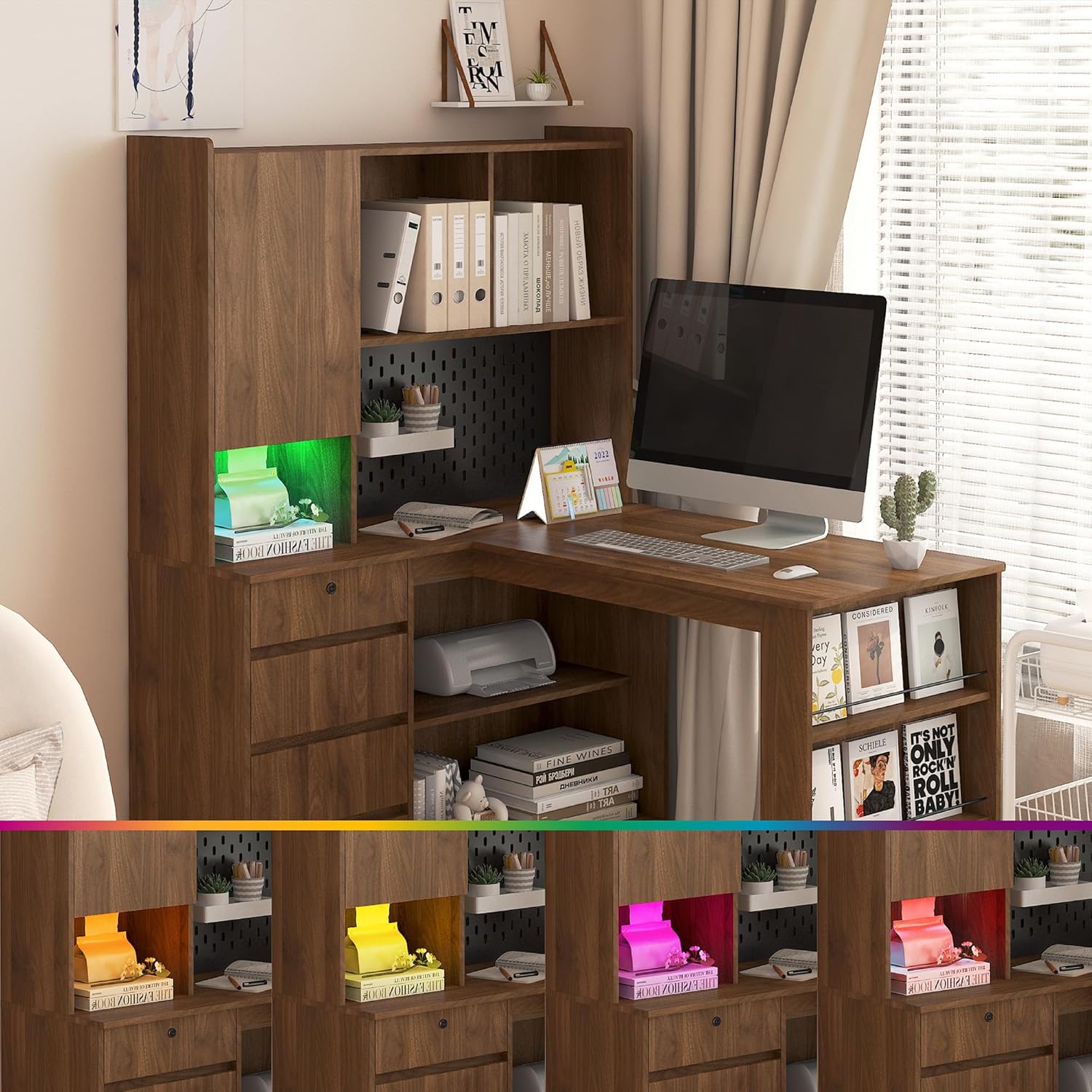
Foto: The L-shaped desk with its integrated LED lighting system displaying a range of colors, demonstrating the customizable ambient light feature.
Nlekọta
- Nhicha: Jiri nwayọ hichaa elu oche ahụ, damp akwa . Zere kemịkalụ siri ike ma ọ bụ ihe nhicha abrasive.
- Na-emechi: Na-elele ma mee ka skru niile na ihe nkedo niile ka ị hụ nkwụsi ike.
- Mwụfu: Hichaa ihe ndị gbapụtara ozugbo iji gbochie mmebi nke ihe e ji osisi rụọ.
Nchọpụta nsogbu
- Issue: Desk wobbles after assembly.
- Ngwọta: Ensure all screws and fasteners are fully tightened. Check that the desk is on a level surface. Adjust leg levelers if present.
- Issue: Charging station not working.
- Ngwọta: Verify the desk's main power cord is securely plugged into a functional wall outlet. Check if the wall outlet itself is working by plugging in another device.
- Issue: LED lights not responding to remote.
- Ngwọta: Ensure the remote has working batteries. Point the remote directly at the LED receiver. Check that the LED light strip is properly connected to its power source.
- Issue: Missing parts during assembly.
- Ngwọta: Review the package contents list. If parts are genuinely missing, contact customer support with your model number and a description of the missing parts.
Nkọwapụta
| Njirimara | Nkọwa |
|---|---|
| Nọmba nlereanya | D7456963245 |
| Ụdị | N'ozuzu |
| Ụdị | L-ọdịdị |
| Akụkụ ngwaahịa (D x W x H) | 46.06"D x 55.9"W x 62.79"H |
| Ụdị ihe | Osisi injinia |
| Ibu Ibu | 138 pound |
| Njirimara Pụrụ Iche | Storage, Charging Station, LED Light |
| Mgbakọ achọrọ | Ee |
| Nchaji Ebe | 3 AC Outlets (110V/12A), 2 USB Ports (5V/2A), 4.92ft Ike eriri |
Ozi akwụkwọ ikike
Please refer to the warranty card included in your package for specific warranty terms and conditions. Generally, products are covered against manufacturing defects for a limited period from the date of purchase. Keep your proof of purchase for warranty claims.
Nkwado ndị ahịa
For assistance with assembly, missing parts, or any other inquiries, please contact our customer support team. Refer to the contact information provided in your product packaging or on the retailer's websaịtị.
When contacting support, please have your model number (D7456963245) and purchase date ready.