
Okwu mmalite
Thank you for choosing the Mxmoonant Scent Air Machine, Model rad8. This waterless essential oil diffuser is designed to provide consistent and customizable fragrance for spaces up to 1500 sq.ft. Featuring smart app control, motion sensing capabilities, and a large 800ml oil reservoir, this device offers a convenient and efficient way to enhance your environment. Please read this manual thoroughly before operation to ensure proper use and maintenance.
Ozi nchekwa
- Use only pure essential oils or aroma oils specifically designed for waterless diffusers. Do not use water or other liquids.
- Debe ngwaọrụ ahụ ka ụmụaka na anụ ụlọ ghara iru.
- Debe ihe mgbasa ozi n'elu kwụsiri ike ma dịkwa larịị.
- Do not block the air outlet or inlet during operation.
- Wepụ ihe mkpuchi ahụ tupu ị sachaa ma ọ bụ tinyeghachi ya.
- Akwụsịla ma ọ bụ nwaa ịrụkwa ngwaọrụ n'onwe gị. Kpọtụrụ nkwado ndị ahịa maka enyemaka.
- Avoid direct contact with essential oils, as they can cause irritation. In case of contact, wash thoroughly with water.
Ihe ngwugwu
Chọpụta na ihe niile dị na ngwugwu:
- Mxmoonant Scent Air Machine (Model rad8)
- Ihe nkwụnye ọkụ
- Ngwa mgbanaka (skru, arịlịka mgbidi)
- Key for internal access
- Akwụkwọ ntuziaka onye ọrụ

Image: The Mxmoonant Scent Air Machine shown with its power adapter, mounting screws, wall anchors, and a small key, illustrating the complete package contents.
Ngwaahịa gafereview
Familiarize yourself with the main components of your scent air machine:
- Isi ngalaba: Houses the diffusion mechanism and control board.
- Ebe nchekwa mmanụ: 800ml capacity bottle for essential oils.
- Ogwe njikwa: Located on the top, with indicator lights for intensity levels (Min, Low, Med, High, Max) and a manual mode shift button.
- Sensọ ngagharị: Detects movement for automatic scent adjustment.
- Ike mgba ọkụ: On/Off switch, typically located on the side or back.
- Lock Design: A keyhole for secure internal access to the oil reservoir.
- Bottom Anti-skid Pad: Ensures stability on surfaces.

Image: A close-up showing the internal 800ml oil reservoir, the key lock mechanism, the manual mode shift button, the durable PP material of the casing, and the anti-skid pads on the base.
Melite
1. Ntinye mbụ
Choose a suitable location for your diffuser. It can be placed on a flat surface or mounted on a wall using the provided hardware. Ensure the area is clear and allows for optimal scent dispersion.

Image: The scent air machine positioned discreetly in a modern living room, blending with the decor.
2. Na-ejuputa ebe nchekwa mmanụ
- Use the provided key to unlock and open the front panel of the diffuser.
- Carefully remove the empty oil bottle from its compartment.
- Unscrew the cap from the oil bottle.
- Fill the bottle with your desired waterless essential oil or aroma oil. Do not overfill.
- Screw the cap back onto the bottle securely.
- Insert the filled oil bottle back into the diffuser compartment.
- Close the front panel and lock it with the key.
3. Na-agbanye ike
- Connect the power adapter to the diffuser's power port.
- Tinye ihe nkwụnye ọkụ n'ime oghere eletrik ọkọlọtọ.
- Flip the power switch (usually located on the side or back) to the "ON" position. The indicator lights on the top panel will illuminate.
4. Nbudata na Njikọ Ngwa
The Mxmoonant Scent Air Machine can be controlled via a smartphone app. Scan the QR code in the manual or search for "Aroma Link" in your app store.
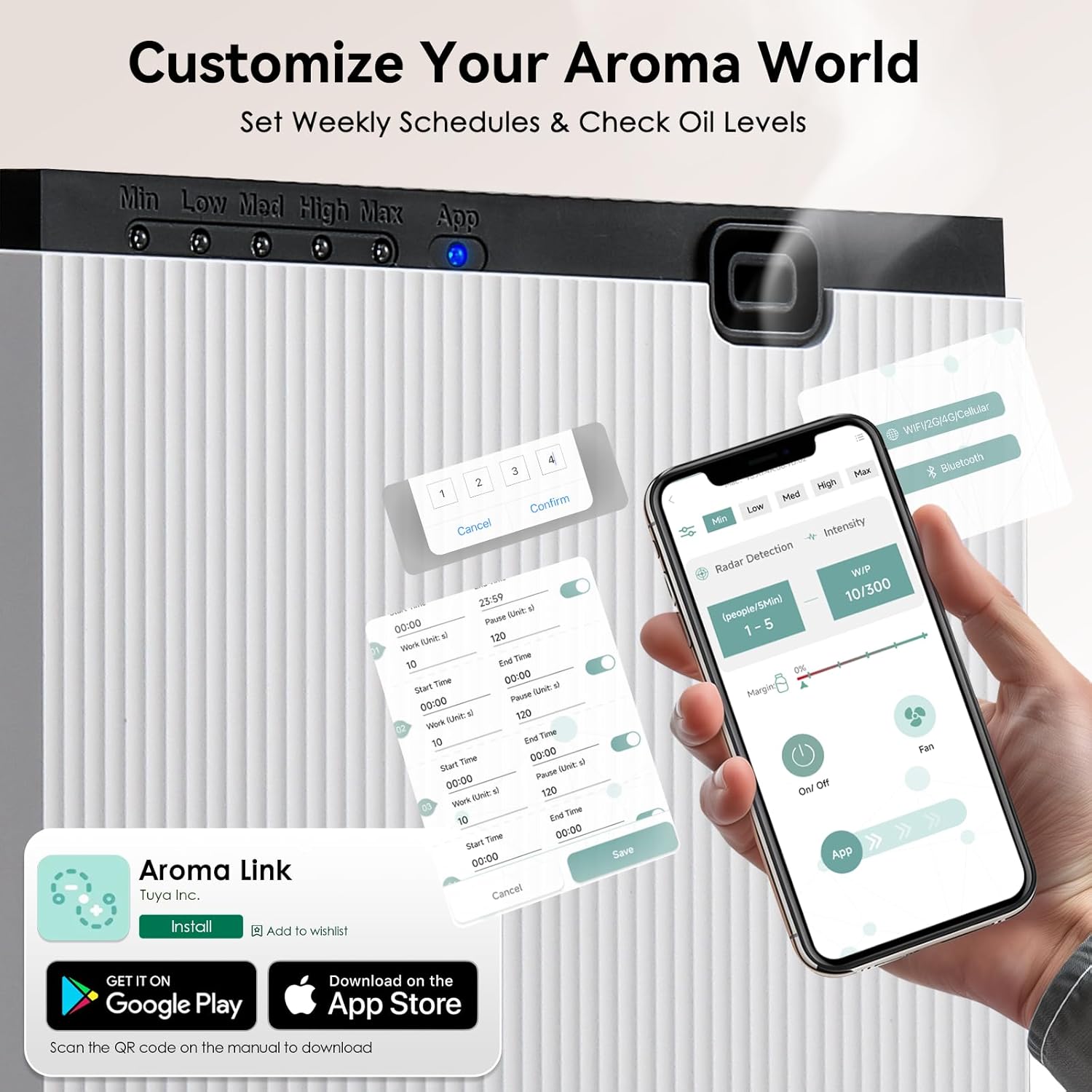
Image: A smartphone displaying the "Aroma Link" app, showing controls for work time, pause time, and radar detection settings.
- Download and install the "Aroma Link" app from the App Store (iOS) or Google Play Store (Android).
- Open the app and follow the on-screen instructions to register an account or log in.
- Add your device by selecting the appropriate model and following the pairing instructions. Ensure your phone's Bluetooth and Wi-Fi are enabled.
Ntuziaka ọrụ
1. Njikwa akwụkwọ ntuziaka
The device has a manual mode shift button on the top panel. Pressing this button cycles through different intensity levels (Min, Low, Med, High, Max), indicated by the LED lights. Each press changes the diffusion intensity.
2. App Control Features
The "Aroma Link" app provides comprehensive control over your diffuser:
- Gbanyụọ/ Gbanyụọ: Remotely turn the diffuser on or off.
- Mgbanwe ike: Customize spray frequency (Work Time: 5 to 900 seconds) and pause intervals (Pause Time). This allows for precise control over scent output to match room size and preference.
- Nhazi oge kwa izu: Program up to 5 daily time slots from Monday to Sunday for automated operation. Set specific start and end times for diffusion.
- Motion Sensing (Radar Detection): Activate the motion sensor mode. The diffuser will adjust spray frequency based on occupancy within a 3m/10ft range. More people detected may result in longer spray times and shorter pause intervals. If no one is detected for 5 minutes, the system enters standby mode.
- Lelee ọkwa mmanụ: Monitor the remaining essential oil level directly from the app.
- Njikwa Fans: Control the built-in fan for faster and more even fragrance dispersion.

Image: A smartphone screen displaying the app's scheduling interface, allowing users to set specific work and pause times for each day of the week.

Image: An illustration demonstrating the motion sensor's 3-meter detection range and a table detailing how working time and pause time adjust based on the number of detected people.
Nlekọta
1. Ichacha Unit
To maintain optimal performance, clean the diffuser periodically:
- Kwupu ngwaọrụ ahụ na ntinye ọkụ.
- Jiri ihe dị nro, d hichaa mpụta nke ihe mgbasa ozi ahụ.amp akwa . Ejila ihe nchacha abrasive ma ọ bụ tinye akụkụ ahụ n'ime mmiri.
- If changing essential oil types, it is recommended to clean the oil bottle. Empty any remaining oil, rinse the bottle with a small amount of rubbing alcohol, and let it air dry completely before adding new oil.
2. Refilling the Oil Reservoir
When the oil level is low (indicated by the app or reduced scent output), follow these steps:
- Kwupu ngwaọrụ ahụ.
- Unlock and open the front panel using the key.
- Remove the oil bottle.
- Unscrew the cap and refill with essential oil.
- Securely screw the cap back on and reinsert the bottle.
- Mechie ma kpọchie akụkụ ihu.
- Plug the device back in and turn it on.
Nchọpụta nsogbu
| Nsogbu | Ihe nwere ike ime | Ngwọta |
|---|---|---|
| No scent output | Oil reservoir empty or low. Nozzle clogged. Device not powered on. | Refill oil. Clean nozzle with rubbing alcohol. Ensure power switch is ON and adapter is plugged in. |
| Ngwa enweghị ike jikọọ na ngwaọrụ | Bluetooth/Wi-Fi off. Device not in pairing mode. App error. | Ensure phone's Bluetooth/Wi-Fi is on. Restart diffuser and app. Re-attempt pairing process. |
| Scent is too weak/strong | Incorrect intensity settings. Room size mismatch. | Adjust work time and pause time in the app. Consider the room size relative to the diffuser's coverage. |
| Ngwaọrụ na-eme mkpọtụ pụrụ iche | Normal operation (light vibration from air pump). Internal component issue. | A light vibration sound from the air pump is normal. If the noise is loud or unusual, unplug and contact support. |
Nkọwapụta
| Njirimara | Nkọwa |
|---|---|
| Ụdị | Mxmoonant |
| Aha Nlereanya | rad8 |
| Njirimara Pụrụ Iche | App Control, Motion Sensing |
| Agba | Ọcha |
| Mkpuchi Mpaghara Ala | Ruo 1500 Square Feet |
| Ụdị ọrụ | Automatic, Manual, App Controlled |
| Akụkụ ngwaahịa | 4.17"D x 4.17"W x 9.45"H (106mm x 106mm x 240mm) |
| Oil Reservoir Capacity | 800 milliliters |
| Isi Iyi Ike | Igwe ọkụ eletrik (12V, 10W) |
| Ọkwa mkpọtụ | <40dBa |
| Ibu Ibu | 6 pound (ihe dị ka 2.7 n'arọ) |

Image: A visual representation of the diffuser's dimensions and a table summarizing its key specifications like voltage, power, noise, capacity, weight, scent coverage, and product size.
Akwụkwọ ikike na nkwado
The Mxmoonant Scent Air Machine comes with a standard manufacturer's warranty. For detailed warranty information, product support, or service inquiries, please refer to the warranty card included in your package or visit the official Mxmoonant website. You can also contact customer service through your purchase platform.