
1. Okwu mmalite
This manual provides detailed instructions for the safe and efficient operation of your INNOVV P1 Portable Tire Inflator Air Compressor. Please read this manual thoroughly before using the device and retain it for future reference. The INNOVV P1 is designed for inflating tires on cars, motorcycles, bicycles, and various sports equipment, featuring a compact design, high efficiency, and automatic shut-off functionality.
2. Ihe ngwugwu
Nyochaa na etinyere ihe niile edepụtara n'okpuru na ngwugwu gị:
- INNOVV P1 Portable Tire Inflator Air Compressor
- Igwe ikuku braided
- Ihe nkwụnye Valve
- Ihe nkwụnye bọọlụ
- Igwe mgbanaka igwu mmiri
- -Dị-C Nchaji USB
- Akpa nchekwa
- Akwụkwọ ntuziaka (akwụkwọ a)

Image: The INNOVV P1 package contents, including the inflator, air hose, various adapters, charging cable, and storage bag.
3. Ngwaahịa gafereview
The INNOVV P1 is a compact and powerful cordless tire inflator designed for convenience and efficiency. It features an aluminum casing for enhanced durability and heat dissipation, an LED screen for clear pressure readings, and multiple inflation modes.
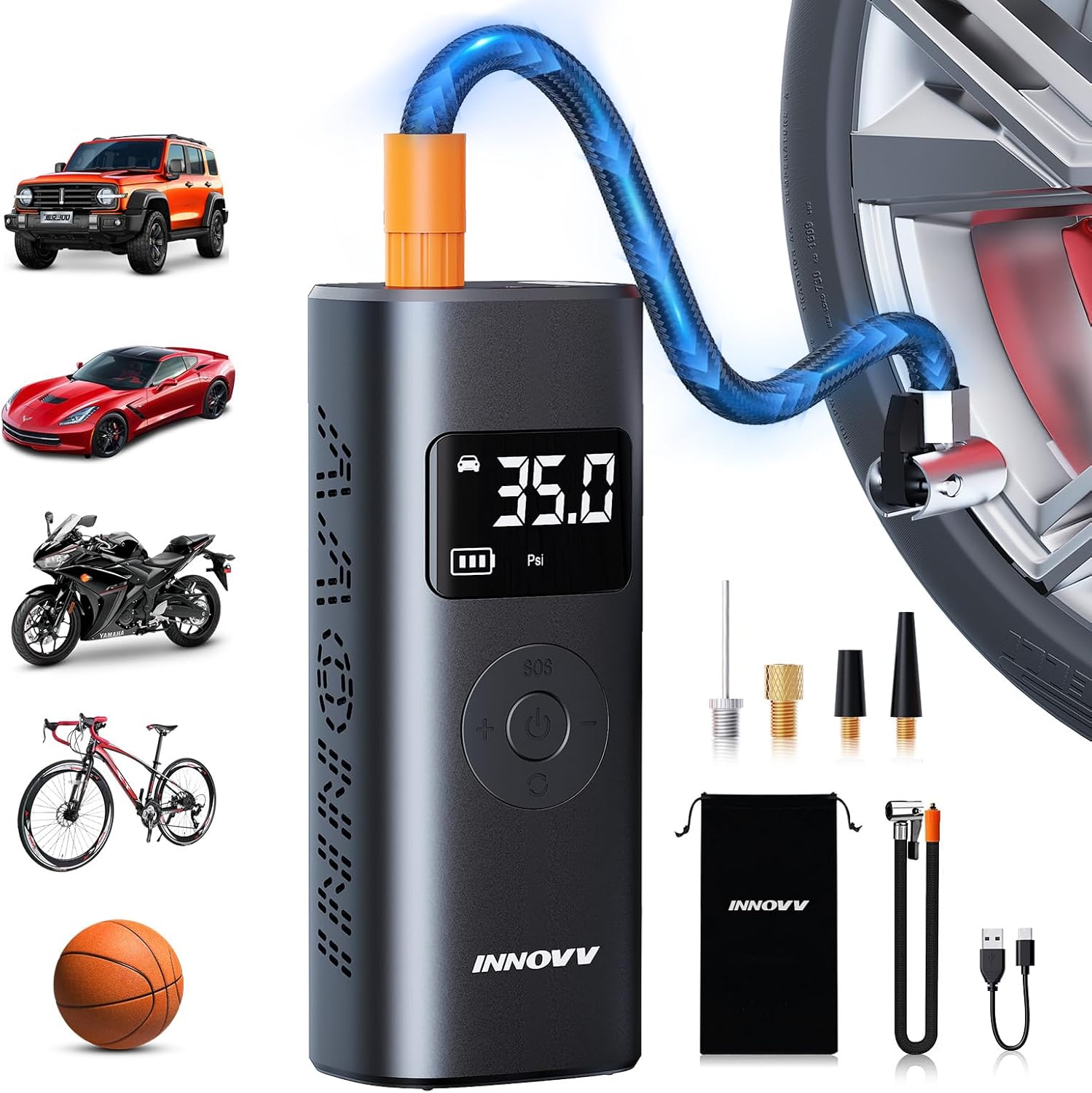
Image: The INNOVV P1 portable tire inflator with its digital display, control buttons, and various accessories, demonstrating its use for cars, motorcycles, bikes, and balls.
Akụkụ ndị bụ isi:
- Mmepụta Nrụgide Dị Elu: Up to 150 PSI for various inflation needs.
- Ọrụ enweghị eriri: Batrị 6000mAh nwere ike ịchaji n'ime ya.
- Gbanyụọ na akpaghị aka: Automatically stops when preset pressure is reached.
- Ngosipụta LED dijitalụ: Clear real-time pressure readings and mode selection.
- Ụdị ọtụtụ: Pre-set modes for Car, Motorcycle, Bike, Ball, and Custom.
- Ọtụtụ ọrụ: Integrated LED light (Normal, SOS, Flashing) and power bank function (Type-C and USB output ports).
- Ịjụ oyi nke ọma: Aluminom casing and built-in fan for optimal heat dissipation.

Foto: Ihe dị n'ime view highlighting the built-in speed fan and L-shaped cooling air duct, illustrating the advanced heat dissipation system of the INNOVV P1.

Image: The compact dimensions of the INNOVV P1 inflator and its extended air pipe, demonstrating its portability and ease of storage in various vehicles or bags.
4. Nkọwapụta
| Njirimara | Nkọwapụta |
|---|---|
| Nọmba nlereanya | P1 |
| Oke nrụgide | 150 PSI |
| Ike batrị | 6000mAh (Lithium Ion) |
| Ntinye Nchaji Port | Ụdị-C |
| Nchaji ọdụ ụgbọ mmiri | USB (for external devices) |
| Akụkụ ngwaahịa | 8.99 x 5.99 x 16.99 cm |
| Ibu Ibu | 810 g |
| Ihe onwunwe | Aluminom |
| Agba | Agba ntụ |
5. Ịchaji ngwaọrụ
Before first use, fully charge the INNOVV P1. The device features a built-in 6000mAh rechargeable battery.
- Locate the Type-C input charging port on the device.
- Connect the provided Type-C charging cable to the inflator and a suitable USB power adapter (not included).
- The LED display will indicate the charging status. A full battery icon signifies a complete charge.
A single full charge can inflate approximately 8 car tires (195/65R15) from 30-35 PSI or operate continuously for 30 minutes.

Image: An illustration showing the INNOVV P1's 6000mAh battery capacity and its ability to inflate multiple car, motorcycle, bike, and ball tires on a single charge.
6. Nhazi
Follow these steps to prepare your INNOVV P1 for inflation:
- Jikọọ eriri ikuku: Screw the braided air hose securely into the inflation port on the top of the device.
- Họrọ nkwụnye ziri ezi: Choose the appropriate nozzle adapter for the item you wish to inflate (e.g., Presta valve adapter for some bicycles, ball needle for sports balls, swimming ring nozzle for inflatables).
- Jikọọ na Valve: Securely attach the air hose with the selected adapter to the valve stem of the tire or inflatable item. Ensure a tight seal to prevent air leakage.
7. Ntuziaka ọrụ
The INNOVV P1 offers intuitive operation with pre-set modes and an auto-shutoff feature.
- Ike Na: Press and hold the power button (usually the central button) to turn on the device. The LED display will illuminate, showing the current tire pressure.
- Select Inflation Mode: Press the 'M' button (Mode button) to cycle through the pre-set modes: Car, Motorcycle, Bike, Ball, and Custom Mode. Each mode has a default pressure range.
- Tọọ nrụgide achọrọ: Use the '+' and '-' buttons to adjust the target pressure. In Custom Mode, you can set any desired pressure value within the device's range.
- Malite onu oriri: Once the desired pressure is set, press the power button again to start inflation. The device will display the real-time pressure as it inflates.
- Gbanyụọ na akpaghị aka: The inflator will automatically stop once the pre-set target pressure is reached, preventing over-inflation.
- Kwụpụ: Carefully disconnect the air hose from the valve stem. A small amount of air may escape, which is normal.
- Gbanyụọ: Pịa ma jide bọtịnụ ike ka gbanyụọ ngwaọrụ ahụ.

Image: The INNOVV P1 inflating a car tire, demonstrating its wireless and fast inflation capability, reaching desired pressure in approximately one minute for standard car tires.

Image: The INNOVV P1 displaying its digital interface with various preset modes for car, motorcycle, bike, and ball inflation, along with their respective pressure ranges.

Image: A visual representation of the INNOVV P1's versatility, showing its application across various items like car tires, motorcycle tires, bicycle tires, sports balls, and swimming inflatables, with recommended pressure ranges for each mode.
8. Multi-Functional Features
8.1 ọkụ ọkụ LED
The INNOVV P1 includes an integrated LED light for convenience in low-light conditions or emergencies.
- Normal Light: Press the 'SOS' button once to turn on the steady white LED light.
- Ụdị SOS: Press the 'SOS' button a second time to activate the flashing red SOS signal.
- Ụdị ọkụ: Press the 'SOS' button a third time for a rapid flashing white light.
- Gbanyụọ: Press the 'SOS' button a fourth time to turn off the light.
8.2 Ike Bank arụ ọrụ
The device can also serve as a power bank to charge other electronic devices.
- Connect your electronic device (e.g., smartphone) to the USB output port or Type-C port on the inflator using an appropriate charging cable.
- The inflator's battery will provide backup power.

Image: The INNOVV P1 demonstrating its multiple functions, including external discharge for charging mobile devices and various LED light modes (Normal, SOS, Flashing) for emergency and maintenance use.
9. Nlekọta
Proper maintenance ensures the longevity and optimal performance of your INNOVV P1.
- Nhicha: Jiri akwa dị nro hichaa ngwaọrụ ahụ. Ejila kemịkalụ siri ike ma ọ bụ ihe mkpocha abrasive.
- Nchekwa: Store the inflator in a cool, dry place, away from direct sunlight and extreme temperatures. Use the provided storage bag to protect it from dust and damage.
- Nlekọta batrị: For optimal battery life, charge the device at least once every three months if not in regular use. Avoid fully discharging the battery for extended periods.
- Hose na nkwụnye: Ensure the air hose and adapters are clean and free from debris before and after each use. Check for any signs of wear or damage.
10. Nchọpụta nsogbu
If you encounter issues with your INNOVV P1, refer to the following common problems and solutions:
| Nsogbu | Ihe nwere ike ime | Ngwọta |
|---|---|---|
| Ngwaọrụ anaghị agbanwu | Batrị dị ala; Apịghị bọtịnụ ike nke ọma | Charge the device; Press and hold the power button for 3 seconds |
| Enweghị onu oriri ma ọ bụ onu oriri nwayọ nwayọ | Air hose not securely connected; Adapter not properly attached to valve; Leakage; Target pressure too low | Ensure all connections are tight; Check for damage to hose/adapters; Increase target pressure if necessary |
| Ngwaọrụ kwụsịrị na mberede | Reached preset pressure (auto-shutoff); Overheating; Low battery | Check current pressure; Allow device to cool down; Recharge the device |
| Ọgụgụ nrụgide na-ezighi ezi | Njikọ dị nro; Nsogbu sensọ | Ensure connections are tight; If problem persists, contact customer support |
If the problem persists after attempting these solutions, please contact INNOVV customer support.
11. Ozi nchekwa
Biko debe ihe nchekwa nchekwa ndị a:
- Do not leave the inflator unattended during operation.
- Debe ebe ụmụaka na-apụghị iru.
- Do not operate the device in wet conditions or near flammable liquids/gases.
- Avoid prolonged continuous operation to prevent overheating. Allow the device to cool down if it becomes hot.
- Always check the recommended pressure for the item you are inflating to avoid over-inflation and potential damage or injury.
- Do not disassemble or attempt to repair the device yourself. Contact qualified personnel for service.
- Jiri naanị eriri chaja na ngwa ndị enyere.
12. Akwụkwọ ikike na nkwado
For warranty information, technical support, or service inquiries, please refer to the warranty card included with your product or visit the official INNOVV website. Contact details for customer support are typically available on the product packaging or the manufacturer's websaịtị.