
HITBOX TIG200PRO
HITBOX TIG200PRO 6-in-1 Digital Welder
Akwụkwọ ntuziaka
1. Okwu mmalite
Thank you for choosing the HITBOX TIG200PRO 6-in-1 Digital Welder. This professional welding machine is designed for versatility and precision, supporting MMA, DC HF TIG, Pulsed TIG, TIG Clean, and Spot Welding functions. It is ideal for welding thin and highly thermally conductive metals without burn-through. This manual provides essential information for safe operation, setup, maintenance, and troubleshooting to ensure optimal performance and longevity of your welder.
2. Ozi nchekwa
ỊDỌ AKA NA NTỊ: Ịgbado ọkụ nwere ike ịdị ize ndụ. Na-agbaso ihe ndị dị mkpa iji gbochie mmerụ ahụ ma ọ bụ ọnwụ.
- Ọkụ eletrik: Can kill. Do not touch live electrical parts. Wear dry welding gloves and protective clothing. Ensure the workpiece is properly grounded.
- Uzuoku na gas: O nwere ike imebi ahụike gị. Debe isi gị ka anwụrụ ọkụ ghara iru ebe ị na-eku ume. Jiri ikuku ma ọ bụ ikuku na-eku ume wepụ anwụrụ ọkụ n'ebe ị na-eku ume.
- Arc Rays: Can burn eyes and skin. Wear a welding helmet with a proper shade filter and protective clothing.
- Ọkụ na mgbawa: Welding sparks can cause fire or explosion. Keep flammable materials away from the welding area. Have a fire extinguisher nearby.
- Ọkụ: Hot metal can cause severe burns. Do not touch hot parts with bare hands.
- Mkpọtụ: Mkpọtụ gabigara ókè nwere ike imebi ntị. Yiri ihe nchebe ntị.
- Akụkụ na-ebugharị: Keep clear of moving parts to avoid injury.
3. Ihe ngwugwu
Chọpụta na ihe niile dị na ngwugwu gị:
- HITBOX TIG200PRO Welder (200A)
- TIG-26 Torch (4m)
- Ala Clamp (300A)
- Electrode Holder (200A)
- WT20 Tungsten Electrode
- Argon Gas Tube
- Ọkụ Clamps
- Waya ahịhịa
- Hama
- Auto-darkening Cold Welding Helmet
- Pedal ụkwụ
- TIG Consumables (collets, collet bodies, ceramic nozzles)

Image: All accessories included with the HITBOX TIG200PRO welder, laid out for inspection.
4. Nhazi
4.1 Njikọ ike
- Ensure the welder is connected to a 230V power supply.
- Verify that the power outlet and circuit breaker can handle the required ampoge.
4.2 Gas Connection (for TIG welding)
- Connect the argon gas tube to the gas inlet on the rear panel of the welder.
- Connect the other end of the gas tube to your argon gas cylinder via a pressure regulator.
- Gbaa mbọ hụ na njikọ niile echekwabara iji gbochie ntapu gas.
4.3 Welding Cable Connections
The connection polarity depends on the welding mode:
- Ụdị TIG: Connect the TIG torch to the negative (-) terminal and the ground clamp gaa na njedebe (+) dị mma.
- Ụdị MMA: Jikọọ ihe njide elektrọd na njedebe dị mma (+) na cl alaamp gaa na njedebe (-) adịghị mma.

Image: Diagrams illustrating the correct connection setup for TIG and MMA welding modes, including gas cylinder for TIG.
4.4 Foot Pedal Connection
- Connect the 8-pin foot pedal cable to the dedicated foot pedal interface on the welder's front panel.
- The foot pedal allows for remote and precise amperage control during welding.

Image: The HITBOX TIG200PRO welder shown with its optional 8-pin foot pedal and an auto-darkening welding helmet, demonstrating remote control capability.
4.5 Welding okpu agha
- Always wear the provided auto-darkening welding helmet to protect your eyes and face from arc rays and sparks.
5. Ntuziaka ọrụ
5.1 Ogwe njikwa gafereview
The TIG200PRO features a high-definition LED screen for clear display of all welding parameters. The intuitive panel allows for easy adjustment.

Image: Close-up of the HITBOX TIG200PRO's high-definition LED display, showing various customizable welding parameters and digital controls.
5.2 Ụdị ịgbado ọkụ
The HITBOX TIG200PRO offers 6 functions:
- MMA (Manual Metal Arc) Welding: For general-purpose stick welding.
- DC HF TIG Welding: High-frequency start TIG for precise welding of various metals (not aluminum).
- Pulsed TIG Welding: Offers precise digital control over parameters like base current, peak current, frequency, and duty cycle, reducing heat input and distortion.
- TIG Clean: A specialized function for cleaning the weld area (torch not included for this specific function).
- Ịgbado ọkụ ntụpọ: High-precision spot welding for ultra-thin materials (down to 0.1 mm).
- Cold TIG: A mode for welding with minimal heat input.
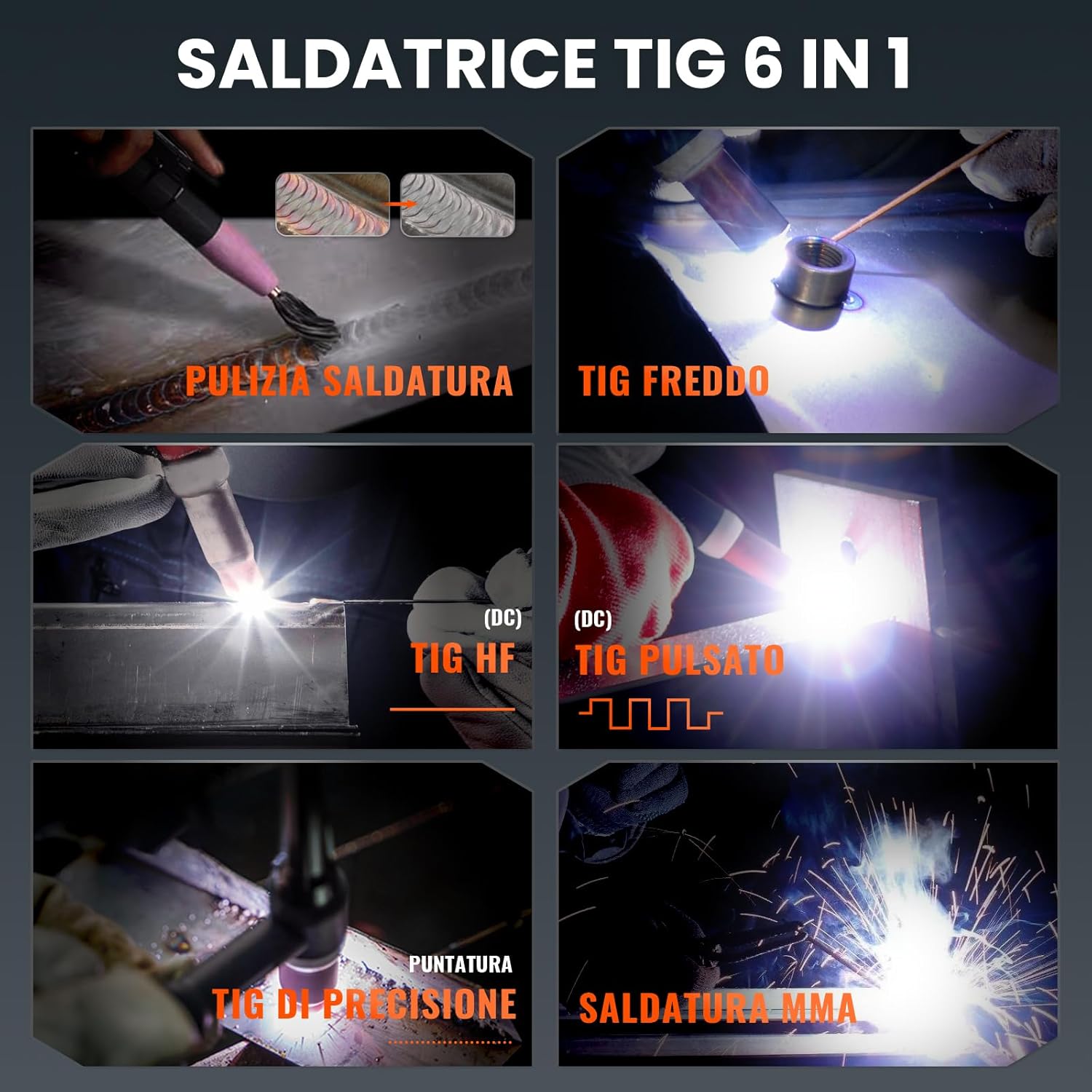
Image: Visual representation of the six welding functions available on the HITBOX TIG200PRO: Weld Clean, Cold TIG, DC HF TIG, Pulsed TIG, Precision Spot TIG, and MMA welding.
5.3 Ndozi Paramita
The digital control allows precise adjustment of various parameters:
- Ugbu a: 1-200 afọ
- Pre-gas: 0-10 seconds (ensures oxidation-free start)
- Post-gas: 1-10 seconds (protects weld pool as it cools)
- Spot Welding Time: 0.01-9 sekọnd
- Spot Welding Interval: 1-900 ms
- Pulsed TIG Frequency: 0.1-500 Hz
- Pulsed TIG Duty Cycle: 10%-90%
- Base Current (Pulsed TIG): 10-180A
- Peak Current (Pulsed TIG): 10-200A
- Malite Ramp (Pulsed TIG): 0-10s
- Ọgwụgwụ Ramp (Pulsed TIG): 0-10s
- End Current (Pulsed TIG): 10-200A

Foto: Examples of weld beads produced using TIG DC and Pulsed TIG modes, showcasing the precision achievable with the HITBOX TIG200PRO.

Image: Diagram illustrating the pre-gas and post-gas functions in TIG welding, which prevent oxidation and ensure clean welds.
5.4 2T/4T Mode Selection
The welder supports both 2T (Two-Touch) and 4T (Four-Touch) modes for continuous and spot welding applications.
- 2T Mode: Press and hold the torch button to start welding; release to stop. Suitable for short welds.
- 4T Mode: Press and release to start welding; press and release again to stop. Ideal for longer welds, reducing hand fatigue.

Image: Graphs illustrating the current profiles for 2T and 4T TIG welding modes, showing how current changes with button presses for different welding durations.
5.5 Ndakọrịta Ihe
The TIG200PRO is suitable for welding steel, stainless steel, copper, brass, and similar metals. It is not suitable for aluminum, which requires an AC/DC welding machine.

Image: A collage showing various metal types compatible with the HITBOX TIG200PRO welder, including copper, mild steel, cast iron, square tube, stainless steel, and sheet metal. Aluminum is explicitly noted as not supported.
5.6 Welding Thickness

Image: Visual comparison illustrating the minimum and maximum welding thicknesses for TIG (0.1mm to 4mm) and MMA (2mm to 10mm) processes.
6. Nlekọta
6.1 Nhicha
- Regularly clean the welder's exterior with a dry, soft cloth.
- Ensure ventilation openings are free from dust and debris to maintain proper airflow.
6.2 Nyocha
- Periodically inspect all cables, connections, and the torch for damage or wear. Replace any damaged components immediately.
- Check the gas tube for leaks and ensure secure connections.
6.3 Smart Fan Operation
- The intelligent fan activates only when necessary, reducing noise and power consumption. This is normal operation.
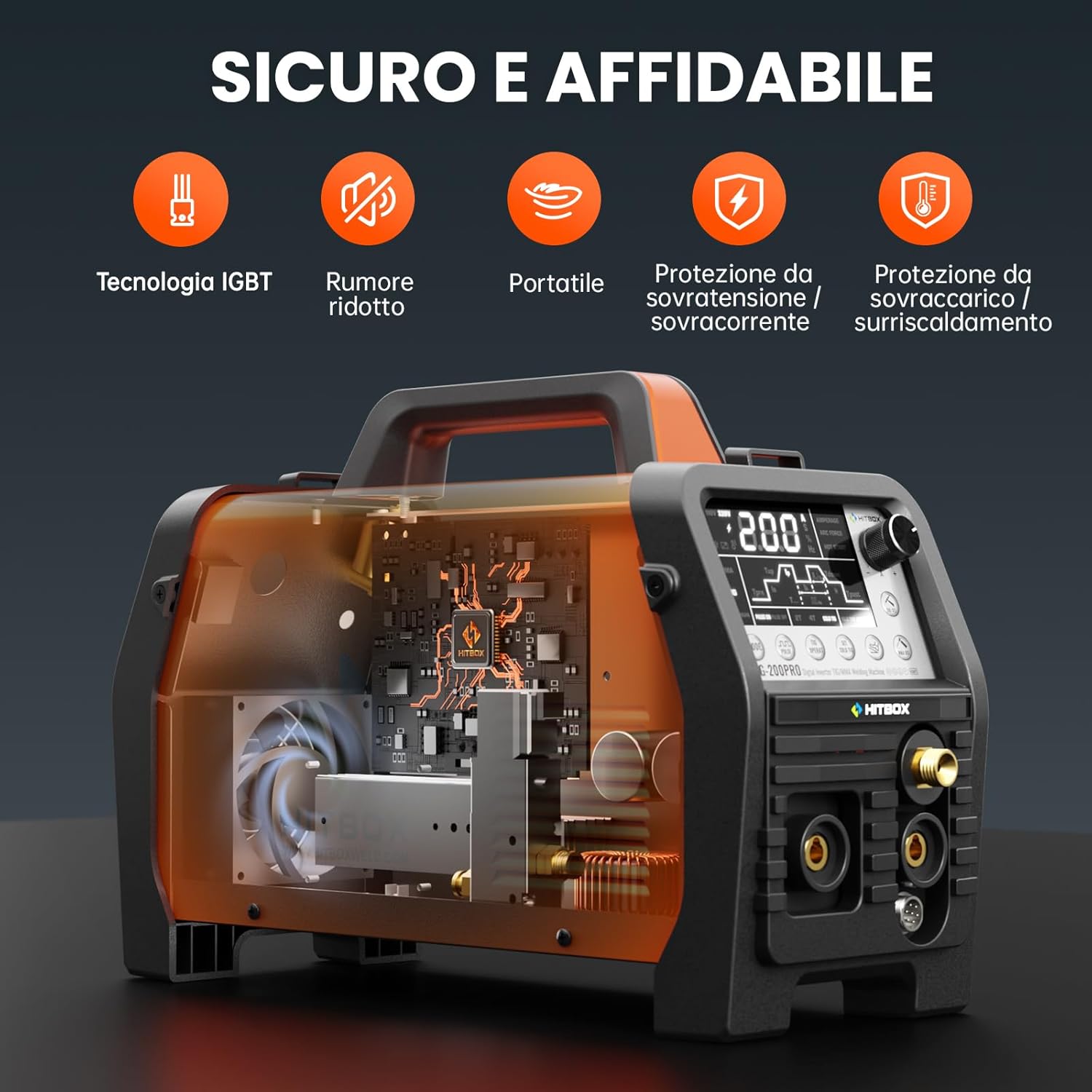
Foto: Ihe dị n'ime view of the HITBOX TIG200PRO welder, showcasing its robust design and safety features such as IGBT technology, efficient cooling fan, and various protection circuits.
7. Nchọpụta nsogbu
If you encounter issues with your HITBOX TIG200PRO welder, refer to the following common problems and solutions:
- Enweghị ike: Check power cable connection, main power switch, and circuit breaker.
- No Arc: Ensure proper grounding, correct electrode/tungsten setup, and sufficient welding current. Check for loose connections.
- Poor Weld Quality: Adjust welding current, gas flow (for TIG), travel speed, and arc length. Ensure workpiece is clean.
- Nchekwa ekpo oke ọkụ: If the welder stops and an overheat indicator lights up, allow the machine to cool down. Ensure proper ventilation and do not exceed the duty cycle.
- Gas Flow Issues (TIG): Check argon cylinder pressure, regulator settings, and gas tube connections for leaks or blockages.
For persistent issues or problems not listed here, please contact HITBOX customer support.
8. Nkọwapụta
8.1 Nkọwa n'ozuzu
| Njirimara | Uru |
|---|---|
| Onye nrụpụta | HITBOX |
| Nọmba nlereanya | TIG200PRO |
| Koodu ihe | H1022007 |
| Ụdị Ike | DC |
| Voltage | 230 volts |
| Ọnụọgụ nke ihe | 1 |
| Ibu Ibu | 7.26 kilogram |
| Akụkụ ngwugwu | 58 x 51.5 x 30 cm |
| Agụnyere batrị? | Mba |
| Achọrọ batrị? | Mba |
8.2 TIG Welding Specifications

Image: Table detailing recommended current, tungsten electrode diameter, gas flow rate, nozzle diameter, and filler wire diameter for TIG welding.
8.3 Stick (MMA) Welding Specifications

Image: Table outlining recommended current for Stick welding based on electrode diameter and workpiece thickness.
9. Akwụkwọ ikike na nkwado
For warranty information and customer support, please refer to the documentation provided with your purchase or visit the official HITBOX website. If you require technical assistance or have questions regarding the operation or maintenance of your TIG200PRO welder, please contact HITBOX customer service directly.
Ask a question about this manual
Ask about setup, troubleshooting, compatibility, parts, safety, or missing instructions. Manuals+ will review the question and use this page’s manual context to help answer it.